OPL (Open PS2 Loader)

PS2 Open PS2 Loader v1.1.0

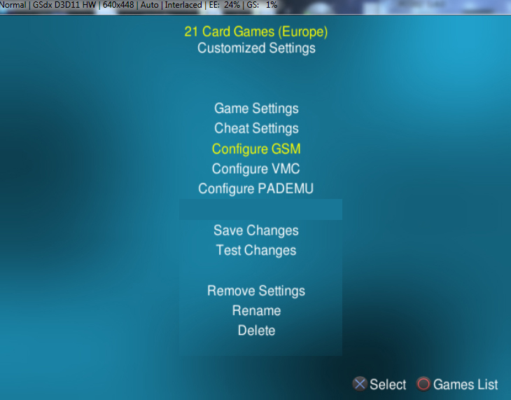
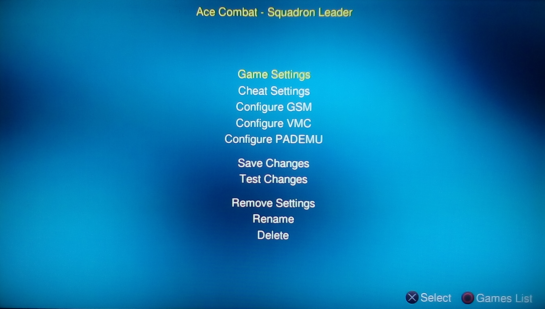
The pic was just to show Remove Settings placement, I think it's a compromise everyone should be happy with.. it's not causing the issue I was talkin about.

Have a rough idea of how to fix those annoying flashes of text but will require a custom guiio handling function and helper function to return a pointer to the config set struct.. will try it out tomorrow
 
Ok I think the whole Global->Per Game system is fine and complete now...

  • some small fixes to Remove Settings.
  • GUI is updated upon switching Settings Mode making it more intuitive.
  • no more 'Loading Config' pop ups unless actually booting a game.
  • fixed PADEMU GUI settings not updating properly when switching Settings Mode.
  • Cheat Mode = 1 was originally disabled for Globals... but is now available (in case someone fixes the mode in cheatman in the future).

https://www.sendspace.com/file/2gb4ca

I'll add it to the Pending PR after a few days if everyone is happy with it and can't find any bugs (we have tested it)... since it works and should clear up reservations with the Remove Settings debacle on the current PR.

Cheers guys.
 
Last edited:
Moving 'Network Update' under 'Parental Controls' (in the settings-list) and name it 'Updates' (or similar) and let it have support for loading other things as well!

We were talking about this a while ago...

It would be nice if the OPL-CL cfgs were up to date and maintained. Also if they contained other information such as Release Date, Developer, Description etc.
 
That rather would be an OPL-(Game-)Info-DB.

A separate 'game-info'-file would be good IMO (separated from the config-file, but following a similar naming-scheme with the Game-ID/SLUS/SLES, etc. in the beginning) and the Info-Page-Implementation needs some serious re-work, because even with the new custom button (which is a huge improvement, compared to the previous unflexible and 'stubborn' handling, which forced the user to either viewing it, or not having access to it), there are still some non-resolved related issues left!

tl;dr I see the Cheat-Support and the Info-Page as the biggest 'issues' in OPL's GUI!
 
Compromise


  1. Is there a way to also "separate" Save Changes & Test Changes:
    compromise-23.png


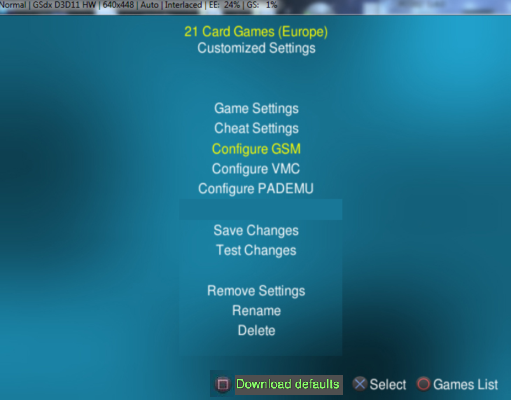
  2. What about Download Defaults:
    download-def.png

    I mean I don't remember whet I hook up my PS2 to net,
    but does additionally other things than compatibility modes can be downloaded?
    I mean short info about game, etc.
    If yes, why not move\add it elsewhere?
    compromise-234.png


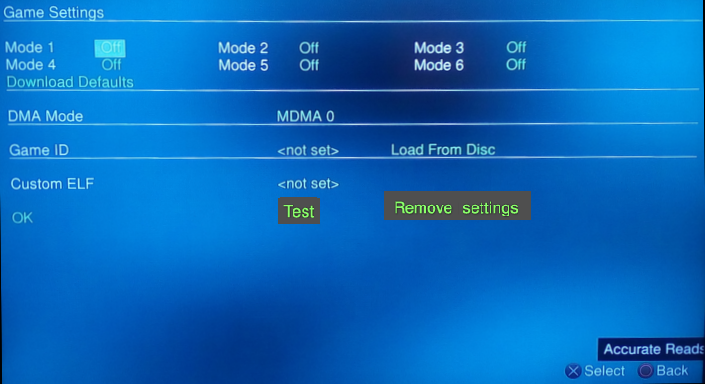
  3. A way to Test and Remove settings at different configs:
    test-button33.png
 
Is there a way to also "separate" Save Changes & Test Changes:
Yes that is possible, I don't want to add the lines though as it makes it look too much like a dialog window.


What about Download Defaults:
nah that can stay where it is, currently the feature only gets compatibility modes from what I understand, that's why it is there... as TnA and Tupakaveli were saying above though it would be nice if in the future we could get all game info through this feature.. if that ever happens we can move the Download Defaults button.


A way to Test and Remove settings at different configs:
This ones doable, but is it necessary? Aren't you better off testing all changes together?
 
nah that can stay where it is, currently the feature only gets compatibility modes from what I understand, that's why it is there... as TnA and Tupakaveli were saying above though it would be nice if in the future we could get all game info through this feature.. if that ever happens we can move the Download Defaults button.

Here is what I've got from Shaopedia:
Download defaults:
allows you to download defaults records reported by users from OPL-CL site
(<game ID>.cfg files including compatibility modes, settings, game data…
https://bitbucket.org/ShaolinAssassin/open-ps2-loader-0.9.3-documentation-project/wiki/game-settings.
Open PS2 Loader 0.9.3 has an embedded Network feature,
that allows you to download <game_ID>.cfg files from OPL-CL site.
You can access its main page in OPL menu [Menu > Network update].
<game_ID>.cfg files are stored in your CFG folder and contain games settings data
(such as compatibility modes reported by users…) and game informations
that can be displayed on the info page (you need to use a theme that supports info page for that)
https://bitbucket.org/ShaolinAssass...9.3-documentation-project/wiki/network-update.

So theoretically also game(s) information's will be downloaded.
Unfortunately like I mention before I do not tried this feature, so I'm not 100% sure what can be downloaded.

However I've downloaded few cfg files from OPL-CL.
Here is cfg for .hack//G.U Vol.1: Rebirth (SLUS_212.58):
Code:
CfgVersion=1
#Region=ntsc-u/c
Parental=esrb/teen

Here is for God of War (SCES_531.33):
Code:
CfgVersion=1
So not everything might be added...

This ones doable, but is it necessary? Aren't you better off testing all changes together?

It is only my humble opinion not to get back when you can test your game almost "immediately".
As for remove all settings... I agree that there is no need to duplicate it elsewhere.
 
Last edited:
  • Like
Reactions: TnA
However I've downloaded few cfg files from OPL-CL.
Here is cfg for .hack//G.U Vol.1: Rebirth (SLUS_212.58):
Code:
CfgVersion=1
#Region=ntsc-u/c
Parental=esrb/teen
Here is for God of War (SCES_531.33):
Code:
CfgVersion=1
So not everything might be added...
hmm, this is strange for a couple reasons... first off Region seems to be commented out? or do user game cfgs use the # as part of the key or something?.. I don't use OPLM or anything for a long time now :-p
edit: lol I see name, size etc uses # so im assuming region does also..

Also in the code it is commented to only work for compat modes, which is another reason I find it strange.
But then also CfgVerison=1 is also odd because in the code it appears to use 2 as a value for downloaded cfgs.. and 1 as custom saved settings.
edit: disregard this I confused cfgVersion with ConfigSource...

https://github.com/ifcaro/Open-PS2-...0d43cee41868439ae2573920/include/config.h#L23

Anyone know if that Icyson bloke (he used to maintain OPL-CL i think) is still around and contactable?... perhaps we can get access to the site and upload/maintain the cfgs and potentially add more info to the cfgs
 
Last edited:
  • Like
Reactions: TnA
Here is what I've got from Shaopedia:

Given its usefullness, @ShaolinAssassin should rename it. :D

So theoretically also game(s) information's will be downloaded.

During its inception, the idea was to also provide game information too. But we were not familiar with the CFG format, so the feature was cut down. There were reasons why, but it was all in history.
If you guys want to revive that feature and if IcySon55 wants to, it would close the loop.

Normally, the download feature would merge the downloaded attributes with the one in your file. On the other hand, "Download Defaults" would replace your local settings with the one from the OPL-CL service.

hmm, this is strange for a couple reasons... first off Region seems to be commented out? or do user game cfgs use the # as part of the key or something?.. I don't use OPLM or anything for a long time now :-p
edit: lol I see name, size etc uses # so im assuming region does also..

Yes, that is commented out.

Also in the code it is commented to only work for compat modes, which is another reason I find it strange.
But then also CfgVerison=1 is also odd because in the code it appears to use 2 as a value for downloaded cfgs.. and 1 as custom saved settings.
edit: disregard this I confused cfgVersion with ConfigSource...

The config source attribute determines where it came from. The idea is that anything changed by the user, should never be automatically overwritten.

The development flag in OPL was meant to determine whether the configuration sets for stable or development releases were to be used. However, you may have known that this flag was butchered by people who did not know what it was for, and did not bother to ask.
The version number becomes part of the user agent too: https://github.com/ifcaro/Open-PS2-Loader/blob/master/include/compatupd.h
Code:
#if OPL_IS_DEV_BUILD
#define OPL_COMPAT_HTTP_URI "/oplcl/sync.ashx?code=%s&device=%d&dev=1"
#else
#define OPL_COMPAT_HTTP_URI "/oplcl/sync.ashx?code=%s&device=%d"
#endif
#define OPL_USER_AGENT "OPL/" OPL_VERSION

Anyone know if that Icyson bloke (he used to maintain OPL-CL i think) is still around and contactable?... perhaps we can get access to the site and upload/maintain the cfgs and potentially add more info to the cfgs

I thought he registered here, but I cannot find his account. So that would leave psx-scene and the certain other website.
Now if only you guys shown up earlier, like say 2015. :eek:

If the server is still up, he might have some interest. I remember he wrote that he owned the server.
 
"Shaopedia" :chewie:+ Freaky-smiley


Regarding the 'info'-stuff:
Well... I really think it should be separate from the settings and in it's own file.

Regarding 'updates':
I sure wish for that feature to be updated as well! I ever thought, that it would be a great addition, to get ART via it as well. A lot of OPLM-related stuff could be done in OPL simply, especially regardin ART.


@jolek: I like your mockup with 'Download settings' mapped at SQUARE! That would be the preferred way to do it IMO, if we can download all with it (like 'info' as well)! :)


About 'lines': Well, they can be partially transparent (or barely visible), but it's also alright without them...

One suggestion thought:
I think the distance between the 'blocks' should be decreased! ;)


There are still a lot GUI-related faults or limitations, but unrelated to your commits. Your current PR definitely makes it waaaaay better already!

I also really like, that Rename and Delete got moved out of the main-menu! Finally more free space in the menu and Info-Page mapped to another button! It makes it kind of more polished and 'clean' (visually and structurally) and is more flexible in handling.
I hope it still all works well with Parental Control?! ;)

tl:dr
The GUI still has sooooo much room for improvement, but the current PR is neat IMO!
 
Last edited:
The development flag in OPL was meant to determine whether the configuration sets for stable or development releases were to be used. However, you may have known that this flag was butchered by people who did not know what it was for,
yea I saw that...the whole definition has been commented out rather than just changing it to false.. I also noticed for some time there were a couple attributes using the same config key (due to copy pasting I imagine).. I suppose that is what was causing all the issues that ultimately led to the feature remaining in its current state.. its a shame..and tbh ridiculous that it was held back due to that...

If the server is still up, he might have some interest. I remember he wrote that he owned the server.
its definitely up still, the feature still works.. we asked Dekkit (since he has SMB set up) to test it with the pending PR build to make sure it wasn't broken and it works perfectly still.. hopefully we can get IcySon55 on board. :)

I hope it still all works well with Parental Control?!
Yes, all the parental lock checks are still in place.

Regarding 'updates':
I sure wish for that feature to be updated as well! I ever thought, that it would be a great addition, to get ART via it as well. A lot of OPLM-related stuff could be done in OPL simply, especially regardin ART.
not a bad idea, I like it.. a lot of other platform game loaders have features like this... we'll just take it one step at a time first though and see if we can get cfgs updated, his server might not even be able to handle that much data but we'll see what happens.
 
Last edited:
Indeed! One step at a time!

I think these things are important:
  • Splitting off the 'info' from the 'config' to its own file
  • Adding support for alternate server-URLs/IPs! When a server goes down, we can manually add another one through the OSD-Keyboard. Kind of like the update-lists for apps in Linux, where you can add multiple sources as well... ;)
 
I suppose that is what was causing all the issues that ultimately led to the feature remaining in its current state.. its a shame..and tbh ridiculous that it was held back due to that...

You mean the problems with OPL_IS_DEV_BUILD? That was a defect from ps2-home. Nothing really to do with OPL itself.

For some reason, the OPL-CL service just did not successfully replace the many compatibility lists around. The maintainers of those lists decided to continue with manually updating their lists. So yeah, it probably doesn't feel good when your solution doesn't actually help to solve the problems it was meant to solve.

its definitely up still, the feature still works.. we asked Dekkit (since he has SMB set up) to test it with the pending PR build to make sure it wasn't broken and it works perfectly still.. hopefully we can get IcySon55 on board. :)

Awesome.

not a bad idea, I like it.. a lot of other platform game loaders have features like this... we'll just take it one step at a time first though and see if we can get cfgs updated, his server might not even be able to handle that much data but we'll see what happens.

I'm sure it can. If it could not be done, then we would not have considered supporting more data than just compatibility settings, in the first place.

Adding support for alternate server-URLs/IPs! When a server goes down, we can manually add another one through the OSD-Keyboard. Kind of like the update-lists for apps in Linux, where you can add multiple sources as well... ;)

We should avoid "Linux'ification" of OPL, even though the PS2 kernels were somewhat based on Linux concepts. It's meant to be a gaming console, not a Linux box. How many users would care to change the update URL? Aren't you tired of seeing multiple compatibility lists spring up too?

If you want alternate servers, then those servers would also have to be 100% compatible with the client within OPL itself. That means that the API must work in the same way.

  1. What about Download Defaults:
    download-def.png

    I mean I don't remember whet I hook up my PS2 to net,
    but does additionally other things than compatibility modes can be downloaded?
    I mean short info about game, etc.
    If yes, why not move\add it elsewhere?
    compromise-234.png


This "Download Defaults" option was meant to be per-game. For the user to revert back the configuration to the defaults, from OPL-CL.

The global option for downloading compatibility settings for all games (except for those with local user settings), is the Network Update option in the main menu.
 
Yes that is possible, I don't want to add the lines though as it makes it look too much like a dialog window.

Thank for new pull request with updated main Game menu GUI:
Game-memu-GUI-2.png


This ones doable, but is it necessary? Aren't you better off testing all changes together?

For now I'm leaving this suggestion...
Maybe I just need to get used to the new things\changes.


Anyway, if someone else want to try new test version with global config for game settings, get it from here:
https://github.com/ifcaro/Open-PS2-Loader/pull/232.
 
I like it!
The distance between the blocks is better than in the first picture-mockup and version as well!
 
##Updated with v3 - didn't realize the tags are super case sensitive, so have redone EnablePADEMU. / PadEmuSource to match opl code## - thanks to Krah / Tup for calling out.

---
Guys,

Nice to see so much active development happening on OPL! Nice to see some more globals! Good job @Krah @Tupakaveli .

To help out, i pulled together a script to rebuild the cfg files and auto-magically add the new global cfg tags to save having to do it manually.

This script will look for the following tags:

$EnableGSM=1 and then add new line with $GSMSource=1
$EnableCheat=1 and then add new line with $CheatsSource=1
$EnablePADEMU=1 and then add new line with $PadEmuSource=1

Just drop it into the \cfg folder and run (it doesn't need any special permissions or anything)

Note: make sure you backup your cfg folder just in case it breaks anything.

After playing around with this one, i'm tempted to make script to shares a single virtual memory card (VMC) across multiple games but that might be a feature better suited to OPL Manager.

Anyways if someone can test this on a few more cfg files as it seems to work fine for me.

Dek.

@sp193 - good to see you still active here too! ;)
 

Attachments

Last edited:
have updated my script post above.... had some of the tags with the wrong case - which meant that pad emu didn't work.

Make sure you grab v3 above.... or manually change v2 yourself.

dek
 
  • Like
Reactions: TnA

Similar threads

Back
Top