
You are using an out of date browser. It may not display this or other websites correctly.
You should upgrade or use an alternative browser.
You should upgrade or use an alternative browser.


jolek
Senior Member
@El_Patas can try to test and compile once again OPL 1440\1442?
It seems that freezing problems has been fixed.
Fix for PS2SDK:
https://github.com/ps2dev/ps2sdk/pull/111/commits/0f0b76da2c9ec0910e92e135ee47bc62dbb781ec.
Additionally also read this:
https://www.psx-place.com/threads/o...leases-language-pack.20547/page-6#post-239310.
It seems that freezing problems has been fixed.
Fix for PS2SDK:
https://github.com/ps2dev/ps2sdk/pull/111/commits/0f0b76da2c9ec0910e92e135ee47bc62dbb781ec.
Additionally also read this:
https://www.psx-place.com/threads/o...leases-language-pack.20547/page-6#post-239310.

El_Patas
Member
@jolek, yes i saw this, i tested a test build some days ago and not freezes, but now there is the@El_Patas can try to test and compile once again OPL 1440\1442?
It seems that freezing problems has been fixed.
Fix for PS2SDK:
https://github.com/ps2dev/ps2sdk/pull/111/commits/0f0b76da2c9ec0910e92e135ee47bc62dbb781ec.
Additionally also read this:
https://www.psx-place.com/threads/o...leases-language-pack.20547/page-6#post-239310.
newlib, and is needed update all, ps2toolchain, ps2sdk, ps2sdk-ports and gsKit,
and maybe better have a new test build compiled with all this updates for test them.
I answer your other question in the other thread.
Someone knows the code in linux for update the ps2toolchain and the ps2sdk-ports?
I updated them long time ago with the help of @sp193, and i have no idea now,
i use a virtual machine with Windows.
I remember how update ps2sdk and gsKit, but not the other two.
Best regards.
If they help these are my notes for building OPL on a new VM install of Ubuntu Server 18.04.@jolek, yes i saw this, i tested a test build some days ago and not freezes, but now there is the
newlib, and is needed update all, ps2toolchain, ps2sdk, ps2sdk-ports and gsKit,
and maybe better have a new test build compiled with all this updates for test them.
I answer your other question in the other thread.
Someone knows the code in linux for update the ps2toolchain and the ps2sdk-ports?
I updated them long time ago with the help of @sp193, and i have no idea now,
i use a virtual machine with Windows.
I remember how update ps2sdk and gsKit, but not the other two.
Best regards.
Build tools:
sudo apt install gcc make texinfo
Packer dependencies:
sudo apt install libucl-dev zlib1g-dev
Set environment variables and paths in sh:
echo "export PS2DEV=\$HOME/ps2dev" >>$HOME/.profile
echo "export PS2SDK=\$PS2DEV/ps2sdk" >>$HOME/.profile
echo "export GSKIT=\$PS2DEV/gsKit" >>$HOME/.profile
echo "export PATH=$PATH:\$PS2DEV/bin:\$PS2DEV/ee/bin:\$PS2DEV/iop/bin:\$PS2DEV/dvp/bin:\$PS2SDK/bin" >>$HOME/.profile
. $HOME/.profile
Download, build and install ps2toolchain, ps2eth, ps2-packer, ports and gsKit:
cd $HOME && git clone --depth 1 --branch master https://github.com/ps2dev/ps2toolchain.git && cd ps2toolchain && ./toolchain.sh
cd $HOME && git clone --depth 1 --branch master https://github.com/ps2dev/gsKit.git && cd gsKit && make && make install && make clean
cd $HOME && git clone --depth 1 --branch master https://github.com/ps2dev/ps2eth.git && cd ps2eth && make && make install && make clean
cd $HOME && git clone --depth 1 --branch master https://github.com/ps2dev/ps2-packer.git && cd ps2-packer && make && make install && make clean
cd $HOME && git clone --depth 1 --branch master https://github.com/ps2dev/ps2sdk-ports.git && cd ps2sdk-ports && make freetype2 libjpeg libpng
Download and build OPL:
cd $HOME && git clone --branch master https://github.com/ifcaro/Open-PS2-Loader.git && cd Open-PS2-Loader && make
I haven't built it in some time, so something might have changed.
EDIT: Since the new version of newlib needs texinfo to build I've appended it to build tools.
Last edited:
El_Patas
Member
Thank you very much, they are different from my notes for building ps2sdk and gskit in Linux Mint,If they help these are my notes for building OPL on a new VM install of Ubuntu Server 18.04.
Build tools:
sudo apt install gcc make
Packer dependencies:
sudo apt install libucl-dev zlib1g-dev
Set environment variables and paths in sh:
echo "export PS2DEV=\$HOME/ps2dev" >>$HOME/.profile
echo "export PS2SDK=\$PS2DEV/ps2sdk" >>$HOME/.profile
echo "export GSKIT=\$PS2DEV/gsKit" >>$HOME/.profile
echo "export PATH=$PATH:\$PS2DEV/bin:\$PS2DEV/ee/bin:\$PS2DEV/iop/bin:\$PS2DEV/dvp/bin:\$PS2SDK/bin" >>$HOME/.profile
. $HOME/.profile
Download, build and install ps2toolchain, ps2eth, ps2-packer, ports and gsKit:
cd $HOME && git clone --depth 1 --branch master https://github.com/ps2dev/ps2toolchain.git && cd ps2toolchain && ./toolchain.sh
cd $HOME && git clone --depth 1 --branch master https://github.com/ps2dev/gsKit.git && cd gsKit && make && make install && make clean
cd $HOME && git clone --depth 1 --branch master https://github.com/ps2dev/ps2eth.git && cd ps2eth && make && make install && make clean
cd $HOME && git clone --depth 1 --branch master https://github.com/ps2dev/ps2-packer.git && cd ps2-packer && make && make install && make clean
cd $HOME && git clone --depth 1 --branch master https://github.com/ps2dev/ps2sdk-ports.git && cd ps2sdk-ports && make freetype2 libjpeg libpng
Download and build OPL:
cd $HOME && git clone --branch master https://github.com/ifcaro/Open-PS2-Loader.git && cd Open-PS2-Loader && make
I haven't built it in some time, so something might have changed.
but i will try.
Best regards.
jolek
Senior Member
If someone wants to test OPL 1442 (currently without new newlib)
grab it from attachment.
Changelog:
grab it from attachment.
Changelog:
- Increase read delay cycles for Kingdom Hearts II
- Inline assembler compatibility with new toolchain
- Fix memcpy linking error with new toolchain
- Remove unnecessary inline specifier from functions
Attachments
Last edited:

e.v.o
Forum Noob
what a pain to build opl with newlib .. so much outdated stuff .. so many things to do .. and just not enough time :'(
thanks @rickgaiser for all the PRs on GitHub <3
thanks @rickgaiser for all the PRs on GitHub <3

Maximus32
Developer
I know there's many ways to get the latest sources and compile them all, but I'll add 1 to the list which I think is the most simple. I have a different build system then most of you, but when making a PR I want to make sure everything works with all the latest sources.
As @e.v.o mentions, this is a pain. So I created scripts to automate the task of updating and compiling everything. You can follow this simple readme:
https://gitlab.com/ps2max/ps2dev-repo/-/tree/ps2dev
As @e.v.o mentions, this is a pain. So I created scripts to automate the task of updating and compiling everything. You can follow this simple readme:
https://gitlab.com/ps2max/ps2dev-repo/-/tree/ps2dev
Maximus32
Developer
I forgot to add 2 needed symbolic links. They are added now. To update everything to the latest version, run:
To build everything run:
This should currently end in the compilation of OPL, with something like:
Ofcourse this will keep failing untill the newlib PR is merged.
Code:
repo sync -j4To build everything run:
Code:
./build-all.shThis should currently end in the compilation of OPL, with something like:
Code:
Building Open PS2 Loader 0.9.3+.1442-Beta-361883d...
-Interface
In file included from /home/rgaiser/dev/ps2dev/ps2dev/ps2sdk/common/include/fileXio.h:23,
                 from /home/rgaiser/dev/ps2dev/ps2dev/ps2sdk/ee/include/fileXio_rpc.h:19,
                 from include/opl.h:29,
                 from src/pad.c:7:
/home/rgaiser/dev/ps2dev/ps2dev/ps2sdk/common/include/iox_stat.h:23:2: #error "Using fio/fileXio functions directly in the newlib port will lead to problems."
/home/rgaiser/dev/ps2dev/ps2dev/ps2sdk/common/include/iox_stat.h:24:2: #error "Use posix function calls instead."
In file included from /home/rgaiser/dev/ps2dev/ps2dev/ps2sdk/ee/include/fileXio_rpc.h:19,
                 from include/opl.h:29,
                 from src/pad.c:7:
Ofcourse this will keep failing untill the newlib PR is merged.
Changelog:
- Increase read delay cycles for Kingdom Hearts II
jolek
Senior Member
Read this:
https://github.com/ifcaro/Open-PS2-Loader/issues/246.
Here is PR:
https://github.com/ifcaro/Open-PS2-Loader/pull/248.
https://github.com/ifcaro/Open-PS2-Loader/issues/246.
Here is PR:
https://github.com/ifcaro/Open-PS2-Loader/pull/248.
e.v.o
Forum Noob
For those of you who are curious: OPL Build 1443 built with newlib.
- Open PS2 Loader 0.9.3+.1443-Beta-4c00bcb-newlib_opl.7z
- opl.elf
- opl.map
- opl_stripped.elf
- Open PS2 Loader 0.9.3+.1443-Beta-4c00bcb-newlib_OPNPS2LD.7z
- OPNPS2LD.ELF
Attachments
e.v.o
Forum Noob
Code:Building Open PS2 Loader 0.9.3+.1442-Beta-361883d... -Interface In file included from /home/rgaiser/dev/ps2dev/ps2dev/ps2sdk/common/include/fileXio.h:23, from /home/rgaiser/dev/ps2dev/ps2dev/ps2sdk/ee/include/fileXio_rpc.h:19, from include/opl.h:29, from src/pad.c:7: /home/rgaiser/dev/ps2dev/ps2dev/ps2sdk/common/include/iox_stat.h:23:2: #error "Using fio/fileXio functions directly in the newlib port will lead to problems." /home/rgaiser/dev/ps2dev/ps2dev/ps2sdk/common/include/iox_stat.h:24:2: #error "Use posix function calls instead." In file included from /home/rgaiser/dev/ps2dev/ps2dev/ps2sdk/ee/include/fileXio_rpc.h:19, from include/opl.h:29, from src/pad.c:7:
This is exactly what i ran into when i first tried to compile...
jolek
Senior Member
For those of you who are curious: OPL Build 1443 built with newlib.
I have a problem with Notification system on this build.
No matter if it is ON or OFF, I have not noticed its presence (do not pops out).
With OPL 1442 or with 1436 everything is fine.
From I remember problem was fix here:
https://www.psx-place.com/threads/newlib-porting-challenges.26821/page-3#post-228581.
Maximus32
Developer
I've got many bugfixes stacked up here:
https://gitlab.com/ps2max/Open-PS2-Loader/-/commits/master-ps2max/
I was planning a separate PR for most of them, but since this is a regression I will add the bugfixes to the PR later today.
https://gitlab.com/ps2max/Open-PS2-Loader/-/commits/master-ps2max/
I was planning a separate PR for most of them, but since this is a regression I will add the bugfixes to the PR later today.
Tried using my build instructions on Ubuntu Server 20.04 and newlib requires texinfo to build, I've edited it in my previous post.
Since I have a new build with Maximus32 latest commits I might as well share it if anyone wants to try it.
Since I have a new build with Maximus32 latest commits I might as well share it if anyone wants to try it.
Attachments
Last edited:
jolek
Senior Member
With OPL 1450 notification system seems to work, but I have another problem...
With:
USB Device start mode - Manual
When I manually start USB device and I want to exit from this app, OPL will freeze:
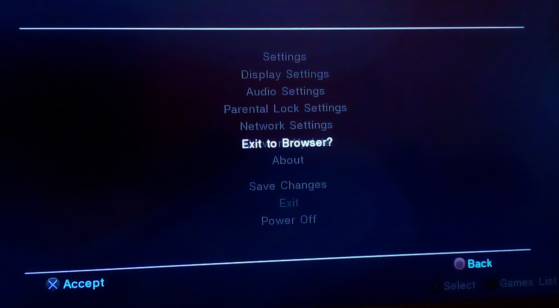
When I will not enable USB device everything seems to be fine (I can exit OPL).
Additionally I've enabled notification, PS2 logo, HTDV 720p, SFX+Boot sound.
EDIT: The same thing happens with USB Device start mode - Auto.
EDIT 2: This problem might be related to HDTV modes (at least 720p\1080i),
because with Auto I don't have this problem.
This problem also exists in OPL 1443 (with newlib)
I do not have this problem on OPL 1442 (without newlib).
With:
USB Device start mode - Manual
When I manually start USB device and I want to exit from this app, OPL will freeze:
When I will not enable USB device everything seems to be fine (I can exit OPL).
Additionally I've enabled notification, PS2 logo, HTDV 720p, SFX+Boot sound.
EDIT: The same thing happens with USB Device start mode - Auto.
EDIT 2: This problem might be related to HDTV modes (at least 720p\1080i),
because with Auto I don't have this problem.
This problem also exists in OPL 1443 (with newlib)
I do not have this problem on OPL 1442 (without newlib).
Last edited:
Maximus32
Developer
I can confirm:
HIRES mode + USB started = freeze on exit.
EDIT: When compiled with DEBUG=1, exit no longer freezes, so that makes debugging a little more difficult
EDIT2: I'm suspecting a timing issue, and there's fixed delay times for sfx. When disabling sound, exit no longer freezes.
HIRES mode + USB started = freeze on exit.
EDIT: When compiled with DEBUG=1, exit no longer freezes, so that makes debugging a little more difficult
EDIT2: I'm suspecting a timing issue, and there's fixed delay times for sfx. When disabling sound, exit no longer freezes.
Last edited:
jolek
Senior Member
I'm suspecting a timing issue, and there's fixed delay times for sfx. When disabling sound, exit no longer freezes.
Did You try to change e.g. Overscan in Display Settings while you enable HDTV 1280x720p @60Hz 16bit (HIRES)?
Or even change res from 720p to 1080i?
I have these problems even with disabled SFX\boot sound and notifications.
Currently tested OPL 1450. USB Device start mode - Auto.
