alexparrado
Developer
-
-
What is OpenTuna?
OpenTuna is an open source version of "Fortuna", based on reverse engineering!!!. Good news!!, OpenTuna is now compatible with each PS2 Console starting from SCPH-18000 up to SCPH-90010 and PS2 TV (ROM versions ranging from 1.10 to 2.30). Yeah, it turned out almost all PS2 consoles are hackable this way, as additional advantage OpenTuna does not require MagicGate compliant MCs.
Protokernels (SCPH-10000 and SCPH-15000) are excluded and OpenTuna won't be ported to them (at least by me), I'm not sure if they're hackable or not.
-
While Fortuna was merely a proof of concept, OpenTuna was made having future development in mind:
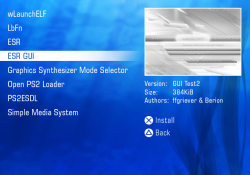
- It is made to be easy to use by the user. We included an easy to use installer were you only need to press X to install it. Now installation can be performed on either slot1 or slot2 for each compatible model.
- Also, we included OPL on the release package, so you are ready to play once you install it.
- It allows embedding compressed and uncompressed executables to the exploit icon
- Thanks to added fat compatibility, some test models can use OpenTuna as MC-based exploit.
-
Since it is open source, it will allow porting it to other hardware versions, including TEST consoles.
-
Compatibility:
- OpenTuna is now compatible with each PS2 Console starting from SCPH-18000 up to SCPH-90010 and PS2 TV. (ROM versions ranging from 1.10 to 2.30)
Every Slim PS2 Console (SCPH-700XX, 750XX, 770XX, 790XX, 900XX)PS2 TVOnly one specific FAT console model: SCPH-500XX with BIOS v1.90
Technical write-up describing internals of OpenTuna/Fortuna: drive.google.com
(or see next tab)
Youtube video/tutorials:ViZoR RetroGames (Spanish) New!!
ViZoR RetroGames (Spanish)
HardLevel (Portuguese)
Project Phoenix Media (English)
-
What is OpenTuna?
-
DEMYSTIFYING PS2 FORTUNA THROUGH OPENTUNA
by alexparrado
Fortuna is the newest MC-based exploit for PS2 consoles, allowing homebrew software to run on consoles with BIOS v2.30, which are incompatible with FreeMCBoot. As an additional advantage, Fortuna does not require MagicGate Memory Cards (MCs). The vulnerability Fortuna is based on was described first by @TnA some years ago, and developer krat0s exploited it around a year ago. At first, krat0s was willing to prepare a technical write-up about Fortuna's internals. Still, in the end, he decided to maintain this exploit in secrecy due to several reasons I'm not going to describe here.
Fortuna's magic and the secrecy around it made me very curious, so I started reading posts from @TnA, @HWNJ, krat0s, CTurt, and @sp193 in order to get some clues to reverse engineer Fortuna. The conjectures from @TnA were very useful, and they gave some insights; however, @sp193 was the first person that first described some technical details about Fortuna and how it works. His post was the starting point of what I'm about to describe here. CTurt's FreeDVDBoot helped me out to polish the exploit implementation as well [1].
How Does Fortuna work?
Fortuna exploits a buffer-overflow vulnerability that can be triggered when the OSDSYS reads an icon (icon.icn), including a compressed texture segment. Compressed texture segments use RLE (Run-Length-Encoding), which is a simple way to zip images. The PS2 icon format and RLE encoding are explained in depth within this document [2], and @sp193 did so for Fortuna RLE encoding on this post [3].
Fortuna uses two icon files, icon.sys and icon.icn. First, icon.sys is a regular file that points to the FORTUNA folder; on the other hand, icon.icn is valid except for the texture segment. Here is where magic lays. From now on, I will explain how Fortuna works from the reverse engineering tasks I performed for the case of the RLE texture segment that is shown in the following figure.
Fortuna v1 and Fortuna v2 were both reverse engineered. They are similar but have slight differences related to the payload and its load address. First, Fortuna is based on the exploitation of a buffer overflow vulnerability in OSDSYS. RLE decoder in OSDSYS has no boundary check at all. Exploitation is performed by using the following approach: NOP-sled + shellcode + return address repetition + zero pad.
The NOP-Sled technique is used in both versions, whose size is chosen to have a load address for payload (shellcode) of the form: 0x20XX20XX. This is because of the way the RLE decoder repeats load address by using halfwords. Hence, for Fortuna v1, the load address is 0x20b020b0; and for Fortuna v2, the load address is 0x20c020c0. NOP-Sled is used in this case to create room for remaining game saves in MC. Fortuna Rev1 hung on black screen when whole icons were loaded due to scarce room in RAM, this was fixed in Fortuna Rev2.
Exploit is loaded into RAM when MC contents are shown along with the distinctive Fortuna "white icon", which actually is NOP-Sled. Once the exploit is loaded into RAM after RLE decoding, it is necessary to trigger payload execution from the load address. This is achieved in the classical buffer overflow exploitation by estimating the offset of the return address on the stack. Fortuna replicates the payload load address to maximize the probability of triggering when the function returns and pops the return address from the stack, which happens when the user hits twice the exit button on the PS2 browser.
After analyzing the compressed texture segment, I found out that for both Fortuna v1 and Fortuna v2 maximum buffer size is 7335998 and 7336041 halfwords, respectively. This is an approximation to the maximum size OSDSYS buffer can have, and this buffer seemingly starts at address 0x20A62050 for the first icon. Further, difference between load addresses for Fortuna v1 and Fortuna v2 exactly corresponds to difference between NOP-Sled sizes (0xD003E−0x50036)*2=0x20c020c0-0x20b020b0= 0x100010.
Payload (shellcode) is RLE encoded and injected as chunks of 254 half-words. Fortuna v1 payload is composed of 17646 halfwords, and Fortuna v2 payload is composed of 6834 halfwords. I only disassembled Fortuna v2 payload, which performs the following:
1. The cache is flushed in the usual way.
2. The CPU is placed in kernel mode.
3. The 2nd stage payload is copied beginning from 0x90000 (presumably an ELF loader).
4. Clears some bytes after 2nd stage payload (.bss segment?) (memset from libc is embedded)
5. Flushes cache again
6. And ExecPS2 from 0x900D8.
After the shellcode, the buffer is zero-padded to fill the remaining available space. Zero-pad is composed of 6990618 halfwords for Fortuna v1 and 6477177 halfwords for Fortuna v2. The data below correspond to the return address repetitions (words) after the payload buffer, which is 14168 for Fortuna v1 and 7315 for Fortuna v2. The number of required repetitions is dependent on the Payload size.
After return address repetitions, there is some zero pad, which is included into RLE encoded data (1948 bytes for Fortuna v1 and 1902 bytes for Fortuna v2). I'm still not sure how OSDSYS RLE decoder interprets that zero-pad; nonetheless, I've been able to trigger the exploit no matter its size.
Finally, after OSDSYS decodes the texture information, the memory layout looks more or less as shown in the next figure.
From this point, the exploit will start running from the load address if return address repetitions were well estimated. To date, I don't know if the payload buffer lays on stack, heap, or if it is a static buffer.
Let's Open Tuna
After figuring out how Fortuna works, the next goal was to create its own icon files with embedded ELFs along with a set of tools to allow users to build their own exploits as needed. In addition, above everything, is to keep software and knowledge free. The above considerations motivated the creation of the OpenTuna project.

OpenTuna's logo was created by Howling Wolf & Chelsea.
OpenTuna uses the same layout of texture segment in Fortuna Rev2 for slim models, in this case the load address is 0x20C020C0 and 0x20D020D0 for Fat models. However, there are at least three OSDSYS memory layouts across ROM versions:
- ROM versions 1.10, 1.20, 1.50 and 1.60 for which first icon load address is 0x20B59050.
- ROM version 1.70 for which first icon load address is 0x20B62050.
- ROM versions 1.90, 2.00, 2.20 and 2.30 for which first icon load address is 0x20A62050.
In addition, OpenTuna uses a two stages payload:
First stage payload at load address 0x20C020C0/0x20D020D0 (https://github.com/ps2homebrew/opentuna-payload/tree/main/exploit)
1. Performs PS2 basic initialization.
2. Launches (ExecPS2) user payload
Second stage payload: Can be any user ELF, compressed or uncompressed. The source code for two sample payload projects is provided along with their corresponding icon files (OPENTUNA-KEYS https://github.com/ps2homebrew/opentuna-payload/tree/main/launcher-keys and OPENTUNA-BOOT https://github.com/ps2homebrew/opentuna-payload/tree/main/launcher-boot). You're encouraged to use an older SDK to compile payloads, to get smaller icon possible. However compilation with newer SDK is possible as shown here (https://github.com/blckbearx/opentuna-payload)
A small utility written in Kotlin will also create the icon file for you from a binary payload
https://github.com/parrado/opentuna-RLE/releases/tag/v1.0 To date, I haven't been able to automate return address repetitions, so maybe you'll be forced to manually hex-edit the generated icon file.
The below figure shows how to perform manual editing of icon.icn to modify return address repetitions to trigger the exploit, in this case for OPENTUNA-KEYS flavor.
In this case, return address (0x20b020b0 in Little Endian encoding) is repeated (0x7ff0+0x7716)/2=0x7b83 times.
You should test your exploits on actual hardware as PCSX2 tends to give false positives. To adjust return address repetitions, you can follow the next procedure. Use as a template a sample icon file, and if you watch a messed OSDSYS browser like the one in the following Figure, you probably are missing return address repetitions, so increase them.
Conversely, if you completely freeze the console when loading MC contents as shown in the next Figure, you indeed include too many repetitions, so reduce them.
Finally, keep in mind that one chunk of repetitions cannot be larger than 0x7fff; if you need more repetitions, please use the next available word (32-bit).
Bibliography
[1] "FreeDVDBoot - Hacking the PlayStation 2 through its DVD player." [Online]. Available:
https://cturt.github.io/freedvdboot.html. [Accessed: 16-Feb-2021].
[2] "(No Title)." [Online]. Available: https://www.ps2savetools.com/ps2icon-0.5.pdf. [Accessed:
16-Feb-2021].
[3] "PS2 - Fortuna. ALL PS2s (incl. TV) HACKABLE! Another discless exploit! | Page 5 | PSX-
Place." [Online]. Available: https://www.psx-place.com/threads/fortuna-all-ps2s-incl-tv-hackable-
another-discless-exploit.27226/page-5#post-221178. [Accessed: 16-Feb-2021].
.ORIGINAL DOCUMENT LINK: drive.google.com
-
How to install (using the installer):
1 - Copy the "OpenTuna_Installer.elf" to a pendrive.
2 - In your PS2, launch uLaunchELF.
3 - In uLE go to "File Browser", then "mass:/" and then look for the "OpenTuna_Installer.elf" file and execute it (with O or X depending on your configuration).
4 - On the installer, everything is straightforward. You should press O/X, then start the installation and wait until it finishes.
5 - Done!
How to install (using the PSU file and the APPS folder):
1 - In your console launch uLE and check your ROM version by opening MISC->Debug Info. Your ROM version corresponds to the first four characters in the string after rom0:ROMVER. For instance, if those characters are 0150 your ROM version is 1.50 and you should use OPENTUNA-OPL-ULE-110-120-150-160.psu file.
2 - Copy the psu file according to the ROM version of target console (OPENTUNA-OPL-ULE-190-200-220-230.psu, OPENTUNA-OPL-ULE-110-120-150-160.psu or OPENTUNA-OPL-ULE-170.psu) and the "APPS" folder to a pendrive.
3 - In uLE go to "File Browser", then "mass:/" and then look for "psu" file you copied in previous step and highlight it.
4 - Press R1, then "Copy". (Check if there's a green label in the top right corner, if it is NOT there, then try pressing O instead of X or X instead of O when you select the "Copy" option).
5 - Go to ".." then go to "mc0:/".
6 - If you hava a folder called "OPENTUNA" or "FORTUNA", highlight it, press R1 and select "Delete"
7 - Check there's at least 1.68MB of free space in your Memory Card (check at the top).
8 - Press R1 and then select "psuPaste" (not "Paste").
9 - Wait until it finishes, then go to ".." then go to "mass:/" and then look for the "APPS" folder and highlight it.
10 - Press R1, then "Copy". (same as step 4).
11 - Go to ".." then go to "mc0:/".
12 - Press R1 and then select "Paste" (not "psuPaste").
13 - Wait until it finishes, then reboot your console.
(*) We advise to use the specific uLE version provided here (WorkingULE.ELF) as we noticed that some uLE and wLE builds out there fails to properly set the timestamp.
How to execute it:
1 - Go to the PS2 Browser, then open your 1st memory card and you will see an invisible icon.
2 - Press O to go back (or X if your console is Asian)
3 - You will see that the memory card icons are now transparent. Press O (or X) to go back again.
4 - If you want to run wLE, press and hold O when your screen turns black, else, do not press any key and Open PS2 Loader will launch instead.
5 - That's it!
-
Warning:
- OpenTuna MC should be used in the console for which it was installed, it is advised to NOT use an OpenTuna MC on a different console or it could freeze your console and in the worst case it could damage the savedatas inside your MC.
- Avoid setting up your console in Japanese language or having game saves showing Kana or Kanji characters while using OpenTuna.
- OpenTuna exploits a buffer overflow vulnerability in stock OSDSYS, so don't use it along with HDD-OSD.
OpenTuna in this actual version is just for use in Slim PS2 consoles and on SCPH-500XX with v1.90 BIOS.This has not been tested, but assuming that OpenTuna's exploit is like the original Fortuna project, once it is installed on your Memory Card, it is advised to NOT use it on a FAT PS2 console or it could damage the savedatas inside your Memory Card. If you want to use that Memory Card on these kind of consoles, just delete OpenTuna and done.
-
Wanna know how does it work?
This is a technical write-up describing internals of OpenTuna/Fortuna.
Wanna build your own "icons" to hack your console?
- Download the tools I coded and used to create OpenTuna. They are written in Kotlin and you'll need to install JRE.
- https://github.com/ps2homebrew/opentuna-RLE
Source code for exploit, payloads, installer and tools is available at GitHub:
- https://github.com/ps2homebrew/opentuna-payload
- https://github.com/ps2homebrew/opentuna-installer
- https://github.com/ps2homebrew/opentuna-RLE
dAdditional F.A.Q.
-
Q.: Which models is this compatible with?
- A.: All PS2 models but protokernels (SCPH-10000 and SCPH-15000)
A.: Currently all the slimline and SCPH-500XX with BOOT-ROM 1.90
Q.: Do I still need to set the timestamp to 2099-12-31?- A. If you edit the OPENTUNA folder, you will need to change the timestamp!
If you just copy/paste the PSU using a good version of uLE/wLE or if you used the provided installer, it will not be required to do so.
Q.: I used PSUPaste but the timestamp is not 2099-12-31, what should I do?- A.: You probably used an incompatible version of uLE/wLE. Try doing PSUPaste using uLE 4.37. In addition you can use this wLE fork to fix timestamp (https://www.psx-place.com/threads/wlaunchelf-4-43x_isr.32655/)
Q.: What is different about this exploit then others?- A.: It's currently very similar to Fortuna! However... The Payload can be completely replaced as well as the vulnerability exploited in other ways! and now it works on almost each Fat model.
Q.: What can i do / expect from this exploit?- A.: Fat compatibility is a reality, so I guess you can expect more from OpenTuna as my team and I are active developers in PS2 scene.
-
A.: Higher BOOT-ROM- and hence device-compatibility (for example with TEST-PS2s, FATs, etc.) along other "goodies"!
Q.: Does this improve Fortuna in anyway other then being an Open Source Solution currently?- A.: No explanation needed, I guess .
-
A.: You can probably imagine it better, once you see those advances.
Q.: Any known issue with the project?- A.: You tell us!
Q.: Any special requirements?- A.: A MemoryCard which is recognized by the OSDSYS!
Q.: Were any Tuna Fish harmed in the creation of this project?- A.: No real and no virtual Tunas have been harmed! Our Tunas are happily swimming through the Scene and are nice to play with!
-
Credits:
- OpenTuna: alexparrado
- Inspired on Fortuna Project by krat0s
- OpenTuna Installer: Howling Wolf & Chelsea (HWNJ) , Krah, alexparrado, El_isra.
- Logo: HWNJ.
- 3D Icon: Cagatayssolak (with assistance from theANYFed)
- Special Thanks: CTurt, TnA, uyjulian
- Write-up proofread: Howling Wolf & Chelsea, MrMario2011, uyjulian, Versatile
- Beta Testers: GMV, Haker120 (a youkai of love), LourdesAnn (Snow), Migue, Venão, Versatile, VizoR, Chromaryu, lilkuz2005, 「jse」, Roman Alexander, Kevin Alejandro Romero Moya.
- Also, HWNJ will like to thank ibisjc and nokiajavi for their help all these years!
Download
Alternative download link:
http://www.hwc.nat.cu/ps2-vault/hwc-projects/opentuna/OpenTuna_v2.zip
Este archivo se encuentra en un servidor cubano, así que puede ser bajado en Cuba usando navegación nacional, los 300MB de bono de datos o desde navegación nacional con nauta.
Alternative download link:
http://www.hwc.nat.cu/ps2-vault/hwc-projects/opentuna/OpenTuna_v2.zip
Este archivo se encuentra en un servidor cubano, así que puede ser bajado en Cuba usando navegación nacional, los 300MB de bono de datos o desde navegación nacional con nauta.
News Coverage: v1.0 - psx-place.com
Last edited:


 " to install to MC0, press "
 to install to MC1?