
You are using an out of date browser. It may not display this or other websites correctly.
You should upgrade or use an alternative browser.
You should upgrade or use an alternative browser.


This is my hope as well. Large drive support with lightweight client. Love it. Unless there is a way load games off the drive more directly.I understand. Thanks for the explanation. Neutrino supports large HDDs, according to what they answered on their github. Hopefully opl too, someday.
ZjemCiKolege
Member
This does not apply to sd2psx :/

1052
Member
OPLNEUTV41 works well with the latest neutrino via USB. But OPLNEUTV41 only supports neutrino 1.2.0 via UDPBD.Which version is the latest for USB?
Hi, thanks for reporting! I just wanted to update OPLNEUT for 1.3.1 UDPBD support, but found that it works fine with neutrino 1.3.1 via UDPBD. 1.3.1 still uses same command arguments for UDPBD exfat (default) share. I didnt tested current development version of neutrino, though. But 1.3.1 works fine with UDPBD via OPLNEUTV41.OPLNEUTV41 works well with the latest neutrino via USB. But OPLNEUTV41 only supports neutrino 1.2.0 via UDPBD.
OPLNEUTV41.ELF is latest version for all supported backends, including USB. It works fine with Neutrino 1.3.1.Hi.
Which version is the latest for USB?
Are you planing to update it for Neutrino v1.3.1 or is it not necessary?
Just checked it right now with neutrino 1.3.1 it works just fine. UDPBD works fine too.
OPLNEUT - just a binary patched OPNPS2LD-v1.2.0-Beta-2044 (UDPBD enabled build) to convert it to neutrino GUI with familiar UI. You may think of it as of neutrino GUI, or you may get on other side of view, and look at OPLNEUT as OPL version with "externalized" main core, where is main core became a "plugin" in form of external neutrino.elf. It takes best from both worlds - GUI from OPL (also cheats and gsm) and speed, compatibility, innovations, lower memory footprint from neutrino.
Thereofe, it use OPNPS2LD-v1.2.0-Beta-2044 original browser and management core code, and only at the launch stage, when user selected game and launched it - it swaps original OPL core to external neturino.elf, providing all needed data for it to propertly launch selected game.
Thereofe, until you selected game and launched it, OPLNEUT behaves like a original OPNPS2LD-v1.2.0-Beta-2044. Just because, until you launch selected game, the patch code still not enabled. That means, if you have any difficulties at any pre launch stage - you will have same difficulties with original OPNPS2LD-v1.2.0-Beta-2044 (UDPBD enabled build), and those problems not related to OPLNEUT nor neutrino.
If you want to use any new type of share (backend), supported by neutrino, but not supported by OPNPS2LD-v1.2.0-Beta-2044 - it will not work, because OPNPS2LD-v1.2.0-Beta-2044 core and manager dont know how to use it. But in other cases, if command line arguments format for neutrino.elf not changed, OPLNEUT will work with any neutrino version with any supported backends (usb,hdd, mx4sio, iLink, UDPBD)
And main bonus of OPLNEUT, that it allow to use OPL gsm and cheat features with neutrino.
Last edited:

jolek
Senior Member
OPLNEUTV41.ELF is latest version for all supported backends, including USB. It works fine with Neutrino 1.3.1.
Just checked it right now with neutrino 1.3.1 it works just fine. UDPBD works fine too.
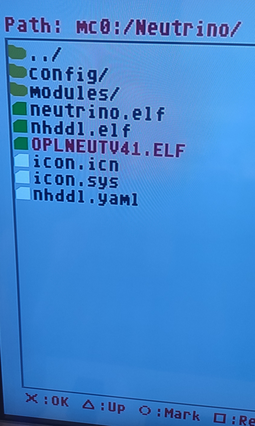
1. I have unpacked Neutrino and copy everything into mc0:/Neutrino:
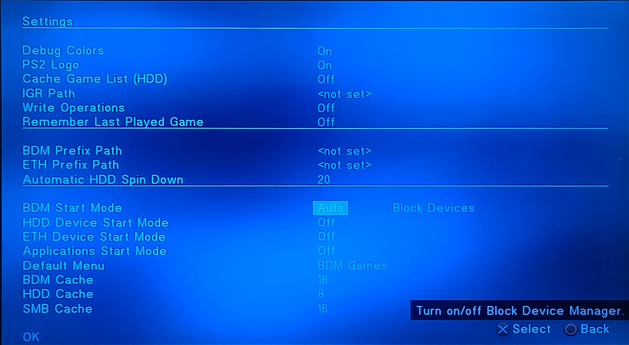
2. Turn on BDM:
3.
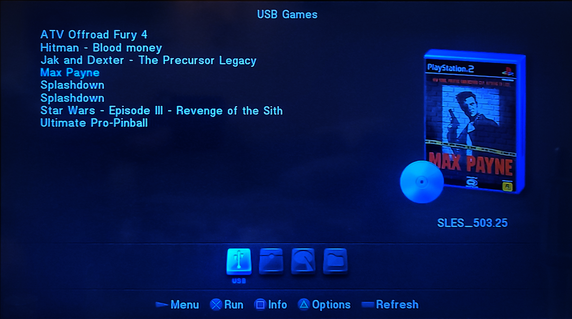
Once I select any game it keeps me kicking into PS2 Broser instead of launching the game.
I do not have this issue with e.g. NHDDL.
EDIT 1: Never mind.
Neutrino should be in mc0:/NEUTRINO/, not mc0:/Neutrino/.
So all the folder letters should in UPPER case.
Although the PS2 logo and the debug colors do not work for me...
EDIT 2: Added into the Resources.
Last edited:
nikeymikey
Member
Another vote for exfat hdd support.
It shouldn't be too hard to support exfat hdds here as Neutrino already does it. NHDDL uses Neutrino and loads from my exfat hdd just fine so it is possible.
This could then become the latest greatest loader. Although I think a new, built from scratch loader that is based off Neutrino without relying on OPL's backend should be the way forward. Then Grimdoomers version (although it is great work) can finally be retired.
It shouldn't be too hard to support exfat hdds here as Neutrino already does it. NHDDL uses Neutrino and loads from my exfat hdd just fine so it is possible.
This could then become the latest greatest loader. Although I think a new, built from scratch loader that is based off Neutrino without relying on OPL's backend should be the way forward. Then Grimdoomers version (although it is great work) can finally be retired.
RandomGuy2024
Member
What's the command to run udpbd-vexfat.exe? If using udpbd-server.exe on OPL UDPBD, it is:
"C:\path\to\udpbd-server.exe" \\.\F:
("F:" is a USB flash drive in this case).
What's the command to run udpbd-server.exe?
May I have my games on the PC's SSD along with udpbd-vexfat.exe, instead of on an USB flash drive (unlike if using udpbd-server.exe)?
Also, may I have my games on the PC's SSD and udpbd-server.exe on an USB flash drive or it has to be otherwise for it to work? Do I need to format the PC's SSD partition/USB flash drive where the games are located in Linux/GParted Live if using udpbd-vexfat.exe or only if using udpbd-server.exe?
"C:\path\to\udpbd-server.exe" \\.\F:
("F:" is a USB flash drive in this case).
What's the command to run udpbd-server.exe?
May I have my games on the PC's SSD along with udpbd-vexfat.exe, instead of on an USB flash drive (unlike if using udpbd-server.exe)?
Also, may I have my games on the PC's SSD and udpbd-server.exe on an USB flash drive or it has to be otherwise for it to work? Do I need to format the PC's SSD partition/USB flash drive where the games are located in Linux/GParted Live if using udpbd-vexfat.exe or only if using udpbd-server.exe?
Last edited:
1052
Member
nikeymikey
Member
@nikeymikey you can also use this.
Yeah I am aware of XEBPLUS.. Once I get one of those tiny USB sticks I will probably switch to it as I dont believe XEBPLUS can be run from memory card? Also not sure if I could use cheats?
RandomGuy2024
Member
I don't get what the first link has to do with what I asked and what is write mode?
What's the command to run udpbd-vexfat.exe? If using udpbd-server.exe, it is:
"C:\path\to\udpbd-server.exe" \\.\F:
("F:" is a USB flash drive in this case).
May I have my games on the PC's SSD and udpbd-server.exe on an USB flash drive or it has to be otherwise for it to work? Do I need to format the PC's SSD partition/USB flash drive where the games are located in Linux/GParted Live if using udpbd-vexfat.exe or only if using udpbd-server.exe?
Yes, I found out about that XEB+ neutrino Launcher Plugin fork which supports UDPBD unlike the original and I was able to run it but the game I tried still had issues when compared to running it on OPL via UDPBD, though less. The game I ran and udpbd-vexfat.exe (which comes with the fork [together with udpbd-server.exe] and is ran by it) were both on the laptop's SSD.
Also, unfortunately, XEB+ doesn't work if ran from a MC so I have to run it from an USB device.
EDIT: Now, the original XEB+ neutrino Launcher Plugin supports UDPBD as well.
Last edited:
jolek
Senior Member
OPLNEUTV41.ELF
Any chance for OPLNEUTRINO with support for neutrono build from 20241206?
I mean to support and add mode 7 in compatibility modes:
https://github.com/rickgaiser/neutrino/commit/ab085bb47168544f5370977cb5a8772d7d195330.
nikeymikey
Member
Give up with OPL completely. Move over to XEB+ with the Neutrino plugin. It truly is the way forward.Any chance for OPLNEUTRINO with support for neutrono build from 20241206?
I mean to support and add mode 7 in compatibility modes:
https://github.com/rickgaiser/neutrino/commit/ab085bb47168544f5370977cb5a8772d7d195330.
Similar threads
-

-
 PS2 [POC/Outdated] unofficial Open PS2 Loader (uOPL)
- Started by Ripto
- Replies: 58
-

-
