PS2 OPL from HDD in router usb port using smb

Wkz

Forum Noob
Hello all,
i've been using opl for a few years over ethernet cable to my laptop into the external hdd.
Recently i got it working via wifi instead but i would like to be able to place my hdd on the router.

my router does create the smb server and i can access it on my pcs but it does need a password unlike how i used opl before.

opl however never manages to find the smb server.

Could you provide more guidance?
my hdd has 3 partitions but for now i am only using smb on one.

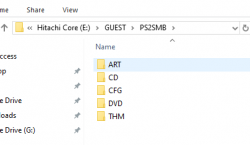
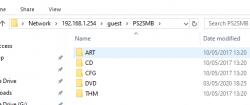
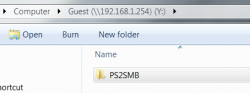
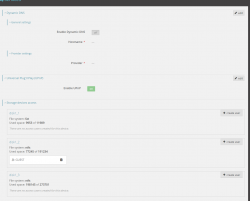
I've tried to create a GUEST folder before the PS2SMB but it didn't work either. Screenshot_1.png smb at router.png
 
Typically, the router creates a separate directory from the one you share, for example, "usb1_1_1." You must enter that name in OPL, in the "Settings/ETH Prefix Path" section. The shared folder name will be the same as the one you entered in the "Settings/Network Sharing" section.

In short, first identify the name of your shared folder using Samba.
Then, identify the name of the folder that contains the typical OPL folders (DVD, CD, VMC, THM).
 
ok i have tried to do so but i must be making a mistake with some name:
i've attached the paths for my hdd from usb in the pc and from network on the router.

how does smb1 being deprecated make a difference in the os if i am trying not to even use the pc?

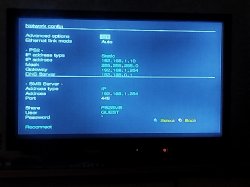
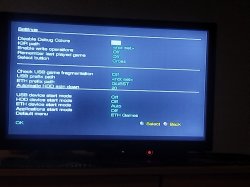
Pictures from opl. Or perhaps do you mean the prefix should be disk1_2/GUEST/PS2SMB ? Or maybe disk1_2/GUEST ?
 

Attachments

  • local.png
    local.png
    7.6 KB · Views: 35
  • network.png
    network.png
    10.8 KB · Views: 39
  • IMG_20250525_082844.jpg
    IMG_20250525_082844.jpg
    1.4 MB · Views: 34
  • IMG_20250525_082749.jpg
    IMG_20250525_082749.jpg
    1.6 MB · Views: 39
Last edited by a moderator:
Let's do the following:

Step 1: Place all the OPL folders (DVD, CD, THM, VMC, etc.) on the root of your USB device.

Step 2: Access your router's settings and enter the name "samba" in the "Share folder with Samba" field.

Step 3: Disable the username and password option (for now).

Step 4: Access the Hostname from your computer with the following address:

\\192.168.1.254\samba

Step 5: Take a screenshot and show it to me.
 
there is no option to set the shared folder with samba:
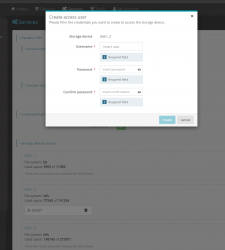
when i try to create a user, which requires username and password, the router creates a folder in the hdd root with the users name.
smb_user_creation.png
that is why my user is GUEST and the path i set was GUEST/PS2SMB if you check the screeshots of the second post

it seems to create a public folder but i'm not quite sure how that works:
upload_2025-5-26_3-59-24.png
 
AFAIR you can't do slashes for the share, but only the name. If you need deeper paths, use ETH-Prefix.
 
Yep I tried it on the Eth path like shown above in the pictures
If I remember correctly, it seems you had them backwards; it should be like this:

ETH prefix path: PS2SMB
Network Settings Share:guest

Then you'd have the shared folder name as "guest" and the username as "guest," according to what you're saying.

I'm just trying to figure out why you're creating a folder on your device called "GUEST." Could it be that the router isn't creating it automatically, but rather you have to enter the name of an already created folder?
 
needing a prefix seemed redundant so i tried just creating the user ps2 and putting the dvd and other folders inside.
at the ps2:
share = user = ps2
pw: 2

and it worked without a prefix having the hdd with just a single ps2 folder created by the router :chuncky:
not quite sure how it it worked but it did :D

i think i tried this before but it didn't work i think.
i realized, when creating a new user, the router also creates a "share" folder in the root.
 
needing a prefix seemed redundant so i tried just creating the user ps2 and putting the dvd and other folders inside.
at the ps2:
share = user = ps2
pw: 2

and it worked without a prefix having the hdd with just a single ps2 folder created by the router :chuncky:
not quite sure how it it worked but it did :D

i think i tried this before but it didn't work i think.
i realized, when creating a new user, the router also creates a "share" folder in the root.

Having the folder shared directly is ideal. In fact, that's what I was trying to get you to do when I told you to place the folders in the root of your USB device. Because of the way you access the hostname, your router doesn't assign any folders based on the device name (which other routers, like mine, do).
I was just trying to figure out how your router handles things.
The ETH prefix path is optional if you want to have a subfolder on your device.;)
 

Similar threads

Back
Top