PS2 OPL poblems

Fannste94

Member
Nothing needs to be modified.
Copy "OPL_1562-Beta-41f7cf0.ELF" into memory card.
Use FMCB Configurator -> Configure OSDSYS options... -> Configure Item 3 : Open PS2 Loader.
In "Path1" look for "OPL_1562-Beta-41f7cf0.ELF".
Save CNF to MC?.

I updated OPL to 1562-Beta and now the GSM HDTV 576p 50Hz mode is working but the cutscenes are lagging and some won't load


MOD EDIT: I moved this and many other posts from here:
https://www.psx-place.com/threads/funtuna-free-mcboot-for-fortuna.30973/.
 
Last edited by a moderator:
When I open ESR I have a black screen

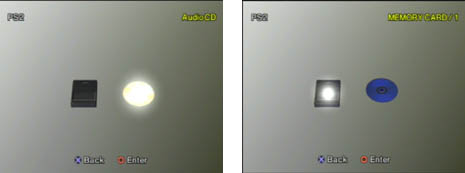
When FMCB is not initialized, did you try to put in any backup disc?
I mean put in DVD-R disc before FMCB has been initialized, e.g. on PS2 Browser screen:
guide9.jpeg

If you are getting an error (disc cannot be read), something is not right.

Can you give a few games titles that you tested?

Additionally try ESR r10f disco (esr_r10f_direct.elf):
https://www.psx-place.com/threads/esr.30217/.
This version has debug colors.

Did you patch your disc(s)?
You can use ESR disc patcher GUI v0.24a or ESRPatcher Pro for that.


I updated OPL to 1562-Beta and now the GSM HDTV 576p 50Hz mode is working but the cutscenes are lagging and some won't load

Does this stuttering also happen without enabled GSM?
Can you give few examples of games that you tested with this mode?
Did you try to enable Field flipping?
 
Are you loading your games from USB?
Try SMB or HDD instead.
Yes from the USB, and Need for Speed Underground 2 won't load it shows a black sceen

When FMCB is not initialized, did you try to put in any backup disc?
I mean put in DVD-R disc before FMCB has been initialized, e.g. on PS2 Browser screen:
guide9.jpeg

If you are getting an error (disc cannot be read), something is not right.

Can you give a few games titles that you tested?

Additionally try ESR r10f disco (esr_r10f_direct.elf):
https://www.psx-place.com/threads/esr.30217/.
This version has debug colors.

Did you patch your disc(s)?
You can use ESR disc patcher GUI v0.24a or ESRPatcher Pro for that.


Does this stuttering also happen without enabled GSM?
Can you give few examples of games that you tested with this mode?
Did you try to enable Field flipping?
I didn't put a CD in the PS2, when I disable GSM the games work fine but are in interlaced mode, it happens in PES 2013, 2014 and Need for Speed Underground 2 and Underground 2 won't load it has a black screen, Yes I have that option enabled
 
Can you please do something for me?
There is an option to quote:
quote.png

Once you select it, it should change into:
quote2.png


You can quote multiple posts by it and "hit":
insert.png


It is not a chat, it is a forum.

Can you answer all the questions?

1. When FMCB is not initialized, did you try to put in any backup disc?
I mean put in DVD-R disc before FMCB has been initialized, e.g. on PS2 Browser screen:

If you are getting an error (disc cannot be read), something is not right.

2. Additionally try ESR r10f disco (esr_r10f_direct.elf):
https://www.psx-place.com/threads/esr.30217/.
This version has debug colors.

3. Did you patch your disc(s)?
You can use ESR disc patcher GUI v0.24a or ESRPatcher Pro for that.

4. CD will not work, it has to be DVD, the best compatibility you will get with DVD-R.

I have tried Need for Speed - Underground 2 (SLES_527.25) through SMB with OPL 1562...
Game boots fine when GSM (576p) has been enabled.
There is no need to enable Field flipping in this game.

Do these games that you have mentioned you have on USB or on disc (DVD-R)?
 
Can you please do something for me?
There is an option to quote:
quote.png

Once you select it, it should change into:
quote2.png


You can quote multiple posts by it and "hit":
insert.png


It is not a chat, it is a forum.

Can you answer all the questions?

1. When FMCB is not initialized, did you try to put in any backup disc?
I mean put in DVD-R disc before FMCB has been initialized, e.g. on PS2 Browser screen:

If you are getting an error (disc cannot be read), something is not right.

2. Additionally try ESR r10f disco (esr_r10f_direct.elf):
https://www.psx-place.com/threads/esr.30217/.
This version has debug colors.

3. Did you patch your disc(s)?
You can use ESR disc patcher GUI v0.24a or ESRPatcher Pro for that.

4. CD will not work, it has to be DVD, the best compatibility you will get with DVD-R.

I have tried Need for Speed - Underground 2 (SLES_527.25) through SMB with OPL 1562...
Game boots fine when GSM (576p) has been enabled.
There is no need to enable Field flipping in this game.

Do these games that you have mentioned you have on USB or on disc (DVD-R)?
I told you I didn't try any CDs or DVDs with ESR, and maybe the games won't load because I'm using an USB flash drive and I don't have an external hard drive
 
There is something that I do not understand...

Previously you wrote that:
ESR also doesn't work in Funtuna
Now that:
I didn't try any CDs or DVDs with ESR

Do you know what this app is for?

Flash drive and external HDD should have the same compatibility,
because both of them use USB port.
However some USB drives can be not fully compatible.

EDIT: I have also tried Need for Speed - Underground 2 (SLES_527.25) through USB with OPL 1562...
Game boots fine when GSM (576p) has been enabled.
As previous there is no need to enable Field flipping in this game.

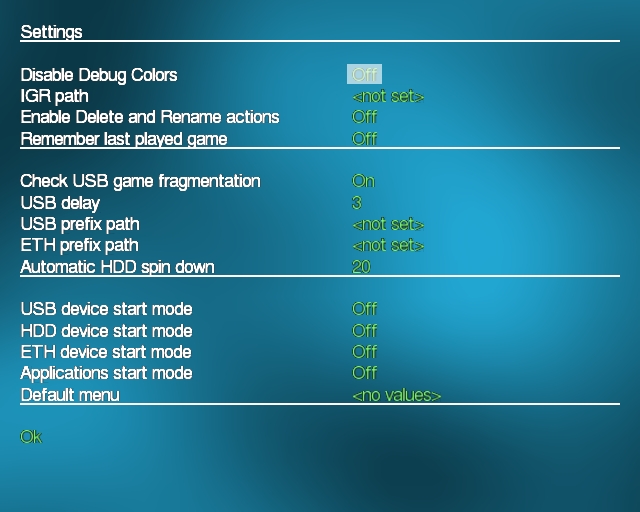
Try to enable debug colors in OPL's settings:
vigimagesnyddd6ee.jpg

Disable debug colors: Off

EDIT 2: Also "Check USB game fragmentation" should be set: ON
 
Last edited:
  • Like
Reactions: TnA
  1. Are your files on USB 100% defragmented?
  2. Nowadays I'd recommend Jabu's FDVDB-ESR-Patcher-GUI to patch disc-based games.
 
There is something that I do not understand...

Previously you wrote that:

Now that:


Do you know what this app is for?

Flash drive and external HDD should have the same compatibility,
because both of them use USB port.
However some USB drives can be not fully compatible.

EDIT: I have also tried Need for Speed - Underground 2 (SLES_527.25) through USB with OPL 1562...
Game boots fine when GSM (576p) has been enabled.
As previous there is no need to enable Field flipping in this game.

Try to enable debug colors in OPL's settings:
vigimagesnyddd6ee.jpg

Disable debug colors: Off

EDIT 2: Also "Check USB game fragmentation" should be set: ON

20201202_233019.jpg
20201202_233118.jpg
20201202_233228.jpg


  1. Are your files on USB 100% defragmented?
  2. Nowadays I'd recommend Jabu's FDVDB-ESR-Patcher-GUI to patch disc-based games.
I don't know
 
Last edited by a moderator:
Yes! In-game-files (ISO, VMC) need to be 100% defragmented.
However... It seems yours are already defragmented, if the USB fragmentation check is turned on, but it doesn't complain when starting a game.
 
I have notice that there is something wrong with "POWEROFF.ELF" included in the package...
It does not matter if I launch it through wLe or from FMCB menu I only have BSOD.

This version seems to work fine:
https://www.psx-place.com/resources/power-off.696/.
OK! I will replace it later! Thanks!

It still won't work because the file needs to be modified for Funtuna
OPL does NOT needs to be modified for FunTuna

ESR also doesn't work in Funtuna
When I open ESR I have a black screen
It does works, you just do not have a ESR patched disc inserted

I still have the error with a defragmented USB with Auslogics Disk Defrag

View attachment 28960
It seems you did not had enough space to defrag the game.
If it stills RED, it is fragmented. It should be GREEN
 
Last edited by a moderator:
You can copy all the content from USB device into PC HDD\SSD.
Format USB device (FAT32).
Copy the content from PC HDD\SSD into USB device.
 
The idea was a little bit different.
If you copy all the content from an USB device to a PC HDD and copy them back without formatting (USB device),
file system will (mostly) overwrite previous data, but the files still might be fragmented.
Or maybe in other words it will not start to create data from the first sector, but from the last that was used.

Because deleting\moving files are not fully erasing them from any device.

If you format your USB device (even fast, which is is a way faster), files will be write from the 1st sector
and they will be continuous (not fragmented)...

In a simplified way. My English is quite bad, so many people will have a problem with understanding what I just wrote.
That is why I previously wrote these 3 simple steps.
 
Last edited:
  • Like
Reactions: TnA

Similar threads

Back
Top