PS2 OPL vs Disc - Resolution difference?

SomaDaydream

Forum Noob
Hello,
Recently got a memcard pro 2, very happy with the purchase.

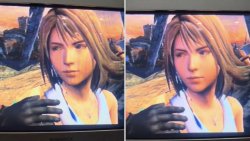
A friend was asking about how games ran, so I made a quick comparison video - disc vs running off of memcard pro 2 - to show him that there was no stuttering (at least in the FFX intro). However, in doing so I noticed that there was much more aliasing in the copy that ran off of the memcard pro 2.

Is this an issue with the resolution OPL runs at? Any settings I can tweak? Or is there any sort of processing removed when running a game off OPL vs the physical disc?

I've tried fiddling with GSM/modes, but haven't found anything that actually fixed the issue.

Here's the video for reference. The aliasing is obvious when Tidus puts his hand on Yuna's shoulder.

 
I maybe wrong but OPL sets everything at the highest resolution possible, where as Disc just runs it in interlaced unless your game has a inbuilt 480p mode that can be activated via button combo or menu, the same as widescreen.
Gran Turismo 4 & possibly Tourist Trophy are the only two games I know of which supported 1080i.
If you press the info button on your tv remote it should tell you the resolution & signal, you change the ui resolution in OPL settings, for PS3 it should default to 720p, for PS2 it should be able to output in the higher 1080i, keep in mind your tvs upscaler may or not look better at higher or lower base resolutions most just use a cheap bicubic filter.
 
OPL does not change internal or external (upscale) resolution.
OPL has built-in GSM that can change (upscale) external resolution, but you have to turn it on.
Whether games look better with GSM... well some might disagree with this statement.

There might be also NHL 2004 & Valkyrie Profile 2: Silmeria that do support 1080i:
https://www.psdevwiki.com/ps2/Games_With_Alternative_Display_Modes.
Unfortunately I have not tested this games, so I do know if it is true.

As for this game launch though OPL or disc...
It looks like it is more smooth:
IMG_20250713_084149.jpg
Or maybe even with "added" anti aliasing.

From what I remember PS2 has an ability to change texture mapping but only for PS1 games:
wsmooth.png smooth.png

Hmm.
To be honest it is quite interesting.
 
OPL does not change internal or external (upscale) resolution.
OPL has built-in GSM that can change (upscale) external resolution, but you have to turn it on.
Whether games look better with GSM... well some might disagree with this statement.

There might be also NHL 2004 & Valkyrie Profile 2: Silmeria that do support 1080i:
https://www.psdevwiki.com/ps2/Games_With_Alternative_Display_Modes.
Unfortunately I have not tested this games, so I do know if it is true.

As for this game launch though OPL or disc...
It looks like it is more smooth:
View attachment 46203
Or maybe even with "added" anti aliasing.

From what I remember PS2 has an ability to change texture mapping but only for PS1 games:
View attachment 46205 View attachment 46204

Hmm.
To be honest it is quite interesting.

Good info about the resolution/GSM. I should have clarified in post, left was OPL, right was via disc.

I've done a lot of searching around about this, I saw some messages saying that when GSM is used, it disables a "flicker filter". I'm not able to test at the moment, but going to have to try disabling GSM entirely when launching FFX to see if it then looks "smoother".
 
Yep the Wii has an option for it iirc, I think you can do the same for Gamecube via codes or Nintendon't to disable the flicker filter.
If you want even more upscaling the mclassic / mcable upscales from a base 480p to 1080p you can daisy chain it with the photofast 4k, to go from 1080p to 4K.
 

Similar threads

Back
Top