
You are using an out of date browser. It may not display this or other websites correctly.
You should upgrade or use an alternative browser.
You should upgrade or use an alternative browser.

PS2 PFS BatchKit Manager (2TB) Support 1.2.0
- Thread starter GDX
- Start date
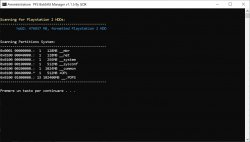

If I remember The "*" means that there are several partitions to make one
so 2x256 = 512MB
That symbol isn't present anymore...
Also checking with the HDD manager of El_isra HDL batchkit program +OPL is shown as a single 512MB partition. Maybe that symbol meant something else. Is not important anyway, everything works perfectly.
I noticed, when installing in one sitting, that if there are 2 games with same ID (even if the title is different) the second one is not installed.
What if I try to install the other one separately (after the first one is been installed in a previous session), will it be installed or the program will check for the already installed games IDs??
it depends if you install the game as a partition or in a __POPS# partition?
If you install your games in the __.POPS partition there should be no problem if you install a game with the same game id with a different name
Sorry forgot to mention I was referring to Ps2 games. So will the program avoid to install a game with the same ID as an already installed one?

GDX
Member
Normally the id does not pose a problem but when you install a game it creates a partition with 32 charecters max so if a game has the same ID and the first 17 charecters of the title then it will consider this game as already installed
To work around this you need to change the partition name with wLaunchELF
Example:
Your second game that has the same gameid must be different from the first like
My First Game with same gameid:
PP.SLES-51061..GRAND_THEFT_AUTO
Second Game with same gameid:
PP.HACK-51061..GRAND_THEFT_AUTO
To work around this you need to change the partition name with wLaunchELF
Example:
Your second game that has the same gameid must be different from the first like
My First Game with same gameid:
PP.SLES-51061..GRAND_THEFT_AUTO
Second Game with same gameid:
PP.HACK-51061..GRAND_THEFT_AUTO
Normally the id does not pose a problem but when you install a game it creates a partition with 32 charecters max so if a game has the same ID and the first 17 charecters of the title then it will consider this game as already installed
To work around this you need to change the partition name with wLaunchELF
Example:
Your second game that has the same gameid must be different from the first like
My First Game with same gameid:
PP.SLES-51061..GRAND_THEFT_AUTO
Second Game with same gameid:
PP.HACK-51061..GRAND_THEFT_AUTO
Yes I know how to workaround this changing the game's ID. Actually I was hoping that your program doesn't allow to install games with same ID.
I used HDL dump helper gui for years. That program doesn't allow you to install games with the same first characters (22 I seems to remember, starting from the actual game's name, not ID), even if the ID is different.
It was a problem for games as Shin megami Tensei series and many others. I see your program doesn't has that limit, I already installed a lot of games with the same 22 and even more characters.
As for IDs HDL dump helper allows you to install all games with the same ID you want (as long as the names are not the same in the first characters as I explained above). That was actually a problem. It happened to me once to install 2 times the same game for mistake, then deleting it after will probably lead to fragmentation...
If your program doesn't allow at all to install 2 games with the same ID (also in different installing sessions) is the best thing imho.
In the example I mentioned I was installing namco museum and namco museum 50th anniversary edition and your program didn't installed the second one (it was in a single installing session).
This is a particular case of 2 different games with the same ID (easilly solvable by changing the ID of one of them. I had to do it also for cover arts).
Namco Museum is just 12 characters (counting also the space), so it matters 17 characters starting from PP.??
Namco Museum is just 12 characters (counting also the space), so it matters 17 characters starting from PP.??
I was forgetting I selected the option "rename from database" when installing. The program picks names basing on the ID so the 2 games were named the same, that's why one of them has not been installed.
I guess if I installed with iso's names (that were correct) both games would have been installed even with the same ID.
GDX
Member
I was forgetting I selected the option "rename from database" when installing. The program picks names basing on the ID so the 2 games were named the same, that's why one of them has not been installed.
I guess if I installed with iso's names (that were correct) both games would have been installed even with the same ID.
Yes the script will take the first name of the ID which will find in the database so if Namco Museum is at line 139 and that Namco Museum 50th Anniversary Edition is at line 140 He will take the name that at line 139 But in a next update I will add an MD5 analysis to differentiate them and give the right name
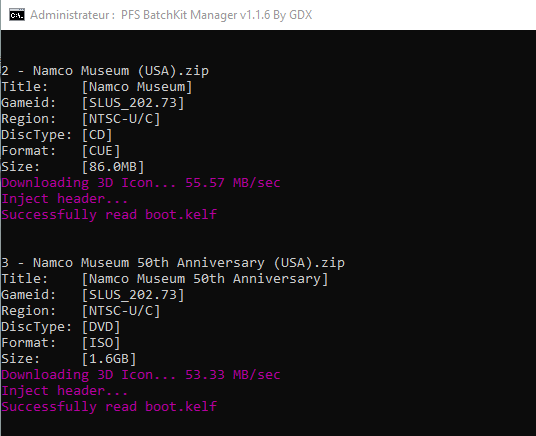
Here I configured it
I think I will publish the update this weekend if I have time to finish other small improvements
Good. However this is a unique case I think. And btw best thing is to change the ID of one of them (for example putting the PAL ID on the USA 50th anniversary edition) in order for OPLM to download the correct cover arts (I use OPLM in tandem with pfs batchkit, they share the same folders).
GDX
Member
GDX updated PFS BatchKit Manager (2TB) Support with a new update entry:
PFS BatchKit Manager (2TB) Support
Read the rest of this update entry...
PFS BatchKit Manager (2TB) Support
1.1.6 [2023/03/10]
- Added Option to copy Manually selected PS2 games to another hard drive (also copy games header to keep HDD-OSD icons)
- Added Choose a Custom path when transferring PS2 games (useful if your games are stored on another HDD or Directory)
- Added Option for Update OPNPS2LD.ELF in root of OPL partition
- Added Md5 scan for "Namco museum" and "Namco musem 50th anniversary" games to give them the correct title during installation
- Added A lot New gameids in PS1 & PS2...
Read the rest of this update entry...
Also on this HDD I got these "*" symbols on the first 3 partition I manually created (HDLoader Settings, +OPL and __.POPS). Strangely that's not present on the 4th one I made, __.POPS1.
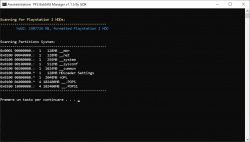
But I guess it will disappear later like on the other HDD.
Maybe is just a bug on the program (writing * instead of : sometimes)?
But I guess it will disappear later like on the other HDD.
Maybe is just a bug on the program (writing * instead of : sometimes)?
GDX
Member
GDX updated PFS BatchKit Manager (2TB) Support with a new update entry:
PFS BatchKit Manager (2TB) Support
Read the rest of this update entry...
PFS BatchKit Manager (2TB) Support
1.1.7 [2023/06/01]
- Added A new Title database containing all redump titles for PS1 & PS2 games. The databases probably contain 99% of titles, with the missing 1% being games from the Asian region.
- Added An option to download compatibility modes for OPL when installing a PS2 game.
- Added When downloading CFGs, it will keep OPL user settings and add compatibility mode to needed games.
- Added Option for ZSO LZ4HC compression.
- Added FreeHDBoot Fix Graphic Corruption in OSD
- Fixed DVD9...
Read the rest of this update entry...

crapatron
Member
Any idea why any partition I make is 128MB no matter what size I choose?
I deleted the first game on my HD hoping to make a new larger +OPL at the beginning of the HD.
The game I deleted was 1.6 GB.
I deleted the old +OPL.
Whenever I choose to create a Partition I choose 1GB and name it +OPL.
It creates it but at 128mb.
I delete that one and tray again with different name with plans to change it to +OPL on uLaunchelf but when I look its 128 mb again.
Am I stupid?
I deleted the first game on my HD hoping to make a new larger +OPL at the beginning of the HD.
The game I deleted was 1.6 GB.
I deleted the old +OPL.
Whenever I choose to create a Partition I choose 1GB and name it +OPL.
It creates it but at 128mb.
I delete that one and tray again with different name with plans to change it to +OPL on uLaunchelf but when I look its 128 mb again.
Am I stupid?
crapatron
Member
I did. 1G. I also tried 512M. Still makes it 128M. When I try to make a new partition with ulaunchelf and choose 1G or 512M it also only makes it at 128M. I have over 8Gb available. When I run HDDChecker it says finds and fixes 1 error even if I run it multiple times in a row. Years ago I used ulaunchelf to expand opl partition but it broke VMC. That's why I deleted it. So I could make a fresh +opl partition but I can't seem to make one bigger than 128m. Now my artwork won't fit because I have over 300m of it but on the plus side, VMC works now. 700 games on a 2TB SATA HD but something must be borked. Maybe I should format it and do it all over. This program was my last try idea but no avail.Did you specify the letter for the size
1G
Similar threads
-

-
-
PS2 Installation of Bootable OPL on PSBBN (When Everything Else Fails)
- Started by nowskowski
- Replies: 0
-
PS2 Unable to use HDD under ANY possible config
- Started by MillenniumTwilight
- Replies: 3