PS2 Phantasy Star Universe OPL black screen

HDD didn't work for me. I was playing on USB.

Ok, then from USB this game doesn't need MODE 8 for some reason.

I've checked Phantasy Star Universe (SLES_543.08) only with OPL 1406
and it seems that none of the compatibility modes helps.
I'm only getting BSOD at start.

Thanks for your report.
I'll try to add "Phantasy Star Universe"
and "Phantasy Star Universe: Ambition of the Illuminus"
into Game Bug Reports:
https://www.psx-place.com/threads/open-ps2-loader-game-bug-reports.19401/.

From which device did you test it?
 
From which device did you test it?

I do not remember from which device I have made this test, so I re-test this game (SLES_543.08) through USB and SMB.
Through SMB I am only getting BSOD...
Through USB everything seems to be fine.
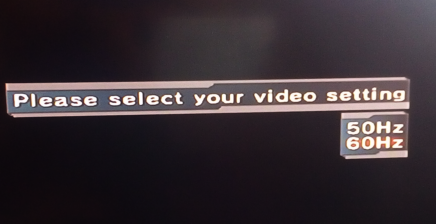
I can pass the 50\60 Hz selection screen:
Test-1.png


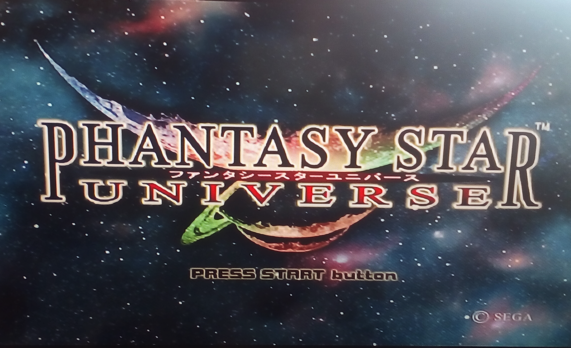
The main menu appears:
Test-2.png


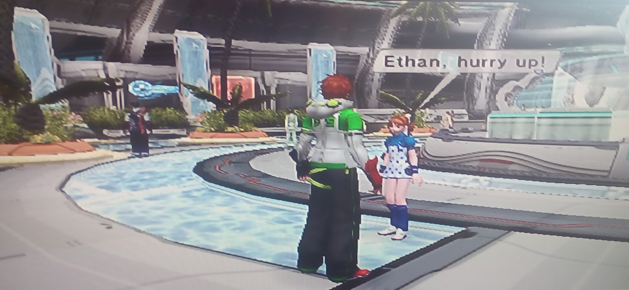
After watching all intro FMVs (which were smooth BTW) and cut-scenes I can start the game:
Test-3.png


Tested with OPL v1.0.0.
 
I do not remember from which device I have made this test, so I re-test this game (SLES_543.08) through USB and SMB.
Through SMB I am only getting BSOD...
Through USB everything seems to be fine.
I can pass the 50\60 Hz selection screen:
Test-1.png


The main menu appears:
Test-2.png


After watching all intro FMVs (which were smooth BTW) and cut-scenes I can start the game:
Test-3.png


Tested with OPL v1.0.0.

Perfect, thank you. So it could be something wrong in OPL HDD and SMB code.
 
I did not try HDD because I am out of my home, so I do not know...
For now I can only make tests on a SLIM console, so through SMB\USB...

But if the OP have had positive results with mode 8 through HDD
then it is something that we can get a closer look.
 
Last edited:
I did not try HDD because I am out of my home, so I do not know...
For now I can only make tests on a SLIM console, so through SMB\USB...

But if the OP have had positive results with mode 8 through HDD
it is something that we can get a closer look.

Yes it works with MODE 8 (i.e. using OPL 0.9.3) from HDD and also from SMB. With MODE 8 OFF it is BSOD at boot from both devices (the Ps2 doesn't freeze though, you can IGR/IGPO from there).

EDIT: it seems a clone NA related problem: https://www.psx-place.com/threads/recompile-opl-to-add-mode-8.33736/#post-292543
 
Last edited:
I did not try HDD because I am out of my home, so I do not know...
For now I can only make tests on a SLIM console, so through SMB\USB...

But if the OP have had positive results with mode 8 through HDD
it is something that we can get a closer look.
I tested the game (PAL version). It doesn't work via HDD without Mode8. I used OPL 0.93 with Mode8 it worked well.
 
Last edited:
I tested the game (PAL version). It doesn't work via HDD without Mode8. I used OPL 0.93 with Mode8 it worked well.
@Rockman98, i have a report that both games of Phantasy Universe works fine in the internal HDD
without Modes.

You are using the original IDE network adapter with an IDE HDD?

Or you are using one of those crapy SATA clone network adapters like the GameStar one with a SATA HDD?

Best regards.

EDIT: I tested myself both games:

Phantasy Star Universe (USA) (SLUS-21194)
Phantasy Star Universe - Ambition of the Illuminus (USA) (SLUS-21631)

Both games works perfect with OPL v1.0.0 and without any Modes.

Tested with the original IDE network adapter and IDE HDD.

The author of that thread and those who claim that the game does not work or needs Mode 8 with the internal HDD, it will be because they use clone network adapters and not the original adapter. These two games have always worked well on any version of the OPL on the internal HDD.

Reports made with clone network adapters should never be accepted.
It is well know that they have less compatibility and have strange behaviors
compared with the original one, they are trash.

EDIT 2:
Tested also the PAL versions:

Phantasy Star Universe (PAL) (SLES-54308)
Phantasy Star Universe - Ambition of the Illuminus (PAL) (SLES-54892)

Ant they work fine also with OPL v1.0.0 in the internal HDD with the original network adaptader an IDE HDD.
No any Modes required.

Best regards

 
Last edited:
Hello, I know from version 1499 opl discontinued mode 8, but at least the 2 phantasy star universegames gives bsod if mode 8 is not active. Is any posibility to recompile again opl to the last version with mode 8 again?
@Crissaegrim87, stop opening threads everywhere saying that the Phantasy Star Universe
games don't work with the internal HDD and claiming that a Mode 8 be put back in, which is
not necessary for the internal HDD.

I said you in the spanish forum of EOL and in the OPL repository where you posted the same, that
this games works fine with the internal HDD.

I tested yesterday both games, in PAL and USA versions, and they work fine in OPL v1.0.0
with the internal HDD, and without any Modes.

If you are using a clone network adapter, buy the original one, and this games will work perfect,
they never needed the Mode 8 in any OPL version for the internal HDD.

And this is posted already in another thread here in psx-place:

https://www.psx-place.com/threads/phantasy-star-universe-opl-black-screen.27008/

This is not an issue of OPL, it is an issue from your clone network adapter.

Best regards.
 
@Crissaegrim87, stop opening threads everywhere saying that the Phantasy Star Universe
games don't work with the internal HDD and claiming that a Mode 8 be put back in, which is
not necessary for the internal HDD.

I said you in the spanish forum of EOL and in the OPL repository where you posted the same, that
this games works fine with the internal HDD.

I tested yesterday both games, in PAL and USA versions, and they work fine in OPL v1.0.0
with the internal HDD, and without any Modes.

If you are using a clone network adapter, buy the original one, and this games will work perfect,
they never needed the Mode 8 in any OPL version for the internal HDD.

And this is posted already in another thread here in psx-place:

https://www.psx-place.com/threads/phantasy-star-universe-opl-black-screen.27008/

This is not an issue of OPL, it is an issue from your clone network adapter.

Best regards.
Hi, I did that to widen the response zone. I didnt known this was a issue with the clone networks adapters. I do have 2 original IDE ones, but no big HDD drives to put a handfull of games inside them. So I did buy one clone from gamestar years ago, for the sata connector mostly.
I was only asking if there are a way to add again mode 8 via recompiling, because only with that mode enabled my games run. Can it be done? or it is impossible now? just that
 
Re-adding old features can potentially break some other/games compatibility - and all of this for what price? To making works with some obscure device, while even proper QA tests cannot be performed (to small peoples have it)? So if this is the real reason why those games aren't working, just stick to old OPL for those specific games and newer for games which works on OPL v1.0.0.
 
Re-adding old features can potentially broken some other, and for what price? To making works with some obscure device, while even proper QA tests cannot be performed (to small peoples have it)? So if this is the real reason why those games aren't working, just stick to old OPL for those specific games and newer for games which works on OPL v1.0.0.
I think I will go that route, years ago tried to adapt a SATA HDD to the original network adapter but it dindt work. Thank you
 
@Rockman98, i have a report that both games of Phantasy Universe works fine in the internal HDD
without Modes.

You are using the original IDE network adapter with an IDE HDD?

Or you are using one of those crapy SATA clone network adapters like the GameStar one with a SATA HDD?

Best regards.

EDIT: I tested myself both games:

Phantasy Star Universe (USA) (SLUS-21194)
Phantasy Star Universe - Ambition of the Illuminus (USA) (SLUS-21631)

Both games works perfect with OPL v1.0.0 and without any Modes.

Tested with the original IDE network adapter and IDE HDD.

The author of that thread and those who claim that the game does not work or needs Mode 8 with the internal HDD, it will be because they use clone network adapters and not the original adapter. These two games have always worked well on any version of the OPL on the internal HDD.

Reports made with clone network adapters should never be accepted.
It is well know that they have less compatibility and have strange behaviors
compared with the original one, they are trash.

EDIT 2:
Tested also the PAL versions:

Phantasy Star Universe (PAL) (SLES-54308)
Phantasy Star Universe - Ambition of the Illuminus (PAL) (SLES-54892)

Ant they work fine also with OPL v1.0.0 in the internal HDD with the original network adaptader an IDE HDD.
No any Modes required.

Best regards
in SMB with original IDE network don't work so maybe have some problem with this two game on OPL v1.0.0
 
@Crissaeegrim87, it is a nonsense to try to fix games and the OPL to work with the GameStar crapy clone network adapter.
It is well know that the clone GameStar adapter breaks games!!

If you have two original IDE network adapters and you failed to modify them for SATA HDD's, buy the connector
from Bitfunx v2.0 and modifiy one of your two original IDE networks adapters with it:

Recently people are buying this Bitfunx v2.0 connector instead of the one used by Maxdiypower to modify their
original IDE network adapters to connect SATA HDD's:

https://es.aliexpress.com/item/32809586287.html

And by the results the Bitfunx v2.0 connector offers the same compatibility as the Maxdiypower connector and
the original unmodified IDE adapter.

The seller Maxdiypower is no longer available to sell their connector.

I don't know if with the Bitfunx v2.0 connector these two Phantasy Universe games will work, no one has tried it yet with this games,
but it is the current best alternative to modify the original IDE network adapter.

I have bought this Bitfunx v2.0 connector and an original IDE network adapter to modify and test it,
but i am still waiting for them to arrive.

Do not report games with the GameStar or other chinese clone network adapters, do not use them.

Best regards.
 
in SMB with original IDE network don't work so maybe have some problem with this two game on OPL v1.0.0
@Fanhais, SMB is SMB, and internal HDD is internal HDD.

The fact that the PS2 Fat uses the network adapter to connect the ethernet network cable and the game
does not work over SMB does not imply never that the cause is the network adapter, the game is simply
not compatible over SMB as well as not it is on a PS2 Slim and needs fixed in the OPL.

Please don't mix or confuse things.

It is stated in the thread already that the game don't work with SMB! read the thread.

This games works fine with USB and internal HDD, but not with SMB.

Best regards.
 
@Crissaeegrim87, it is a nonsense to try to fix games and the OPL to work with the GameStar crapy clone network adapter.
It is well know that the clone GameStar adapter breaks games!!

If you have two original IDE network adapters and you failed to modify them for SATA HDD's, buy the connector
from Bitfunx v2.0 and modifiy one of your two original IDE networks adapters with it:

Recently people are buying this Bitfunx v2.0 connector instead of the one used by Maxdiypower to modify their
original IDE network adapters to connect SATA HDD's:

https://es.aliexpress.com/item/32809586287.html

And by the results the Bitfunx v2.0 connector offers the same compatibility as the Maxdiypower connector and
the original unmodified IDE adapter.

The seller Maxdiypower is no longer available to sell their connector.

I don't know if with the Bitfunx v2.0 connector these two Phantasy Universe games will work, no one has tried it yet with this games,
but it is the current best alternative to modify the original IDE network adapter.

I have bought this Bitfunx v2.0 connector and an original IDE network adapter to modify and test it,
but i am still waiting for them to arrive.

Do not report games with the GameStar or other chinese clone network adapters, do not use them.

Best regards.

Personally I never experienced any compatibility differences using the Sony NA with its original IDE board or modding it with the maxdiypower/BITFUNX SATA boards.
Btw I never tried this specific game, so I can't guarantee.

Good to know there's a 2.0 version of the BITFUNX board (1.0 had problems with some HDDs).
 
Personally I never experienced any compatibility differences using the Sony NA with its original IDE board or modding it with the maxdiypower/BITFUNX SATA boards.
Btw I never tried this specific game, so I can't guarantee.

Good to know there's a 2.0 version of the BITFUNX board (1.0 had problems with some HDDs).
@Peppe90, thank you, it is great that the Bitfunx work fine for you.
And good to know what do you mention about the 1.0 version with some HDD's, now it is understood that the
manufacturer will release a 2.0 version.

Best regards.
 
Hi, I did that to widen the response zone. I didnt known this was a issue with the clone networks adapters. I do have 2 original IDE ones, but no big HDD drives to put a handfull of games inside them. So I did buy one clone from gamestar years ago, for the sata connector mostly.
I was only asking if there are a way to add again mode 8 via recompiling, because only with that mode enabled my games run. Can it be done? or it is impossible now? just that
You can just modify iso if issue is the same as in pcsx2 (smap gets crap out). Open HXD, Search for Text: DEV9.IRX , change it to DAV9.IRX. Push F3 to find another, repeat, Save Iso.

upload_2021-5-4_10-53-1.png


upload_2021-5-4_10-54-1.png


Next push F3 to find another instance, and edit it like that. Etc.Etc. Unless there is no more DEV9.IRX found. Then just save ISO.
I own only First PSU, and no working ps2, so i can't tell that will work 100% for you, or that will work for PSU2. But it should, that obviously break any network functionality in game...
 
Last edited:
@Peppe90, thank you, it is great that the Bitfunx work fine for you.
And good to know what do you mention about the 1.0 version with some HDD's, now it is understood that the
manufacturer will release a 2.0 version.

Best regards.

Yes, I had a talk years ago with a BITFUNX manufacturer (with the seller actually and she reported things to the manufacturer), since only one out of 4 boards worked with my 2TB 2,5" SATA III HDD (and even the one that worked, stopped to read the HDD after a couple weeks. It still works though with smaller HDDs).

The manufacturer showed some photos of him playing on a 2TB 3,5" HDD, so we came to the conclusion that it wasn't compatible with all 2TB HDDs. Then we had email related problems and I didn't heard them anymore since then.

I'm glad there's a 2.0 version now (I don't know if it's the same manufacturer, I think there are more than one).
The one from the link you posted has a quite good price, cheaper than the maxdiypower one. Most probably this 2.0 revision is 100% compatible with any HDD as the mdiyp one.
 
@Rockman98, i have a report that both games of Phantasy Universe works fine in the internal HDD
without Modes.

You are using the original IDE network adapter with an IDE HDD?

Or you are using one of those crapy SATA clone network adapters like the GameStar one with a SATA HDD?

Best regards.

EDIT: I tested myself both games:

Phantasy Star Universe (USA) (SLUS-21194)
Phantasy Star Universe - Ambition of the Illuminus (USA) (SLUS-21631)

Both games works perfect with OPL v1.0.0 and without any Modes.

Tested with the original IDE network adapter and IDE HDD.

The author of that thread and those who claim that the game does not work or needs Mode 8 with the internal HDD, it will be because they use clone network adapters and not the original adapter. These two games have always worked well on any version of the OPL on the internal HDD.

Reports made with clone network adapters should never be accepted.
It is well know that they have less compatibility and have strange behaviors
compared with the original one, they are trash.

EDIT 2:
Tested also the PAL versions:

Phantasy Star Universe (PAL) (SLES-54308)
Phantasy Star Universe - Ambition of the Illuminus (PAL) (SLES-54892)

Ant they work fine also with OPL v1.0.0 in the internal HDD with the original network adaptader an IDE HDD.
No any Modes required.

Best regards

I'm using Game Star SATA adapter. I can only play via USB or OPL 0.93 with Mode 8.
 
Back
Top