Resource icon

PS3 Pop-fe a utility to create PSX Classics packages for PS3 v1.16

Ok, i see in lines 627 and 629 you are running atracdenc... with default settings ? (i was guessing you was using some specific settings), and at the end you finish it with "create_riff"
Code:
atracdenc/src/atracdenc', '--encode=atrac3', '-i', snd0, '-o', tmp_snd0

This procedure using atracdenc should become more popular, in comparison with the goldwave tutorial i posted is like you upgraded the contents of the AT3 file from atract2 to atract3 codecs, pretty cool :D

Btw, maybe the result of goldwave (AT3 files containing a weird attrac2 audio) depends of the "system codec" suggested to install in the tutorial, or what i was using when i made the sample files i posted before, dunno... but right now doesnt matters much because your method is better
The only payback i see is im guessing the GWAT3 tool is not going to be able to create loops in your AT3 files. did you try that ?

Worth noting is that you can do this conversion manually. You do not need pop-fe. You just need riff.py from pop-fe.

Then the manual process is:
$ atracdenc --encode=atrac3 -i file.wav -o file.ea3
$ python3 riff.py create file.ea3 SND0.AT3 --max-data-size=2400000

Anyone that wants to can just make a copy of riff.py and use in their projects.
--max-data-size is because I think you said earlier that the max size must be < 2.5MB
 
--max-data-size is because I think you said earlier that the max size must be < 2.5MB
Yeah, i cant tell you the exact numbers (if there is more people playing around with this we will know more accuratelly), but in general is like the initial support for PSP was around 500KB and 1 minute... and for PS3 they multiplyed it by 5 (2.5MB and 5 minutes)
Probably is because the XMB/VSH are reserving an space in the PS3 memory for the file, in PSP both things (size and lenght) are smaller, you will need to adjust it for PSP

Also, if there is some point of the procedure where you could get the audio track lenght in miliseconds you should make a restriction with it too
 
Also, if there is some point of the procedure where you could get the audio track lenght in miliseconds you should make a restriction with it too

The length seems to be computed by "sample rate" in the FMT header multiplied by the "number of samples" that is stored in the 'fact' chunk.
To get the exact "number of samples" I think we would need to change atracdenc to provide this number.

To generate the 'number of samples' to store in the 'fact' chunk I use the following magic formula:

'size of data chunk in bytes' divided by the size of the at3 frames (192) and then multiply this with the magic number 0x201.

In many of my tests this formula gives the exact same number as what GoldenWave would give.
In some tests it gave a very slightly different number.

EDIT: when I typed this in I realized : "sometimes I am just really dense and blind to the obvious"
If I want the EXACT number of samples, I should just take "size of 'data' chunk in the original WAV file" and divide by 4.
Jeez, I am so dense sometimes.
 
Last edited:
The length seems to be computed by "sample rate" in the FMT header multiplied by the "number of samples" that is stored in the 'fact' chunk.
To get the exact "number of samples" I think we would need to change atracdenc to provide this number.

To generate the 'number of samples' to store in the 'fact' chunk I use the following magic formula:

'size of data chunk in bytes' divided by the size of the at3 frames (192) and then multiply this with the magic number 0x201.

In many of my tests this formula gives the exact same number as what GoldenWave would give.
In some tests it gave a very slightly different number.

EDIT: when I typed this in I realized : "sometimes I am just really dense and blind to the obvious"
If I want the EXACT number of samples, I should just take "size of 'data' chunk in the original WAV file" and divide by 4.
Jeez, I am so dense sometimes.
Nice, i was mentioning the meassure unit in miliseconds (instead os samples) because i was thinking in both features, the restriction to the total track lenght (to prevent overflowing the memory) and the loops

In the practise, all the loops using a "loop start" value different than zero needs to be calculated with a different tool, as example in audacity or goldwave, you can open the audio track and "set" a mark for the "loop start" and play the song to see if is well adjusted, if you do the loop in a silence is easy but otherway is very tricky in some songs... and after doing that calculations the user knows the exact milisecond she/he needs to enter in your tool

The point is... the AT3 format is adjusting the times to the "samples" (not the miliseconds) and the value that indicates the "loop start" seems to be using "sample" meassuring units too, right ?
When i was doing experiments in a hexadecimal editor with the loops i could not understand well how works that conversion in between "miliseconds to samples"
But as far i remember... increasing 1 unit of the hex value was not working, neither 2 units or 3 units (dont remember well), also i was not sure why the loops was played almost identical in XMB when increasing/substracting this tiny values from the "loop start"
As far i reemmber what i was doing was to use either +-4 or +-8 (or maybe somethign bigger +-40 or +-80 ? dont remember well)... what i remember is i had to use values with some kind of alignment because for some strange reason (i could not understand) it was needed

And now you are telling the total number of samples can be calculated by dividing the contents of the data by 4 sounds like a match... maybe what i was doing in the hexeditor was to "jump" in between groups of 4 samples
 
Last edited:
Nice, i was mentioning the meassure unit in miliseconds (instead os samples) because i was thinking in both features, the restriction to the total track lenght (to prevent overflowing the memory) and the loops

In the practise, all the loops using a "loop start" value different than zero needs to be calculated with a different tool, as example in audacity or goldwave, you can open the audio track and "set" a mark for the "loop start" and play the song to see if is well adjusted, if you do the loop in a silence is easy but otherway is very tricky in some songs... and after doing that calculations the user knows the exact milisecond she/he needs to enter in your tool

The point is... the AT3 format is adjusting the times to the "samples" (not the miliseconds) and the value that indicates the "loop start" seems to be using "sample" meassuring units too, right ?
When i was doing experiments in a hexadecimal editor with the loops i could not understand well how works that conversion in between "miliseconds to samples"
But as far i remember... increasing 1 unit of the hex value was not working, neither 2 units or 3 units (dont remember well), also i was not sure why the loops was played almost identical in XMB when increasing/substracting this tiny values from the "loop start"
As far i reemmber what i was doing was to use either +-4 or +-8 (or maybe somethign bigger +-40 or +-80 ? dont remember well)... what i remember is i had to use values with some kind of alignment because for some strange reason (i could not understand) it was needed

And now you are telling the total number of samples can be calculated by dividing the contents of the data by 4 sounds like a match... maybe what i was doing in the hexeditor was to "jump" in between groups of 4 samples

Yes, in the original WAVE/16bit/Stereo/44100Hz Wave file the number of samples are like that, size of 'data' divided by 4 (16 bits per sample, 2 channels).
In the Atrac3 file, I suspect you might need to do increments in 192, since that is the smallest unit of a AT3 frame.
I don;t know, but either tomorrow or the day after I will do some reverse engineering and try to find out what/how it does.
It is really just a matter of "change some bytes, see what happens, change some other bytes, ..." etc.


(rant: This stuff would be SO much easier if people stopped just releasing binaries and then leave the scene forever. Open source guys. Open source.)
 
Nice, i was mentioning the meassure unit in miliseconds (instead os samples) because i was thinking in both features, the restriction to the total track lenght (to prevent overflowing the memory) and the loops

In the practise, all the loops using a "loop start" value different than zero needs to be calculated with a different tool, as example in audacity or goldwave, you can open the audio track and "set" a mark for the "loop start" and play the song to see if is well adjusted, if you do the loop in a silence is easy but otherway is very tricky in some songs... and after doing that calculations the user knows the exact milisecond she/he needs to enter in your tool

The point is... the AT3 format is adjusting the times to the "samples" (not the miliseconds) and the value that indicates the "loop start" seems to be using "sample" meassuring units too, right ?
When i was doing experiments in a hexadecimal editor with the loops i could not understand well how works that conversion in between "miliseconds to samples"
But as far i remember... increasing 1 unit of the hex value was not working, neither 2 units or 3 units (dont remember well), also i was not sure why the loops was played almost identical in XMB when increasing/substracting this tiny values from the "loop start"
As far i reemmber what i was doing was to use either +-4 or +-8 (or maybe somethign bigger +-40 or +-80 ? dont remember well)... what i remember is i had to use values with some kind of alignment because for some strange reason (i could not understand) it was needed

And now you are telling the total number of samples can be calculated by dividing the contents of the data by 4 sounds like a match... maybe what i was doing in the hexeditor was to "jump" in between groups of 4 samples

Looking more at it, I thing increments should be done by units of FMT 'block align' which for raw 16bit stereo WAV files is 4.
2 bytes for each channel and 2 channels/
But for AT3 data it should be multiples of 384 ( 2 channels, each channel using a 192 byte at3 frame)
 
Last edited:
Im reviewing the documentation more calmly and is the first time i realize about some interesting details of the "smpl" chunk that worths to be mentioned, i guess you realized about it too but im going to make a recap
Please check the descriptions in this link while reading my post https://sites.google.com/site/musicgapi/technical-documents/wav-file-format#smpl

As an introduction... the "smpl" chunk have a variable size, because is composed by 0x2C bytes + a "list of sample loops" composed by a variable number of loops. Every loop is 24 bytes (0x18), and the GWAT3 tool only adds 1 loop

0x00 4 Chunk ID <-------------------- static (0x736D706C)
0x04 4 Chunk Data Size <-------------------- static 36 + (1 * 24) + 0 = 60 (0x3C)
0x08 4 Manufacturer <-------------------- static GWAT3 uses 0, but you can use the 0x4C for sony :D
0x0C 4 Product <-------------------- static GWAT3 uses 0, not sure if there is an ID for the PSP and other for PS3
0x10 4 Sample Period <-------------------- i dont understand how to calculate this value
0x14 4 MIDI Unity Note <-------------------- 0x3C again ?, it seems GWAT3 uses the same value here than in the "Chunk Data Size"
0x18 4 MIDI Pitch Fraction <-------------------- GWAT3 uses 0
0x1C 4 SMPTE Format <-------------------- GWAT3 uses 0 (the file doest seems to have SMPTE)
0x20 4 SMPTE Offset <-------------------- GWAT3 uses 0 (the file doest seems to have SMPTE)
0x24 4 Num Sample Loops <-------------------- static GWAT3 uses 1 (because there is only 1 loop inside the "list of sample loops"
0x28 4 Sampler Data <-------------------- static this is the total size of the "list of sample loops" (1 loop = 24 bytes = 0x18)

-------------
Now, inside the loop (24 bytes)
0x00 4 Cue Point ID <-------------------- static GWAT3 uses 0
0x04 4 Type <-------------------- static, GWAT3 uses 0 (Loop forward, normal)
0x08 4 Start <-------------------- static, GWAT3 uses 0. This is what i was changing with a hexeditor !!!
0x0C 4 End <-------------------- the default GWAT3 loop is always aligned to the end of the audio track
0x10 4 Fraction <-------------------- static, GWAT3 uses 0
0x14 4 Play Count <-------------------- static, GWAT3 uses 0 (it means infinite loop)

Code:
Offset(h) 00 01 02 03 04 05 06 07 08 09 0A 0B 0C 0D 0E 0F

00000040              73 6D 70 6C 3C 00 00 00 00 00 00 00      smpl<.......
00000050  00 00 00 00 94 58 00 00 3C 00 00 00 00 00 00 00  ...."X..<.......
00000060  00 00 00 00 00 00 00 00 01 00 00 00 18 00 00 00  ................

00000070  00 00 00 00 00 00 00 00 00 58 0E 00 FF D7 1B 00  .........X..ÿ×.. <--- this is the loop (24 bytes)
00000080  00 00 00 00 00 00 00 00                          ........

From that list there are only a couple of values i dont know how to calculate, but most of them are easy

 
Last edited:
Im reviewing the documentation more calmly and is the first time i realize about some interesting details of the "smpl" chunk that worths to be mentioned, i guess you realized about it too but im going to make a recap
Please check the descriptions in this link while reading my post https://sites.google.com/site/musicgapi/technical-documents/wav-file-format#smpl

As an introduction... the "smpl" chunk have a variable size, because is composed by 0x2C bytes + a "list of sample loops" composed by a variable number of loops. Every loop is 24 bytes (0x18), and the GWAT3 tool only adds 1 loop

0x00 4 Chunk ID <-------------------- static (0x736D706C)
0x04 4 Chunk Data Size <-------------------- static 36 + (1 * 24) + 0 = 60 (0x3C)
0x08 4 Manufacturer <-------------------- static GWAT3 uses 0, but you can use the 0x4C for sony :D
0x0C 4 Product <-------------------- static GWAT3 uses 0, not sure if there is an ID for the PSP and other for PS3
0x10 4 Sample Period <-------------------- i dont understand how to calculate this value
0x14 4 MIDI Unity Note <-------------------- 0x3C again ?, it seems GWAT3 uses the same value here than in the "Chunk Data Size"
0x18 4 MIDI Pitch Fraction <-------------------- GWAT3 uses 0
0x1C 4 SMPTE Format <-------------------- GWAT3 uses 0 (the file doest seems to have SMPTE)
0x20 4 SMPTE Offset <-------------------- GWAT3 uses 0 (the file doest seems to have SMPTE)
0x24 4 Num Sample Loops <-------------------- static GWAT3 uses 1 (because there is only 1 loop inside the "list of sample loops"
0x28 4 Sampler Data <-------------------- static this is the total size of the "list of sample loops" (1 loop = 24 bytes = 0x18)

-------------
Now, inside the loop (24 bytes)
0x00 4 Cue Point ID <-------------------- static GWAT3 uses 0
0x04 4 Type <-------------------- static, GWAT3 uses 0 (Loop forward, normal)
0x08 4 Start <-------------------- static, GWAT3 uses 0. This is what i was changing with a hexeditor !!!
0x0C 4 End <-------------------- the default GWAT3 loop is always aligned to the end of the audio track
0x10 4 Fraction <-------------------- static, GWAT3 uses 0
0x14 4 Play Count <-------------------- static, GWAT3 uses 0 (it means infinite loop)

Code:
Offset(h) 00 01 02 03 04 05 06 07 08 09 0A 0B 0C 0D 0E 0F

00000040              73 6D 70 6C 3C 00 00 00 00 00 00 00      smpl<.......
00000050  00 00 00 00 94 58 00 00 3C 00 00 00 00 00 00 00  ...."X..<.......
00000060  00 00 00 00 00 00 00 00 01 00 00 00 18 00 00 00  ................

00000070  00 00 00 00 00 00 00 00 00 58 0E 00 FF D7 1B 00  .........X..ÿ×.. <--- this is the loop (24 bytes)
00000080  00 00 00 00 00 00 00 00                          ........

From that list there are only a couple of values i dont know how to calculate, but most of them are easy


Sample period is the length in nano-seconds for one sample.
You can calculate it as (1 / 'sample rate') * 1000000000
Sample rate is 44100

I have added code that creates a loop the same way GWAT does. Using the same "start/end" values as GWAT generates.
See current pop-fe master branch.

I think start/end refers to the sample offset in the original uncompressed WAV data (or the regenerated WAV data after decoding the AT3 data) and not the compressed AT3 data. Setting a value of 44100*4 should represent a 1 second interval.
44100 is the sample rate and there are 4 bytes for each sample (2 bytes for each channel, two channels)


If you want to experiment, it should be easy to tweak riff.py (a lot easier than hexedits at least:)
$ atracdenc --encode=atrac3 -i file.wav -o file.ea3
$ python3 riff.py create file.ea3 file.at3 --max_data_size=2400000 --loop


We also have the "copy" command that can copy one WAV to another and at the same time truncate the length of the audio in ms:

$ python3 ./riff.py copy Original.wav Truncated.wav --max-duration-ms=119000

To truncate a file to 119 seconds.
 
Last edited:
Sample period is the length in nano-seconds for one sample.
You can calculate it as (1 / 'sample rate') * 1000000000
Sample rate is 44100

I have added code that creates a loop the same way GWAT does. Using the same "start/end" values as GWAT generates.
See current pop-fe master branch.

I think start/end refers to the sample offset in the original uncompressed WAV data (or the regenerated WAV data after decoding the AT3 data) and not the compressed AT3 data. Setting a value of 44100*4 should represent a 1 second interval.
44100 is the sample rate and there are 4 bytes for each sample (2 bytes for each channel, two channels)


If you want to experiment, it should be easy to tweak riff.py (a lot easier than hexedits at least:)
$ atracdenc --encode=atrac3 -i file.wav -o file.ea3
$ python3 riff.py create file.ea3 file.at3 --max_data_size=2400000 --loop

I updated it so that now I clamp the audio on duration. I clamp PSP to 59 seconds and PS3 to 119 seconds.
It works quite well.
I need to tweak the loop data that is generated and also create a way to accurately clamp the size restriction too, but that comes later.
So far it works well for me. And having music on the XMB makes a HUGE difference.

I find a good OST for the game on youtube, download it as 3gp and then convert to 44100/stereo/wav like so :

$ ffmpeg -i Azure\ Dreams\ OST\ 3.\ Overture.3gp -ar 44100 -ac 2 Azure\ Dreams\ OST\ 3.\ Overture.wav

Then I feed the wav file to pop-fe and the magic happens.
 
What I think we need now is 'tool-tips' but I have not found any good documentation on how to do it in pygubu. It is probably simple to add and it is just me not even knowning this thing existed until very recently.
But any pointers or help would be welcome.
 
Couldn't you just add a HELP button that displays a windows msg box when you click it with everything you need ?
Also Atracdenc added support for WAVE and AT3 awhile back, is that not compatible for what you need ? (in the source code not the binaries i mean, it says "Add support for writing .at3/.wav files with ATRAC3" and "AT3/WAV export: Add big endian support, force packed structs") and do you think its worth me compiling the source version since the last binary was a few years ago ? or are the new features useless ?
 
Couldn't you just add a HELP button that displays a windows msg box when you click it with everything you need ?
Also Atracdenc added support for WAVE and AT3 awhile back, is that not compatible for what you need ? (in the source code not the binaries i mean, it says "Add support for writing .at3/.wav files with ATRAC3" and "AT3/WAV export: Add big endian support, force packed structs") and do you think its worth me compiling the source version since the last binary was a few years ago ? or are the new features useless ?

I actually just noticed. I actually never tracked upstream much as I thought it was feature complete as far as upstream were concerned and little more development would happen.
My riff.py is absolutely a duplication of effort as for converting EA3 to RIFF, but I did add a feature to automagically clamp the wav file to a certain duration, so not all is lost. But yeah, there is duplication of effort and redundant capability :-(

I will convert the scripts to use current upstream and remove the duplication of functionality. Not today bot maybe this weekend or the next.
 
I actually just noticed. I actually never tracked upstream much as I thought it was feature complete as far as upstream were concerned and little more development would happen.
My riff.py is absolutely a duplication of effort as for converting EA3 to RIFF, but I did add a feature to automagically clamp the wav file to a certain duration, so not all is lost. But yeah, there is duplication of effort and redundant capability :-(

I will convert the scripts to use current upstream and remove the duplication of functionality. Not today bot maybe this weekend or the next.
well i wouldn't worry about that then, if its just doing the same thing you already figured out on your own you can just keep doing it your way :) i built a windows Binary of it Static linked just incase it is needed (below)
Im going to attempt to do a 32bit build of Pop-fe again today and see if i can get it working, last time i tried it failed so i just switched to x64 and it compiled right away, not actually sure its needed but always nice to have more options
 

Attachments

Last edited:
Added a 32bit Binary to the other topic on it, seemed to build fine this time (before i kept getting python errors) so now there is a build for 32bit and 64bit for those who need, didnt require many changes to get it working
you need the 32bit versions of Gcc and python and then just do pretty much the same as your current instructions, also if you add
yes |
before a command it will auto "yes" any prompts which speeds things up, should be possible to make a small BAT file or a installer to auto build it all on windows
 
Added a 32bit Binary to the other topic on it, seemed to build fine this time (before i kept getting python errors) so now there is a build for 32bit and 64bit for those who need, didnt require many changes to get it working
you need the 32bit versions of Gcc and python and then just do pretty much the same as your current instructions, also if you add
yes |
before a command it will auto "yes" any prompts which speeds things up, should be possible to make a small BAT file or a installer to auto build it all on windows

Nice.
It should be possible to add a github action to build these and make them available for download automatically after every push.
I will look into that tomorrow.
 
Nice.
It should be possible to add a github action to build these and make them available for download automatically after every push.
I will look into that tomorrow.
nice, if it can autobuild the exe's ready that would be great everytime you push a change
So far i haven't noticed any huge bugs in the current version, only thing thats slightly annoying is having to close the GUI and reopen to make a 2nd package but other then that it seems to be working fine (plus the couple of bugs in pyinstaller like leaving temp files sometimes hanging around if the app isn't closed properly but thats all on pyinstaller), also thinking of looking into Nuitka to see if its better then pyinstaller for this.
 
nice, if it can autobuild the exe's ready that would be great everytime you push a change
So far i haven't noticed any huge bugs in the current version, only thing thats slightly annoying is having to close the GUI and reopen to make a 2nd package but other then that it seems to be working fine (plus the couple of bugs in pyinstaller like leaving temp files sometimes hanging around if the app isn't closed properly but thats all on pyinstaller), also thinking of looking into Nuitka to see if its better then pyinstaller for this.

In theory it should be possible but I fail to install pycryptodome on the windows VM used to build :-(
See here: https://github.com/sahlberg/pop-fe/runs/6847280125?check_suite_focus=true#step:7:687

This is the workflow after trying to experiment over and over to get pycryptodome to install, but to no avail
https://github.com/sahlberg/pop-fe/actions/runs/2482095696/workflow
 
In theory it should be possible but I fail to install pycryptodome on the windows VM used to build :-(
See here: https://github.com/sahlberg/pop-fe/runs/6847280125?check_suite_focus=true#step:7:687

This is the workflow after trying to experiment over and over to get pycryptodome to install, but to no avail
https://github.com/sahlberg/pop-fe/actions/runs/2482095696/workflow

Actually, making some progress using ntive windows tools instead of msys. This should be doable.
 
Actually, making some progress using ntive windows tools instead of msys. This should be doable.

Ha, I think it might even work.
Please have a look at the github page. There should be a release there now.
Right now it builds pop-fe and pop-fe-ps3 and all its dependencies automatically for every push I make
and it becomes available from the action/build as a artefact zip file.
I think this might only be downloadable by myself, so I had to download it and then re-upload it as a "new release".

That works, that is simple enough to to do every now and then. It would be annoying to have to manually do a "release" every time
but I can live with it. There might be a way to automatically create a new release on every push. I will have a look at that on sunday.

https://github.com/sahlberg/pop-fe/releases/tag/v0.0.1
If you are on windows (which I am not really) please test and see if it works. If something does not then let me know, or better, send a PULL-REQUEST to fix what was broken.

I will probably not create a workflow or make releases for Linux as it is currently basically just :
git clone ... followed by ./pop-fe.py --install
 
Ha, I think it might even work.
Please have a look at the github page. There should be a release there now.
Right now it builds pop-fe and pop-fe-ps3 and all its dependencies automatically for every push I make
and it becomes available from the action/build as a artefact zip file.
I think this might only be downloadable by myself, so I had to download it and then re-upload it as a "new release".

That works, that is simple enough to to do every now and then. It would be annoying to have to manually do a "release" every time
but I can live with it. There might be a way to automatically create a new release on every push. I will have a look at that on sunday.

https://github.com/sahlberg/pop-fe/releases/tag/v0.0.1
If you are on windows (which I am not really) please test and see if it works. If something does not then let me know, or better, send a PULL-REQUEST to fix what was broken.

I will probably not create a workflow or make releases for Linux as it is currently basically just :
git clone ... followed by ./pop-fe.py --install
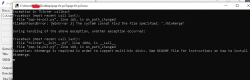
nice work, it instantly fails for me as soon as i try to load a image with a binmerge error but you are getting there :)
uploading a picture of the error, looks to me like its trying to load the linux/python binmerge instead of the exe
 

Attachments

  • Error Annotation 2022-06-15 144345.png
    Error Annotation 2022-06-15 144345.png
    17.7 KB · Views: 93

Similar threads

Back
Top