POPStarter

PS2 POPStarter 2019/06/05

I cannot IGR from POPS to BOOT.ELF (OPL) anymore, even with the old POPStarter rev that used to work. Tried IGR from Crash 1 and Silent Hill and get a BSOD.
I'll try other games too. But I think it worked before with these games.

I don't know what could have happened. It might be some problem on my set. I'll let you know if I found out something.
 
Who'll be win POPStarter or PS1 Disc Format for PS2?
POPStarter vs PS1 Disc Format for PS2?
My PS2 disc drive doesn't work anymore. Also, CDDA doesn't work properly with disc format (PSXLauncher or uLaunchELF), but it does in POPStarter. So POPStarter wins!
 
Hi everyone, I'm Marco and I'm new to the forum.
I kindly ask if anyone knows the crash bash codes (action replay/gameshark) SCES_028.34 (Europe version) and how to insert them thanks.
ps: I launch ps1 games with Wle kHn
 
Welcome. There are codes for your game here and there.
Documentation : https://bitbucket.org/ShaolinAssassin/popstarter-documentation-stuff/wiki/cheat-engine

Basically, you put your codes in a CHEATS.TXT file, that you copy to your virtual memory cards folder.

Example with the PCSX-formatted cht file you download off GameHacking.org,
Original code list has :
Code:
[999 Points Pogo Painter]
800A20EC 03E7

[Infinite Health Jungle Bash Event Y Papu Event]
800A20D2 0014

[Infinite Health Crash Ball]
800A20EC 000F
The POPStarter CHEATS.TXT file would contain :
Code:
$SAFEMODE

[999 Points Pogo Painter]
$800A20EC 03E7

[Infinite Health Jungle Bash Event Y Papu Event]
$800A20D2 0014

[Infinite Health Crash Ball]
$800A20EC 000F
 
Last edited:
I thank you for the reply but the codes of both sites did not work. I am attaching the "cheats.txt" file that I put in the VMC
 

Attachments

Hello)
Could somebody help me with running games via hdd?
- I do all steps like in manual https://bitbucket.org/ShaolinAssassin/popstarter-documentation-stuff/wiki/quickstart-hdd but got only PSX logo at the screen after launch "my game". elf and it freeze on it - only start +select+l1+l2+R1+rR2 combination can exit from there. Even folders in __common\pops\ with game's name and their virtual memory cards are created, but the games won't started.

But when i try usb-method with usb flash cards it's work well and completely running all my list of games...
 
Maybe you haven't done everything from manual...
If you will try to wrote what are you doing it will be easier to help you.
 
"elfstater" means "POPSTARTER.ELF"?

Taken from wiki:
Code:
hdd:/__common/POPS/IOPRP252.IMG
hdd:/__common/POPS/POPS.ELF
hdd:/__common/POPS/GAME.ELF
hdd:/__.POPS/GAME.VCD

Maybe this is typo:
Hdd0:\__POPS (missing dot)
It should be:
hdd:/__.POPS/

e.g.
hdd:/__.POPS/GTA.VCD
hdd:/__common/POPS/IOPRP252.IMG
hdd:/__common/POPS/POPS.ELF
hdd:/__common/POPS/GTA.ELF

Anyway... did you tried to launch your (game) .VCD through "uLE_kHn_20191110"?
 
Last edited:
"elfstater" means "POPSTARTER.ELF"?
- ofcourse!

Yes, i tried run VCD through uLE_kHn_20191110 - simmilar result!
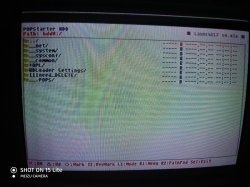
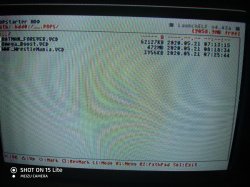
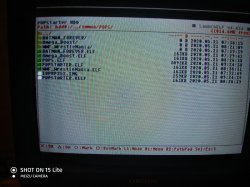
Here my shots of directories ( sorry for bad quality - it is CRT tv):
 

Attachments

  • 1.jpg
    1.jpg
    552.7 KB · Views: 144
  • 2.jpg
    2.jpg
    652.4 KB · Views: 151
  • 3.jpg
    3.jpg
    517.1 KB · Views: 147
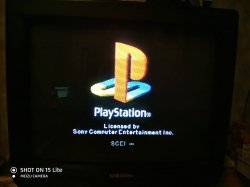
And when i activate it through omega_boost.elf or trough uLE_kHn_ - vcd - i got ps logo screen and it's stopped, can exit only by start +select+l1+l2+R1+rR2
 

Attachments

  • 4.jpg
    4.jpg
    137.5 KB · Views: 110
  • 5.jpg
    5.jpg
    224.1 KB · Views: 115
Last edited:
And i must to say, i use modified ps2 slim with cable soldered to motherboard - maybe that's the reason and it just not supported this method ( but standart ps2 games work well with OPL from hdd)
 

Attachments

  • 11.jpg
    11.jpg
    148.1 KB · Views: 112
  • 12.jpg
    12.jpg
    151.9 KB · Views: 115
  • 112.jpg
    112.jpg
    143.8 KB · Views: 110
So you have SCPH-700XX console...
Maybe additional .IRX modules will help to "fully" load your HDD:
https://bitbucket.org/ShaolinAssassin/popstarter-documentation-stuff/wiki/irx-loader.

You can try to get "USBHDFSD.IRX" & "USBD.IRX" from e.g:
- mc?:/SYS-CONF
- FMCB installer archive (https://sites.google.com/view/ysai187/home/projects/fmcbfhdb#h.p_e31_CKrrgS5f).

I remember that similar "problem" is with FHDB on SCPH-700XX consoles.

EDIT: While loading POPStarter did you notice that HDD was initialized in some way?
While entering wLe try at least to enter "hdd0:/".
 
Last edited:
EDIT: While loading POPStarter did you notice that HDD was initialized in some way?
While entering wLe try at least to enter "hdd0:/".
- Yes, it started buzz little bit and then stopped....


Maybe additional .IRX modules will help to "fully" load your HDD:
https://bitbucket.org/ShaolinAssassin/popstarter-documentation-stuff/wiki/irx-loader.

-not totally understood what the .IRX modules - where i could download it and in which pops folder it place??
I've unzipped FMCB v1.966 (2019/04/13 to Desktop\[190413]FMCB-1966-bin\INSTALL\SYS-CONF - there are USBD.IRX and USBHDFSD.IRX - is this files i need? And where it put - to hdd:/__common/POPS/ or hdd:/__.POPS/ ??
 

Similar threads

Back
Top