POPStarter

PS2 POPStarter 2019/06/05

Anyone know where to find documentation on Popstarter? I'm looking specifically for steps how to set it up so I can run PS1 games on an internal HDD, but the user guide in the overview gives me a 404 error when I click on it. I've been looking at various videos on Youtube, but they all seem to use different versions of OPL and shows widely different steps to complete. I've tried following the steps in a couple videos but I did not manage to get anywhere and now I feel pretty frustrated.


I'm currently using FMCB v1.996 btw
Official Documentation at BitBucket:
https://bitbucket.org/ShaolinAssassin/popstarter-documentation-stuff/

Backup at archive.org:
https://web.archive.org/web/*/https://bitbucket.org/ShaolinAssassin/popstarter-documentation-stuff/
(if the information you're looking for is missing for some reason, you can always go back in time and find an stored copy)
 
Anyone know where to find documentation on Popstarter? I'm looking specifically for steps how to set it up so I can run PS1 games on an internal HDD, but the user guide in the overview gives me a 404 error when I click on it. I've been looking at various videos on Youtube, but they all seem to use different versions of OPL and shows widely different steps to complete. I've tried following the steps in a couple videos but I did not manage to get anywhere and now I feel pretty frustrated.


I'm currently using FMCB v1.996 btw

In short if you use official OPL builds (so listing Ps1/POPS games as apps):

1. __.POPS partition (up to 128GB): to where store your VCDs (you can also create more partitions if running out of space, like __.POPS1, __.POPS2, etc... up to number 9 I think).

2. __common\POPS (a POPS folder into __common partition): here you put POPS.ELF and IOPRP252.IMG this folder works as on USB/SMB, so also game's folder (where VMCs are created) will be here as eventual IGR textures, patches and trojan you'd want to use

3. +OPL partition with APPS folder to where store the ELFs (POPSTARTER.ELF renamed as the game's VCDs, don't touch the extension) and ART folder if you wan cover arts

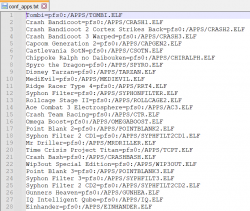
4. A text file named: conf_apps.cfg for listing the games ELFs as apps. +OPL partition will be seen as pfs0. Here an example:

Immagine.png

Keep in mind that VCD names must be the same as ELFs (just with VCD extension), and also games folders into __common/POPS

As for cover arts to work with apps/elf, you need to name each cover art as the elf (extension included). Like this:

Immagine2.jpg

I usually use OPLM to name games VCDs with theyr ID as prefix, download the cover arts, then I shorten the VCD names, create ELFs and rename cover arts accordingly.
 
Last edited:
Someone have experience in creating a __.POPS partition after many ps2 games on a big HDD??

Let's say I have a 2TB HDD with system partitions at the beginning, but __.POPS quite far, like in this order:

128MB __mbr
128MB __net
256MB __system
512MB __sysconf
1024MB __common
512MB +OPL
about 450 Ps2 games (1,4TB)
100GB __.POPS

The POPS games will be listed as apps, so POPSTARTER.ELFs will be into +OPL partition that's at the HDD beginning (same for POPS game folders that are into __common). However the actual VCDs will be very far away. Will it cause slowdowns when listing or booting the games?

If yes, I could delete the first 40/45 installed Ps2 games to free about 128GB for the __.POPS partition to be at the hdd beginning. Then I'll re-install the Ps2 games.
However if someone have experience in this and tell me that where __.POPS is positioned doesn't matter I would save myself (and the HDD) the trouble.
 
$SAFEMODE is only for hexadecimal cheats yeah.

I made a couple POPS partitions on a HDD:

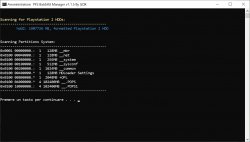
system.jpg

I thought __.POPS was seen the same as __.POPS0 (like for example +OPL is seen as pfs0, also mass: is equal to mass0: and so on).
So I named the second partition as __.POPS1.

But then I read this by accident on a POPStarter document written by you:

" ** You made a 128GB __.POPS partition, it's full, and you want to intall more VCDs in this HDD **

Create another partition named __.POPS0
When using this launch type, POPStarter mounts and scans the partitions in this order :
__.POPS -> __.POPS0 -> __.POPS1 -> __.POPS2 -> __.POPS3 -> __.POPS4 -> __.POPS5 -> __.POPS6 -> __.POPS7 -> __.POPS8 -> __.POPS9 "


Therefore, should I rename __.POPS1 to __.POPS0, it would be better for some reason, like the games to start faster or it wouldn't matter at all?
And also, it is safe to rename a POPS partition even if there are VCDs on it already? (I don't have VCDs installed at the moment, I'm just curious).
 
This also works from USB. And from what I have seen, slightly more games work on USB than HDD with POPStarter. At least in the past. I haven't kept up.

Also, read speed is not a problem on USB for PSX games.
 
I have already converted all my ps1 games to .vcd format and deleted all my .bin and .iso ps1 games

is there any way to return the .VCD to its original .bin or .iso format for ps1 games
 
I have already converted all my ps1 games to .vcd format and deleted all my .bin and .iso ps1 games

is there any way to return the .VCD to its original .bin or .iso format for ps1 games
@OmGp, yes, can use the "POPS2CUE" tool for come back them to BIN/CUE files.

You can download it from the bundle "CUE2POPS" here:

https://bitbucket.org/ShaolinAssassin/popstarter-documentation-stuff/wiki/apps-last-version

The .ISO format it is not a suitable format for PSX games.

Best regards.
 
@hugopocked I was checking Tomb Raider games and I have a question for you (and any other that might have experience in this) about the first 2 games if you also tested those ones.

Both TR 1 and TR 2 in their 1.0 USA version work flawlessly on POPStarter, no need of anything.
However in newer revs of both games, music tracks cannot be played. Do you have any idea why?

For example, TR 1.0 and 1.1 versions should be pratically the exact same, aside for one level file that has a slightly different size.
Maybe bin files should be merged in some specific way on the 1.1 rev for some absurd reason?

There's also a issue that makes the games (from 1.1 versions onward) to freeze before any level loading screen. This is solvable with the old POPStarter game fixes I attached. But the missing music tracks problem remains (no musics or Lara advices in Lara's home that are also tracks).


I'm asking 'cause it would be great to have every TR working on POPS, since with your the last revelation patch, also the "times" porting works perfectly.
Unfortunately, TR 1 unfinished buisness and TR2 the Golden Mask ports are based on newer revisions of the games apparently. So they're playable using the old game fixes but no music tracks.

A work-around would be to base these portings on the 1.0 version of the games if possible. If there won't be any other solution I'll do some tries.


Knowing what causes the TR missing tracks problem might be of help also for other multi-track games with the same issue, like Air Combat (also this game plays perfectly on POPS but with no musics).
 

Attachments

Last edited:
@hugopocked I was checking Tomb Raider games and I have a question for you (and any other that might have experience in this) about the first 2 games if you also tested those ones.

Both TR 1 and TR 2 in their 1.0 USA version work flawlessly on POPStarter, no need of anything.
However in newer revs of both games, music tracks cannot be played. Do you have any idea why?

For example, TR 1.0 and 1.1 versions should be pratically the exact same, aside for one level file that has a slightly different size.
Maybe bin files should be merged in some specific way on the 1.1 rev for some absurd reason?

There's also a issue that makes the games (from 1.1 versions onward) to freeze before any level loading screen. This is solvable with the old POPStarter game fixes I attached. But the missing music tracks problem remains (no musics or Lara advices in Lara's home that are also tracks).


I'm asking 'cause it would be great to have every TR working on POPS, since with your the last revelation patch, also the "times" porting works perfectly.
Unfortunately, TR 1 unfinished buisness and TR2 the Golden Mask ports are based on newer revisions of the games apparently. So they're playable using the old game fixes but no music tracks.

A work-around would be to base these portings on the 1.0 version of the games if possible. If there won't be any other solution I'll do some tries.


Knowing what causes the TR missing tracks problem might be of help also for other multi-track games with the same issue, like Air Combat (also this game plays perfectly on POPS but with no musics).


I had the same problem only TR1 USA 1.0 (Rev.0) worked correctly, the others revisions had no music but levels still load. But i tried those patches by KrHACKen which he made for every version of TR1 & TR2 for PS3 and it work flawless. I only tested it on Tomb Raider revision 6 (1.6) though but i guess it will work for others too. For TR1 Gold & TR2 Gold ports, levels don't even load i'm stuck at the main menu with no music, i don't know what fixes to use.

I can't post the link for the patches for you can find them in Resources> PS3 > Tools, and scroll down.
 
I had the same problem only TR1 USA 1.0 (Rev.0) worked correctly, the others revisions had no music but levels still load. But i tried those patches by KrHACKen which he made for every version of TR1 & TR2 for PS3 and it work flawless. I only tested it on Tomb Raider revision 6 (1.6) though but i guess it will work for others too. For TR1 Gold & TR2 Gold ports, levels don't even load i'm stuck at the main menu with no music, i don't know what fixes to use.

I can't post the link for the patches for you can find them in Resources> PS3 > Tools, and scroll down.

Do you mean this?: PS3 - Tomb Raider I and II patches by krHACKen | PSX-Place


With the fixes I linked, both Tomb Raider Unfinished Buisness and Tomb Raider 2 The Golden Mask should work perfectly fine, aside there's no tracks playback. Put each patch into the respective game folder.


I don't think KrHACKen patches can be applied to those mods, have you tried?
 
Last edited:
Ok i've done more testing to figure out wich revision worked or not.

Tomb Raider (USA) Rev 0: Music work and levels load. No patch needed.
Tomb Raider (USA) Rev 1: No music, level doesn't load. The patch fixes it.
Tomb Raider (USA) Rev 2: No music, level doesn't load. The patch fixes it.
Tomb Raider (USA) Rev 3: No music, level doesn't load. The patch fixes it.
Tomb Raider (USA) Rev 4: No music, level doesn't load. The patch fixes it.
Tomb Raider (USA) Rev 5: No music, level doesn't load. The patch fixes it.
Tomb Raider (USA) Rev 6: No music, level doesn't load. The patch fixes it.
Tomb Raider II (USA) Rev 0: Music work and levels load. No patch needed.
Tomb Raider II (USA) Rev 1: Music work and levels load. No patch needed.
Tomb Raider II (USA) Rev 2: Music work and levels load. No patch needed.
Tomb Raider II (USA) Rev 3: Music work and levels load. No patch needed.

Everything was tested with TROJAN_7.bin which contain severals game fixes made by krHACKen and updated by hugopocked.
And also TROJAN_8.bin wich is the one that hugopocked made for Tomb Raider III.
And PATCH_4.bin.

Sadly i believe those patches are individuals and wont work on TR Gold & TR II Gold and krHACKen only made them for the official games and some beta versions.
Thank you for the files, at least TR Gold and TR II Gold work now even without music.
 
@hugopocked I was checking Tomb Raider games and I have a question for you (and any other that might have experience in this) about the first 2 games if you also tested those ones.

Both TR 1 and TR 2 in their 1.0 USA version work flawlessly on POPStarter, no need of anything.
However in newer revs of both games, music tracks cannot be played. Do you have any idea why?

For example, TR 1.0 and 1.1 versions should be pratically the exact same, aside for one level file that has a slightly different size.
Maybe bin files should be merged in some specific way on the 1.1 rev for some absurd reason?

There's also a issue that makes the games (from 1.1 versions onward) to freeze before any level loading screen. This is solvable with the old POPStarter game fixes I attached. But the missing music tracks problem remains (no musics or Lara advices in Lara's home that are also tracks).


I'm asking 'cause it would be great to have every TR working on POPS, since with your the last revelation patch, also the "times" porting works perfectly.
Unfortunately, TR 1 unfinished buisness and TR2 the Golden Mask ports are based on newer revisions of the games apparently. So they're playable using the old game fixes but no music tracks.

A work-around would be to base these portings on the 1.0 version of the games if possible. If there won't be any other solution I'll do some tries.


Knowing what causes the TR missing tracks problem might be of help also for other multi-track games with the same issue, like Air Combat (also this game plays perfectly on POPS but with no musics).

Yes El_Patas already reported the same to me, right now I'm finishing other compatibility modes, then I'll do some reverse engineering in the krHACKen fixes for Tomb Raiders1/2 to see what it did in the 1.0 versions and port it to the other versions.

Let's see if I remember everything I did this month:

1# Restore emulation from [Get GPU Info E2h/E3h/E4h/E5h and 10000007h, also sync those GPU ports, this fixes games like FF7 Xenogears Siphon Filter 3 and possibly other games from the Pops emulation.

2# Fill Rectangle in Vram GP0(02h)=(60h) Rect this fixes games like the Yu-Yu-Gi-Oh! FM and possibly other games.

3# Improve GTE Saturation calculations from GTE FIXES Rev1 this fixes phosphorescent color issues in Tomb Raiders 3/4/5.

4# I also restored texture transparency issues that affect example games like Jade Cocoon and Alone in the Dark The new nightmare and possibly other games

5# And I improved fixes of other individual games.

6# Other things that I don't remember right now.

Greetings!
 
Last edited:
Sadly i believe those patches are individuals and wont work on TR Gold & TR II Gold and krHACKen only made them for the official games and some beta versions.

I made a try anyway, patched TR2 Golden Mask with kHn patch for rev 3 but as expected it didn't worked (it messes all the tracks).
 
Last edited:
Yes El_Patas already reported the same to me, right now I'm finishing other compatibility modes, then I'll do some reverse engineering in the krHACKen fixes for Tomb Raiders1/2 to see what it did in the 1.0 versions and port it to the other versions.

Let's see if I remember everything I did this month:

1# Restore emulation from [Get GPU Info E2h/E3h/E4h/E5h and 10000007h, also sync those GPU ports, this fixes games like FF7 Xenogears Siphon Filter 3 and possibly other games from the Pops emulation.

2# Fill Rectangle in Vram GP0(02h)=(60h) Rect this fixes games like the Yu-Yu-Gi-Oh! FM and possibly other games.

3# Improve GTE Saturation calculations from GTE FIXES Rev1 this fixes phosphorescent color issues in Tomb Raiders 3/4/5.

4# I also restored texture transparency issues that affect example games like Jade Cocoon and Alone in the Dark The new nightmare and possibly other games

5# And I improved fixes of other individual games.

6# Other things that I don't remember right now.

Greetings!

That's great. There are too much games for fixing one by one, so if you manage to make the emulator more like the actual Ps1 retro-compatibility, hopefully, it will become compatible with all games.
In that case POPStarter will be the absolute best way for playing Ps1 games on real hardware.
 
Im trying to get popstarter to work via network on opl. Ive tried multiple versions of opl with the same results so im assuming its my popstarter install. I put all the files mc on mc0 and pops_iox.pak in pops folder on. Ive converted the vcd with the latest oplm. Opl smb works fine for ps2 games and i configured pops the same way but nothing shows to show ps1 games.
 

Similar threads

Back
Top