PS3 Possibility of a Life With Playstation Revival? (Request) (sans folding@home)

Idk if this can be of any help but here is an old 2007 version of F@H that installs to the game category. Possibly a dev version, not sure (No Debug symbols), it uses the same title ID as release. (NPIA00002)

The pkg was labelled as "2007-03-29-Folding-GameCategory.pkg" and it came randomly thrown in with some developer Home stuff we got.

DOWNLOAD 2007-03-29-Folding-GameCategory.pkg (49.4MB)
 
Idk if this can be of any help but here is an old 2007 version of F@H that installs to the game category. Possibly a dev version, not sure (No Debug symbols), it uses the same title ID as release. (NPIA00002)

The pkg was labelled as "2007-03-29-Folding-GameCategory.pkg" and it came randomly thrown in with some developer Home stuff we got.

DOWNLOAD 2007-03-29-Folding-GameCategory.pkg (49.4MB)

that's awesome! Thanks for sharing that, I'll definitely take a look.

Since I got you here, have you run into a situation with the home assets where they are hosted in 3rd party servers and require some form of authentication? I dont remember any form of authentication when we were messing with the home xml files, but I was curious if you guys ever ran into that somewhere else in the project.
 
that's awesome! Thanks for sharing that, I'll definitely take a look.

Since I got you here, have you run into a situation with the home assets where they are hosted in 3rd party servers and require some form of authentication? I dont remember any form of authentication when we were messing with the home xml files, but I was curious if you guys ever ran into that somewhere else in the project.
Not really with Home assets, but with all the other non file servers yeah for sure. Loads of different ways. it can just be failing on SSL certs maybe if urls are https.

What I would do starting off is edit all urls you can find in eboot/sprx/xml etc from https to http. Then use wireshark to examine the requests its making. Then redirect those domains with DNS to your own local server and try replicate the responses.

starting with oldest version you have as it probably has least security.

EDIT: I see you have a good bit of that done already so. Probably need to try reverse engineer the eboot with IDA/Ghidra next then
 
Last edited:
Not really with Home assets, but with all the other non file servers yeah for sure. Loads of different ways.

What I would do starting off is edit all urls you can find in eboot/sprx/xml etc from https to http. Then use wireshark to examine the requests its making. Then redirect those domains with DNS to your own local server and try replicate the responses.

starting with oldest version you have as it probably has least security.

EDIT: I see you have a good bit of that done already so. Probably need to try reverse engineer the eboot with IDA/Ghidra next then

nice, Im glad at least I'm mostly going in the right direction :) Yeah, I've decompiled the latest package, but I like your suggestion and will go back to the earliest ones next. Really excited to see what that possible dev package might have.
 
I also have this normal non dev 2008 version that was dumped from a console. Param.sfo says v1.00 on both this and the pkg that installs to game category, but there are definitely some differences, The FAHApp.sprx is larger in the game category version for one.

Folding@Home (NPIA00002) June 2008

Versioning and filesizes seem all over the place.

I guess you know about nopsn.org, there is a large pkg there with title id NPIA00007 too.

https://nopsn.org/pkg/ps3/?dir=life-with-playstation
 
Last edited:
I also have this normal non dev 2008 version that was dumped from a console. Param.sfo says v1.00 on both this and the pkg that installs to game category, but there are definitely some differences, The FAHApp.sprx is larger in the game category version for one.

Folding@Home (NPIA00002) June 2008

Versioning and filesizes seem all over the place.

I guess you know about nopsn.org, there is a large pkg there with title id NPIA00007 too.

https://nopsn.org/pkg/ps3/?dir=life-with-playstation

I'm familiar with nopsn, but i had no idea they had package for lwp! The later packages are bigger (since they started adding the news feed the early didnt have), but its curious it has a different title id, but according to devwiki thats a valid id for lwp. I'm have to figure out the exact version and compare to the npia00002 versions i have to see what is different
 
Yeah, need to check them all really. I think we can assume some of the devs were lazy and didnt edit version in the PARAM.SFO, there are at least four different "1.00" pkgs as far as I can see.

All with different sizes.

2007 game category pkg is labelled 1.00
2008 install dump is labelled 1.00
2 different 1.00 versions on nopsn.org.
 
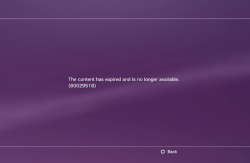
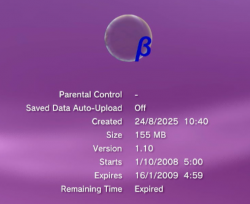
So the 1.10 pkg with title id NPIA00007 is a beta by the looks of it, and it installs to the game category.

upload_2025-8-24_12-2-37.png

It says expired and wont boot.
upload_2025-8-24_12-3-5.png

upload_2025-8-24_17-31-22.png

Possibly rolling back RTC real time clock to when it was valid might allow that Beta to boot. not sure, I didn't spend much time on it as its only a beta, not a dev version.

========================================================================================


Then I decided to take a quick look at v.121 (spoofed it to 1.22 to block the update)

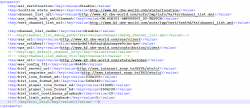
Next there is an interesting file property.xml that has some important settings you will want to play with. Edit the ssl verification to disable, and all the urls to http something like this.


upload_2025-8-24_14-28-59.png


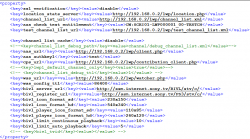
What I did here next was change the domain to my PCs LAN IP, then added .php to all those non file links, then I made simple php that logs the requests.

I'm running these phps via xampp locally on my LAN. I shortened the urls a little too so folders are not so deep. Makes it easier to see whats going on if everything is in one folder.

upload_2025-8-24_15-8-1.png


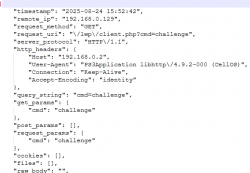
So the first thing it seems to contact is the aas_url with query param ?cmd=challenge. This is the first thing to figure out. It just keeps repeating this over and over. It seems obvious to assume it is going to use/need the aas_authkey1 soon too (I have edited it to "test" for my last test).

upload_2025-8-24_14-53-51.png


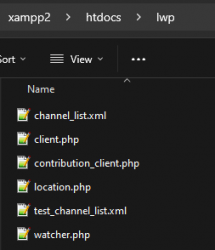
I attached these files here that I used, its a very basic start to help log the requests. The xmls are simply a copy of the default_channel_list.xml from inside the pkg, should work ok.

upload_2025-8-24_15-11-20.png


If I get time I will look a bit more. Ideally need to try all the older versions too and see how they are different.

 

Attachments

Last edited:
So the 1.10 pkg with title id NPIA00007 is a beta by the looks of it, and it installs to the game category.

View attachment 46439

It says expired and wont boot.
View attachment 46440


Possibly rolling back RTC real time clock to when it was valid might allow that Beta to boot. Or maybe the date can be edited somewhere, not sure, I didn't spend much time on it as its only a beta, not a dev version.

========================================================================================


Then I decided to take a quick look at v.121 (spoofed it to 1.22 to block the update)

Next there is an interesting file property.xml that has some important settings you will want to play with. Edit the ssl verification to disable, and all the urls to http something like this.


View attachment 46441


What I did here next was change the domain to my LAN IP, then add.php to all those non file links, then I made simple php that logs the requests. I'm running these phps via xampp locally on my LAN. I shortened the urls a little too so folders are not so deep. Makes it easier to see whats going on if everything is in one folder.

View attachment 46453


So the first thing it seems to contact is the aas_url with query param ?cmd=challenge. This is the first thing to figure out. It just keeps repeating this over and over. It seems obvious to assume it is going to use/need the aas_authkey1 soon too (I have edited it to "test" for my last test).

View attachment 46447


I attached these files here that I used, its a very basic start to help log the requests. The xmls are simply a copy of the default_channel_list.xml from inside the pkg, should work ok.

View attachment 46455


If I get time I will look a bit more. Ideally need to try all the older versions too and see how they are different.

oh wow, the php logging idea is brilliant. Thank you! Yeah, I've made it into the cmd=challenge, and I'm stuck there right now. One of the other xml has a client aas key, but I'm not sure when we will need that.

I also found another authentication call, I'll look up my notes later today to remember how I did it, and I'll document it here.
 
Some archived info here https://web.archive.org/web/20081021103009/http://www.playstation.com/life/en/livech_providers.html

View attachment 46457

Also.. I figured out a way to get it load content locally, and how to add more cities. Dublin wasn't on it before. :)

So worst case at least it could be filled out with static data so it looks nicer than errors everywhere.

View attachment 46458

Thats awesome! I think I know which file you changed, but how did you get it to load? Did you get past the client auth?
 
No I didn't do anything with that yet. I just edited the data/life_info/live/en/default_city_info.xml. It seems to be the exact same format as the online version would be by the looks of it

This format works.
upload_2025-8-24_19-39-46.png


So far I only know how to add new items, and add the temperature. I think there is probably a way to add a url to each item but I don't know the syntax yet.
 
Some archived info here https://web.archive.org/web/20081021103009/http://www.playstation.com/life/en/livech_providers.html

View attachment 46457

Also.. I figured out a way to get it load content locally, and how to add more cities. Dublin wasn't on it before. :)

So worst case at least it could be filled out with static data so it looks nicer than errors everywhere.

View attachment 46458
Can we have a copy if this pkg (or when further completed)? This is epically awesome. Home and now this...a blast from past :-). If it folded that would be even more insane. That most likely will never be though.
 
No I didn't do anything with that yet. I just edited the data/life_info/live/en/default_city_info.xml. It seems to be the exact same format as the online version would be by the looks of it

This format works.
View attachment 46459

So far I only know how to add new items, and add the temperature. I think there is probably a way to add a url to each item but I don't know the syntax yet.
Ah, of course -- you changed the default error message file with news content :) that makes sense now. Turns out I already had a 1.10 file (NPIA00007), and under usrdir/data/plugins/live/city_info.xml, I found the following attached file. This defines the URL format for the livecam. I added the .txt extension so I could upload the file.

My working theory at the moment is that whenever the client fails to authenticate, it loads default_city_info.xml, with all the error messages. There are several default_* files throughout, and I think that it loads one of them whenever it can't find the real thing.

So in my example, it should get a single city_info.xml file from the service... and if it cannot, then it loads default_city_info.xml with the errors.
 

Attachments

Last edited by a moderator:
Ah, of course -- you changed the default error message file with news content :) that makes sense now. Turns out I already had a 1.10 file (NPIA00007), and under usrdir/data/plugins/live/city_info.xml, I found the following attached file. This defines the URL format for the livecam. I added the .txt extension so I could upload the file.
oh wow, thats very nice. That has examples of way more syntax that wouldn't have been easy to figure out.

I will pack up a pkg soon with a Offline Test version.


I see they used php too, cool.
image.png


That format is different tho. so will need to try figure out updated version of that for 1.21 ideally.
 
Some archived info here https://web.archive.org/web/20081021103009/http://www.playstation.com/life/en/livech_providers.html

View attachment 46457

Also.. I figured out a way to get it load content locally, and how to add more cities. Dublin wasn't on it before. :)

So worst case at least it could be filled out with static data so it looks nicer than errors everywhere.

View attachment 46458
earthtv.com has expired certs and webcams.travel has had a domain change, maybe this could be causing some issues?
 
Ok so I made some progress. I think 1.21 must support both formats, which is lucky for us, and I think the offline format supports most of the same stuff if not ALL of it. I have not figured out how to do some things yet though in the offline xml format. See below.

Here is a build that can work 100% offline (Including not signed into PSN and internet disabled). It has placeholder data added from the beta xml that @marciolsf found in the 1.10 beta pkg. Its a kinda cool time capsule of news from 2007 :)

This means it now shows 117 cities all offline, pretty cool!


I did add Dublin, Belfast and Edinburgh cos western Europe was kinda empty. :)

This pkg is v1.00, with v1.10 (non beta) files added on top, then v1.20 on top, then 1.21 on top. Then of course spoofed to 1.22 to block the shutdown update. This combined pkg is probably how most peoples installs will have ended up if they kept it installed, as pkg installs/updates can never delete files, only overwrite. Unless they add a clean up as part of the code in the app of course.

DOWNLOAD Life_With_PlayStation_v1.21_NPIA00002_Offline_Test1.pkg

I have not figured out how to add the thumbnails/media in the offline format yet, or add urls for the news stories, or add the little weather icons on the globe. I think they can all be added though including media links, just need to trial and error loads of different syntaxes, shouldn't be too hard though if lots of us try?

I have not really looked much into adding more stuff offline yet, wanted to get something packaged to share. This is what it looks like now.

upload_2025-8-25_14-6-31.png


For debugging the app further for online, and for figuring out more offline RSS XML syntax THIS should help ;) (I got some help with those. Massive thanks for that. ;) )
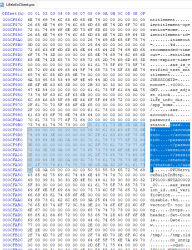
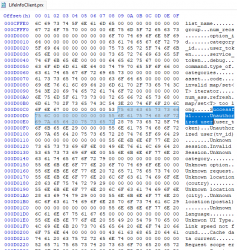
In there you will find decrypted sprx/self from 1.21 and 1.10 beta. This can tell us a lot about the responses needed. Few snippets from when I had a quick look.

upload_2025-8-25_14-33-43.png upload_2025-8-25_14-34-19.png upload_2025-8-25_14-35-46.png

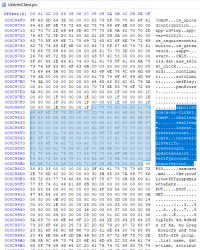
This area in particular shows all the xml elements supported in the offline xml for the Live channel, it doesnt show exactly how to use them but we can guess that with some trial and error.

upload_2025-8-25_14-39-18.png


See also keep in mind, potentially as a Plan B, worst case, if we cant reverse the authentication, we could maybe have webman update the local xmls with a script on boot up, so have it update this way, bypassing all of the security, so this is why the offline format is especially important as well. It allows for loads of cool custom stuff too.


Then this below looks a lot like some of kind of key, and its right there next to the cmd challenge. Probably directly related to the authentication response.


upload_2025-8-25_15-26-25.png


I think one important thing from that prx is this xml format. I don't know its used right now. It is possible it saves some data locally in that format.

Code:
<aas>
<accountid></accountid>
<password></password>
<sessionid></sessionid>
<status></status>
</aas>


Also I think we should all look out for dumps from consoles from before 1.22 update was installed (NPIA00002 and NPIA00007), or even after if it wasn't removed (unlikely). There might be more files in there that can help with taking it further, related to other channels other than "Live" and Folding@Home".
 
Last edited:
Back
Top