Problem jailbreak Ps3 4.84 freeze help me pls

werwolf88

Forum Noob
Hey guys
i have that the problem occurs. When I press the "Initialize exploitation" the file is detected but as soon as I press "Patch NOR Flash Memory" the screen freezes. The PS3 doesn't make any beeping sounds it just freezes. Any suggestions on how to solve this problem?
 
I'm assuming you've already installed HFW? Is your PS3 hackable - what model? If so, did you verify the MD5 of flash_484.hex on the root of your USB drive before attempting. The MD5 must be AB2B3A2E23FA731301260F5702FC4101 otherwise the file is somehow corrupted.

I'm sort of guessing here since you didn't provide any information other than the screen freezes. If you could give a little bit more information that would be helpful :)
 
I see "lots" of people having the freezing issue, not sure is there something we are missing here.

The contents of the hex should not cause a freeze like that, If they have a corrupt hex or wrong hex it should get flashed regardless, so not sure why people are getting this freeze..
 
I'm assuming you've already installed HFW? Is your PS3 hackable - what model? If so, did you verify the MD5 of flash_484.hex on the root of your USB drive before attempting. The MD5 must be AB2B3A2E23FA731301260F5702FC4101 otherwise the file is somehow corrupted.
Yes HFW is instaled. My ps3 is 2504B and data code is 0D. flash_484.hex is at the root of my usb key too.But against the file that I downloaded there is no MD5 just HFW 4.84.1 and edb4e74bc6f83b1d767f3db978e0dd86 but dedan there is nothing in the folder edb4e74bc6f83b1d767f3db978e0dd86 After I'm French I followed a French tutorial I did everything to the letter as write in the tutorial. The only stall bug that is the ps3 or this blocks when I click on "Patch NOR Flash Memory" If you understand French I can send you the tutorial that I followed

I'm sort of guessing here since you didn't provide any information other than the screen freezes. If you could give a little bit more information that would be helpful :)

I see "lots" of people having the freezing issue, not sure is there something we are missing here.

The contents of the hex should not cause a freeze like that, If they have a corrupt hex or wrong hex it should get flashed regardless, so not sure why people are getting this freeze..
Yes HFW is instaled. My ps3 is 2504B and data code is 0D. flash_484.hex is at the root of my usb key too.But against the file that I downloaded there is no MD5 just HFW 4.84.1 and edb4e74bc6f83b1d767f3db978e0dd86 but dedan there is nothing in the folder edb4e74bc6f83b1d767f3db978e0dd86 After I'm French I followed a French tutorial I did everything to the letter as write in the tutorial. The only stall bug that is the ps3 or this blocks when I click on "Patch NOR Flash Memory" If you understand French I can send you the tutorial that I followed
 
Yes HFW is instaled. My ps3 is 2504B and data code is 0D. flash_484.hex is at the root of my usb key too.But against the file that I downloaded there is no MD5 just HFW 4.84.1 and edb4e74bc6f83b1d767f3db978e0dd86 but dedan there is nothing in the folder edb4e74bc6f83b1d767f3db978e0dd86 After I'm French I followed a French tutorial I did everything to the letter as write in the tutorial. The only stall bug that is the ps3 or this blocks when I click on "Patch NOR Flash Memory" If you understand French I can send you the tutorial that I followed

Il semble qu'il ne trouve pas le fichier "flash_484.hex". Vérifie qu'il est bien sur ta clé USB (FAT32), port USB le plus à droite, et que tu sélectionnes dev_usb000 sur la page web.
Ou utlises l'édition "HDD".

Seems it can not find the file "flash_484.hex". Check that it is on your USB key (FAT32), USB port on the far right, and that you select dev_usb000 on the web page.
Or use the HDD edition.
 
Il semble qu'il ne trouve pas le fichier "flash_484.hex". Vérifie qu'il est bien sur ta clé USB (FAT32), port USB le plus à droite, et que tu sélectionnes dev_usb000 sur la page web.
Ou utlises l'édition "HDD".

Seems it can not find the file "flash_484.hex". Check that it is on your USB key (FAT32), USB port on the far right, and that you select dev_usb000 on the web page.
Or use the HDD edition.
Flash484 is at the root of my usb key then my usb key is also connected to the USB port on the right the Dev000 I do not understand it's when I click on "Patch NOR Flash Memory" my ps3 this block
 
Flash484 is at the root of my usb key then my usb key is also connected to the USB port on the right the Dev000 I do not understand it's when I click on "Patch NOR Flash Memory" my ps3 this block

Quel est le modèle de ta console?
Ta clé usb est bien en FAT 32?
Tu as essayé avec une autre clé USB?

What is the model of your console?
Your USB drive is FAT32 formatted?
Did you tried with another USB drive?
 
Yes HFW is instaled. My ps3 is 2504B and data code is 0D. flash_484.hex is at the root of my usb key too.But against the file that I downloaded there is no MD5 just HFW 4.84.1
Did you run MinVerChk to see if you achieve a result of 3.56 or less. Also, MD5 is a checksum method of verifying the integrity of files, it has nothing to do with the exploit. :)

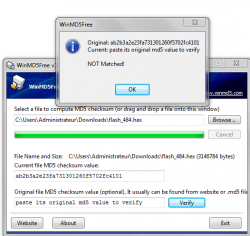
Download an MD5 checker (WinMD5Free - http://winmd5.com/) is free of cost and then drag the flash_484.hex into the program and it will generate the MD5 of the file. You need to check that against the MD5 posted (AB2B3A2E23FA731301260F5702FC4101) and if they don't match then there's a problem. If they do match, then everything is working as it should be. :)
 
Quel est le modèle de ta console?
Ta clé usb est bien en FAT 32?
Tu as essayé avec une autre clé USB?

What is the model of your console?
Your USB drive is FAT32 formatted?
Did you tried with another USB drive?
Model is cech2504B data code is 0D, my usb drive is Fat32 and i did another usb and don't march :/
 
Did you run MinVerChk to see if you achieve a result of 3.56 or less. Also, MD5 is a checksum method of verifying the integrity of files, it has nothing to do with the exploit. :)

Download an MD5 checker (WinMD5Free - http://winmd5.com/) is free of cost and then drag the flash_484.hex into the program and it will generate the MD5 of the file. You need to check that against the MD5 posted (AB2B3A2E23FA731301260F5702FC4101) and if they don't match then there's a problem. If they do match, then everything is working as it should be. :)
It is ok or not ? :/
 

Attachments

  • nnnn.PNG
    nnnn.PNG
    47.7 KB · Views: 207
Model is cech2504B data code is 0D, my usb drive is Fat32 and i did another usb and don't march :/
You did something wrong for sure. It should work.
But well... try the HDD edition instead (the index_nor_hdd.html). No need of USB drive with it.
 
Ok thank you very much for everything, how do I do HDD? You have tuto?

Load the "index_nor_hdd.html" in your ps3 browser : http://**ps3xploit.com >Domain no L...xploit.me =new)/hfw/writer/index_nor_hdd.html
Then follow the three steps.

Then dump to check. if good, reboot.
 
I see "lots" of people having the freezing issue, not sure is there something we are missing here.

The contents of the hex should not cause a freeze like that, If they have a corrupt hex or wrong hex it should get flashed regardless, so not sure why people are getting this freeze..
Same freeze when launching han exploit
Initialization gets success but launching freeze
 

Similar threads

Back
Top