PS2 Problems Launching "Buzz! The Big Quiz (Europe) (v2.00)" via OPL through sd2psx (PSxMemCard Gen2)

SawJig511

Forum Noob
Hi everyone, tried to post this report on the dedicated forum (https://www.psx-place.com/threads/open-ps2-loader-game-bug-reports.19401) but couldn't due to low privileges, so here goes:

Title = Buzz! The Big Quiz
ID = SCES_538.79
Media = DVD
OPL version = 1.2.0-Beta-2216-bb415d
Device = PSxMemCard Gen2
Compatibility Mode(s) used = Tried every separately
VMC = Not tried
PADEMU = Not tried
IGR = Not tried
Compatible = Unknown
MD5 Checksum = 7b760c3c831a542d30949b87bdd5db6f (ISO)

Notes: PS2 SCPH-30003 R (PAL Version)

When trying to launch the game, it freezes on a black screen
 
Yes it does:
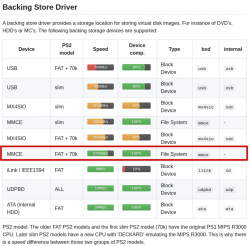
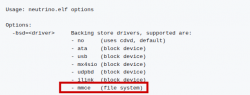
  • https://github.com/rickgaiser/neutrino.
    neutrino 2.png neutrino.png

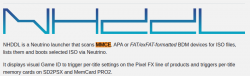
  • https://github.com/pcm720/nhddl.
    Nhddl.png nhddl 2.png
 

Hey again! Thank you for the reply. Just finished updating my OPL to the latest version (v1.2.0-Beta-2212-e215bff) and even with Mode 1 enabled, Buzz still doesn't launch and crashes immediately with a Black Screen (vid below). I think the issue is with the MMCE fork and not with the OPL itself (I also checked if the fork had a new version but confirmed I was on the latest version from the start https://github.com/ps2-mmce/Open-PS2-Loader/releases/tag/OPL-MMCE-beta-2). Later today I will try again using neutrino+nhddl.

Video showing the game crash:
 
Great news! It works with neutrino + nhddl! Thanks so much for the tip.
Now to discover if there's any way to remove the stutters from another Buzz! game xD (Buzz The Mega Quiz SCES-54504). Do you know anything about this? I know with OPL mode 1 helps, but I don't think this applies to Neutrino.
 
Code:
Game compatibility modes, supported are:
                    - 0: IOP: Fast reads (sceCdRead)
                    - 1: dummy
                    - 2: IOP: Sync reads (sceCdRead)
                    - 3: EE : Unhook syscalls
                    - 5: IOP: Emulate DVD-DL
                    - 7: IOP: Fix game buffer overrun
Multiple options possible

Try mode: 7: IOP: Fix game buffer overrun,
or 2: IOP: Sync reads (sceCdRead).
Or even both (2+7).

Also use the latest development build of neutrino instead of v1.7.0:
https://github.com/rickgaiser/neutrino/releases/tag/latest.
It has a few tweaks that v1.7.0 does not have.

The same thing is with NHDDL:
https://github.com/pcm720/nhddl/releases/tag/nightly.

EDIT: I can boot this game (SCES_538.79) through USB (exFAT) with OPL 2212 and neutrino + NHDDL.
However after a few seconds I get a warning that I need to connect the Buzz set (controller) in order to play.
 
Last edited:
Code:
Game compatibility modes, supported are:
                    - 0: IOP: Fast reads (sceCdRead)
                    - 1: dummy
                    - 2: IOP: Sync reads (sceCdRead)
                    - 3: EE : Unhook syscalls
                    - 5: IOP: Emulate DVD-DL
                    - 7: IOP: Fix game buffer overrun
Multiple options possible

Try mode: 7: IOP: Fix game buffer overrun,
or 2: IOP: Sync reads (sceCdRead).
Or even both (2+7).

Also use the latest development build of neutrino instead of v1.7.0:
https://github.com/rickgaiser/neutrino/releases/tag/latest.
It has a few tweaks that v1.7.0 does not have.

The same thing is with NHDDL:
https://github.com/pcm720/nhddl/releases/tag/nightly.

EDIT: I can boot this game (SCES_538.79) through USB (exFAT) with OPL 2212 and neutrino + NHDDL.
However after a few seconds I get a warning that I need to connect the Buzz set (controller) in order to play.

Hey again! Will try with those modes when I have the chance. I was also able to boot the game without any issue without using any modes (with the buzz! controllers, which enables to me to access the game's main menu). However the trouble starts when you get to the main menu. It's here the game starts to stutter really bad.
 

Similar threads

Back
Top