Problems with icons on __common

Berion

Developer
As we know, contents of "hdd0:/__common" can be displaying in HDD OSD for each folder (default one, comes from HDD OSD, the briefcase) or sub-folder (customs). But I encountering on strange problem which I don't know how to resolve:
  • If I copy save from i.e Memory Card to i.e "hdd0:/__common/SAVES/", then I see the icon.
  • If I create folder by uLE in "hdd0:/__common/SAVES/test/" and copy icon and sys files from the same save it doesn't show up.
  • If I copy POPS VMC folder (which getting it's icon automatically from POPStarter) by HDD OSD to /SAVES it is displaying correctly.
  • If I do the same by uLE, it doesn't showing up.
So the question is why? There is no such things like databases in OSD HDD so the only thing which comes to my mind is some "improper" file system handle by uLE/uLE kHn/wLE but also I cannot find anything in hex which i.e point me to some kind of file attributes missing or something like that.

Anyone know what's the problem here?
 
Si kHn (krHACKen) passe sur le site, il pourra sûrement te répondre car il a travaillé sur ceci via "POPStarter" installé sur HDD interne.

Cordialement.


In English via "G-Trad" :

If kHn (krHACKen) comes to the site, he will probably be able to answer you because he worked on this via "POPStarter" installed on internal HDD.

Cordially.
 
Directory attributes.

From the POPStarter src,
header :
Code:
#define POPS_DIR_ATTR 0xA0
#define VMC_DIR_ATTR 0xC4A7
function :
Code:
int StatChecker(char* dirpath, int attribute)
{
   iox_stat_t stat;
   memset(&stat, 0, 0x40);
   if(0 > fileXioGetStat(dirpath, &stat)) {
     memset(&stat, 0, 0x40);
     fileXioMkdir(dirpath, DEFAULT_MODE);
     fileXioGetStat(dirpath, &stat);
     stat.attr = attribute;
     stat.private_0 = 0xFFFF;
     stat.private_1 = 0xFFFF;
     fileXioChStat(dirpath, &stat, FIO_CST_ATTR);
     fileXioChStat(dirpath, &stat, FIO_CST_PRVT);
     memset(&stat, 0, 0x40);
     return -666;
   } else {
     if(stat.attr != attribute || stat.private_0 != 0xFFFF || stat.private_1 != 0xFFFF) {
       stat.attr = attribute;
       stat.private_0 = 0xFFFF;
       stat.private_1 = 0xFFFF;
       fileXioChStat(dirpath, &stat, FIO_CST_ATTR);
       fileXioChStat(dirpath, &stat, FIO_CST_PRVT);
       memset(&stat, 0, 0x40);
     }
   }
   return 1;
}
function calls:
Code:
StatChecker(path, VMC_DIR_ATTR); // for the actual game save folder
StatChecker("pfs1:/POPS/", POPS_DIR_ATTR); // for the parent directory (briefcase)

The PSX XMB (at least system software version 1.xx) ignores the attribs and always display stuffs.
 
I found easy workaround for this problem. Instead of crawling in hex editor, it is sufficient to just save settings in HDLGame Installer. It saves in "hdd0:/__common/Your Saves/" and adds needed attribs. So after that, user can just change folder name and repeat this procedure. It is lame but 100% safe. :D

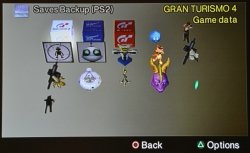
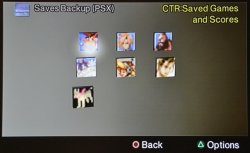
And funny thing is, HDD OSD doesn't allow copy saves from PSX MC to "Your Saves" but allow to custom folders and displays saves as on real PSX MC!

For my needs, I have created this nice places:
pfs_atr_ps2.jpg pfs_atr_psx.jpg
 

Similar threads

Back
Top