
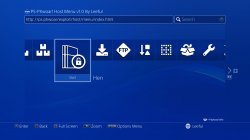
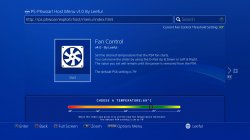
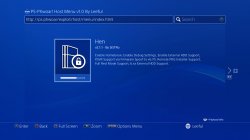
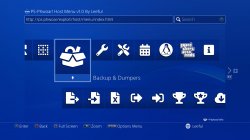
We re-tweeted this when it was released a week or so ago but wanted to get something up on the news page about this project, Developer leeful has recently released a new Exploit Host menu for serving up the essential payloads for exploited PS4 (5.05) Consoles's. This host menu theme is based on the PS4's main home screen bringing a seamless look. The host menu contains descriptions of various payloads it provides (which is about all) that will provide alot of features when executed such as Fan Controls, Linux Loader, Mod Menu's, firmware spoof, Update blocks ect.. You can see many of the payloads included in the sceenshots attached. Various methods to using this exploit host menu are available , see additional details in the installation tab below about using this new host menu:.
The host menu also adds the convenience of replacing the User Manual (first option in Settings>>User Manual/Helpful info) for easy and quick launching for when you power on your Console and have to activate HEN.
The host menu also adds the convenience of replacing the User Manual (first option in Settings>>User Manual/Helpful info) for easy and quick launching for when you power on your Console and have to activate HEN.
-
PS-Phwoar! Exploit Host Menu - An extensive collection of all the latest PS4 exploit payloads for your exploitable PS4 5.05 console.
Here is my (leeful) new Host Menu based on the original PS4 home menu design. It includes all the latest payloads and an exclusive new set of Backup & Restore payloads for various parts of the PS4 system.
ScreenShots
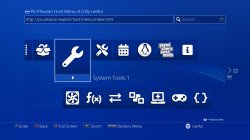
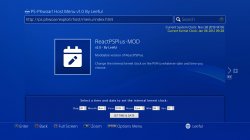
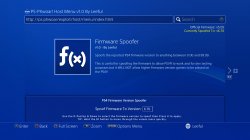
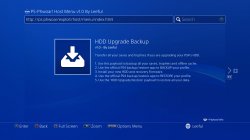
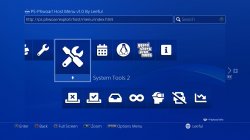
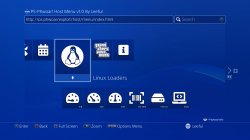
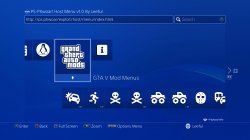
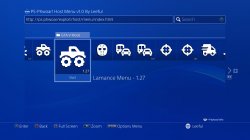
Main Menu Tips:
- When the menu loads, you can just press the X button to instantly run HEN 2.1.1.
- Press the 'R1' button to see a description of the selected payload. (Special Payloads like Fan Control, Firmware Spoofer and ReactPSPlus-MOD display extra information when you press 'R1' like 'Current Fan Control Temperature setting' 'Current Official and Spoofed Firmware versions' and 'Current system clock and kernel clock times')
-
How To Install PS-Phwoar! On Your PS4:
There are several methods to install the menu to your PS4.
You can install the menu from a USB drive, from a PC, from an ESP board or from an Android device.
(Video by by Nagato's Revenge showcasing PS-Phoar! Including a full tutorial of using BinLoader to install it via USB.)
Install From USB:
First copy the 'PS-Phwoar.USB' file to the root of a USB drive and plug it into your PS4.
Using your existing exploit menu, use BinLoader to load the 'PS_Phwoar_Installer.bin' file on your PS4.
The PS-Phwoar! Host Menu will now be installed to your PS4 Browser and to the UserGuide.
Alternatively if you have internet access on your PS4 you can go to: leeful.github.io/usb in the PS4 Browser to install the PS-Phwoar! Host Menu from your USB drive.
Install From A PC: >
If you want to load the menu in the PS4's Browser use the 'Server For PS4 Browser.exe' and follow the instructions it tells you.
If you want to load the menu in the PS4's UserGuide use the 'Server For PS4 UserGuide.exe' and follow the instructions it tells you.
Whichever server you use, once the PS-Phwoar! Host Menu has finished installing on your PS4 you can close the server and the Host menu will then always load from your PS4's internal cache.
Before you install PS-Phwoar! on your PS4 it is advised to first clear your browser settings so that it does not interfere with any previous Host menus you have used.
To do this open the Browser app and press the options button then select: Settings > Delete Cookies > Clear Website Data.
Install From An ESP Device: >
Flash the PS-Phwoar!_v1.0_ESP.bin file to your ESP8266 device using NodeMCU PyFlasher v4.0 found here:
https://github.com/marcelstoer/nodemcu-pyflasher/releases
The WiFi settings for the ESP are:
WiFi-SSID:PS4 ESP HOST
PASSWORD:12345678
Use either the PS4 User Guide or the PS4 Web Browser URL at: http://esp.com/index.html
HOW TO SET UP ESP
------------------
On the PS4 go to:
Settings > Network > Set Up Internet Connection > Use Wi-Fi > Custom
Select 'PS4 ESP HOST' from the list and use the password '12345678'
IP Address Settings > Automatic
DHCP Host Name > Do Not specify
DNS Settings > Automatic
MTU Settings > Automatic
Proxy Server > Do Not Use
Test Internet Connection >
Obtain IP Address : Successful
Internet Connection : Failed
This is perfectly normal because you are offline when using the ESP.
Press the PS button to go back to the PS4 Home Screen.
Install From An Android Device: >
If you have installed xPloitServer on your phone before you must uninstall it first and also delete the xPloitServer folder from your phones storage.
1. Make sure that your PS4 and phone are connected to the same network.
2. Install and run the xPloitServer app on your phone.
3. When the app has loaded press the 'Start Server' button and enter the exact address it tells you in your PS4 browser.
e.g. http://192.168.0.14:8080/index.html
4. The PS-Phwoar! Host Menu will now install on your PS4. Once it has finished installing you can close the server on your phone and from now on PS-Phwoar! will automatically load from your PS4's internal offline cache.
If you are having trouble installing the server on your phone, make sure you have allowed installing apk's from unknown sources and that you temporally disable google play protect on your phone.
Credit to Stooged for the original version of his xPloitServer.
Downloads:
- PS-Phwoar__v1.0_USB_Installer.zip : https://mir.cr/0XE6VZUQ
- PS-Phwoar__v1.0_PC_Installer.zip : https://mir.cr/KVER3LLM
- PS-Phwoar__v1.0_ESP_Installer.zip : https://mir.cr/HNOBFXUV
- PS-Phwoar__v1.0_Android_Installer.zip : https://mir.cr/SMKG2E9J
- Optional_USB_FILES.zip : https://mir.cr/1FY9DFOS (Copy the Optional USB Files to your USB Drive if you use the appToUsb, PKG Backup or the Game Dumper payloads.)
Release Thread @: gbatemp.net
Last edited:







