PS1 Games issues on both HEN and CFW

Mahmood

Member
Hi everyone,

I have 3 PS3 1 PS3 Super slim on OFW, and 2 PS3 Slim, one with HEN and the other with CFW REBUG, I'm using Multiman, webman, and IRIS Man on the 2 slim consoles with HEN and CFW to run my PS1 Games, and these are the problems I faced so far on both consoles:-
1- IRIS MAN plays all my multi track games without music.
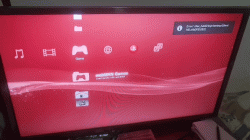
2- WEBMAN can't see my whole list of PS1 Games, and even some of the games which was recognized by webman cannot be mounted, after trying to mounting it no Black disk icon , then I get an error something like "devhdd0/tmp".
3- Multiman wount recognize .img .ccd
4- And the last problem is that with both multiman and WEBMAN The pink panther game plays without music "I own the PAL version" my brother had the NTSC version, tried it as well but the strange thing is the music plays for about 3 minutes then stopes, I guess it con not recognize or move to the next track, Also mission impossible game have weird noise on the background music.

And my last question as well, how can I use gameshark codes for these games, as well as the official PS1 Purchased pkg games?

Any help would be appreciated.
 
1- PS1 games require a CUE sheet to play the music. Use CUE/BIN format.
2- PS1 games should be stored in /dev_hdd0/PSXISO, dev_usb000/PSXISO or dev_ntfs0/PSXISO
3- multiMAN does not support these file extensions. Use CUE/BIN format.
4- Check that the CUE sheet is correct.

IIRC you can use Codebreaker with PS1 games. You need to swap the disc. You can mount another PSXISO using a smartphone.
 
Thanks for your reply,
1- I'm actually using .Bin/ .cue formats but still IRISMAN failing to recognize the music in multitrack games.
2- I'm using external HDD, and the PS ISOs are stored in the PSXISO folder, unfourtunately as I said in the post, some ISOs when clicing on them are not mounted, I got the notification that the emu is activated, and then says game loaded and then error on something like "devhdd0/temp" something like this, and on the HEN console WEBMAN can not recognize the whole ISOs.
3- That's great already converted them to bin cue.
4- How can I make sure if the .cue is correct or not ?
It's playing correctly on PC emulator.

And regarding the mounting another ISO using smartphone, can you tell me how ?

Thanks very much
 
Thanks for your reply,
1- I'm actually using .Bin/ .cue formats but still IRISMAN failing to recognize the music in multitrack games.
2- I'm using external HDD, and the PS ISOs are stored in the PSXISO folder, unfourtunately as I said in the post, some ISOs when clicing on them are not mounted, I got the notification that the emu is activated, and then says game loaded and then error on something like "devhdd0/temp" something like this, and on the HEN console WEBMAN can not recognize the whole ISOs.
3- That's great already converted them to bin cue.
4- How can I make sure if the .cue is correct or not ?
It's playing correctly on PC emulator.

And regarding the mounting another ISO using smartphone, can you tell me how ?

Thanks very much

1- Try changing the emulator from ps1_emu to ps1_netemu or viceversa. Also I want to note that IRISMAN has a slightly different method of parsing CUE sheets. webMAN MOD has a different method that might be better. Use it for these games.

2- Try using prepISO. If you still have issues, copy the games to internal HDD.

4- Maybe the CUE is formatted in a way not recognized by webMAN or IRISMAN. Try dumping the game again.

5- Open the browser in your smartphone, navigate to the IP address of the PS3. Open Games and mount the game.
 
1- I prefer using WEBMAN and multiman as well, but was just trying to see if IRIS MAN can help in recognizing the music in these games or not.

2- I'm using Prepiso, I'll take screenshot of the error I get when I get home to clarify more.

4- I'm using Img burn to dump the games, do you prefer other dumping softwares ?

5- That means that the PS3 mist be connected to the internet right ?
 
1- Try changing the emulator from ps1_emu to ps1_netemu or viceversa. Also I want to note that IRISMAN has a slightly different method of parsing CUE sheets. webMAN MOD has a different method that might be better. Use it for these games.

2- Try using prepISO. If you still have issues, copy the games to internal HDD.

4- Maybe the CUE is formatted in a way not recognized by webMAN or IRISMAN. Try dumping the game again.

5- Open the browser in your smartphone, navigate to the IP address of the PS3. Open Games and mount the game.
Just curious, but can apps not scan the image and see where tracks are located in theory? Like recreate the cue file if it needed to? Not asking for the feature or anything like that. just curious as to why this is an issue when we can do things that seem much more complicated.
 
Just curious, but can apps not scan the image and see where tracks are located in theory? Like recreate the cue file if it needed to? Not asking for the feature or anything like that. just curious as to why this is an issue when we can do things that seem much more complicated.

What I can not understand is that the playstation emulators on PC have the ability to read the cue sheet correctly.
But the PS3 needs specific naming and stricture for the .cue and that's what I think is the issue, for example Doom and Final Doom version for PS will freeze on the loading screen unless you name the .bin file as "PSXDOOM", or "PSXFINALDOOM" other than that it will freeze, so I think it will be great idea if these apps would Have the ability to read directly from the image file.
 
Any solutions to the multitracks issue ?

And regarding to WEBMAN not being able to mount PSX games from tge external HDD, I attached a gif for you to see the error
 

Attachments

  • 20210303_005638_1.gif
    20210303_005638_1.gif
    1.6 MB · Views: 189

Similar threads

Back
Top