PS3 PS2 Classic GUI v2.2.3 (for PS3 by Aldostools) updated w/ Auto-Suggest Configs & DVD9 Support

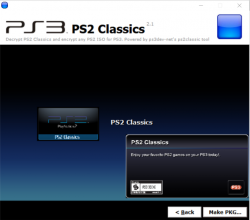
PS2 Classic GUI is a useful utility for an exploited PS3 Console by either CFW or HAN, this utility makes converting your PS2 Games into PS2 Classic format a breeze and as more and more discoveries are made we see more updates provided for the popular utility created by @aldostools. The release of v2.2.2 comes to us today with a discovery that expands the game compatibility by now supporting PS2 Games that are in DVD9 format. Recently we seen @kozarovv figured out an issue when trying to help get an English Patch for Final Fantasy XII IZSJ Working, Not only was a solution found but a guide was written as well >> Running PS2 DVD9 games on HAN/CFW . Then to make the process even easier now developer Aldostools has incorporated the needed changes into the PS2 Classic Utility (for PS3) while adding a few other features like an AUTO-SUGGEST features for PS2 Configs which seen support added in v2.1
ps2classicd.png

  • Version 2.2.2 Changelog:

    • Added support for DVD9 (thanks to kozarovv)
    • Fixed "Invalid number of arguments for encryption"
    • Auto-suggest CONFIG (detect first maching file in CONFIGS folder)

    Version 2.2.3
    :
    New build of PS2 Classics GUI 2.2.3 to add the CONFIG.

    A set of CONFIG files taken from ManaGunZ repository are included in the archive.

    To make a PKG, simply select the ISO.BIN.ENC and the optional CONFIG file from the CONFIGS folder (included in the rar).
    The tool will auto-encrypt the CONFIG file and include it in the PKG next to ISO.BIN.ENC.
    If the game doesn't require a CONFIG, just cancel the dialog and the PKG will be made without it.

  • List of known DVD9 Games:

    • 24: The Game
    • 50 Cent: Bulletproof
    • ATV Offroad Fury 4
    • Band Hero
    • Champions of Norrath
    • Dynasty Warriors 6
    • Forbidden Siren 2
    • Genji: Dawn of the Samurai
    • God of War
    • God of War II
    • Gran Turismo 4
    • Gran Turismo Concept: 2002 Tokyo-Geneva
    • Guitar Hero 5
    • Guitar Hero: Metallica
    • Guitar Hero Smash Hits
    • Guitar Hero: Van Halen
    • Guitar Hero World Tour
    • The Guy Game
    • Kessen III
    • The Lord of the Rings: Futatsu no Tou
    • Madden NFL 2005 Collector's Edition
    • Metal Gear Solid 2: Substance
    • Midnight Club 3: DUB Edition Remix
    • Pride of the Dragon Peace
    • Rock Band
    • Rock Band 2
    • Rogue Galaxy
    • Rogue Galaxy Director's Cut
    • Sakura Taisen: Atsuki Chishio Ni
    • Sakura Wars: So Long, My Love
    • Samurai Warriors 2 Xtreme Legends
    • School Days LxH
    • Siren
    • SingStar Bollywood
    • Susu Yatoto: The Video Game
    • Train Simulator: Keisei, Toei Asakusa, Keikyu Line
    • Train Simulator: Kyushu Shinkansen
    • Wild Arms: Alter Code F
    • Xenosaga Episode I: Der Wille zur Macht
    • Xenosaga: Episode I Reloaded
    • Yakuza 2
    • Ying Hua Da Zhan: Chi Re Zhi Xie

 
Last edited by a moderator:
multiMAN is a PS3 app. You can not magically create a PS3 app and turn it into a PS2 app. There is no porting it , a 100% re-write would be needed and your running a HOMEBREW through Emulation. Your going to have tons of limitation for an app that has as much system access as something like multiMAN. The PS2 Homebrew also is going to be isolated to the PS2 enviorment itself as the PS3 actually goes into a PS2 mode and is cut off from the PS3 environment. CFW user's know this well as you have to set your internal fan settings prior to entering into PS2 as there is no way within PS2 mode to control this as the PS3 resources are cut off

Simply put this would not work for many reasons, while i do like the idea and thought behind the idea, its just not feasible iMO
Thanks for the answer. I had no knowledge of this.
 
Hi guys, I have a problem, Idk if you guys could help me a bit.
When I install ps2 pkg's, I get error 80029564 (With han enabled) and error 80029567 (with han debug pkg), I do the steps to make the pkg properly but still get the error.
The error occur when the installation get to 14%
What could it be?
 
Hi guys, I have a problem, Idk if you guys could help me a bit.
When I install ps2 pkg's, I get error 80029564 (With han enabled) and error 80029567 (with han debug pkg), I do the steps to make the pkg properly but still get the error.
The error occur when the installation get to 14%
What could it be?
Update: I was trying to add a config into the pkg, but I wasn't doing it properly, that caused both errors. Mainly because i put the config into the USRDIR folder, but I did that because the ps2 classics gui dint add them automatically when i choose the config, so now the problem is: How do i add the config to the game?
 
Update: I was trying to add a config into the pkg, but I wasn't doing it properly, that caused both errors. Mainly because i put the config into the USRDIR folder, but I did that because the ps2 classics gui dint add them automatically when i choose the config, so now the problem is: How do i add the config to the game?
I managed to fix my errors, the iso and config of the game must have the exact same name.
Also theres a "CONFIG" file that must be with the iso and Game.config file in the USRDIR folder (to recognice the config), idk why but when I was making he pkg it was created outside of the folder, so I had to create a second time a pkg to put that file.
Now all its allright.
Autolearning and testing is usefull lol
 
Help! It seems that I have a compatibility problem, try several versions of this program but when choosing the .iso / .bin the program will crash and close. I tried it with Half-life PAL and Sonic. The closest thing to fixing it was to drag the .iso but the "Encrypt" button was still disabled. Thanks for the effort!
 
So now with the V2.2.3 the issue with the FFXII international blablabla is fixed or i need to follow the guide from @kozarovv? I ask that cuz i was about to convert the patched version of the same game, cassualities of life..
 
Hye guys I think I succesfully made a pkg of gran turismo and champion of norrath, both ps2 dvd9 games.
But on gran turismo, I cant use the 1080i option, it distorts my tv screen, does this happen to someone else? is this normal on the ps3 classics?
 
@SSJPussyEater Error messages have their content. You cannot say it displaying error because this is completely useless information. ;p Paste here content or screenshot or just call the seer...

@aldostools Often used MSVCR (but my memory could be faulty ;p) and those libs are always missing in his releases (because they are on MS site). So *maybe* this is Your problem or *maybe* mixing 32 and 64bit libs or *maybe* You disc image in not proper.
 
Last edited:
@SSJPussyEater Error messages have their content. You cannot say it displaying error because this is completely useless information. ;p Paste here content or screenshot or just call the seer...

@aldostools Often used MSVCR (but my memory could be faulty ;p) and those libs are always missing in his releases (because they are on MS site). So *maybe* this is Your problem or *maybe* mixing 32 and 64bit libs or *maybe* You disc image in not proper.


it deosn't have any content it just says error
 

Similar threads

Featured content

Trending content

Back
Top