PS3 PS2 Classics causing overheating

yukimi Kazari

Forum Noob
When i run PS2 Classics games that i have built with the tool on a Phat PS3, they run fine but the system fans are never increased leading to the temps to reach 72 and at one time it went to 82 and blinked red and then back to green and max fan speed. It typically idles around 66 and i have put new themal paste but its always been a space heater.

On my Slim it seems to also not control the fan but the temps are much lower and max at like 64

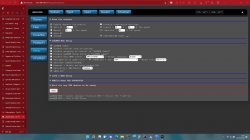
Im running Evilnat 4.88 if that matters. My webman config is attached
 

Attachments

  • Screenshot 2022-01-10 140006.jpg
    Screenshot 2022-01-10 140006.jpg
    688.7 KB · Views: 291
When i run PS2 Classics games that i have built with the tool on a Phat PS3, they run fine but the system fans are never increased leading to the temps to reach 72 and at one time it went to 82 and blinked red and then back to green and max fan speed. It typically idles around 66 and i have put new themal paste but its always been a space heater.

On my Slim it seems to also not control the fan but the temps are much lower and max at like 64

Im running Evilnat 4.88 if that matters. My webman config is attached
Have you changed you're thermal paste? 60% fan usage while running ps2 games is a bit much if only staying as cool as you're describing. I'd say change that out if you haven't already and clean out all the dust. That would be a good start if you haven't done it.
 
When i run PS2 Classics games that i have built with the tool on a Phat PS3, they run fine but the system fans are never increased leading to the temps to reach 72 and at one time it went to 82 and blinked red and then back to green and max fan speed. It typically idles around 66 and i have put new themal paste but its always been a space heater.

On my Slim it seems to also not control the fan but the temps are much lower and max at like 64

Im running Evilnat 4.88 if that matters. My webman config is attached
I assume that your console is overheating a little anyway & that the fan noise must be quite high when you play games in general.
You might need to change the paste & pads however for the time being if you want the same kind of cooling on ps2 classics as on ps3 games you should
1. Check at what speed percentage the fan runs on average when you play a PS3 game after 15mn.
2. Use that percentage for the ps2 emulator manual setting in webman temp config.

If I were you, I would first use the average fan speed gotten with a demanding ps3 game like TLOUS, GT6.. so that you have a higher ceiling value, you can always tweak it down later.
 
@yukimi Kazari If you're launching the PS2 Classics from the direct icon created by the PS2 Classics PKG, the PS2 fan settings in webMAN MOD are ignored.

webMAN MOD only can set the fan speed for games mounted through the plugin. In other words, the .BIN.ENC must be copied to the folder /dev_hdd0/PS2ISO and mount the game from webMAN Games menu.

If you plan to play PS2 Classic games installed through PKG, I recommend to set the fan to manual speed using SELECT+UP/DOWN before launch the game.
 
@yukimi Kazari If you're launching the PS2 Classics from the direct icon created by the PS2 Classics PKG, the PS2 fan settings in webMAN MOD are ignored.

webMAN MOD only can set the fan speed for games mounted through the plugin. In other words, the .BIN.ENC must be copied to the folder /dev_hdd0/PS2ISO and mount the game from webMAN Games menu.

If you plan to play PS2 Classic games installed through PKG, I recommend to set the fan to manual speed using SELECT+UP/DOWN before launch the game.

Really? I didn't know that, guess it's a good thing I only use webMAN. Again thank you for all your knowledge
 
Really? I didn't know that, guess it's a good thing I only use webMAN. Again thank you for all your knowledge

Yes. When you mount the PS2 game through webMAN MOD, it changes the fan speed to manual.

However, when the PS2 game is launched from disc or from the direct icon created by the PKG, the game is started before webMAN MOD can detect the game. In this case, the fan speed remains at the last fan speed selected when it was idle on XMB. This speed normally is too low for the CPU demanded by the ps2 emulator and results in overheating the system.

If the fan speed is set manually before start the PS2 game, the overheating should not occur at 60%.
 
Yes. When you mount the PS2 game through webMAN MOD, it changes the fan speed to manual.

However, when the PS2 game is launched from disc or from the direct icon created by the PKG, the game is started before webMAN MOD can detect the game. In this case, the fan speed remains at the last fan speed selected when it was idle on XMB. This speed normally is too low for the CPU demanded by the ps2 emulator and results in overheating the system.

If the fan speed is set manually before start the PS2 game, the overheating should not occur at 60%.

Nice to know but luckily I'll never use it. Been spoiled with full BC until since launch day. Love the slims form factor but I'll always use my half ton brick BC unit
 
@yukimi Kazari If you're launching the PS2 Classics from the direct icon created by the PS2 Classics PKG, the PS2 fan settings in webMAN MOD are ignored.

webMAN MOD only can set the fan speed for games mounted through the plugin. In other words, the .BIN.ENC must be copied to the folder /dev_hdd0/PS2ISO and mount the game from webMAN Games menu.

If you plan to play PS2 Classic games installed through PKG, I recommend to set the fan to manual speed using SELECT+UP/DOWN before launch the game.

Thanks man i did not know about SELECT UP/DOWN, I notice now what you mean when i put in "Castle Shinigami 2" physical disk i hear the fans kick up like they should but when i launch the PKG version it does not.
 
Have you changed you're thermal paste? 60% fan usage while running ps2 games is a bit much if only staying as cool as you're describing. I'd say change that out if you haven't already and clean out all the dust. That would be a good start if you haven't done it.
Yes i have thoroughly cleaned it to the point of disassembling the fan cage. I got it from my dad so it only has like 60Days of uptime but is a day one model so its up there in age. I did not use my best thermal paste in the world, Im using Insignia thermal paste cause that's the only thing i can get locally.

I am also doing a "no no" and its inside my entertainment stand but i put a fan in there to force the air out and to the side to prevent any heat from building up.

The only time the console has gotten hot has been PS2 games, I just finished metal gear rising and it stayed at 66 and 28% fan speeds.
 
Thanks man i did not know about SELECT UP/DOWN, I notice now what you mean when i put in "Castle Shinigami 2" physical disk i hear the fans kick up like they should but when i launch the PKG version it does not.
Exactly what Aldo explained, thanks @aldostools ;-)
wMM is not well suited to set the manual fan setting for ps2 emu unless it is directly involved in the mounting/launching of that game.
In your case, to set the fan properly when using directly a ps2 classics XMB icon (pkg installation) to launch a game, afaik either of these 4 things could do the trick

1. A vsh sprx plugin hook to set up the fan. When the XMB icon is clicked, a sprx plugin, well, technically speaking several sprx plugins are involved but let's keep this simple, processes the game launch request, in theory that code could be hooked to execute custom code that sets up the fan. This would be a userland only solution, not the best option imho but it could work. Another such hook would probably be needed to restore the fan settings on emu exit, no doubt another sprx plugin (or vsh.self) routine can be identified & hooked for that purpose.
2. A kernel hook to set up the fan, same as above but the hook resides in kernel (in Cobra or specific kernel payload loaded by Cobra on boot), & executes when the emu game launch lv2 kernel syscall is called.
Original fan settings could get restored with a hook on the lv2 function that brings vsh back to the foreground or something along those lines.
That's probably the easiest of the 4 options to implement because Cobra/Mamba have everything ready, syscall or lv2 function hooking is kinda trivial to do, dozens of hooks are already in place, that is precisely what Cobra (or Mamba) does.
3. A ps2 emu patch & payload to have the ps2 emu deal with the fan stuff independently. I must assume this option will also require some decent ps2 emu background knowledge & reverse engineering.
4. A syscon mod to avoid using kernel based fan payloads altogether. Possibly the best solution overall but for the moment, afaik, only the earliest phat console models have a syscon mod readily available, it appears to give good results but it is still considered experimental. It will probably take a while before all syscon models are dumped, analysed & syscon mods are made to support all models & before the mods are deemed both efficient & safe enough to be used casually.

But unfortunately those are not things you can improvise as a user, you would need to write some C code to implement any of those things.

 
Last edited:
Exactly what Aldo explained, thanks @aldostools ;-)
wMM is not well suited to set the manual fan setting for ps2 emu unless it is directly involved in the mounting/launching of that game.
In your case, to set the fan properly when using directly a ps2 classics XMB icon (pkg installation) to launch a game, afaik either of these 4 things could do the trick

1. A vsh sprx plugin hook to set up the fan. When the XMB icon is clicked, a sprx plugin, well, technically speaking several sprx plugins are involved but let's keep this simple, processes the game launch request, in theory that code could be hooked to execute custom code that sets up the fan. This would be a userland only solution, not the best option imho but it could work. Another such hook would probably be needed to restore the fan settings on emu exit, no doubt another sprx plugin (or vsh.self) routine can be identified & hooked for that purpose.
2. A kernel hook to set up the fan, same as above but the hook resides in kernel (in Cobra or specific kernel payload loaded by Cobra on boot), & executes when the emu game launch lv2 kernel syscall is called.
Original fan settings could get restored with a hook on the lv2 function that brings vsh back to the foreground or something along those lines.
That's probably the easiest of the 4 options to implement because Cobra/Mamba have everything ready, syscall or lv2 function hooking is kinda trivial to do, dozens of hooks are already in place, that is precisely what Cobra (or Mamba) does.
3. A ps2 emu patch & payload to have the ps2 emu deal with the fan stuff independently. I must assume this option will also require some decent ps2 emu background knowledge & reverse engineering.
4. A syscon mod to avoid using kernel based fan payloads altogether. Possibly the best solution overall but for the moment, afaik, only the earliest phat console models have a syscon mod readily available, it appears to give good results but it is still considered experimental. It will probably take a while before all syscon models are dumped, analysed & syscon mods are made to support all models & before the mods are deemed both efficient & safe enough to be used casually.

But unfortunately those are not things you can improvise as a user, you would need to write some C code to implement any of those things.

Actually Cobra 8.3 has the kernel hook (solution #2) already implemented.
https://github.com/Evilnat/Cobra-PS...RMAL/CEX/SRC/stage2/storage_ext.c#L2734-L2736

It requires to have PS2 fan speed configured in CFW Tools in order to set the fan speed when a PS2 game is launched directly without webMAN MOD involved.

I haven't tested that code, but I guess Evilnat tested it when he added it to Cobra.
 
Actually Cobra 8.3 has the kernel hook (solution #2) already implemented.
https://github.com/Evilnat/Cobra-PS...RMAL/CEX/SRC/stage2/storage_ext.c#L2734-L2736

It requires to have PS2 fan speed configured in CFW Tools in order to set the fan speed when a PS2 game is launched directly without webMAN MOD involved.

I haven't tested that code, but I guess Evilnat tested it when he added it to Cobra.
Oh, I have not yet used Cobra 8.3 & I didn't even realise Nat had added this already..
Well then that is something that should be tried, it should solve the OP's issue in theory..
 
Have not figured out much of what Cobra is or can do.
If you are still using Evilnat 4.88.2 CFW, you should try what Aldo just mentioned, use the CFW Tools entries to get Cobra to set up the fan for you instead of wMM, you may or may not need to disable wMM fan control altogether though, I am not sure I haven't used this feature yet.
 
Last edited:
Yes i have thoroughly cleaned it to the point of disassembling the fan cage. I got it from my dad so it only has like 60Days of uptime but is a day one model so its up there in age. I did not use my best thermal paste in the world, Im using Insignia thermal paste cause that's the only thing i can get locally.

I am also doing a "no no" and its inside my entertainment stand but i put a fan in there to force the air out and to the side to prevent any heat from building up.

The only time the console has gotten hot has been PS2 games, I just finished metal gear rising and it stayed at 66 and 28% fan speeds.
The 66 at 28% fan speed doesnt looks very realistic, i guess you quitted the game before checking temperatures, this always reduces a bit the results, for a accurate check you need to keep an eye at the temperatures while playing to try to catch one of the "temperature peaks" from the RSX that happens in specific points of the game whith big graphics workload

Anyway, if you want an easy and failproof solution you could buy one of those and forget about the overheating problems forever
https://www.psx-place.com/threads/temps-after-delid.36003/#post-318168
 
Back
Top