PS2 Controller Remapper by pelvicthrustman

PS2 PS2 Controller Remapper by pelvicthrustman 1.20

jolek

Senior Member
icon.png


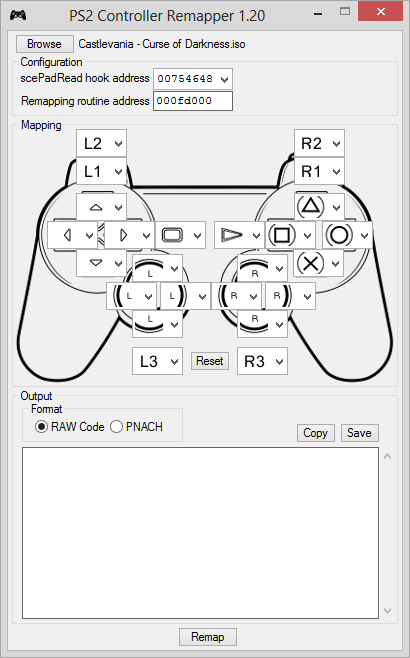
PS2 Controller Remapper


PS2 Controller Remapper is a tool designed to arbitrarily remap a PS2 game's controls using cheat codes.

Remapping codes can be used on either a real PS2 or PCSX2.

This will not work with all games but compatibility should be better than 90% based on analysis of about 200 games.

Thanks goes out to @No.47 for both suggesting the project and doing a lot of testing for me.

How to use it
Opening an ISO
  • Drag and drop the .iso/.img/.bin file or click 'Browse'.
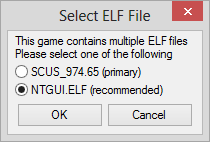
  • If a game contains multiple ELFs the following window will appear
    preview110_2.png

    When it is possible to automatically tell which ELF is the main ELF then that ELF will be pre-selected.
    If no ELF is automatically selected then select one. Press "Ok" to load the ELF.
Opening an ELF
  • ELF files can be found using ELF Extractor
  • Drag and drop the ELF file or click 'Browse'.
Remapping
  • Select the input to change and scroll through the list of inputs to select what to replace it with
  • PS2 Controller Remapper makes sure that every input can be mapped to only one other input - this is by design
Options
  • Selecting the 'RAW Code' radio button generates codes in unencrypted 'RAW' PS2 cheat code format - compatible with ps2rd and Codebreaker 9.3+
  • Selecting the 'PNACH' option generates codes in PCSX2 cheat code format (also compatible with PS2 Patch Engine and ps2rdmod)
Finally
  • Hit the 'Remap' button, copy or save the code and enjoy!


General FAQ
  • Received error "File is not a valid ELF or CD/DVD image"
    The file is not supported or is broken.
  • Received error "Unable to locate controller routine"
    The selected ELF is not remappable.
  • "The code did not change the controls or screwed up the controls"
    Try the following
    • In the 'scePadRead hook address' drop down try selecting a different address, if there are no others or the others do not work please report the game here.
  • "Why are the codes so long?"
    See the Technical FAQ.
  • "Can you explain how to use cheat codes to me?"
    No - Google is your friend.
  • "I have not used this program, is it compatible with game XXX?"
    Try it and find out.


Technical FAQ
  • "Does this work with scePad2Read games"
    Yes.
  • "Can this be made into an ELF hack"
    Remapping codes can be applied directly to disc images using PS2 Patch Engine.
  • "Why are the codes so long?"
    The codes are long because PS2 Controller Remapper dynamically writes a function to process the controller's data structure to match the specified remapping, the functions generated are extremely well optimized and in most cases can't be made shorter.
  • "Does this impact game performance?"
    In my testing - no, although it does slow down the controller's read function considerably. Fortunately a few extra cycles are generally not a big deal for a 290+mhz CPU.
  • "Are there any known incompatibilities?"
    Yes
    • Controls will not be remappable in digital (PS1) mode, some games begin in digital mode by defaut (Ridge Racer V). Enabling analog mode by pressing the "mode" button will allow the controls to be remapped properly.
    • Some games may load libpad or libpad2 from an IRX - in these cases ELF analysis can't locate the scePadread/scePad2Read function.
    • There may still be some versions of libpad which are not profiled - if you have a ton of games lying around (more than 100) let me know, you may be able to help me discover new versions and increase compatibility.

Version 1.20 includes the following
- Code generation engine completely rewritten

- Codes are MUCH shorter now (at or near theoretical code length minimums for most remappings)
- Technically more accurate button to button remapping (digital and pressure data are copied separately)
- Replaced all branches with MIPS IV conditional moves (faster/more efficient/really cool)
- Fixed ELF selection dialog potentially displaying incorrect recommended ELF file name
- Fixed potential crash on reading corrupt or damaged image file
- Fixed error reading ELFs with very large program header tables (Onimusha series)
- Fixed not closing image files after reading
- Codes are no longer generated if no remapping is specified


-Releases-
Code:
1.20 - Current
1.10 - Image Support/Optimizations
1.00 - Initial Release
 

Attachments

Last edited:
Hello. Thank you for your hard work. I tried to change the accel and brake buttons to L2 and R2 for gran turismo 4 without success. NFS works great. Is there any solution? Tried many options before posting here. GT4 SCUS_973.28
 
It won't work with GT4, because of the packed executable. Not to mention, you can swap the controls in GT4 settings.
 
Thanks a lot. I had a suspicion that inside the image there is also an image with gt4. For me, it makes sense to swap the axes of the right stick with the axes L2 and R2 for dualshock 4
 
Hi. I'm trying to remap controls For "Gungriffon Blaze", by inverting Left and Righ analog sticks.
I had no error while doing all the process but it seems the controls have not been remapped. Nothing has changed.

I've already done exactly the same process with "Fur Fighters", and it worked like a charm.

Any clues?
 
I know this tool is a little on the older side and I have to say it works well. But is it possible to duplicate inputs through the code? I would like to map X to the thumbstick without losing X as a button. Basically I want to be able to hit "X" and "push on the thumbstick" to press X. Or or does all buttons need to be available?
 
@jolek
I gotta say really easy to use software!

I have an issue I want trying to solve regarding controllers and the PS2onPS4-emulator for a PS2 game, and I thought if there is someone who knows this stuff it's probably you.

The problem is that emulator is flawed doesn't allow reading from controllers that are mapped to multitap in port 2, i.e. controller 2A/2B/2C/2D (which some games requires).

This has been solved by Kozarovv using memory patches to utilize multitap 1 instead, but he's not active her anymore and I can't ask him how and what method he used to find these offsets.

The patches in the spoilers below takes the controller inputs and redirects them back to multitap 1, something like this:
2A -> 1B,
2B -> 1C,
2C -> 1D


What methods would you use to solve this problem?
Thanks for any advice!

Example #1:
Def Jam™ Fight for N.Y. (4 Player fix)
Comment:
4 player working. All thanks to Kozarovv for his multi-tap patches. Tested quite a bit, works great.

-- Def Jam: Fight for NY (SLUS-21004)
-- Multi-Tap fix by Kozarovv
-- ported to PS4 by Stayhye
-- emu used=aofa

CLI
--mtap1=always
--mtap2=always​

LUA
apiRequest(0.1)

local eeObj = getEEObject()

local mtap_fix = function()
-- Force controllers detection
eeObj.WriteMem32(0x32F3EC,0x00000000)
-- Manually count to 8...
eeObj.WriteMem32(0x1EADFC,0x24100000)
eeObj.WriteMem32(0x1EAE04,0x26100001)
-- Rearrange controllers from port 2 to 1
eeObj.WriteMem32(0x0fff00,0x10040007)
eeObj.WriteMem32(0x0fff04,0x28b90003)
eeObj.WriteMem32(0x0fff08,0x54190001)
eeObj.WriteMem32(0x0fff0c,0x24a50001)
eeObj.WriteMem32(0x0fff10,0x54190001)
eeObj.WriteMem32(0x0fff14,0x24040000)
eeObj.WriteMem32(0x0fff18,0x080CBBD0)
eeObj.WriteMem32(0x0fff1c,0x00000000)
eeObj.WriteMem32(0x0fff20,0x54050001)
eeObj.WriteMem32(0x0fff24,0x24040001)
eeObj.WriteMem32(0x0fff28,0x54050001)
eeObj.WriteMem32(0x0fff2c,0x24a5ffff)
eeObj.WriteMem32(0x0fff30,0x080CBBD0)
eeObj.WriteMem32(0x0fff34,0x00000000)
eeObj.WriteMem32(0x32F36C,0x0c03ffc0)
end

emuObj.AddVsyncHook(mtap_fix)​

Example #2:
Urban Reign™ NTSC (4 Player Fix)
Comment:
Big thanks to Kozarovv for this one! Finally 4 player multi-tap works! Apparently the emulator is flawed in how it handles multi-tap when it involves "--mtap2". All functions for 2A, 2B, 2C, 2D must be redirected to ports on multi-tap 1.

-- Urban Reign NTSC (SLUS-21209)
-- Multitap fix by Kozarovv
-- ported to PS4 by Stayhye
-- emu used=kof98um

CLI
--mtap1=Always​

LUA
apiRequest(0.1)

local gpr = require("ee-gpr-alias")

local emuObj = getEmuObject()
local eeObj = getEEObject()
local gsObj = getGsObject()


emuObj.PadSetLightBar(0, 45,65,55)
emuObj.SetDeinterlace(true)
emuObj.SetDisplayAspectWide()


local WS = function()
-- Init first mtap
eeObj.WriteMem32(0x12BA88,0x24040000)
-- Read data from 1B port when 2A is requested
eeObj.WriteMem32(0x0ffc00,0x10040005)
eeObj.WriteMem32(0x0ffc04,0x00000000)
eeObj.WriteMem32(0x0ffc08,0x14050003)
eeObj.WriteMem32(0x0ffc10,0x24040000)
eeObj.WriteMem32(0x0ffc14,0x24050001)
eeObj.WriteMem32(0x0ffc18,0x080c5cbd)
eeObj.WriteMem32(0x0ffc1c,0x24030070)
eeObj.WriteMem32(0x3172ec,0x0803ff00)

emuObj.ThrottleMax()
end

emuObj.AddVsyncHook(WS)

emuObj.SetGsTitleFix( "globalSet", "reserved", { workLoadThreshold = 100000} )
emuObj.SetGsTitleFix( "globalSet", "reserved", { waveThreshold = 90000} )
emuObj.SetGsTitleFix( "ignoreAreaUpdate", 0, { } )​
 
Ah, close but no cigar :biggrin2:
Tried remapping The Shooting Vol 37 Double Shienryu...... it's a shoot 'em up that only uses the d-pad (not sure why, not a great choice). There's two games included. The older game is the one in question (SHIEN1.ELF)
It did work sort of. But the stick deadzones are non-existent so it's not controllable at all! :biggrin2:
There's no way to modify deadzones that I know of. Still, really cool tool!! It's amazing that this is possible at all. Even though my use-case is too ambitious, the amount of useful ways you can use this seems really great
 
Back
Top