
You are using an out of date browser. It may not display this or other websites correctly.
You should upgrade or use an alternative browser.
You should upgrade or use an alternative browser.
ps2 doesnt let me go to browser
- Thread starter chris111
- Start date

 button.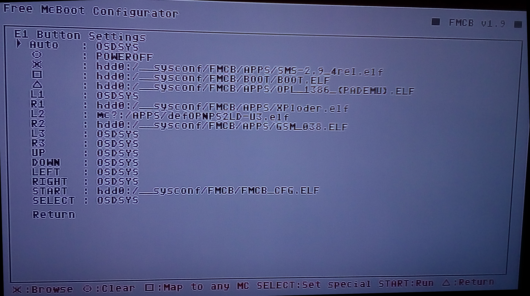
 button a few times.
HWNJ
Developer
"Parental control"?It sounds like it's been setup with parental control.
What is this? PS3?
-If it displays MATRIX and then goes to OPL, then you have DEV1 enabled... this will be a little bit tricky to change... let me know if that's the caseHow come when I start my ps2 it does not let me go to browser?IT just continues to opl...
-If it displays MATRIX, then Free McBoot and then goes to OPL, then you have OPL set as AUTO, to change it do as @jolek said above
-If it displays Free McBoot and then goes to OPL, then you have OPL set as AUTO, to change it do as @jolek said above

P10God
Member
"Parental control"?
What is this? PS3?
Child Proof OPL. Same same.
HWNJ
Developer
Not related to the issueChild Proof OPL. Same same.
P10God
Member
Could've been.Not related to the issue
HWNJ
Developer
Not even close. Could never have been...Could've been.
P10God
Member
Not going to get into a flame war with a seasoned member of the forums and a developer, but if you inject OPL onto your memory card, the PS2 then fires up in Child Proof mode, (I've done it countless times over the past 10 years for my kids).Not even close. Could never have been...
So, yes, it could've been that.
Luckily it was for the OP, but lots of people buy Memory Cards from unknown sources, with no idea how FMCB has been installed.
HWNJ
Developer
That will only do if you have DEV1 direct to OPL (at BOOT/BOOT.ELF) or have FMCB directly configured to AUTO launch OPL (which is what we said above). Hence, not related to OPL or CP mode.Not going to get into a flame war with a seasoned member of the forums and a developer, but if you inject OPL onto your memory card, the PS2 then fires up in Child Proof mode, (I've done it countless times over the past 10 years for my kids).
Similar threads
-
PS2 Transferring ISOs from PC to PS2 hardrive without removing the latter from the console?
- Started by latinking
- Replies: 1
-
-

-