
PS2 Pnacher (Linux)

PS2 PS2 Pnacher (Linux) 1.0

cpta320

Member
Hello all!

I did made my switch to the Linux world some time ago. I was surprised to see how much of the original tools here actually do work here (with wine or having a native port). However one tool I mainly used to apply widescreen patches onto PS2 ISOs (PS2 Patch Engine as seen here: https://www.psx-place.com/resources/ps2-patch-engine-by-pelvicthrustman.694/) does not work, at all. So I thought I'd just write my own variant.

Introducing PS2 Pnacher.
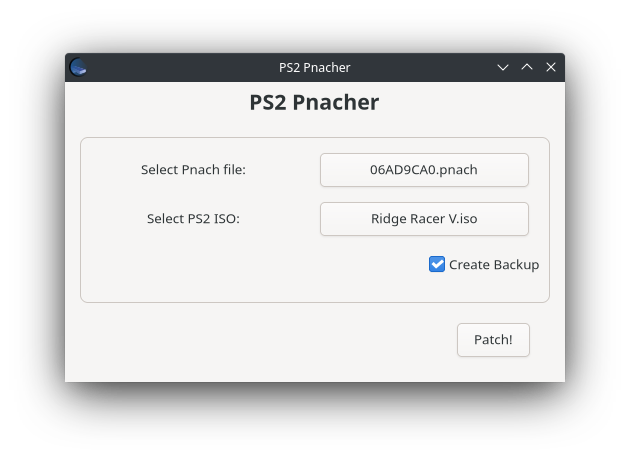
ps2pnacher_screenshot.png

Simply select one Pnach File and the corresponding PS2 ISO and hit Patch! A backup file of the ISO will be created in the same folder. NOTE: If you using the Flathub release check if the backup file was left behind as a hidden file in said directory.

The app can be downloaded from Flathub or you can build and install yourself with the following commands:

Code:
git clone https://github.com/Snaggly/PS2_Pnacher.git
cd PS2_Pnacher
cmake . -DCMAKE_BUILD_TYPE=Release -DCMAKE_INSTALL_PREFIX=/usr
sudo make install
 
Could You attach *.flatpak? That's site doesn't allow to download packages and also in release section on github You didn't put it there. I'm mostly Windows user and in Linux case mostly fan of *.appimage. ;)
 
This isn't how Flatpaks are supposed to be distributed... You will be able to install that directly from your Software Center or AppStore, as long as you have Flatpak support on your distro (although most do, I think..) If you do not see fit to install that Flatpak variant you can still just copy paste the few commands into your terminal and have it installed that way :P
 
You can run flatpak package locally, You don't need any network infrastructure... It is how all of them are designed (AppImage, Flatpak, Snappy) to be free from repositories and standard packaging Linux software to make it (at least in theory...) independent.
 
Right.. I was considering the convenience of having one central place to download your stuff from. So I took a bit more time into reading how these *.flatpak bundles are being generated and uploaded one into my GitHub release (https://github.com/Snaggly/PS2_Pnacher/releases/latest/download/PS2_Pnacher.flatpak).
I admit I find that a little weird, because I never see *.flatpak files around :shrug:

To be honest I was first wanting to release that as an AppImage but dropped the idea after going from errors to errors with alone the example build on their Wiki... I might want to try that one day again once I figure what keeps messing up.
 
Thanks.

Yeah, their docs are not very informative. Once I wanted bundle cli app and stuck on making loader (or whatever they call it). However, AppImage is most portable solution (if made correctly) than other two (or other one, as Cannonical moved to Flatpak, leaving Snappy).
 
Thanks.

Yeah, their docs are not very informative. Once I wanted bundle cli app and stuck on making loader (or whatever they call it). However, AppImage is most portable solution (if made correctly) than other two (or other one, as Cannonical moved to Flatpak, leaving Snappy).

Hi I gave another shot packaging an AppImage. Looks like their guides were updated over the year and I got to know a new packaging tool called linuxdeploy. Things have gotten much easier apparently because I finally were able to generate a working AppImage now :D
You'll find that AppImage in the release tab. I cannot put a link here because apparently the forum thinks I'm sending porn or something.

Greets!
 
160MiB (~40MiB compressed) of libs for 80KiB app. :D
Maybe there is possible of some optimization? I didn't trace which are needed for elf but I believe not all are necessary.

Thanks anyway.

About links: after some post count (10?), limits will be lifted.
 
Tried AppImage and it doesn't work for me (Linux Mint with Cinnamon 64bit v20.1):
Code:
mint@mint:~$ '/home/mint/PS2Pnacher v1.0.AppImage'
/tmp/.mount_PS2PnaF2NKQE/AppRun.wrapped: /lib/x86_64-linux-gnu/libc.so.6: version `GLIBC_2.33' not found (required by /tmp/.mount_PS2PnaF2NKQE/usr/bin/../lib/libgtk-3.so.0)
/tmp/.mount_PS2PnaF2NKQE/AppRun.wrapped: /lib/x86_64-linux-gnu/libc.so.6: version `GLIBC_2.33' not found (required by /tmp/.mount_PS2PnaF2NKQE/usr/bin/../lib/libgio-2.0.so.0)
/tmp/.mount_PS2PnaF2NKQE/AppRun.wrapped: /lib/x86_64-linux-gnu/libc.so.6: version `GLIBC_2.33' not found (required by /tmp/.mount_PS2PnaF2NKQE/usr/bin/../lib/libtracker-sparql-3.0.so.0)
/tmp/.mount_PS2PnaF2NKQE/AppRun.wrapped: /lib/x86_64-linux-gnu/libc.so.6: version `GLIBC_2.33' not found (required by /tmp/.mount_PS2PnaF2NKQE/usr/bin/../lib/libxkbcommon.so.0)
/tmp/.mount_PS2PnaF2NKQE/AppRun.wrapped: /lib/x86_64-linux-gnu/libc.so.6: version `GLIBC_2.33' not found (required by /tmp/.mount_PS2PnaF2NKQE/usr/bin/../lib/libmount.so.1)
/tmp/.mount_PS2PnaF2NKQE/AppRun.wrapped: /lib/x86_64-linux-gnu/libc.so.6: version `GLIBC_2.33' not found (required by /tmp/.mount_PS2PnaF2NKQE/usr/bin/../lib/libtiff.so.5)
/tmp/.mount_PS2PnaF2NKQE/AppRun.wrapped: /lib/x86_64-linux-gnu/libc.so.6: version `GLIBC_2.33' not found (required by /tmp/.mount_PS2PnaF2NKQE/usr/bin/../lib/libicuuc.so.70)
/tmp/.mount_PS2PnaF2NKQE/AppRun.wrapped: /lib/x86_64-linux-gnu/libc.so.6: version `GLIBC_2.33' not found (required by /tmp/.mount_PS2PnaF2NKQE/usr/bin/../lib/libsqlite3.so.0)
/tmp/.mount_PS2PnaF2NKQE/AppRun.wrapped: /lib/x86_64-linux-gnu/libc.so.6: version `GLIBC_2.33' not found (required by /tmp/.mount_PS2PnaF2NKQE/usr/bin/../lib/libxml2.so.2)
/tmp/.mount_PS2PnaF2NKQE/AppRun.wrapped: /lib/x86_64-linux-gnu/libc.so.6: version `GLIBC_2.33' not found (required by /tmp/.mount_PS2PnaF2NKQE/usr/bin/../lib/libblkid.so.1)
/tmp/.mount_PS2PnaF2NKQE/AppRun.wrapped: /lib/x86_64-linux-gnu/libc.so.6: version `GLIBC_2.32' not found (required by /tmp/.mount_PS2PnaF2NKQE/usr/bin/../lib/liblzma.so.5)
/tmp/.mount_PS2PnaF2NKQE/AppRun.wrapped: /lib/x86_64-linux-gnu/libc.so.6: version `GLIBC_2.32' not found (required by /tmp/.mount_PS2PnaF2NKQE/usr/bin/../lib/libsystemd.so.0)
/tmp/.mount_PS2PnaF2NKQE/AppRun.wrapped: /lib/x86_64-linux-gnu/libc.so.6: version `GLIBC_2.33' not found (required by /tmp/.mount_PS2PnaF2NKQE/usr/bin/../lib/libsystemd.so.0)
/tmp/.mount_PS2PnaF2NKQE/AppRun.wrapped: /lib/x86_64-linux-gnu/libc.so.6: version `GLIBC_2.33' not found (required by /tmp/.mount_PS2PnaF2NKQE/usr/bin/../lib/libcap.so.2)
/tmp/.mount_PS2PnaF2NKQE/AppRun.wrapped: /lib/x86_64-linux-gnu/libc.so.6: version `GLIBC_2.33' not found (required by /tmp/.mount_PS2PnaF2NKQE/usr/bin/../lib/libgcrypt.so.20)

I have unpacked the elf (*.AppImage|usr\bin\ps2pnacher") and checked his dependencies via "readelf -d " (so the rest probably aren't needed and just bloats a lot the package):
Code:
 0x0000000000000001 (NEEDED)  Shared library: [libgtkmm-3.0.so.1]
 0x0000000000000001 (NEEDED)  Shared library: [libatkmm-1.6.so.1]
 0x0000000000000001 (NEEDED)  Shared library: [libgdkmm-3.0.so.1]
 0x0000000000000001 (NEEDED)  Shared library: [libgiomm-2.4.so.1]
 0x0000000000000001 (NEEDED)  Shared library: [libgtk-3.so.0]
 0x0000000000000001 (NEEDED)  Shared library: [libgdk-3.so.0]
 0x0000000000000001 (NEEDED)  Shared library: [libz.so.1]
 0x0000000000000001 (NEEDED)  Shared library: [libatk-1.0.so.0]
 0x0000000000000001 (NEEDED)  Shared library: [libcairo-gobject.so.2]
 0x0000000000000001 (NEEDED)  Shared library: [libgio-2.0.so.0]
 0x0000000000000001 (NEEDED)  Shared library: [libpangomm-1.4.so.1]
 0x0000000000000001 (NEEDED)  Shared library: [libglibmm-2.4.so.1]
 0x0000000000000001 (NEEDED)  Shared library: [libcairomm-1.0.so.1]
 0x0000000000000001 (NEEDED)  Shared library: [libsigc-2.0.so.0]
 0x0000000000000001 (NEEDED)  Shared library: [libpangocairo-1.0.so.0]
 0x0000000000000001 (NEEDED)  Shared library: [libpango-1.0.so.0]
 0x0000000000000001 (NEEDED)  Shared library: [libharfbuzz.so.0]
 0x0000000000000001 (NEEDED)  Shared library: [libcairo.so.2]
 0x0000000000000001 (NEEDED)  Shared library: [libgdk_pixbuf-2.0.so.0]
 0x0000000000000001 (NEEDED)  Shared library: [libgobject-2.0.so.0]
 0x0000000000000001 (NEEDED)  Shared library: [libglib-2.0.so.0]
 0x0000000000000001 (NEEDED)  Shared library: [libiso9660++.so.0]
 0x0000000000000001 (NEEDED)  Shared library: [libiso9660.so.11]
 0x0000000000000001 (NEEDED)  Shared library: [libcdio++.so.1]
 0x0000000000000001 (NEEDED)  Shared library: [libcdio.so.19]
 0x0000000000000001 (NEEDED)  Shared library: [libstdc++.so.6]
 0x0000000000000001 (NEEDED)  Shared library: [libm.so.6]
 0x0000000000000001 (NEEDED)  Shared library: [libgcc_s.so.1]
 0x0000000000000001 (NEEDED)  Shared library: [libc.so.6]
AppImage package missing:
Code:
libgdk-3.so.0
libz.so.1
libharfbuzz.so.0
libglib-2.0.so.0
libstdc++.so.6
libm.so.6
libgcc_s.so.1
libc.so.6
 
Hello thank you for letting me know! This is very unfortunate that things did not just work out this easy... I tried linuxdeploy with the gtk plugin to automatically bundle me the AppImage... Honestly, I've not had a good time trying to package that Application for a Linux OS. On Windows I know it's just that exe and few dlls I can just ship with, it's just easier to work with. And people wonder why they isn't much support for Linux going.

I will give that another shot in future...
 
I've tried few times to make AppImage and always failed, so "I know how You feel bro". ;p

Anyway, normally software is distributed in Linux in packages (like i.e *.deb for Debian family, *.rpm, *.yum etc.) which are managed by packaging system (aptget, apptidute etc.) and resolving dependency issues. Packages like AppImage, Snappy and Flatpack are in theory portable, independent solution, but in reality this lie on creator knowledge and often they are not. Lack of noobie documentation and easy to use tools not help in this mission. I'm a fan of AppImage because it is not dependent of any special module in background and additional tools but must be created properly (i.e I always using Krita on Linux in AppImage format, like some other tools from KDE to not install tons of libs from KDE while my system is build around Gnome3).

Personally I'm compiling apps from outside official repositories as normal ELFs, checking what libs they needs and if needs something which I must install, I retrieve those libraries and put in $appdir (later checks on live environment if works, some libs needs another libs, and another libs another...) - it is a way how this shouldn't be done but I don't give a shit. If something stop working, quicker for me is to boot live session of older Mint from *.iso than thinking of how to fix the compiling and/or lib issue. ;p

Very popular in Linux are Python apps because every distro have Python 2 and/or 3 already installed. Some prefers Java RE which is covering by "Java Ice something". And some people choosing QT which as I heard is easy to maintain for both Windows and Linux world.

On Windows I know it's just that exe and few dlls I can just ship with, it's just easier to work with. And people wonder why they isn't much support for Linux going.
Linux is endlessly evolving (and remember it is server based OS in the first place) while Windows stick to ancient code to preserve backward compatibility (i.e in Windows 11 is still Edge on Trident, Edge on Webkit and... stripped IE11 ;)), something not really needed in most of Linux (desktops are just tiny percentage of where it is used). Google knows that and they decided to put their OS on Linux kernel but on custom userland which in similar way like Windows, support old solutions to keep backward compatibility for some time.

You can distribute software also in "Windows way" on Linux, as I described above (even linked static but that's not the good idea).
 
Last edited:
Back
Top