PS2 PS2 Slim with OPL 1.1.0: Using the Eye Toy Cam

I'm missing something... I set up a P2P connection between my PC and PS2 (this means I always have to turn on my PC to play)... this way the PC won't be able to be online to the outside world (only if I re-enable automatic connection with DHCP).... where will the disc with all the games be connected? On a LAN network?
 
Not necessarily. You could rule out a duplicate IP address by changing your static IP, but the first thing is to connect your PS2 correctly.
The connection you'll be making is definitely a LAN because the games are on a local network (your disc is on a PC server at home).
 
I don't follow you in this last statement....in any case, I understand that the static IP setting on the server must be removed because it is incorrect...
 
The static IP address you assigned to your PC can be anything and will always be correct. The problem arises when you try to access the internet using DHCP on your router, which is responsible for automatically assigning IP addresses to connecting devices.

Edit: I'm currently using the same static IP address I mentioned and replying to this message. You might be experiencing some conflicts with your addresses, but as I said, the first thing to do is connect to your PS2.
 
Last edited:
As long as it's not the same IP address as the PS2's, there's no problem, and it's within the same range.

That is, like this:

PC:192.168.1.1
PS2:192.168.1.2

and not like this:

PC:192.168.1.256
PS2:192.168.1.2
 
On the server that is now your PC:
Create a folder in the root directory called "PS2" or "PS2SMB" (for example) and place all the OPL folders (DVD, CD, ART, POPS, etc.) inside it.
This way, the folder you will share will be called "PS2" or "PS2SMB".
 
Okay, we'll check that now.

Start OPL and access the network settings.

Configure the parameters as follows.

PS2
IP Address Type : Static
IP Address: the IP address you assigned to your PS2

SMB Server
Address Type: IP
Address: the IP address you assigned to your PC.
Port: the port you chose in OPL Server (default 1024 recommended).
Share:The name of the folder you shared (for example PS2 or PS2SMB).

Check if the games appear.
 
error 300: cannot connect to smb server :mad::topsy turvy::upset:

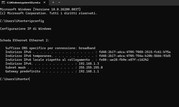
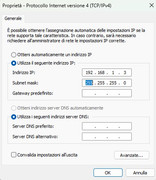
Settings on PC


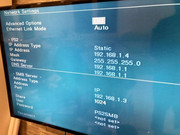
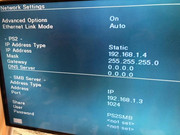
Settings on OPL


In the "Configuring Open ps2 Loader on PS2 console" (from 30 to 36 point) the setting are on UlaunchElf......then on OPL......
 
You don't need to assign a gateway because it's a P2P connection on a LAN. I thought you meant the server's IP address when you said you could leave it the same as the router's.

In the "Configuring Open ps2 Loader on PS2 console" (from 30 to 36 point) the setting are on UlaunchElf......then on OPL......
Don't worry too much about it. As I said, OPL also generates its own network configuration file.

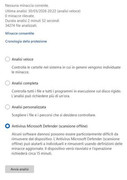
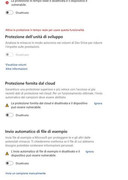
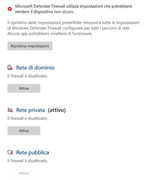
Disable the Firewall and antivirus.
 
Maybe I didn't understand well the first part of static ip assignment to the pc.... It's really frustrating this thing...
 
That's why it's important to follow my instructions to the letter; if you look closely at my message #76, I never mentioned the gateway.

You've made a lot of progress, don't get discouraged, it's just a matter of ruling out possible causes one after another until you find the problem, just like we did before.
 
I set it as per message #76:


I checked (because I had already done so) steps from number 8 to number 29.
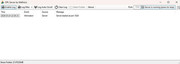
OPL server started on PC

I set the network to OPL


when I try to load games
303: cannot open SMB server

:crushed::crushed::crushed::crushed::crushed::crushed::crushed::crushed::crushed::upset::upset::upset::upset::upset::upset::upset:

I still haven't figured out how to make a p2p connection between the PC and PS2 and the connection with the modem/router coexist (simultaneously), since when I set it as per message #76, the internet line disconnects.
 
If you're using an intermediary like a router, it's no longer a P2P (peer-to-peer) connection.

As I said, forget about the router for now and focus on your PS2's connection.

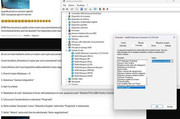
Let's check that your device has auto-negotiation enabled and that it's properly configured. To do this, follow these steps:

1. Press Windows key + X

2. Select "Device Manager"

3. Open the "Network adapters" tab

4. Select the network adapter driver, something like "Realtek PCIe GBE Family Controller"

5. Right-click and select "Properties"

6. On the "Advanced" tab, find "Speed and Duplex" in the "Property" list and select it

7. Under "Value," ensure that "Auto-negotiation" is selected.
 
That's correct.

Please answer the following:

1. Have you already disabled your antivirus and firewall?
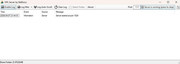
2. Are you running OPL Server as administrator?
3. Please show me a screenshot of OPL Server running.
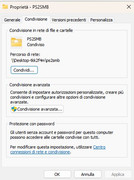
4. Please show me a screenshot of the folder you are sharing.
5. Please show me a screenshot of the shared folder in the Windows "Network" section.
 
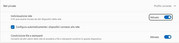
1) Antivirus


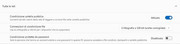
1) Firewall


2) I run OPL server as administrator...right click on OPLServer.exe file and "run as administrator"

3)

4) PS2SMB


5) what do you mean? What do i ?


I'm starting to lose hope....:apologetic:
 
Last edited:

Similar threads

Back
Top