PS3 Ps3 - CECH-M03

Rosssiiii

Member
hello :)
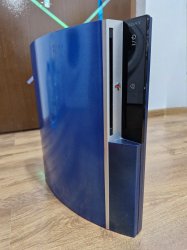
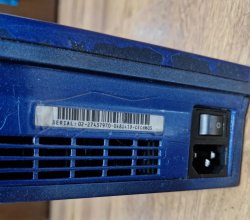
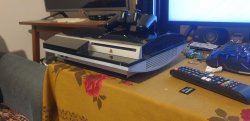
i have put hands for free on this ps3 fat model, a person " gifted me " that big old console but don't work because hdd is missing :upset:


1) the console show that YLOD, do you think is caused by the hdd missing right ?

2) to test if is only that the issue i should try to put an hdd inside like that one ?
https://www.amazon.it/Toshiba-MQ01ABD050-Hard-Disk/dp/B0077IQ0AM/ref=sr_1_5?crid=35J7X09FXYA10&dib=eyJ2IjoiMSJ9.stS6dgBqsV0bfw1y8hNn98pCvBbK9Se9_2knDDcs3AJp6ZVHf5jGEkO7G3Gxa-XcEut9S3VxpDs5iK2sG6NLxB8wvVn3jYvBQSeG-yjhfDZS8buTI6v86OT_tw-Tmr5hEUVqy4xAfMT5qCPDhpRVZ1wDxqLKkXQDqgHLJx7oPGIe--aoNQuimqXLFKty1jLEp2p5zhC8QF9HFjPdoKeLVge4xle0z8MbvdpAL2n6Pg8tjcDyVP2GPovJ5hMjQ0lWZat9R0wMjdJOPhiNo2lr9q1NrIc_8FEl_sCi_HPxdHU.ChC3TISB5hjF61bHL1IjjvPmARTtxgXOlyki84-eE9o&dib_tag=se&keywords=hdd+2.5+500gb&qid=1708097261&sprefix=hdd+2.5,aps,869&sr=8-5

or could be good also that one:
https://www.amazon.it/Unità-Stato-Solido-128GB-Lexar/dp/B07TKGGJ1T/ref=sr_1_10?__mk_it_IT=ÅMÅŽÕÑ&crid=92LH91JL6XHN&dib=eyJ2IjoiMSJ9.AAoWyr3p-SafhALVboKlNIC4VmSACX3KF_V9MdHZj9rQjN-LRqxUJPoA4aKo2CrV2zMOU_BCP9fpOj9snnKb3zZqn0k2Rvk-yj_tYzqrjwARlAm4mHDeARYA05j4X5wFCR1JdWULRGvgfE6_p9lV0DwMoK2ifakFSptNF6zZO1qA5DeF1VsTIm5Qvo9r9Nrg1A1njYlqKKki8VPOuG5A8rzA1uHtubuc9qXqNMYYndldXUB0nTGiwYQj9rmOvzIAxykod-T_pJqtC-EML1VEoNMsvxzlPihdkpZO2Ht7H8I.cK960xCWlFjaEJ4s0ljz-6QaWiEi-ttsweY3wPLI6s0&dib_tag=se&keywords=ssd+sata&qid=1708097322&sprefix=ssd+sata,aps,146&sr=8-10
?

i'm not sure if the console will be able to work even with a different size hdd or with ssd.

3) and how i can install the PS3 Bios/OS ?
 
The first one would be good inside your console. Download the latest pup file from sonys website then you can put it on a fat 32 USB and update from there. From that point you can look into more custom options.
 
Watching your video it may be a lost cause if the console suffers from ylod. Luckily we have experts here cracking that mystery wide open among others if you want to revive that system.
 
If no HDD is on the console, you should get a proper error message on screen.

In order to get a proper diagnose, you should try to get SYSCON logs or run the button combination for light diagnose.
 
The first one would be good inside your console. Download the latest pup file from sonys website then you can put it on a fat 32 USB and update from there. From that point you can look into more custom options.
Hello :)

1)ps3 will not play in better way games with the 120gb ssd compared to the 320gb Hdd ? or on ps3 it does not matter ?

2) or simply the ssd is not compatible with ps3 system ?

3) i have downloaded that from the Italian version of the website:
https://i.imgur.com/hYLdlUX.png


If no HDD is on the console, you should get a proper error message on screen.

In order to get a proper diagnose, you should try to get SYSCON logs or run the button combination for light diagnose.
4) oh understand, so that Ylod is caused by something else and not by the missing hdd so if i will plug an hdd it will show the error anyway ?

5) what i need to take to check the issue on that ps3 ?
log time ago i bought that: https://it.aliexpress.com/item/3287...SrKDxM&gatewayAdapt=glo2ita#nav-specification

6)but i don't have any cable, what cables should i buy from AliExpress ?

7) what is it "button combination for light diagnose" ? never heard that solution, if is easier we can go with that one.

sorry for the many questions
 
4) oh understand, so that Ylod is caused by something else and not by the missing hdd so if i will plug an hdd it will show the error anyway ?

5) what i need to take to check the issue on that ps3 ?
log time ago i bought that: https://it.aliexpress.com/item/3287...SrKDxM&gatewayAdapt=glo2ita#nav-specification

6)but i don't have any cable, what cables should i buy from AliExpress ?

7) what is it "button combination for light diagnose" ? never heard that solution, if is easier we can go with that one.

4) It should be as if the hardware is OK, a missing HDD would still display an error message on your screen.

5 and 6) As long as it's an USB UART-TTL adapter, it should be enough.

Here is a thread on everything to know about diagnosing with SYSCON: https://www.psx-place.com/threads/f...syscon-first-steps-and-error-reporting.30100/

And a video tutorial:


Buy the proper cables to connect the UART adapter and solder them to the pin pads.

7) Here is a video from @RIP-Felix on how to get the SYSCON error codes from the PS3 leds. This should be enough to get the last error code without the need of soldering:

 
4) It should be as if the hardware is OK, a missing HDD would still display an error message on your screen.

5 and 6) As long as it's an USB UART-TTL adapter, it should be enough.

Here is a thread on everything to know about diagnosing with SYSCON: https://www.psx-place.com/threads/f...syscon-first-steps-and-error-reporting.30100/

And a video tutorial:


Buy the proper cables to connect the UART adapter and solder them to the pin pads.

7) Here is a video from @RIP-Felix on how to get the SYSCON error codes from the PS3 leds. This should be enough to get the last error code without the need of soldering:

Hello :)

i have downloaded these files:
https://github.com/db260179/ps3syscon
but watching that movie that you have linked me:

at the second 0.11 he say :
"holding down the reset button" but what he is holding down is the disk eject button...anyway that should be just for slim models, my fat model have code CECH-M03;

so the only way is to check the FAT model is with the UART i think

-----
while for the hard drives the ps3 will work fine and is it worth using an SSD disk?
or as performance there is not difference between ssd and hdd ?
 
Last edited:
There is no difference, the led diagnose button procedure applies to any PS3.
because on ps3 fat from that video looks like at the end there is the red led blinking:

while in the tutorial you give me after that the "fan went at maximum with green light for some seconds", there is no flashing red LED later when he press 3 time in a raw the power button, for this to me looks like a bit different.

I have tested my "usb to TTL" adapter and I saw that on Rx and tx give 3.7v and not 3.3v as I heard is important to don't destroy the chip on the PS3 board. Give 3.3v only on the vcc pad or on 3.3 pad that I bridge to let erogate 3.7v on tx and RX.

Someone know any usb to TTL adapter that give exactly 3.3v ?
 
Last edited:
CECH-M03 is a DIA-001 Motherboard revision...don't debate me on this. IK the devwiki still says VER-001. But I dare anyone to prove that! DO IT!!!... which has the defective 90nm RSX in it. Your short YLOD looks exactly like the ones that were caused primarily by that issue.

You cannot use LED DIAG mode on any console except the 21xx - 30xx models. I have confirmed it doesn't work on phats.

You will have to use a UART adapter and get the errorlogs that way. But I can almost guarintee it has a 3034 (GPU issue presumably).
 
CECH-M03 is a DIA-001 Motherboard revision...don't debate me on this. IK the devwiki still says VER-001. But I dare anyone to prove that! DO IT!!!... which has the defective 90nm RSX in it. Your short YLOD looks exactly like the ones that were caused primarily by that issue.

You cannot use LED DIAG mode on any console except the 21xx - 30xx models. I have confirmed it doesn't work on phats.

You will have to use a UART adapter and get the errorlogs that way. But I can almost guarintee it has a 3034 (GPU issue presumably).
1)So the console have "DIA-001 motherboard"and VER-001 what means ?

2)90nm rsx is the GPU ? and if the issue is the GPU I can't fix it in any convenient way right ?

3)but for any PS3 there should be the same GPU chipset or not ?

4) yes here say it use 65nm GPU, I should open to check what there is really inside right ?
https://www.psdevwiki.com/ps3/SKU_Models
 
Last edited:
1)So the console have "DIA-001 motherboard"and VER-001 what means ?

2)90nm rsx is the GPU ? and if the issue is the GPU I can't fix it in any convenient way right ?

3)but for any PS3 there should be the same GPU chipset or not ?
  1. Motherboard revisions. DIA-001 had 90nm GPU (Defective). VER-001 has 65nm GPU (reliable).
  2. Yes, RSX = GPU. Hard to replace unless you posses expensive BGA rework equipment and the skill to use it. Repair services for this kind of fault is not worth it for nonBC models. It can be replaced with another defective GPU, but will die again in the future.
  3. PS3 had a long run and SONY continued to iterate the design moving from the 90nm GPU to the 65nm, then 40nm and finally the 28nm. 90, 65, and 40nm are pin compatible and can be interchanged (with mods). But it's difficult, even more expensive, and not worth it for a nonBC model. 28nm is not pin compatible.
In short, G,H, M and Q models with the DIA-001 motherboard revision are the least desirable consoles because they have the same defective YLOD issue, and none of the PS2 backwards compatibility to make the risk worth it while it lasts. You can easily and cheaply replace them with a reliable phat or slim model for less than it cost's to repair them.
 
Last edited:
  1. Motherboard revisions. DIA-001 had 90nm GPU (Defective). VER-001 has 65nm GPU (reliable).
  2. Yes, RSX = GPU. Hard to replace unless you posses expensive BGA rework equipment and the skill to use it. Repair services for this kind of fault is not worth it for nonBC models. It can be replaced with another defective GPU, but will die again in the future.
  3. PS3 had a long run and SONY continued to iterate the design moving from the 90nm GPU to the 65nm, then 40nm and finally the 28nm. 90, 65, and 40nm are pin compatible and can be interchanged (with mods). But it's difficult, even more expensive, and not worth it for a nonBC model. 28nm is not pin compatible.
In short, G,H, M and Q models with the DIA-001 motherboard revision are the least desirable consoles because they have the same defective YLOD issue, and none of the PS2 backwards compatibility to make the risk worth it while it lasts. You can easily and cheaply replace them with a reliable phat or slim model for less than it cost's to repair them.
But the M should be with the VER-001 and 65nm GPU, now today I can't open that because too busy but I'm very curious to do.

So if I open the PS3 and I will find a VER-001 MB there should be at 99% a 65nm GPU or still there is the risk to have 90nm GPU ?

Because a bit everywhere online report the ps3 M as 65nm Gpu but you think still some of these could have older motherboard and GPU?

Thank you so much for helping me :)
 
Like I said, the information online hasnt been updated. The dev wiki is wrong. I'm doing my due diligence to research it, without buying a bunch of consoles to confirm. I have spoken with several people that have the CECHM03 model which didnt have a VER-001 and had a DIA-001 instead. And when I solicited the forum for anyone who could show me a M model with a VER-001, nobody has found one.

It appears that was an incorrect assumption. When I'm satisfied there are no VER-001 MB in those models, I'll edit the dev wiki with the correct information. But at this point I'm pretty sure.
 
Fairly sure the VER-001s were either 3rd party swaps or very slim chances of Sony replacing DIA in some of these units. There's recently been a report of someone finding a CECHH with a VER board inside (not on this forum), and I'm watching the thread in case he can find if the serials match.

But for CECHMs, given I bought one just for the purpose of finding out, they're DIA-001 only. Even more so, I recently found ANOTHER M03, which according to the seller (and after asking him for the syscon logs and behavior), has bad caps. Didn't get it because of the casing looking awful and I'm out of dead laptop boards to harvest caps from.
 
Welp, scratch that, I'm going to buy it tomorrow. After all, I figured that there's a small chance (which I never dismiss until I have the console in my hands) it could be a Sony refurb.

Thankfully I have a CECHH spare case to stick it into. (which kinda makes sense, since both use DIA-001s.)
 
If the seller has enabled internal access to syscon, he can get the platform ID with hversion command. That will tell us the MB revision. Again dev wiki is wrong, but if it matches my other DIA-001 platform IDs it's not a DIA-002.
 
If the seller has enabled internal access to syscon, he can get the platform ID with hversion command. That will tell us the MB revision. Again dev wiki is wrong, but if it matches my other DIA-001 platform IDs it's not a DIA-002.
He packed it for shipping already (I had placed the order just this afternoon, after being sniped of a few nice phats, I wasn't taking any chances), but I'll be sure to report once it gets here. The way he got to the syscon log was by browser, while it would stay powered on. (he wasn't as in depth savvy as us so I guided him through ps3toolset on WhatsApp. Especially as it was freshly repasted.)

In the meantime, I'll just leave the few photos he had of the console and the "paintjob" (which looks just awful to me). Yup, guess I'll have to dig for a spare CECHH case in my closet, as well as a few case bits. In contrast, the b/w one is the 200GB CECHG04 in my sig.

M03:
pic1.jpg pic2.jpg

G04:
5gR3yTB.jpeg

As for the refurb possibility - my thoughts were towards a 65nm chip (I have had such a DIA-001 refurb board salvaged from a repair shop around 2019 - the RSX read CXD2981BGB and I was a bit surprised as I knew the board read DIA-001, had the green wired CR2032, the case read CECHH03, and would have expected to find a 2971. Unfortunately I couldn't save it - whatever chap worked on it before me poured almost a gallon worth of flux on the entire board.) and not a full board swap. I still cringe at how stupid I was for throwing the board away as I only now realize how valuable the Sony-made refurb frankies are now. :dejection:
 
Last edited:
Again coming back to confirm this one is DIA-001 as well. The RSX reads CXD2971-1GH, not sure if I ever heard of this revision? btw no reflows or anything else done to it - board is pristine in that regard (aside from the copper ground plane being a bit dull.)

Also it's the first unit I ever come across a 18 blade SFF30A fan.

EDIT: Syscon log. Call me crazy but I'm glad it's just 1002s top to bottom with no 3034s in sight.
20240307_001211.jpg
 
Last edited:

Similar threads

Back
Top