
You are using an out of date browser. It may not display this or other websites correctly.
You should upgrade or use an alternative browser.
You should upgrade or use an alternative browser.
PS3 controller presses buttons when shaken. can it be fixed?
- Thread starter Impaler
- Start date

There's some padding inside the PS3 controllers that tends to shrink with time. This leads to the kind of behavior you describe. I ran in that issue a few years ago (at the time I thought the game I was playing - Mirror's Edge - was simply a disaster. It turned out to be the controller that was broken).
This video shows how you can fix it. Super simple, you just need a screwdriver + something for the padding
This video shows how you can fix it. Super simple, you just need a screwdriver + something for the padding

sandungas
Developer
Also, it uses to happen because the copper lines of the "ribbon board" wears out
When is new that copper lines should be very shiny... but when the time passes it happens some kind of oxidation in the copper and goes darker, in this photo can be seen, the 2 copper lines most at the right are starting to darken
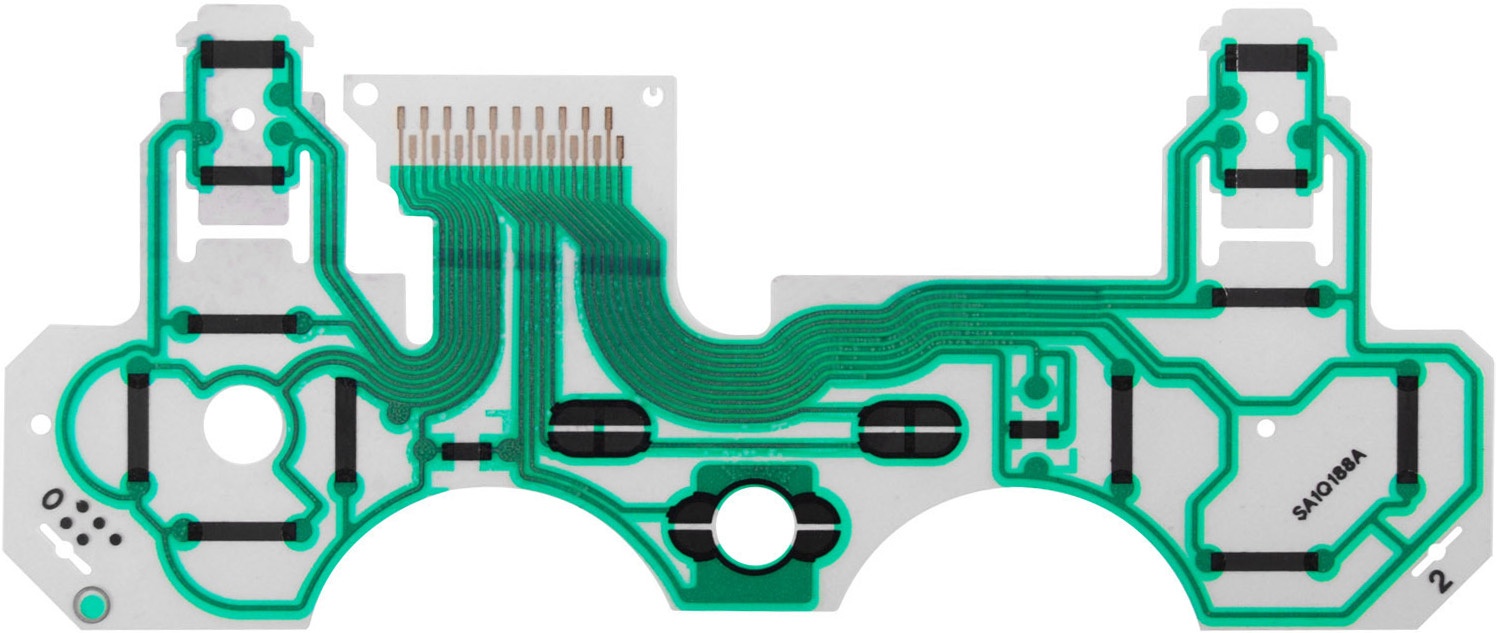
Usually after some years of use of a dualshock3 you are going to have that lines very dark (not only a couple of them, but all of them), is normal
When are so dark electrically is still workinng, but the connections are bad
If you try to clean them up with warm water + soap the dark is not going to be removed
If you try with alcohol what happens is the whole copper trace is going to dissapear (so you have broken that plastic ribbon circuit)
There is no way to return the shiny copper look like when it was new... the copper has been oxidized (or some chemical reaction at microscopy level)
If you want to buy a replacement are around 3€ free shipping or so, are not expensive
But be sure you are buying one that is compatible with your dualshock3 model (by comparing the old one with the new), there are several models and have small differences, you can see a list of them here
http://www.psdevwiki.com/ps3/DualShock_3#Ribbon_Circuit_Boards
When is new that copper lines should be very shiny... but when the time passes it happens some kind of oxidation in the copper and goes darker, in this photo can be seen, the 2 copper lines most at the right are starting to darken
Usually after some years of use of a dualshock3 you are going to have that lines very dark (not only a couple of them, but all of them), is normal
When are so dark electrically is still workinng, but the connections are bad
If you try to clean them up with warm water + soap the dark is not going to be removed
If you try with alcohol what happens is the whole copper trace is going to dissapear (so you have broken that plastic ribbon circuit)
There is no way to return the shiny copper look like when it was new... the copper has been oxidized (or some chemical reaction at microscopy level)
If you want to buy a replacement are around 3€ free shipping or so, are not expensive
But be sure you are buying one that is compatible with your dualshock3 model (by comparing the old one with the new), there are several models and have small differences, you can see a list of them here
http://www.psdevwiki.com/ps3/DualShock_3#Ribbon_Circuit_Boards
Last edited:
sandungas
Developer
Btw, for the record...
The reason why appears that "phantom button presses" is because there are several buttons that are analogic
When the line "breaks" (because the ribbon board is loose or the copper lines too dark) the controller detects a signal "peak" in that button
The button has not been pressed, what is happening is the ribbon board is being disconnected/connected while the main controller chip is monitoring that analogic lines
The reason why appears that "phantom button presses" is because there are several buttons that are analogic
When the line "breaks" (because the ribbon board is loose or the copper lines too dark) the controller detects a signal "peak" in that button
The button has not been pressed, what is happening is the ribbon board is being disconnected/connected while the main controller chip is monitoring that analogic lines

STLcardsWS
Administrator
Also, it uses to happen because the copper lines of the "ribbon board" wears out
When is new that copper lines should be very shiny... but when the time passes it happens some kind of oxidation in the copper and goes darker, in this photo can be seen, the 2 copper lines most at the right are starting to darken
Usually after some years of use of a dualshock3 you are going to have that lines very dark (not only a couple of them, but all of them), is normal
When are so dark electrically is still workinng, but the connections are bad
If you try to clean them up with warm water + soap the dark is not going to be removed
If you try with alcohol what happens is the whole copper trace is going to dissapear (so you have broken that plastic ribbon circuit)
There is no way to return the shiny copper look like when it was new... the copper has been oxidized (or some chemical reaction at microscopy level)
If you want to buy a replacement are around 3€ free shipping or so, are not expensive
But be sure you are buying one that is compatible with your dualshock3 model (by comparing the old one with the new), there are several models and have small differences, you can see a list of them here
http://www.psdevwiki.com/ps3/DualShock_3#Ribbon_Circuit_Boards
I have had to mess with that on a few DS3. Basically just take it apart and re-align it and is good to go. drops can be harmful lol, Usually an insane xmb side scrolling is the first sign of trouble lol
sandungas
Developer
Me too, i had a dualshock3 with phantom buttom presses, and dissasembled it entirelly to try to understand what was happening exactly
When i realized about that copper contacts was too much dark i decided to clean the ribbon board with warm water and soap as i explained, and rubbing them with cotton ear sticks, but nothing changed
At this point i knew the next test was a bad idea... but i did it anyway for science... i tryed to clean them with alcohol and when rubbing them 2 or 3 dissapeared, lol... the end
So i was looking at the different models of that ribbon boards and trying to find the cheapest one, then bought a new one and when replaced the dualshock3 works perfect
The point is.... i did not changed that black rectangled piece of plastic (or foam) that is the responsible of making the pressure over the copper lines of the ribbon, and i did not made any kind of mod to increase that pressure
So the culprit was not that piece of black plastic, are the copper lines of the ribbon that went dark
The fix explained in the video is ok though, probably works for most people, but the root of the problem is the ribbon
When i realized about that copper contacts was too much dark i decided to clean the ribbon board with warm water and soap as i explained, and rubbing them with cotton ear sticks, but nothing changed
At this point i knew the next test was a bad idea... but i did it anyway for science... i tryed to clean them with alcohol and when rubbing them 2 or 3 dissapeared, lol... the end
So i was looking at the different models of that ribbon boards and trying to find the cheapest one, then bought a new one and when replaced the dualshock3 works perfect
The point is.... i did not changed that black rectangled piece of plastic (or foam) that is the responsible of making the pressure over the copper lines of the ribbon, and i did not made any kind of mod to increase that pressure
So the culprit was not that piece of black plastic, are the copper lines of the ribbon that went dark
The fix explained in the video is ok though, probably works for most people, but the root of the problem is the ribbon
 thanks everybody!
STLcardsWS
Administrator
Me too, i had a dualshock3 with phantom buttom presses, and dissasembled it entirelly to try to understand what was happening exactly
When i realized about that copper contacts was too much dark i decided to clean the ribbon board with warm water and soap as i explained, and rubbing them with cotton ear sticks, but nothing changed
At this point i knew the next test was a bad idea... but i did it anyway for science... i tryed to clean them with alcohol and when rubbing them 2 or 3 dissapeared, lol... the end
So i was looking at the different models of that ribbon boards and trying to find the cheapest one, then bought a new one and when replaced the dualshock3 works perfect
The point is.... i did not changed that black rectangled piece of plastic (or foam) that is the responsible of making the pressure over the copper lines of the ribbon, and i did not made any kind of mod to increase that pressure
So the culprit was not that piece of black plastic, are the copper lines of the ribbon that went dark
The fix explained in the video is ok though, probably works for most people, but the root of the problem is the ribbon
I went into my bag of tricks, i put very little "Anti-oxidant compound" on the cable, so not only did it stick better but improved conductivity as well ..but small amount goes a long way, i wouldn't slop it on there. Add it whip it and should be enough to give it a bit of stick. .
sandungas
Developer
There are some pencils used to repair that plastic ribbon boards, that uses an ink made with silver particles, when you paint the ink is liquid but when goes dry is solid
I guess this could work very well to restore the metal, but are not cheap, so not worthy to buy one of this pencils just to fix one ribbon board
But there must be some ghetto trick to make something like that for cheap XD
The other black material that covers the contacts in some dualshock3 circuits boards (and used along the plastic ribbon board too) is made with "carbon particles". Thats conductive too, and it seems is some kind of "glue" (liquid when applyed and solid when dry) but i dont know much about it, i never seen a "pencil" with it, and doesnt looks like somethign that can be made ghetto style at home for cheap
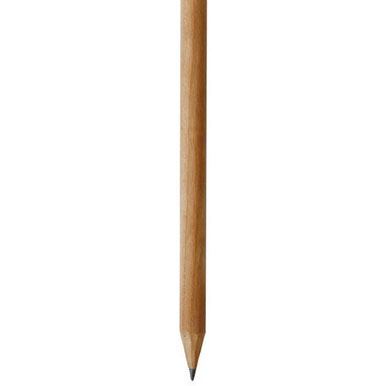
And now im talking about carbon and pencils... the classic pencils made of wood has a core of graphite... i think thats electrical conductive too... maybe just by painting the damaged copper with that could fix it, if some day i have to fix another dualshock3 i will try with it XD
Edit: i mean... a pencil like this
I guess this could work very well to restore the metal, but are not cheap, so not worthy to buy one of this pencils just to fix one ribbon board
But there must be some ghetto trick to make something like that for cheap XD
The other black material that covers the contacts in some dualshock3 circuits boards (and used along the plastic ribbon board too) is made with "carbon particles". Thats conductive too, and it seems is some kind of "glue" (liquid when applyed and solid when dry) but i dont know much about it, i never seen a "pencil" with it, and doesnt looks like somethign that can be made ghetto style at home for cheap
And now im talking about carbon and pencils... the classic pencils made of wood has a core of graphite... i think thats electrical conductive too... maybe just by painting the damaged copper with that could fix it, if some day i have to fix another dualshock3 i will try with it XD
Edit: i mean... a pencil like this

lord3490
Member
I just fixed my old ds3 like in the video, thanks for posting @Wololo 
I also managed to fix my other controller that wouldn't turn on even after resetting and connected (wouldn't even show LEDs while connected).
I just swapped the batteries of the 2 controllers, now both are working flawlessly.
I just wanted to find out if it's the battery causing this issue, I expected one of the 2 wouldn't turn on after, but both are fine now
(I did try just disconnecting the battery and putting it back before, that didn't lead to success, so that's odd)
I also managed to fix my other controller that wouldn't turn on even after resetting and connected (wouldn't even show LEDs while connected).
I just swapped the batteries of the 2 controllers, now both are working flawlessly.
I just wanted to find out if it's the battery causing this issue, I expected one of the 2 wouldn't turn on after, but both are fine now
(I did try just disconnecting the battery and putting it back before, that didn't lead to success, so that's odd)
Similar threads
-
PS3 Having trouble with the L2 & R2 Buttons
- Started by Mastered UI John
- Replies: 0
-
PS3 Drive Eject Loop When Using Eject Button, But Not When Using XMB (Occurs on Multiple Drives)
- Started by byt3swap
- Replies: 0
-
-
