PS3 PS3 dump file size error

I'm trying to dump my ps3's NAND memory and verify it with PS3 dump checker but each time i keep getting a file size error. Can anyone tell me what i'm doing wrong here? I'm a bit confused. I've got a CECHC03 model if that helps.
 
I'm trying to dump my ps3's NAND memory and verify it with PS3 dump checker but each time i keep getting a file size error. Can anyone tell me what i'm doing wrong here? I'm a bit confused. I've got a CECHC03 model if that helps.
Only pyps3checker can validate ps3xploit dumps. The other validation tools have not been updated afaik.
You can get the tool from http://www.github.com/littlebalup.
Read the Readme file for further info about prerequisites, installation & usage.
 
"File "C:\Users\dffdfd\Documents\PyPS3tools-master(1)\PyPS3tools-master\PyPS3checker\checker.py", line 106
print tab, " ".join(a+b for a,b in zip(chunk[::2], chunk[1::2]))
^
SyntaxError: invalid syntax"
this is the error
 
"File "C:\Users\dffdfd\Documents\PyPS3tools-master(1)\PyPS3tools-master\PyPS3checker\checker.py", line 106
print tab, " ".join(a+b for a,b in zip(chunk[::2], chunk[1::2]))
^
SyntaxError: invalid syntax"
this is the error
Usually errors with pyps3checker are either due to the prerequisites not being followed like using the wrong python version (>2.7) or using the wrong syntax, with dump.bin in the checker folder, try
- >python checker.py dump.bin
If you cannot get it to work, you should seek advice from littlebalup.
 
"File "C:\Users\dffdfd\Documents\PyPS3tools-master(1)\PyPS3tools-master\PyPS3checker\checker.py", line 106
print tab, " ".join(a+b for a,b in zip(chunk[::2], chunk[1::2]))
^
SyntaxError: invalid syntax"
this is the error

Apologize for hijacking the thread, but I've run into this identical issue. :confused: Any resolution? ;)
 
Apologize for hijacking the thread, but I've run into this identical issue. :confused: Any resolution? ;)
Install the latest Python 7 installer for your OS available at, https://www.python.org/downloads/release/python-2715/

Start a command prompt in the folder where checker.py is located & launch the program using the syntax:

On Windows :
checker.py "D:\myfiles\mydump.bin"

On Linux or Bash on Windows,
./checker.py /home/username/myfiles/mydump.bin
 
Install the latest Python 7 installer for your OS available at, https://www.python.org/downloads/release/python-2715/

Start a command prompt in the folder where checker.py is located & launch the program using the syntax:

On Windows :
checker.py "D:\myfiles\mydump.bin"

On Linux or Bash on Windows,
./checker.py /home/username/myfiles/mydump.bin

Yep! In Windows did exactly that;

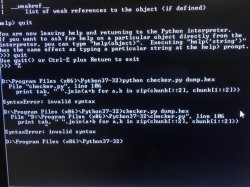
checker.py dump.hex

and got;

"File "checker.py", line 106
print tab, " ".join(a+b for a,b in zip(chunk[::2], chunk[1::2]))
^
SyntaxError: invalid syntax"

Curiously, my dumps are .hex & not .bin
 
Yep! In Windows did exactly that;

checker.py dump.hex

and got;

"File "checker.py", line 106
print tab, " ".join(a+b for a,b in zip(chunk[::2], chunk[1::2]))
^
SyntaxError: invalid syntax"

Curiously, my dumps are .hex & not .bin
Can you post the full command prompt output?
Without testing it ourself, it's the only way for us to know which of the 6 possible calls to the
print_formatedlines function is failing.
 
Can you post the full command prompt output?
Without testing it ourself, it's the only way for us to know which of the 6 possible calls to the
print_formatedlines function is failing.

Figure I do you one better & give you a screenshot. Please find it below;
 

Attachments

  • PhythonError.JPG
    PhythonError.JPG
    127.5 KB · Views: 241
Figure I do you one better & give you a screenshot. Please find it below;
So when you said you did exactly what I said you should do, did you actually check?
Because from your ss, it appears you are using Python 3.7 whereas I specifically said to use Python 2.7.15...
The checker won't work with Python 3.
 
So when you said you did exactly what I said you should do, did you actually check?
Because from your ss, it appears you are using Python 3.7 whereas I specifically said to use Python 2.7.15...
The checker won't work with Python 3.

I apologize. I misunderstood the words in the "PyPS3checker_README.txt" when it said, "Python 2.7.2 or any upper Python 2 version" to mean that any version above 2 was also good.

Sorry. I'll try again with the exact version.

Thanks for correcting me.
 
I apologize. I misunderstood the words in the "PyPS3checker_README.txt" when it said, "Python 2.7.2 or any upper Python 2 version" to mean that any version above 2 was also good.

Sorry. I'll try again with the exact version.

Thanks for correcting me.

No need to apologise. Assuming that the prerequisite conditions are fulfilled because an overlooked detail is a very common mistake to make.

@littlebalup
Rather than it being implicit, you might want to explicitly add to the System Requirements section of your Readme that the script is not compatible with python 3?
 
Python 2.7x is like legacy, note how there is an specific mention to 2.7x series in his web with a: " Looking for Python 2.7? See below for specific releases", it seems they are going to host it forever
https://www.python.org/downloads/

Btw, @littlebalup, have you considered to "pack" your python scripts with http://www.py2exe.org/ ? (there are other alternative toools that does the same btw)
It creates an .exe with the script, this way the user doesnt needs to install python
 
Last edited:
Python 2.7x is like legacy, note how there is an specific mention to 2.7x series in his web with a: " Looking for Python 2.7? See below for specific releases", it seems they are going to host it forever
https://www.python.org/downloads/

Btw, @littlebalup, have you considered to "pack" your python scripts with http://www.py2exe.org/ ? (there are other alternative toools that does the same btw)
It creates an .exe with the script, this way the user doesnt needs to install python
I think I tried it some time ago with some issue. I'll try again.
 
@bguerville, @sandungas,
I made this : https://www.dropbox.com/s/u4r600hxvchpz78/PyPS3checker_2018-16-10_040353.zip?dl=1
Please try and let me know what you think. It's x86 compiled. Maybe some dll dependency issues.
Seems to work fine, tested in windows xp x86. I had python 2.7.15 installed, but i uninstalled it before making the test to be sure, and everything did work, and no problems of dll's or any error message :)

I tryed it with this dump: https://www.mediafire.com/folder/e7rs9wh6w8ohv/mtldr2-dumps#p9w1aiqdim4pp
Results: https://pastebin.com/raw/y6NRRb1r
 
Last edited:
Back
Top