
PS3 PS3 FAT CECHC04 - COK-002 - GLOD - no video on HDMI and Component

SkaziChris

Member
Hello,

I just received a rare console model CECHC04 with hardware backward compatibility.
Mobo: COK-002 - described in the picture below
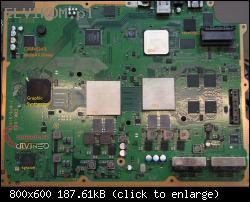


DEFECT:
no video from HDMI
no video from Component
it is so called GLOD (green light of death)

BEHAVIOR:
Console starts up.
Turns on, but no video output.
Recovery menu can be started:
eg.

console is turned off
I hold the power button - green light - one beep - power off - red light - release the power button
I hold the power button - green light - one beep - two beeps - green light - release the power button
Normally, recovery menu should pop up on the screen, even if the console had a different resolution set before.

There is no mechanical damage on mobo.
Both HDMI and Component are visually OK.
HDMI connector was measured using an old hdmi plug with stripped cable.

HDD and BDROM are not blocking mobo startup (checked with and without).

PSU is working fine, taken from another working console.
It gives 5V (green and diodes are working, so it means 5V powerline is ok).
It gives 12v cause the console starts up and does not turn off by itself.

So... since the console boots up to the recovery menu,
it means that:
- the SYSCON is working, it enables CPU power.
- CPU Induction coils and NEC/tokin capacitors are ok,
- CPU is working as well

Otherwise, I'd have a 'hard brick'.

The tokin capacitors have low resistance, but it is normal in these mobos.
If they would be faulty, there would be RLOD/YLOD error (Red Light of Death/Yellow Light of Death)

I think it is not Sil9231CBU (HDMI IC) 'cause AV (component) isn't working as well, so the root cause is before Sil IC.
Sil is connected with RSX and GS,
and GS is also connected to MultiAV IC.


QUESTION:
how to diagnose this further?

Usually, in these mobos, the fault is caused by RSX BGA, but there is no 100% certainty.
I assume that if RSX would be bad, then I would also get RLOD/YLOD, and in this case... the console seems to start up.
I don't want to unnecesarily heat up the mobo, if it is not RSX.

Do you guys have any ideas what else I can check before I risk reflowing/reballing the RSX?
 
Either is the BGA or the Substrate, but GLOD can be mostly associated with the Substrate, having a defect on the GPU BGA will most likely cause a YLOD more than the GLOD, due to the communication check between the Syscon and the RSX, but i am not sure if it works that way, but the best way to see if is not a brick, check if the console syncs the DS3s and there is HDD Activity upon boot-up.

I had a C04 that simply died from a GLOD by playing a PlayStation2 Format Software, the console froze, forcing me to restart it, after that the rest is history, didn't sync nor had any HDD Activity, so the RSX mostly died, funny thing is that the RSX was fine, didn't show artifacts or Graphical anomalies like poor framerates or any sign of a dying graphics chip.

You could try reflowing the Substrate, but you'll need to delid it so you can heat up the die, normally i am against reflowing, but in this situation is an effective way to diagnose a faulty GPU, so you can check if is worth your time to replace the RSX

Sent from my G8141 using Tapatalk
 
Are you sure the problem is related with hardware ?, a flash dump could be handy, im wondering if it could be related with the software inside flash chips

As far i remember the recovery menu (named emer_init.self) is loaded instead of lv1. In a normal boot the console is doing lv0>lv1>lv2>vsh (and the vsh dsplays the XMB)
And in recovery menu is loading only lv0>emer_init.self

Not sure if is exactly like this, but the point is in recovery menu the firmware is not loaded completly
 
Either is the BGA or the Substrate,

Many thx for sharing your inputs.
Could you please elaborate on what U mean by "Substrate"?
I've never heard of this name. Do you refer to the core itself (microballing) that is placed on RSX pcb?

I have nothing to loose, so I can start reflowing/reballing all of these chips (if I find the stencils for them).
However, I'm more interested in building some sort of a checklist/roadmap on how to properly diagnose this.
 
As far i remember the recovery menu (named emer_init.self) is loaded instead of lv1. In a normal boot the console is doing lv0>lv1>lv2>vsh (and the vsh dsplays the XMB)
And in recovery menu is loading only lv0>emer_init.self

Thats some useful info.
However...
recovery menu should also have AV output, so it could still be a hw issue.

Please note that this is COK-002, CECHC...
and somebody was taking it apart before me.
I noticed that the heatsink disassembly is quite problematic for people who do this for the first time.
So I assume that previous owner forcefully took it off the IHS...
This could cause issues with the balls under RSX...
 
Thats some useful info.
However...
recovery menu should also have AV output, so it could still be a hw issue.

Please note that this is COK-002, CECHC...
and somebody was taking it apart before me.
I noticed that the heatsink disassembly is quite problematic for people who do this for the first time.
So I assume that previous owner forcefully took it off the IHS...
This could cause issues with the balls under RSX...
But you said recovery menu works, not sure if always of only sometimes, i could not understand that part of your post
BEHAVIOR:
Console starts up.
Turns on, but no video output.
Recovery menu can be started:
eg.

console is turned off
I hold the power button - green light - one beep - power off - red light - release the power button
I hold the power button - green light - one beep - two beeps - green light - release the power button
Normally, recovery menu should pop up on the screen, even if the console had a different resolution set before.

The fact recovery menu is working is a proof that there are some parts of the firmware working, but we are not sure about the other firmware parts
The previous owner is what is making me wondering if at some point it was made something weird with a hardware flasher, that kind of problems related with damaged parts of the firmware could give confusing error outputs and i dont know all them, but just incase i would start looking at the flash contents before messing around with hardware

Incase you are suspecting about damaged BGA solder balls you can make a test increasing the heatsink pressure... either by bending a bit the metal clamps that holds the heatsink or by adding someting in between them and the metal shields
This could help the electrons to make the "jump" in the BGA fracture and could allow the PS3 to boot (temporally)
Is mostly a test that allows you to see if the problem is in the BGA balls, not a permanent solution
 
Many thx for sharing your inputs.
Could you please elaborate on what U mean by "Substrate"?
I've never heard of this name. Do you refer to the core itself (microballing) that is placed on RSX pcb?

I have nothing to loose, so I can start reflowing/reballing all of these chips (if I find the stencils for them).
However, I'm more interested in building some sort of a checklist/roadmap on how to properly diagnose this.


u cant reball or reflow the sustrate, there are also tiny solder balls under the rams that fail and can cause GLOD. Even these rams failing cause GLOD

If ur controllers can sync and u can get into recovery menu i dont believe this is GLOD either sounds more FW as stated above so i would start there and confirm they are all good.

If u have solder ball issues under the BGA's when these fail u dont get GLOD from these so pressure test wont work for these unfortunately. If it is in fact hardware a replacement GPU will be needed that is if it is GLOD.
 
Fast test if you need to see if you need a rework on CELL:

Make pressure with your finger using your weight on the CELL clamp (you'll need to remove the PSU and use some extension), if you have a BGA contact problem, you should have image now.

If you have the OG HDD, repeat the process with the RSX instead, but see if you have activity on the HDD led, and if the DS3 syncs.

Not having signal at all and only green light means the PS3 didn't even boot, so the common path here is the CELL.
 
I had a C04 that simply died from a GLOD by playing a PlayStation2 Format Software, the console froze, forcing me to restart it, after that the rest is history, didn't sync nor had any HDD Activity, so the RSX mostly died, funny thing is that the RSX was fine, didn't show artifacts or Graphical anomalies like poor framerates or any sign of a dying graphics chip.

That's exactly how my cech 4200a died. Played Yakuza 1 few low fps and black screens at documented chapters on compadibility page no thing else. played shadow of collosues all ok till chapter 3 and replacing thermal compund with Hy10 thermal compound ( i know this material is very low quality but was only thing available to me) althrough temperatures improved to 55 degrees to 67 degrees max on both cell and rsx.

All of sudden starting artifacting on shadow of collosues ps2 classic main menu only wound'nt even work after selecting save file only black screen but other games no problem.So i tried shadow of coolosues for last time same problem.I delected it and played SAW 1 from usb then game frozed up ps3 while game pasued had to shut it down only to boot again to black screen.

Booted to recovery all ok except only recovery worked nothing esle restore setting or any thing. Applied 4.84 ofw update on 4.84 hfw only worked untill file checked to 100% then reboot to accepting update menu but black screen on hdmi so i brought an used av cable but screen only sound of clicks so i followed an update video on youtube and followed the controller button directions and foolishly acepted update instead of declining and that was the last of it working.No more recovery mode only green light black screen.

check if the console syncs the DS3s and there is HDD Activity upon boot-up.
My ps3 syncs ds3 with usb cable after that stays synced wireless untill console is turned off and hdd activity stays on for i think upto 20 secs or more (Note its a 16gb emmc model).I have no hdd in it tried hdd too no response.No display still. One thing was a few times console froze up on saw 1 so after force shutdown would show black screen if usb still plugged but if removed then would boot up normally.

Question:
1): What is wrong with it hardware or software which one would it be? And has any progressed on ps3 emmc programming or unbricking.
2): While opening my ps3 fat which i brought in ylod condition got its heatsink screw stripped by me using a wrong size screw driver so i wolud like to know if there are any methods to remove it without damging system futher. I am asking this here because its a heatsink screw and theres no information on removing it in this type of scenario?
ps3 fat heat sink stripped screw.JPG
 
Last edited:
Weird. Ya probably a bga issue. However I did have a rare occurrence on my cechp before she finally gave up on life, an electrical storm occurred and after much adieu found out the house had electrical grounding issues but a surge took out the hdmi port on the ps3 as well as the hdmi encoder on the TV, I lucked out it only disabled hdmi on my ps4 and was able to still use the rca vid out on it. The tv however was fried.
 
Either is the BGA or the Substrate, but GLOD can be mostly associated with the Substrate, having a defect on the GPU BGA will most likely cause a YLOD more than the GLOD, due to the communication check between the Syscon and the RSX, but i am not sure if it works that way, but the best way to see if is not a brick, check if the console syncs the DS3s and there is HDD Activity upon boot-up.

I had a C04 that simply died from a GLOD by playing a PlayStation2 Format Software, the console froze, forcing me to restart it, after that the rest is history, didn't sync nor had any HDD Activity, so the RSX mostly died, funny thing is that the RSX was fine, didn't show artifacts or Graphical anomalies like poor framerates or any sign of a dying graphics chip.

You could try reflowing the Substrate, but you'll need to delid it so you can heat up the die, normally i am against reflowing, but in this situation is an effective way to diagnose a faulty GPU, so you can check if is worth your time to replace the RSX

Sent from my G8141 using Tapatalk
Hello i need a help with green light of death so 1st i was repairing a ylod ps3 fat cechk08 i think and after removing e108 only one nectokin with three 337uf 2.5v capacitors and now i am stuck on green light of death no output even the controller is not connecting as well what should i do is this has something to do with capacitors power or faulty soldering in capacitors please help
 
I have been able to recover six playstation 3 consoles with extreme pressure placed on the CPU. I'm guessing it's an issue with the CPU substrate; however, I haven't ruled out that placing pressure on the CPU could bend the board reconnecting the GPU substrate. I have tested these, and not only does it recover the console, there is no sign of any graphic anomalies. I have had friends and family test the consoles, and they have racked up over 200 hours between them with no sign of failure. Its so hard to believe I recorded the last modification so you can see it for yourself.

See links below


Sent from my SM-G988B using Tapatalk
 
Last edited:
Hello i need a help with green light of death so 1st i was repairing a ylod ps3 fat cechk08 i think and after removing e108 only one nectokin with three 337uf 2.5v capacitors and now i am stuck on green light of death no output even the controller is not connecting as well what should i do is this has something to do with capacitors power or faulty soldering in capacitors please help


Sent from my SM-G988B using Tapatalk
 
Last edited:
I have been able to recover six playstation 3 consoles with extreme pressure placed on the CPU. I'm guessing it's an issue with the CPU substrate; however, I haven't ruled out that placing pressure on the CPU could bend the board reconnecting the GPU substrate. I have tested these, and not only does it recover the console, there is no sign of any graphic anomalies. I have had friends and family test the consoles, and they have racked up over 200 hours between them with no sign of failure. Its so hard to believe I recorded the last modification so you can see it for yourself.

See links below


Sent from my SM-G988B using Tapatalk

While this may work in lets say for the short term and I have used this method myself just to see what happens more than anything. It is not a long term fix at all and down the road will likely cause bigger problems than already maybe present. In my brief messing about with this method a long time ago consoles could last weeks of continued use or just minutes, very much luck of the draw.

At the end of the day it is a bodge and not a proper fix if you ask me.
 
Yes, I would definitely think so, myself, if I was reading this post. However, I don't believe you watched the videos. The way the pressure is applied is an extreme version of naked snakes mod to lower the CPU temps. I have had one console now last eight months of heavy gaming; that is not a temporary fix! Why don't you watch h the video before passing judgment

Sent from my SM-G988B using Tapatalk
 
I have been able to recover six playstation 3 consoles with extreme pressure placed on the CPU. I'm guessing it's an issue with the CPU substrate; however, I haven't ruled out that placing pressure on the CPU could bend the board reconnecting the GPU substrate. I have tested these, and not only does it recover the console, there is no sign of any graphic anomalies. I have had friends and family test the consoles, and they have racked up over 200 hours between them with no sign of failure. Its so hard to believe I recorded the last modification so you can see it for yourself.

See links below


Sent from my SM-G988B using Tapatalk

Hi Tim!

That was an interesting video. Thank you. Cant watch the whole yet, could you please be so kind and tell me how to do it? I have a CECHC04, and just dissassemled, not yet reassembled it. what and how should i need to do with it? I'll change the pastes, and do a proper cleaning with IPA, but do a i need to push the cpu with my finger? sorry, might be sleepy. :) Thank you in advance.

Nevermind. ~@32:30 I got the answer. :) Lovely! Thank you!

ed2: is this a delidded version? Your temps are insane! 59C @32%? wow!! I have ~68 with fan 38% ... :)
 
Last edited:
Hi,

Yes, the temps are low; that's because the pressure does two things. The first thing it does is push the CPU die towards the underside of the heat spreader. This heat spreader is not straight, which is why the die loses contact with the heat spreader over time. By pushing down on the motherboard directly under the CPU reconnects, the CPU die with the heat spreader (which has all the paste) and this immediately gives you better temps. See the link below on de-lidding


The second thing it does is reconnect broken CPU solder balls. This is one of the main causes of the GLOD. I have also discovered that it's advisable to add a few tantalum capacitors to the top side tokens, one on the CPU side and one on the GPU (see pics). I also add thermal pads to the tokins. If you watch all the videos, all your questions will be answered.
8c9a9fa6f7dc6966ee51d8cfb3262307.jpg


Sent from my SM-G988B using Tapatalk
 
This is not a deliddied version. I only sent you a link to my delidding video to highlight how the CPUdie loses contact with the underside of the heat spreader

Sent from my SM-G988B using Tapatalk
 
Hi,

Yes, the temps are low; that's because the pressure does two things. The first thing it does is push the CPU die towards the underside of the heat spreader. This heat spreader is not straight, which is why the die loses contact with the heat spreader over time. By pushing down on the motherboard directly under the CPU reconnects, the CPU die with the heat spreader (which has all the paste) and this immediately gives you better temps. See the link below on de-lidding


The second thing it does is reconnect broken CPU solder balls. This is one of the main causes of the GLOD. I have also discovered that it's advisable to add a few tantalum capacitors to the top side tokens, one on the CPU side and one on the GPU (see pics). I also add thermal pads to the tokins. If you watch all the videos, all your questions will be answered.
8c9a9fa6f7dc6966ee51d8cfb3262307.jpg


Sent from my SM-G988B using Tapatalk

Thank you! I'm watching all of your experienced videos now. Today I won't do anything, but watching your channel. May I ask why aren't all your useful videos can be found on youtube? I've been into ps3's since a few years now, and never heard those you used to tell.
Thank you! :)
 
Back
Top