
You are using an out of date browser. It may not display this or other websites correctly.
You should upgrade or use an alternative browser.
You should upgrade or use an alternative browser.


Berion
Developer
Updates roadmap:
In upcoming update (somewhere in the middle of December 2022 I think) new features and few fixes will be added.
First one is just fixed unmounting partitions. For some unknown to me reason, on Mint 21.0 is stopped working if path to mount point contains "~", but works if I replace it by "${HOME}". So if someone stuck on this, replace all those symbols in "PS3 HDD Umounter.sh" script (so You don't need to wait so long for such trivial thing to change).
Second is update for "PS3 HDD Tasker.sh" script which will forge so called Key Vault and place it on last sector of HDD which seems to be unused. Added also TRIM command for dev_hdd0 on SSD but I have no idea if it works with UFS2, by default it will be hide in script menu.
Third is "PS3 KO Compiler.sh" which will compile bswap16-ecb and ufs modules from source code. It is safer than using someone else binary and You don't need to be a programmer to do that, thanks to this script.
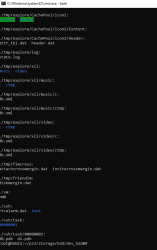
Fourth is good news for Windows 10 and Windows 11 users. Thanks to @DUDUŚ and his great help along with bash help, people are able to compile all needed modules and mount all partitions (including write support) on Windows! Latest Windows 10 (22H2), WSL2 and ms kernel are mandatory.

Also I want thanks for bash help for @GuilloteTesla and @bleepbleep.
In 2023 I have in plans to make "PS3 HDD Cloner.sh" which as name suggest, cloning HDD from one console to another. Of course both
needs EID Root Key from both consoles. First tests proves it works but I need wide spectrum of consoles (eg. to test if NOR HDDs backup works on NAND model and vice versa). ^^
Second thing is, I have in plans to explore a little last sectors mystery. I believe Sony left backdoor for Police etc. to access data without working console, which means storing somewhere needed keys. As rumors says too. We'll see.
In upcoming update (somewhere in the middle of December 2022 I think) new features and few fixes will be added.
First one is just fixed unmounting partitions. For some unknown to me reason, on Mint 21.0 is stopped working if path to mount point contains "~", but works if I replace it by "${HOME}". So if someone stuck on this, replace all those symbols in "PS3 HDD Umounter.sh" script (so You don't need to wait so long for such trivial thing to change).
Second is update for "PS3 HDD Tasker.sh" script which will forge so called Key Vault and place it on last sector of HDD which seems to be unused. Added also TRIM command for dev_hdd0 on SSD but I have no idea if it works with UFS2, by default it will be hide in script menu.
Third is "PS3 KO Compiler.sh" which will compile bswap16-ecb and ufs modules from source code. It is safer than using someone else binary and You don't need to be a programmer to do that, thanks to this script.
Fourth is good news for Windows 10 and Windows 11 users. Thanks to @DUDUŚ and his great help along with bash help, people are able to compile all needed modules and mount all partitions (including write support) on Windows! Latest Windows 10 (22H2), WSL2 and ms kernel are mandatory.
Also I want thanks for bash help for @GuilloteTesla and @bleepbleep.
In 2023 I have in plans to make "PS3 HDD Cloner.sh" which as name suggest, cloning HDD from one console to another. Of course both
needs EID Root Key from both consoles. First tests proves it works but I need wide spectrum of consoles (eg. to test if NOR HDDs backup works on NAND model and vice versa). ^^
Second thing is, I have in plans to explore a little last sectors mystery. I believe Sony left backdoor for Police etc. to access data without working console, which means storing somewhere needed keys. As rumors says too. We'll see.
Last edited:

GuilloteTesla
Moderator
Berion
Developer
PS3 HDD Decryption Helper (2023-01-28)
- Fixed HDD mounting from NAND models, thanks to @Iridule (wrong mapper names, changed to ps3hdd1 for UFS2 (user partition) and ps3hdd2 for FAT32 (cache partition).
- Fixed newest Ubuntu family compatibility (changed path variable from "~/" to "${HOME}").
- Fixed some Debian distributions incompatibilities due to missing some sudo and chown which they needs for tasks which other Linux distributions don't. Thanks to @olokos.
- Fixed lack of information in unlocking more disk space that this tasks is related to NOR models only (performing it on HDD from NAND will break FAT32). It is matter only of mappers name, in future I will add just additional user choice.
- Added "PS3 KO Compiler" script which compile for You bswap16-ecb and ufs kernel modules. ufs module for unknown to me reason, does not reading provided kernel config with rw permissions so don't bother and use system one instead. :P
- Added "PS3 KO Compiler (WSL2)" for Windows 10/11 users with WSL2 and Ubuntu inside of it. Script was modified by @DUDUŚ.
- Added two hidden tasks in "PS3 HDD Tasker". First will inject ERK into last sector (which CellOS not using for unknown reason). Task is very slow because using dd and iterating each 512 bytes, so that's the reason why is hidden until I will find better solution which jumps directly to pointed LBA.If You are super patient, instead of number in main menu, type "wip-1". Second hidden task is for invoking TRIM command on user partition but since I don't have SSD in PS3 and I don't even know if can be done on UFS2, I also hide it ("wip-2", needed ufs.ko with rw permission).
Last edited:
Berion
Developer
Tried script on Linux Mint 21.1 live session and "PS3 KO Compiler" works:was trying to new source in your updated helper package bswap16 compiles fine but ufs has error?
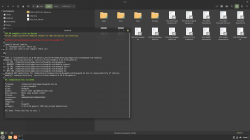
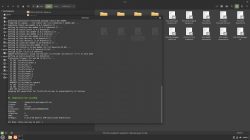
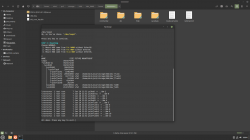
The only issue which I experienced is that access to dev_hdd0 no longer need root permission and for unknown reason, "~/ps3/*.sh" lost executable launching possibility (not attribute but permission, like one set in fstab for a partition: noexec) which is very serious issue, as user will be not able to use "PS3 HDD Umounter" or any other script after mounting. I have no idea how to solve this.
 And again, for some reason start works after all PS3 partitions be unmounted (by hand). WTH? So I strongly NOT recommend Linux Mint 21.1, instead use all Mints up to and include 21.0. Or maybe someone have idea what's going on here and how to solve this?
I'm not sure if "PS3 HDD Cloner" have any sense to write, maybe better be "PS3 HDD Backup" and "PS3 HDD Restorer"? Because of HDD assigning by PS3 firmware and very problematic VFLASH "teleport".Can't wait to try the cloner ....
It will not help in Your issue. TRIM is cleaning no longer used space by filesystem, it is for speed up disk writing after long usage.I was wondering about the notes on the hidden options "...invoking TRIMM command on user partition ..." Since I have SSD would that maybe help? Is it safe
None of tasks in "PS3 HDD Tasker" script are safe (except backuping partition table).
They are for people who knows what they doing. And fstrim is super unsafe because I didn't test it, that's why it is hidden from visible menu.
Last edited:
Berion
Developer
TODO:
- merging compiler scripts for normal Linux and WSL into one
- turning PS3 KO Compiler into PS3 KO Manager
- moving kernel modules stuff from PS3 NAND and HDD Mounter to PS3 KO Manager to keep it independent from kernel related stuff
- making PS3 HDD Backuper & Restorer scripts (instead to PS3 HDD Cloner, easier, support all models and make benefits for more people) [?]
- making PS3 HDD Twin Mounter (for backuper and restorer purpose) [?]
- updating PS3 HDD Umounter to deal with two HDDs
- finishing KeyVault task in PS3 HDD Tasker
GuilloteTesla
Moderator
The only issue which I experienced is that access to dev_hdd0 no longer need root permission and for unknown reason, "~/ps3/*.sh" lost executable launching possibility (not attribute but permission, like one set in fstab for a partition: noexec) which is very serious issue, as user will be not able to use "PS3 HDD Umounter" or any other script after mounting. I have no idea how to solve this.
Hi @Berion, one question. Your .sh scripts are loaded using the source command from a main .sh script?. Because if that the case, you may have some issues regarding permissions and scopes of executions because of the branch execution scheme (I don't know what's the proper name but think of it like the inheritance pattern).
Here is the technical explanation (from StackExchange):
Running scripts with the dot notation is necessary to share variables. All other mechanisms for running start a new shell "context", meaning that any variables set in the called script will not be passed back to the calling script. Bash documentation is a little lite, but it's here: https://www.gnu.org/software/bash/manual/html_node/Bourne-Shell-Builtins.html
One example, you have father.sh which sources child1.sh and child2.sh scripts. If you execute father.sh with root privileges, only what's defined on this script will run with said privileges. If you happen to source some helper or proper functions on the children scripts inside the father, then those would not share the root privileges (think of them as being encapsulated).
But, if you use the . (dot), then the current context of the father.sh up to that point will be included into child1.sh and child2.sh. Bear in mind that if you have some env vars with some values, dot a script and then update those env vars, then the dotted script will still have the env vars with the values when it was dotted.
Hope I was of help.

Iridule
Member
@Berion I have both modules compiled (I did have to rename bswap16, to bswap16-ecb.ko to get script to recognize it) ....I have another error related to my kernel configuration I'm sure my fault. Script says dm_mod not loaded... I've tried going into kernel and setting up "crypt target support" and will recompile the kernel and hope that works.
Note on UFS ...for me the only way I could get it to work was
Note on UFS ...for me the only way I could get it to work was
Code:
zcat /proc/config.gz >.config
cat <<eot >>.config
CONFIG_UFS_FS=m
CONFIG_UFS_FS_WRITE=y
eot
yes ""|make oldconfig
make -j4 M=fs/ufs modules
Last edited:
Iridule
Member
@Berion I got everything to work properly as far as mounting and mounting on NAND console on Linux Mint 20.3 Though I had to use your old un-mounter script the new one wouldn't work.
Didn't want have the modules unloaded every time I unmounted so I commented them to prevent unloading
And my problem with compiling the modules was fixed after using your script (sorry forgot about it) rather than trying to compile from source directory
Didn't want have the modules unloaded every time I unmounted so I commented them to prevent unloading
Code:
sudo rmmod #bswap16 &> /dev/null
sudo rmmod #ufs &> /dev/null
And my problem with compiling the modules was fixed after using your script (sorry forgot about it) rather than trying to compile from source directory
Last edited:
Berion
Developer
@GuilloteTesla My scripts doesn't running another scripts. Each one user must launch himself.
And until now it works fine (fine on Mint 21.0 and older), which means user eg. generating keys, then mounting HDD, exploring mounted partitions (UFS2 partition needed root permission to view data below first recurrency level), and then umounting script. Running scripts just by double clicking on a *.sh file from file manager level (Nemo).
But now (Mint 21.1), after mounting, user getting noexec for some reason on whole /home and can browse data on UFS2 also as ordinary user. At least this is how it behave in live environment. I'm using installed 21.0 on my PC and I now I'm afraid to perform upgrade after live 21.1 tests because of this.
- - -
@Iridule
So, here it is whole magic ("CONFIG_UFS_FS=m" is already written there, so I only set writing):
But... probably config isn't read from there because I still have only read only capabilities. I gave up with this, consuming a lot of my time while I have some more interesting to me tasks. Maybe I will go back to this one day, or maybe someone smart will figure out this. BTW: I want avoid making user choices in makeconfig and just reuse prepared earlier by eg. Ubuntu team config, but just with this ufs changes.
You cannot compile ko from any dir without some needed kernel src stuff from above levels.
And until now it works fine (fine on Mint 21.0 and older), which means user eg. generating keys, then mounting HDD, exploring mounted partitions (UFS2 partition needed root permission to view data below first recurrency level), and then umounting script. Running scripts just by double clicking on a *.sh file from file manager level (Nemo).
But now (Mint 21.1), after mounting, user getting noexec for some reason on whole /home and can browse data on UFS2 also as ordinary user. At least this is how it behave in live environment. I'm using installed 21.0 on my PC and I now I'm afraid to perform upgrade after live 21.1 tests because of this.
- - -
@Iridule
I'm using full application name because earlier was another bswaps: dmbswap16 - original kernel module written by legendary Graf Chocolo (no longer compile since kernel 4.x), bswap16 fork which was userland app, merged with nbdclient by Sguerrini97 (have various of issues), and now it is bswap16-ecb, a kernel module written by Decaf Code. So I stick to full name in filename, but in memory can be invoke just by "bswap16" alone (have few aliases).I have both modules compiled (I did have to rename bswap16, to bswap16-ecb.ko to get script to recognize it)
I'm working with generic kernels, default in live environment for a reason to not force user to making any updates and without need of any internet connection (well, it is now mandatory in case of ufs.ko but user still can use default one from kernel so it is not big deal anyway I think). You are using hand compiled whole kernel, from new line 6.x, so You are on an uncharted land.I have another error related to my kernel configuration I'm sure my fault.
I'm doing everything the same except that editing config in linux-headers, because it is where ufs module src reside and from where is compiled. So I copying (full) src from "~/ps3/apps/source/ufs/" to there where are is not full by default (and it is ok because ufs code wasn't touched for years and probably will never be until some kernel changes be needed affected current code).Note on UFS ...for me the only way I could get it to work was
So, here it is whole magic ("CONFIG_UFS_FS=m" is already written there, so I only set writing):
Code:
sudo sed -i 's/# CONFIG_UFS_FS_WRITE is not set/CONFIG_UFS_FS_WRITE=y/' /usr/src/linux-headers-$(uname -r)/.configThe only change between old and new Umounter script is replacing "~/" by "${HOME}/".Though I had to use your old un-mounter script the new one wouldn't work.
I unloading them because want clean state, especially that Mounter script will try load them again (and this is another reason why I will move kernel modules stuff to separate script in future).Didn't want have the modules unloaded every time I unmounted so I commented them to prevent unloading
Yeah, that's where we are, in PS3 HDD Decrypter Helper toolkit thread, so I'm assuming user will using it.And my problem with compiling the modules was fixed after using your script (sorry forgot about it) rather than trying to compile from source directory
You cannot compile ko from any dir without some needed kernel src stuff from above levels.
Iridule
Member
[USER=1431]@Berion[/USER] Well I'm satisfied with how things work for me everything is mounting/unmounting properly
I even found some fancy icons

I even found some fancy icons
Iridule
Member
I'm learningActivators for a scripts, well, that's something unexpected. But cool, nice idea!
I see that You have sunk in Linux world.
 ... I'm very surprised at how well Linux works with playing 4k vid and such on the same pc windows struggles with. This Linux project has lasted me almost a week now I have things nearly the way I want and have learned much in the process. Thank you for the ps3hdd script without wanting to decrypt my drive I would have never needed to learn about linux. I am glad I found your resources.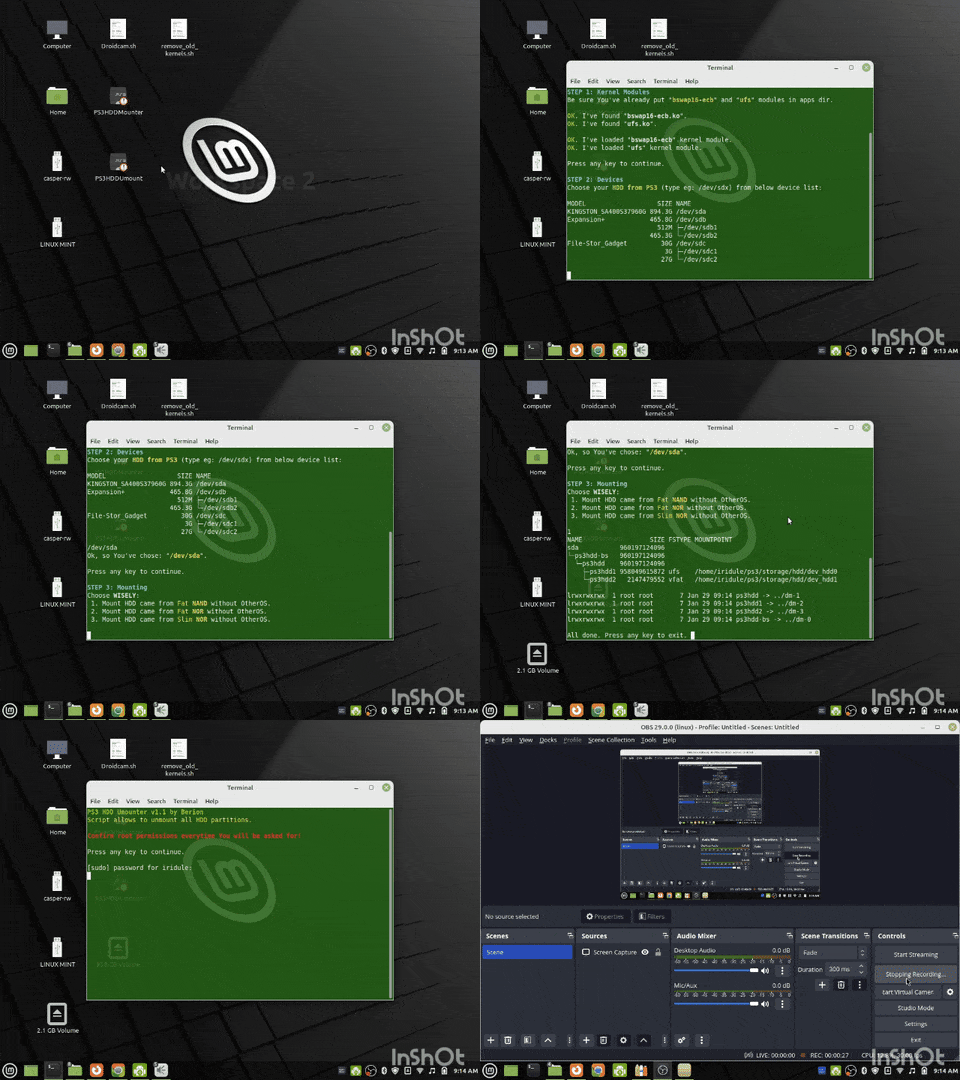
Iridule
Member
@Berion If i am doing this correctly (I think I am) It seems like I have write permission however only when root? Also I tested the inject ERK function but it was not slow (less than 1 second) Now that I have injected the ERK how can I get it from the drive lol? I used the Tasker script and it shows something but I'm not 100% sure if thats the ERK?


Last edited:
Berion
Developer
@Iridule
I wondering, what You are using for screen recording?
So currently by hand: go at the last sector by hex editor (e.g. HxD (all Linux hex editors with GUI sucks)). Eventually using hexdump (calculate offset from LBA*512=xB and turn this decimal into hexadecimal value.
Also commented modules removal.
//attachment removed, it is now part of official release
Yes, I saw the video on mega.I like these activator links I can mount/unmount quickly which makes things easier for me.
I wondering, what You are using for screen recording?But You loading Your own, manually compiled ufs.ko/whole kernel, right? That's the case, if You would load one compiled by my script, You wouldn't have ability to write anything. I think... ^^If i am doing this correctly (I think I am) It seems like I have write permission however only when root?
Maybe because it is SSD, or I don't understand something. Normally on 1TB HDD, this taking one long day. So I've hide it in menu until I find better solution.Also I tested the inject ERK function but it was not slow (less than 1 second)
Getting it back is not coded yet.Now that I have injected the ERK how can I get it from the drive lol? I used the Tasker script and it shows something but I'm not 100% sure if thats the ERK?
So currently by hand: go at the last sector by hex editor (e.g. HxD (all Linux hex editors with GUI sucks)). Eventually using hexdump (calculate offset from LBA*512=xB and turn this decimal into hexadecimal value.In attachment is tiny update. Now it should works always on everything. Damn, I hope so...Though I had to use your old un-mounter script the new one wouldn't work.
Also commented modules removal.//attachment removed, it is now part of official release
Last edited:

