PS3 PS3 Net Server Tutorial

Lmao gotta love SEO. It's a sad day when everyone just wants to capitalize off the internet in every way possible. Anyone remember YT back around 07? It's changed a lot!!!!

I actually watched a few of his videos when HEN first launched and was seeking more visual guidance on how to get everything set up. He had a video about converting folder games to ISO and I think he used UltraISO lol.
 
Can anyone try replacing the ps3netsrv with this one
https://github.com/aldostools/webMAN-MOD/blob/master/_Projects_/ps3netsrv/bins/old/macOS/ps3netsrv-- 20160420.zip
it's the latest i see off aldostools github and if it works, that would be an easy fix/udpate :)

I don't know if it's still needed or not, but I've built a macOS version of ps3netsrv++ (2016-04-20), using the source link by @psykosis

I've built it under macOS Catalina (10.15.1), and the binary executes ok:
Code:
ps3netsrv---master % ./ps3netsrv++
Usage: ./ps3netsrv++ [-d] [-p port] [-w whitelist] rootdirectory
Default port: 38008
Whitelist: x.x.x.x, where x is 0-255 or * (e.g 192.168.1.* to allow only connections from 192.168.1.0-192.168.1.255)

I didn't test much further since I never used the ps3 net server, but feel free to give it a try.

The macOS binary is attached in ps3netsrv++.zip
The complete source code can be found in ps3netsrv---master.zip . If you want to build it yourself, just unzip and run "make"
 

Attachments

Last edited:
... and now I've just realized that there's a newer version of ps3netserv! :sem blush: oops! :D

so I went ahead and built the latest version (2019-06-30) for macOS (Catalina).
The source code used is available at: https://github.com/aldostools/webMAN-MOD/tree/master/_Projects_/ps3netsrv
You can find the binary attached.

Code:
ps3netsrv % ./ps3netsrv           
ps3netsrv build 20190630 (mod by aldostools)

Usage: ps3netsrv [rootdirectory] [port] [whitelist]

 Default port: 38008

 Whitelist: x.x.x.x, where x is 0-255 or *
 (e.g 192.168.1.* to allow only connections from 192.168.1.0-192.168.1.255)

If @aldostools don't mind, I can create a pull request on GitHub and submit the specific Makefile for macOS, so anyone can build future versions.
Note: my build uses PolarSSL, so there's no dependencies with Meson and mbed TLS.

cheers!
 

Attachments

I was developing ps3netsrv on my hackintosh before my radeon 6870 died. Haven't had a hackintosh capable graphics card since, so didn't have a way to compile new ps3netsrv to include :)

Good to see it being updated :)
 
im using PS3netsrv on Synology ds416play, and this server have plugins for download and one of this plugins is ps3netsrv
working good.
bus i cant rip games in multiman on net.
in multiman have choice: hdd0, usb0, netsrv0.
but if i select netsrv, nothing happend.
any1 succsess rip game to NET?
 
I was wondering if it would be possible to also store Savedata e Gamedata over the network in order to access them through the PS3 with PS3NetSrv, I'm trying to do it at the moment but being my google-fu a bit rusty at the time I couldn't find any mention about it around the internet, so I guessed my best shot would be asking directly to the source.
If it makes any difference at the moment I am running it from a Linux (Debian) VM trough snap, hosted of a FreeBSD(XigmaNAS) server.

Anyway huge props to aldostools and all the community maintaining the project, you guys are great!
 
How about storing the game in a dropbox account and straming it to the ps3? it will be something like the ps3 net server but poiting to a online cloud service
 
^ streaming over HTTP(S) is very inefficient. If you want to stream via Internet, just get a VPS server, install ps3netsrv there and store your games there. (tips: make sure to choose a VPS server that is the closest to your place).

after that, you should just enter the IP address of your VPS server under your ps3netsrv. It should work.
 
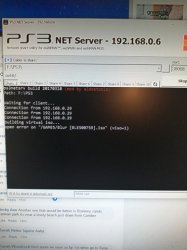
ive been trying to set this up now for 2 days, and it doesn't want to work, i clicked on the [+} on the net server gui, and it says " waiting for client" , am i missing something ?
 
Hi, I have finally sussed how to get this running, my pc is wireless, and my ps3 is wired to the router, all games show up, when i click a game nothing happens, check the client on my pc, and get this (See picture) What am i doing wrong ?
 

Attachments

  • ps3 net server.jpg
    ps3 net server.jpg
    34.5 KB · Views: 155
Download ps3netsrv_20200708.zip, right click, Extract Here (you should get 6 files & 1 folder ps3netsrv),

You can delete the folder ps3netsrv if you don't plan to build your own binaries.

Run PS3_NET_Server.exe, enter the shared path (e.g. F:\PS3), press Start button, then Allow access.

I did these exact steps and it works on my system.

If you still have issues running the GUI, then run directly the CLI application: ps3netsrv.exe
If you copy it in the shared path (e.g. F:\PS3) you just run it, without have to pass command line parameters.
 
Download ps3netsrv_20200708.zip, right click, Extract Here (you should get 6 files & 1 folder ps3netsrv),

You can delete the folder ps3netsrv if you don't plan to build your own binaries.

Run PS3_NET_Server.exe, enter the shared path (e.g. F:\PS3), press Start button, then Allow access.

I did these exact steps and it works on my system.

If you still have issues running the GUI, then run directly the CLI application: ps3netsrv.exe
If you copy it in the shared path (e.g. F:\PS3) you just run it, without have to pass command line parameters.

Ok so i get this (picture below), Games show up on the ps3, i click a game and it returns to the game screen, but the iso isnt showing ?
116339114_852952078445135_8190252334814608804_n.jpg


Tried running ps3netsrv.exe, but all i get is this (pic below) restarted the ps3 and still the same.

cls.jpg
 
Ok so i get this (picture below), Games show up on the ps3, i click a game and it returns to the game screen, but the iso isnt showing ?View attachment 27105

Tried running ps3netsrv.exe, but all i get is this (pic below) restarted the ps3 and still the same.
If you plan to run ps3netsrv.exe (without the GUI), you should move it to F:\PS3 and runn it from there.

The ISO is shown in webMAN only if they are in /PSXGAMES without subfolders or if the ISO is named exactly like the sub-folder.
Examples:
F:\PS3\PSXGAMES\MyGame1.iso
F:\PS3\PSXGAMES\MyGame2\MyGame2.iso
F:\PS3\PSXGAMES\MyGame3\MyGame.iso <= This is not shown because the folder name & file name are different.
 
Still cant get it to work, put the ps3netsrv files in the ps3 folders, and am getting this

View attachment 27132
Each folder has its own usage, you cannot mix & match, just putting any file in any folder and expecting ps3netsrv to be smart enough to adapt to the situation. That kind of flexibility would require more development work from aldostools & it would make using an organised tree structure pointless, it could be done of course but it would be messier for users though imho.

Right now, I think (Aldo correct me if I am wrong because this is all from my poor & often failing memory lol) ps3netsrv is scanning your GAMES directory & finding the iso file entry then errors out when trying to build a virtual iso structure for it like it would for any JB format game.

Try moving your ps3 iso file into the PS3ISO folder instead of the GAMES folder which should be used only for JB format games (files & folders structure) & try again.
 
Last edited:
Back
Top