
You are using an out of date browser. It may not display this or other websites correctly.
You should upgrade or use an alternative browser.
You should upgrade or use an alternative browser.
PS3 PS3 PRO MOD Release/Information Thread
- Thread starter kozarovv
- Start date
- Status
- Not open for further replies.


RandomGuyLovesPS3XPLOIT
Member
I would call it Online Chat as it is, well, an online chat xDGuys i need help
I'm creating the texts now
but i don't know how to call the CHAT and its description
Members Chat?
Users Chat
Online Chat?
gimme your suggestion and a description to put under the info
For the description. Connect and chat with other users of PS3 PRO!

1BERTOX
Forum Noob
@LuanTeles
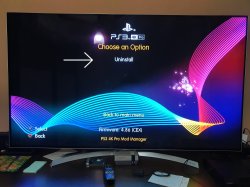
I did the system update to the new version 4.86 +
Hen 3.0.1 but now the ps3 4k mod is not compatible.
I installed version 4.9 and only the option to uninstall appears.
Any way to fix this or do I have to wait for a new version?
I did the system update to the new version 4.86 +
Hen 3.0.1 but now the ps3 4k mod is not compatible.
I installed version 4.9 and only the option to uninstall appears.
Any way to fix this or do I have to wait for a new version?
Attachments

@LuanTeles
I did the system update to the new version 4.86 +
Hen 3.0.1 but now the ps3 4k mod is not compatible.
I installed version 4.9 and only the option to uninstall appears.
Any way to fix this or do I have to wait for a new version?
Yeap, wait for the v5.0 i wll release it by today or tomorrow

Md Hesam
Member
Thank you very much to @LuanTeles for quick release
1BERTOX
Forum Noob
Yeap, wait for the v5.0 i wll release it by today or tomorrow
great!
I got used to your mod and using the simple version is very strange after using your mod.
great!
I got used to your mod and using the simple version is very strange after using your mod.
I feel the same =P
RandomGuyLovesPS3XPLOIT
Member
Your mod menu is of an amazing quality, not gonna lie! There are some things I don't like that much, like the text below the PS3 PRO gaming boot or the changes in icons for the main pkgs like Retroarch, but I respect your idea either way! This is just fantastic! Keep up the great work!!!I feel the same =P
Your mod menu is of an amazing quality, not gonna lie! There are some things I don't like that much, like the text below the PS3 PRO gaming boot or the changes in icons for the main pkgs like Retroarch, but I respect your idea either way! This is just fantastic! Keep up the great work!!!
I removed the pkgs icon changes, and now you can select wherever gameboot you want and etc
@DeViL303 there is a thing that is driving me crazy
I fixed the ram issue and i was able to add all the coldboots again, but adding half of it in the main folder and the other in the last item inside this folder, called more items.
But i also add the flash content in the Network coloumn, it works good, but if i open the file manager it stops to load, only this item.
So i reverted back the coldboots and same problem so i disabled all Customization items, and the same problem again.
So i realized that is the xml content, i erased all and it worked.
So it is happening even without the items in xmb, it counts the lines, but it is strange that only this item get issues, all other things on xmb loads fine.
Usually when it is caused by ram issue all the other icons starts to spins too, but it doesn't
I fixed the ram issue and i was able to add all the coldboots again, but adding half of it in the main folder and the other in the last item inside this folder, called more items.
But i also add the flash content in the Network coloumn, it works good, but if i open the file manager it stops to load, only this item.
So i reverted back the coldboots and same problem so i disabled all Customization items, and the same problem again.
So i realized that is the xml content, i erased all and it worked.
So it is happening even without the items in xmb, it counts the lines, but it is strange that only this item get issues, all other things on xmb loads fine.
Usually when it is caused by ram issue all the other icons starts to spins too, but it doesn't
RandomGuyLovesPS3XPLOIT
Member
Oh wow thank you very much!!! I feel that sometimes simple might look better to be honest!I removed the pkgs icon changes, and now you can select wherever gameboot you want and etc

Not sure exactly what you mean but if its down to lines in the xml, just split stuff up into more xmls.@DeViL303 there is a thing that is driving me crazy
I fixed the ram issue and i was able to add all the coldboots again, but adding half of it in the main folder and the other in the last item inside this folder, called more items.
But i also add the flash content in the Network coloumn, it works good, but if i open the file manager it stops to load, only this item.
So i reverted back the coldboots and same problem so i disabled all Customization items, and the same problem again.
So i realized that is the xml content, i erased all and it worked.
So it is happening even without the items in xmb, it counts the lines, but it is strange that only this item get issues, all other things on xmb loads fine.
Usually when it is caused by ram issue all the other icons starts to spins too, but it doesn't
If that does not work, I wonder if writing the xml the other way would help? If you dont know what i mean, there are 2 ways to build menus in XMBML. compare the way the original package manager is written to my normal style. You will see that menus are made differently, package manager is more modular, uses more lines per item, but its easier to move stuff around quickly, but "my way" is easier to read and write IMO.
Not sure exactly what you mean but if its down to lines in the xml, just split stuff up into more xmls.
If that does not work, I wonder if writing the xml the other way would help? If you dont know what i mean, there are 2 ways to build menus in XMBML. compare the way the original package manager is written to my normal style. You will see that menus are made differently, package manager is more modular, uses more lines per item, but its easier to move stuff around quickly, but "my way" is easier to read and write IMO.
I gave up, even splitting the main xml into many other xmls with 500-1000 it are giving erros,
but Only in the xmls images in the other categories outside the file manager.
So i added the soft reboot action after selecting a coldboot, so it can be visualized and avoid this problem

But seems like even the original themes of the HENTOOLBOX are giving me this issue, but its a minor one, so it's okay.
Only the Flash Games under Network and Online Music under Music are suffering from this aftering interacting with the Coldboot Folder and Theme Folder.
At least it fixed the a issue, before the issue was triggered when just entering in the File Manager folder. Now is when entering in the coldboots or themes. (Even with just 1 item there it will trigger the issue)
Last edited:
1BERTOX
Forum Noob
@LuanTeles
I don't remember if in your mod there was already that option. but is it possible to implement the option of organizing games alphabetically in your mod's xmb?
After upgrading to 4.86, my games were all messed up and out of order.
I don't remember if in your mod there was already that option. but is it possible to implement the option of organizing games alphabetically in your mod's xmb?
After upgrading to 4.86, my games were all messed up and out of order.
@LuanTeles
I don't remember if in your mod there was already that option. but is it possible to implement the option of organizing games alphabetically in your mod's xmb?
After upgrading to 4.86, my games were all messed up and out of order.
It is implemented since v1.2
1BERTOX
Forum Noob
Good to know.It is implemented since v1.2
awaiting the release of v5.0
RandomGuyLovesPS3XPLOIT
Member
Every time I see a comment here I come as fast as I can just to see if version 5.0 is out  This mod became essential to our lives!
This mod became essential to our lives!- Status
- Not open for further replies.
Similar threads
-
-
 PS3 PS3 Firmware 4.93 - Update is Live! (CFW and HFW Released)
- Started by LuanTeles
- Replies: 38
-
-
