PS3 SLIM #6 - PROTOTYPE (DEH-2000A-A)
Upon receiving the console there was a bit of damage. The box had a hole where it looks like the console punched through.
Inspecting the contents revealed why. They only packed it with some crumpled paper and a single layer of bubble wrap. I didn't get any footage of that. But you can see that there is some peeling on the sticker that covers the power/eject switch panel.
Although you can't see it, the case popped out of position a bit. Luckily, I was able to pop it back into position without any damage. The power button still works. But most importantly the console still works too. WHEW!
It was dicey, but it survived the postal service! The console was unsealed and I was a bit concerned it's been tampered with in a way that destroyed it. This would be an expensive paper weight! Since this is a prototype of the 21xx model PS3 that means LED Diagnostic Mode should work on this console. And yep, it does! RRRR RRRR RRRR RRRR translated to 1111 1111 1111 1111 in binary. Which is FFFF in hexadecimal. That means there has never been a SYSCON error. It's empty (full of FF) That's good!
Next order of business was to check what firmware revision it asks for. Since the hard drives were removed, I will have to install firmware. But
@zecoxao reminded me incessantly if it asks for 3.20 or earlier, I have to dump the Nor flash before I can update. That is important because the PS3 holds the last 2 updates. The current active update, and the one it was previously on. If it was on 3.20, the first FW released, the previous FW might be jig firmware. Something used during quality assurance and that wasn't ever meant to leave SONY and that we don't have documented. So it's important save it.
After finding a hard drive to use, it reported I needed firmware 3.20 or higher. And that means I can't just install firmware now. I must try and dump the current flash first. There are several ways to do this. I could disassemble and remove the TSOP-56 NOR and then use a hardware flasher to dump its contents. But that requires difficult soldering and endangers the flash. Another option is installing a Teensy ++2 and rout a million wires. I really don't want to have to do that! The last option is to try and trigger Factory Service Mode and then use a special file that dumps it to a USB stick.
That turned out to be a half day ordeal for both
@zecoxao and myself, fighting and finally loosing a battle with programming a teensy ++2. I ended up using an E3 Card Reader.
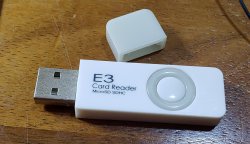
That triggered Factory Service Mode and then a couple of files on a FAT32 MBR formatted USB stick dumped the flash and exited FSM. That last part is really important! If I didn't make sure I was out of Factory Service Mode and then updated, It would brick the prototype! And we don't want that!
The flash dump revealed both ROS banks contained FW 3.21.
After that succeeded, I installed evilnat 4.91 DEX. Fun fact, on low firmware you can simply update strait to Custom Firmware! How convenient! Once there, I dumped the SYSCON EEPROM and EID Root Key.
It was at this point that the fans started ramping up. I usually use webMan Mod to monitor temps and connect to the console over FTP, so I installed it. But just after restarting the console froze! And after restarting it was acting like a Green Light Of Death. I thought I might have bunked the firmware and used safe mode to reinstall 491 dex. It was taking FOEVER and finally seemed to stall at 98%. My buddy
@Nascar1243 suggested it might be a dead HDD. I don't encounter them all that often so this didn't occur to me immediately. I was a bit worried about forcing the console off in the middle of an update, but I had no choice.
I replaced the 120GB HDD with an Seagate Firecuda Solid State Hard Drive and it installed much quicker and without errors. So looks like that was just a bad HDD before.
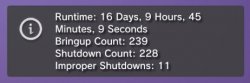
I went to the custom firmware tools to check on the usage time, Only 16 days. That's exciting. It's a youngster!
I checked the temps and fan, which was loud. It was taking 80% fan to maintain 67C on the CPU.
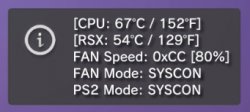
Clearly this console has bad thermal paste. Seeing how it was unsealed, I suspect the answer is waiting for me inside.
And the last thing I did was Dump the LV1 to extract the RSX INFO String, which provides useful information about the GPU in this console. rsx40 a01 500/650 vpe:ff shd:3f [N6553800:0:
4:7:b:7:
3:0:2][
2b:0:2:0:1:0:1][1:1:0]. Of note here is that it's a TSMC fabricated 40nm RSX, but different than retail chips. It comes of D/S line 3, not line 6. I think D/S stands for Design /Specification line, like perhaps the particular assembly line at the foundry. Perhaps someone more familiar with industry terms can provide more context.
It also has a VID value of 2B. According to my Conversion table this RSX should be operating at 1.325v. And that seems excessively high when most are around 0.9 or 1v! It makes me question the accuracy of my VID conversion tables and suggests there's more going on in the programing than I understand. That's a mystery relevant to VID hacking I've been performing on other consoles. So when I'm in there I want to confirm what voltage the RSX is operating at and the actual VID 8-bit binary that determines it.
If the RSX CORE voltage is actually at a lower voltage than the eFuse VID value on the RSX itself would otherwise select, then that could mean the value is being set somewhere else. Like in SYSCON. I know that retail SYSCON's do not set this value, although they can (
@M4j0r and I confirmed that). They instead revert to the RSX eFuse value. Or perhaps a value in LV1, that's still unclear to me...but perhaps this prototype set an absurd upper limit for the eFuse VID and then set a much more easonable one in SYSCON EEPROM. I would just check if it weren't for one big hiccup in that plan.
This prototype uses different SYSCON keys than the retail keys we found!
So while we can access retail SYSCONs, this prototype has to be broken into and hacked before we can gain access. And that's the ultimate goal here.
I will need to desolder the syscon and attach to a breakout board. Then hook up to a Teensy 4.0 and dump the checksums and then attempt to glitch it. If that's successful perhaps
@zecoxao,
@M4j0r, and @wild can get the keys this SYSCON is using. Then we can auth in using a modified UART script and finally Dump the undumped missing SYSCON ROM.