UPDATE 1 (OCT. 11 2018) - With the release of OFW 4.83 portions of PS3Xploit have been patched, The team is looking at workarounds, STAY ON 4.82, DO NOT UPDATE TO 4.83 AT THIS TIME:

UPDATE 2 (MARCH -2019) HFW (Hybrid Firmware) Released - Allows for PS3Xploit Tools / Hacks (including HAN) to work for 4.84 (OFW) OFFICIAL FIRMWARE (See Here) Also the HAN Exploit was updated to v3.01 for 4.84 HFW support

dThe PS3Xploit Team has done it yet once again with an incredible breakthrough that has now just gone LIVE for everyone and as the recent teaser recently suggested it's for those later Slim & SuperSlim models who are not capable of using CFW (aka NoN CFW Compatible Models). While not a HEN (Homebrew Enabler) it's a volatile dose of "HAN" (short for etHANol). This version of the hack has evolved to offer something to every PS3 model now. All existing models will now have the ability to get PS3 games backup pkg installation and PS1/PS2/PSP emulators support among other features as outlined by developer bguerville who is going to take from here with this introduction of PS3Xploit v3.0 -- Codenamed: "HAN"
-STLcardsWS​

PS3Xploit_HAN.png


  • PS3Xploit Team is pleased to announce the official release of the PS3Xploit Tools v3.0 project nicknamed 'HAN'.

    PS3Xploit Tools v3.0 is a suite of 6 tools supporting both official firmware versions 4.81 & 4.82. The only pre-requirement to use HAN is to have an activated PSN user account.
    It's recommend not to use your main PSN account but rather a spare one.
    Users should create a new secondary user account on the PS3 then activate a new PSN account in it.
    This secondary ps3 account should be used to perform all the pkg installations. Then for regular gaming, use the primary user account.

    The principle behind HAN is quite simple, due to a vulnerability in the way npdrm content is managed, it is possible to resign game related files with custom keys, patch vsh & install resigned pkg from XMB.

    The first tool, on the PC side, ps3xploit_rifgen_edatresign.exe should be used to generate rif files and create new signed_act.dat. You should place the act.dat/idps.hex, previously dumped with HAN ACT/IDPS Dumper, in the resigner directory and drag matching rap file for your game onto the executable file. Then rename the new "signed_act.dat" to "act.dat" and place it on USB drive along with the new rif file. The files are now ready to be pushed to the PS3 using the HAN ACT/RIF Copier.

    ** It is recommended to resign all the pkgs that require Han enabler with this tool**
    ** Packages which are converts and packages which needs rif activation **
    **
    keep original act.dat in a safe place **

    On the PS3 side, the other 5 ps3xploit tools are:
    1. HAN Installer - Copies necessary system files to PS3 to run HAN.
    2. HAN Enabler - Enables the HAN patches
    3. HAN ACT/IDPS Dumper - Dumps current user profile user act.dat & PS3 IDPS to USB.
    4.
    HAN ACT/RIF Copier - Copies the resigned act.dat & generated rif file from USB to the current user profile.
    5. HAN Debug PKG Enabler - Provided optionally for users wishing to install debug pkg. Note that if you run this patch you will not be able to install any pkg resigned with the ps3xploit resigner for HAN anymore until you reboot!

    The 'HAN' project is solely relying on userland exploitation to provide digital backups support for the majority of PS3 Games as well as PS1/PS2/PSP Emulators (within the ps3 firmware) and the ability to install PKG files from USB. PS3 PKG Game backups need to be prepared using TABR like technique and only ps3 games having an available "game update" are supported.
    PKG files are installed from the Games XMB column, using a version of the Rebug Package Manager tweaked for this project. On USB of course, the FAT32 limitation of 4Gb is still in effect, it's a partition type limitation, nothing we can do about that. However workarounds using a local server can be used to remedy the situation if required.
    Important:
    To get best results initializing the exploit, remember to load the pages directly from a clean browser session. Never browse to an exploit page from other pages & never use a homepage other than blank or the exploit page you wish to use.
    We recommend to:
    1. Go to the ps3 browser homepage option & choose blank homepage.
    2. Create favourites to HAN Enabler & the other HAN pages you wish to use.
    3. Restart the browser.
    4. Use the favourites to access any page from complete scratch.
    5. Reload the browser between exploits.

  • PS3Xploit Tools v3.0 - PS3 HAN Installer.png
    PS3Xploit Tools v3.0 Overview
    1. HAN style packages allowed (Patched external modules ecdsa)
    2. PSX/PSP Free license type allowed (Patched sceNpdrmHeader check)
    3. Resigned ACT.DAT & RIF allowed
    4. Cinavia protection removed on HDD content
    5. OFW Package Manager
    6. Debug pkg file support added (optional)
    7. reactPSN alternative solution for OFW users

  • Instructions for Each Tool in v3.0

    PS3 HAN Installer
    This tool will copy files from USB to Flash Memory to install OFW Package Manager.
    • Extract all files from "han_supportfiles.zip" on target USB drive root
    • Load Exploit Page
    • Select Root Path where these files are (default /dev_usb000/)
    • Click "Initialize HAN Installer" button
    • When init ready, click "Launch HAN Installation" button to copy files to flash and reboot
    • Once rebooted, you can now use the HAN Enabler and Debug Package Enabler

    PS3 HAN Enabler
    This tool will enable the HAN patches.
    • Load Exploit Page
    • Click "Initialize HAN Enabler" button
    • When init ready, click "Enable HAN" button to activate patches
    • Once browser closes (default option) you can install HAN packages from XMB

    PS3 HAN ACT/IDPS Dumper
    This tool will dump your activation file (act.dat) and your IDPS.
    • Load Exploit Page
    • Select Dump Path From Dropdown Box (default /dev_usb000/)
    • Click "Initialize ACT/IDPS Dumper" button
    • When init ready, click "Dump ACT.DAT & IDPS" button
    • The browser will close automatically by default

    PS3 HAN ACT/RIF Copier
    This tool will write back to the PS3 a modified act.dat and *.rif file
    • Load Exploit Page
    • Change RIF File Name to match your target
      • example PS2 Placeholder: 2P0001-PS2U10000_00-0000111122223333
    • Select Root Path where act.dat/*.rif is located (default /dev_usb000/)
    • Click "Initialize AC/RIF Copier" button
    • When init ready, click "Copy Files" button to transfer to HDD

    PS3 HAN Debug PKG Enabler
    This tool will allow Debug Package types to be installed if required. Do not use this tool if you install pkg files resigned with the ps3xploit resigner app.
    • Load Exploit Page
    • Click "Initialize HAN Debug PKG Enabler" button
    • When init ready, click "Enable Debug PKG" button to activate patches.
    • Once browser closes (default option) you can install Debug pkg packages from XMB.


  • All files are hosted on ** http://www.**ps3xploit.com >Doma...no Longer owned by team** (ps3xploit.me =new)
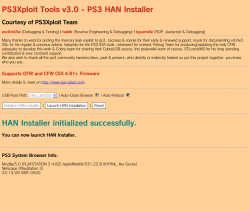
    (See ScreenShot below)

    image.png


Official Website: www.**ps3xploit.com >Domain no Longer owned by team** (ps3xploit.me =new) / Official Forum @ www.PSX-Place.com


UPDATE (USEFUL LINKS)
 
Last edited by a moderator:
HAN installation error .I m trying last 3 days onwards not at all working.error coping files .i think this will not work on superslim CECH-4208A series. Any help.
 
Sakimotor I get error 80029563 when I try to install GTA Vice City and some PS2 games via standard package(after enabling HAN) the error always shows up at 14% or 15% but when I enable debug pkg it gives an error 80029567 as soon as the installer starts. Do I have to sign in to my PSN account for the games to install??? is that what you mean by "activate account"????Do I have to login to the user where I installed the exploit or the non exploit user???
Why not start with following the instructions? If you took a few minutes to understand the explanations & steps in the OP, you would not have any of the problems you described.

1. Use a secondary ps3 user account to do all the HAN installations then you can play games through the main account.
You don't need to sign in to PSN to install your pkg files. You only need to sign in to PSN once to "activate" the secondary user profile, that will create an official act.dat file which is a pre-requirement for HAN to work. Once the act.dat has been created, you can remain offline if you wish.

2. Don't use the Debug pkg Enabler when you try to install pkg files resigned with the ps3xploit resigner app. The ps3xploit resigner app produces retail pkg files not debug ones.
 
HAN installation error .I m trying last 3 days onwards not at all working.error coping files .i think this will not work on superslim CECH-4208A series. Any help.

You can try with a miniweb..They are tutorials to install HAN with a miniweb..It´s fast and less errors.. Look for Cyb3r on youtube..He speaks spanish but download his rar from description in his video :) The first tutorial
 
HAN installation error .I m trying last 3 days onwards not at all working.error coping files .i think this will not work on superslim CECH-4208A series. Any help.
HAN works perfectly well on ALL ps3 models including yours. It has been tested & confirmed long before it was even released.
Your problem isn't related to the ps3 model but to the instructions not being followed/understood.
 
You can try with a miniweb..They are tutorials to install HAN with a miniweb..It´s fast and less errors.. Look for Cyb3r on youtube..He speaks spanish but download his rar from description in his video :) The first tutorial
I tried using miniweb and online both. Its same error .HAN installation failed. I followed each and every steps carefully but i dont know whats wrong.....
 
You can try with a miniweb..They are tutorials to install HAN with a miniweb..It´s fast and less errors.. Look for Cyb3r on youtube..He speaks spanish but download his rar from description in his video :) The first tutorial
Ever since the very first ps3xploit release in November we have kept recommending the use of a local Web server to host our exploits. The choice of the local http server is left to the user, there are dozens of http servers to choose from, for instance the python http server the team uses for development which is included with the release files, any type of Apache server setup like LAMP/XAMPP/WAMP, IIS, Cassini, miniweb etc...

However, while using a local http server definitely helps with certain issues such as the exploit initialization failures, it won't solve issues caused by omitted/misunderstood steps & instructions.
In the case described by this user, IF the exploit initializes correctly but the copying process fails, the issue is most likely related to the usb device or the files on it. Changing server will not solve it, only better understanding of the requirements will.

The HAN installer mounts the read only partition referred to as /dev_flash as a writable partition named /dev_blind. Then it proceeds to copying the 5 files (1 xml, 2 sprx & 2 rco). At the end of the process, the javascript checks the number of written bytes for each copy, that value was returned by the file write syscall.
If that value is found to be 0 OR is different from the number of bytes originally detected in the source file on usb then an error is raised.
On screen, you get the list of the files that failed to be copied properly.
 
Installing games that don't have updates works just fine.. Every game I threw at my PS3 ran perfectly fine so long as I sign both the .RAP and .PKG file and inject the .rif file via the copier.
 
Everything has been working great on my 4.82 PS3 Slim so thank you again to the developers. I had a question about transferring the exploit over to another ps3. My current slim has a damaged hdmi port so im looking at getting another unit and i wanted to see if there is a way to transfer everything over and keep all my working exploits and games intact. Could i just use the ps3's included backup tool and deactivate my account on the old ps3 and enable it on the new one? Thank you in advance for any help.
 
Additionally, in the HAN installer, it's possible to find out whether or not a file was read successfully on usb & whether or not something was written on /dev_blind.

I will maybe make this easier in the future with less cryptic variable naming for users as I originally expected only devs to eventually make use of it. I am only describing this for the handful of people who may need it.

Anyway here it is.
Open ps3xploit_v30.js in a text editor.
Change the first line to
var debug=true;
Then go around line 500, there is a function named rop_exit_5val.
There are 3 commented lines with logAdd calls in that function, uncomment the 3 lines.
Save the js file.

Run the HAN installer again.
When the the process is done & the copying has failed overall you will get a number of values displayed on screen.
The values of interest here are t_val to t_val10.

Here is what they mean:

rco file 1 -> t_val is the number of bytes written to /dev_blind & t_val6 is the number of bytes detected from the rco file on usb.

rco file 2 -> t_val2 is the number of bytes written to /dev_blind & t_val7 is the number of bytes detected from the rco file 2 on usb.

explore plugin sprx file -> t_val3 is the number of bytes written to /dev_blind & t_val8 is the number of bytes detected from the sprx file on usb.

xml file 1 -> t_val4 is the number of bytes written to /dev_blind & t_val9 is the number of bytes detected from the xml file on usb.

video player plugin sprx file -> t_val5 is the number of bytes written to /dev_blind & t_val10 is the number of bytes detected from the sprx file on usb.

Important:
In some cases, t_val6 to t_val10 values might be = 80000000, consider that this particular value is the same as 0 ie the file was not read on usb.

Now look at the values & check against the 3 cases detailed below.

1. If t_val to t_val5 values are all 0 then nothing was written to /dev_blind.

2. If t_val6 to t_val10 values are all 0, it means that files were not even detected on USB.

3. If t_val6 to t_val10 are values equal to each file size but t_val to t_val5 are 0 then it probably means the /dev_blind partition failed to be mounted: the files were detected & read properly on usb but the writing process failed.
 
Last edited:
Additionally, in the HAN installer, it's possible to find out whether or not a file was read successfully on usb & whether or not something was written on /dev_blind.

I will maybe make this easier in the future with less cryptic variable naming for users as I originally expected only devs to eventually make use of it. I am only describing this for the handful of people who may need it.

Anyway here it is.
Open ps3xploit_v30.js in a text editor.
Change the first line to
var debug=true;
Then go around line 500, there is a function named rop_exit_5val.
There are 3 commented lines with logAdd calls in that function, uncomment the 3 lines.
Save the js file.

Run the HAN installer again.
When the the process is done & the copying has failed overall you will get a number of values displayed on screen.
The values of interest here are t_val to t_val10.

Here is what they mean:

rco file 1 -> t_val is the number of bytes written to /dev_blind & t_val6 is the number of bytes detected from the rco file on usb.

rco file 2 -> t_val2 is the number of bytes written to /dev_blind & t_val7 is the number of bytes detected from the rco file 2 on usb.

explore plugin sprx file -> t_val3 is the number of bytes written to /dev_blind & t_val8 is the number of bytes detected from the sprx file on usb.

xml file 1 -> t_val4 is the number of bytes written to /dev_blind & t_val9 is the number of bytes detected from the xml file on usb.

video player plugin sprx file -> t_val5 is the number of bytes written to /dev_blind & t_val10 is the number of bytes detected from the sprx file on usb.

Important:
In some cases, t_val6 to t_val10 values might be = 80000000, consider that this particular value is the same as 0 ie the file was not read on usb.

Now look at the values & check against the 3 cases detailed below.

1. If t_val to t_val5 values are all 0 then nothing was written to /dev_blind.

2. If t_val6 to t_val10 values are all 0, it means that files were not even detected on USB.

3. If t_val6 to t_val10 are values equal to each file size but t_val to t_val5 are 0 then it probably means the /dev_blind partition failed to be mounted: the files were detected & read properly on usb but the writing process failed.
I am unable to launch HAN installer. I tried almost all the methods .pl suggest...what next...
 
I am unable to launch HAN installer. I tried almost all the methods .pl suggest...what next...
What does that mean? "Unable to launch HAN installer.."
Unable to open the page in browser? Initialize the exploit? Install ie copy files?

Also "tried almost all methods", what methods are you referring to? Local server vs remote server?

You need to detail your questions sufficiently otherwise it's impossible to answer.
 
Hey can someone help me I've tried everything but I can't get my browser to get the Java notification so the exploit can detect my ps3
 
Hey can someone help me I've tried everything but I can't get my browser to get the Java notification so the exploit can detect my ps3
did you maybe deactivated in your browser the javascrip? just press triangel and go to setting and then on java and activate
 
Why split a package ? Use an ethernet cable and the web server method to transfer the whole file, install it and then use a pendrive with the act.dat and .rif file to activate it. Simple as that.

"If there is a simplier way, why do it any other way ?"

I do it because I can not always have a PC nearby.
the point is that cable would only save the process of copying and pasting in fat32 usb and when something gets stuck in my head until I do not succeed I do not leave it
 
I do it because I can not always have a PC nearby.
the point is that cable would only save the process of copying and pasting in fat32 usb and when something gets stuck in my head until I do not succeed I do not leave it
So its imposible to use linker with wifi?
 
It's simply not possible.. Lol
If act.dat cannot be dumped it means the current ps3 user profile doesn't have an act.dat!

the possibility arose with me and I do not know why :'v maybe by doing what the comrade says by downloading something from the store you can do the act.dat dump
 

Featured content

Trending content

Latest posts

Back
Top