UPDATE 1 (OCT. 11 2018) - With the release of OFW 4.83 portions of PS3Xploit have been patched, The team is looking at workarounds, STAY ON 4.82, DO NOT UPDATE TO 4.83 AT THIS TIME:

UPDATE 2 (MARCH -2019) HFW (Hybrid Firmware) Released - Allows for PS3Xploit Tools / Hacks (including HAN) to work for 4.84 (OFW) OFFICIAL FIRMWARE (See Here) Also the HAN Exploit was updated to v3.01 for 4.84 HFW support

dThe PS3Xploit Team has done it yet once again with an incredible breakthrough that has now just gone LIVE for everyone and as the recent teaser recently suggested it's for those later Slim & SuperSlim models who are not capable of using CFW (aka NoN CFW Compatible Models). While not a HEN (Homebrew Enabler) it's a volatile dose of "HAN" (short for etHANol). This version of the hack has evolved to offer something to every PS3 model now. All existing models will now have the ability to get PS3 games backup pkg installation and PS1/PS2/PSP emulators support among other features as outlined by developer bguerville who is going to take from here with this introduction of PS3Xploit v3.0 -- Codenamed: "HAN"
-STLcardsWS​

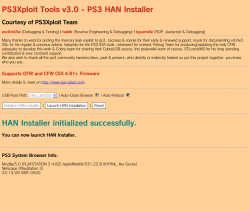
PS3Xploit_HAN.png


  • PS3Xploit Team is pleased to announce the official release of the PS3Xploit Tools v3.0 project nicknamed 'HAN'.

    PS3Xploit Tools v3.0 is a suite of 6 tools supporting both official firmware versions 4.81 & 4.82. The only pre-requirement to use HAN is to have an activated PSN user account.
    It's recommend not to use your main PSN account but rather a spare one.
    Users should create a new secondary user account on the PS3 then activate a new PSN account in it.
    This secondary ps3 account should be used to perform all the pkg installations. Then for regular gaming, use the primary user account.

    The principle behind HAN is quite simple, due to a vulnerability in the way npdrm content is managed, it is possible to resign game related files with custom keys, patch vsh & install resigned pkg from XMB.

    The first tool, on the PC side, ps3xploit_rifgen_edatresign.exe should be used to generate rif files and create new signed_act.dat. You should place the act.dat/idps.hex, previously dumped with HAN ACT/IDPS Dumper, in the resigner directory and drag matching rap file for your game onto the executable file. Then rename the new "signed_act.dat" to "act.dat" and place it on USB drive along with the new rif file. The files are now ready to be pushed to the PS3 using the HAN ACT/RIF Copier.

    ** It is recommended to resign all the pkgs that require Han enabler with this tool**
    ** Packages which are converts and packages which needs rif activation **
    **
    keep original act.dat in a safe place **

    On the PS3 side, the other 5 ps3xploit tools are:
    1. HAN Installer - Copies necessary system files to PS3 to run HAN.
    2. HAN Enabler - Enables the HAN patches
    3. HAN ACT/IDPS Dumper - Dumps current user profile user act.dat & PS3 IDPS to USB.
    4.
    HAN ACT/RIF Copier - Copies the resigned act.dat & generated rif file from USB to the current user profile.
    5. HAN Debug PKG Enabler - Provided optionally for users wishing to install debug pkg. Note that if you run this patch you will not be able to install any pkg resigned with the ps3xploit resigner for HAN anymore until you reboot!

    The 'HAN' project is solely relying on userland exploitation to provide digital backups support for the majority of PS3 Games as well as PS1/PS2/PSP Emulators (within the ps3 firmware) and the ability to install PKG files from USB. PS3 PKG Game backups need to be prepared using TABR like technique and only ps3 games having an available "game update" are supported.
    PKG files are installed from the Games XMB column, using a version of the Rebug Package Manager tweaked for this project. On USB of course, the FAT32 limitation of 4Gb is still in effect, it's a partition type limitation, nothing we can do about that. However workarounds using a local server can be used to remedy the situation if required.
    Important:
    To get best results initializing the exploit, remember to load the pages directly from a clean browser session. Never browse to an exploit page from other pages & never use a homepage other than blank or the exploit page you wish to use.
    We recommend to:
    1. Go to the ps3 browser homepage option & choose blank homepage.
    2. Create favourites to HAN Enabler & the other HAN pages you wish to use.
    3. Restart the browser.
    4. Use the favourites to access any page from complete scratch.
    5. Reload the browser between exploits.

  • PS3Xploit Tools v3.0 - PS3 HAN Installer.png
    PS3Xploit Tools v3.0 Overview
    1. HAN style packages allowed (Patched external modules ecdsa)
    2. PSX/PSP Free license type allowed (Patched sceNpdrmHeader check)
    3. Resigned ACT.DAT & RIF allowed
    4. Cinavia protection removed on HDD content
    5. OFW Package Manager
    6. Debug pkg file support added (optional)
    7. reactPSN alternative solution for OFW users

  • Instructions for Each Tool in v3.0

    PS3 HAN Installer
    This tool will copy files from USB to Flash Memory to install OFW Package Manager.
    • Extract all files from "han_supportfiles.zip" on target USB drive root
    • Load Exploit Page
    • Select Root Path where these files are (default /dev_usb000/)
    • Click "Initialize HAN Installer" button
    • When init ready, click "Launch HAN Installation" button to copy files to flash and reboot
    • Once rebooted, you can now use the HAN Enabler and Debug Package Enabler

    PS3 HAN Enabler
    This tool will enable the HAN patches.
    • Load Exploit Page
    • Click "Initialize HAN Enabler" button
    • When init ready, click "Enable HAN" button to activate patches
    • Once browser closes (default option) you can install HAN packages from XMB

    PS3 HAN ACT/IDPS Dumper
    This tool will dump your activation file (act.dat) and your IDPS.
    • Load Exploit Page
    • Select Dump Path From Dropdown Box (default /dev_usb000/)
    • Click "Initialize ACT/IDPS Dumper" button
    • When init ready, click "Dump ACT.DAT & IDPS" button
    • The browser will close automatically by default

    PS3 HAN ACT/RIF Copier
    This tool will write back to the PS3 a modified act.dat and *.rif file
    • Load Exploit Page
    • Change RIF File Name to match your target
      • example PS2 Placeholder: 2P0001-PS2U10000_00-0000111122223333
    • Select Root Path where act.dat/*.rif is located (default /dev_usb000/)
    • Click "Initialize AC/RIF Copier" button
    • When init ready, click "Copy Files" button to transfer to HDD

    PS3 HAN Debug PKG Enabler
    This tool will allow Debug Package types to be installed if required. Do not use this tool if you install pkg files resigned with the ps3xploit resigner app.
    • Load Exploit Page
    • Click "Initialize HAN Debug PKG Enabler" button
    • When init ready, click "Enable Debug PKG" button to activate patches.
    • Once browser closes (default option) you can install Debug pkg packages from XMB.


  • All files are hosted on ** http://www.**ps3xploit.com >Doma...no Longer owned by team** (ps3xploit.me =new)
    (See ScreenShot below)

    image.png


Official Website: www.**ps3xploit.com >Domain no Longer owned by team** (ps3xploit.me =new) / Official Forum @ www.PSX-Place.com


UPDATE (USEFUL LINKS)
 
Last edited by a moderator:
I can understand the frustration. I plan to do use the "install all" option on the ps4.. thus far, I've only installed one pkg at a time. I've been keeping a copy of each pkg for when I format the hdd. I suggest you do the same. all that's technically needed for an install on the ps3 is the PARAM.SFO which is only 100KBs as a pkg. ;)
 
I Want just to ask if we there is a possibility for qa enable in OFW to make the Install All Packages then it will be magnificent and easier in installing pkg just putting hdd then click triangle and install all
As far as we know, an exploited kernel is needed to enable QA toggling.
We would definitely have used QA otherwise because if it were possible to toggle it without exploiting the kernel, we would already have resigned homebrews running.
 
Last edited:
again hi.

i have question : according the post


1-can use for injecting/installing game from dvd-files instead of extracted-package-file at ofw 4.82 superslim jailbrocken?
2- is not final-game-injected-backup-file larger than 4g ? (is it been multi-file or single-file?)
if single-file larger 4g ; how copy to fat32-usbstick?

INJECT PS3 GAMES ON OFW 4.81/4.82 VIA USB

by SmartSKTech March 19, 2018 7 comments
"No Multiman" via USB or external HDD. I already guide you in my previous article . But many of users comment me how they can inject PS3 games over 4GB plus. PS3 only supports the FAT32 format and you cannot transfer the game file if it is more than 4GB. If you want to do that then you need to format your USB drive to NTFS, but NTFS is not supported by the PS3 console.
So, this is the question that I received from many of my users, how we can install if our game size is more than 4GB? So, in this article, I am going to cover the answer to this question also. Furthermore, I have already published an article . Read it, if you didn't. So, let's start the article.
Before the start, we need something
  • Han Support Files
  • MiniWeb
  • TrueAncestor Backup Retailer V2.30
  • PS3Xploit Resigner Master
  • PKG Viewer
  • PS3PKG games
  • High-Speed Internet connection
  • PS3 Backup file – How to get the PS3 backup file
Once you have all these files. Then you need to extract all the files and put in a folder. Now you can easily transfer the game which has size up to the 4GB into your USB drive (FAT32). But you can't transfer game file which has size more than 4GB, if you try to do this, then you get the error. So, let's see the PS3 OFW 4.81/4.82 game injecting process below.
  1. Run TrueAncestor backup retailer v2.30
  2. Put the backup file TrueAncestor Retailer>backup folder
  3. Open you PKG game with PKG viewer
  4. Extract game files in TrueAncestor backup Retailer>game folder
  5. Type 1 and press enter button in TrueAncestor exe to load the backup file
  6. Again type 1 and press enter to add the backup file
  7. Press 4 to load games
  8. Now press S to show game name
  9. Press A to add game
  10. Type S for injecting game in the backup file
  11. Now Type ok to start your injection process
  12. Now copy paste backup file from TrueAncestor Backup Retailer>Output folder to your external HDD
  13. PS3>EXPORT>BACKUP folder.
  14. Now plug your USB stick (FAT32) also on your computer.
  15. Copy and paste han support file from HAN_Support folder. "category_game, explore_category_game.rco,
  16. explore_plugin.sprx, explore_plugin_full.rco, videoplayer_plugin.sprx" to root folder.
  17. Open MiniWeb>Htdocs folder and delete uploaded, upload an index file.
  18. Now copy and paste HTML files to copy from han_supportfiles folder to MiniWeb Htdoc folder.
  19. Run MiniWeb and remember your IP address. (Make sure you connect same internet connection to your PC and PS3)
  20. Plug your HDD on your PS3 and restore the backup file
  21. After finish restoration process, you will see you injected game.
  22. Now plug your USB drive (near of BD-Drive) which has "category_game, explore_category_game.rco, explore_plugin.sprx, explore_plugin_full.rco, videoplayer_plugin.sprx" in root folder.
  23. Now create a new user and signup/sign in with PlayStation Network (PSN) account. (Do not use your real PSN account.)
  24. Open your web browser
  25. Clear cookies and everything from your browser and close your browser, then open it again
  26. Press the start button and type the same IP which you got from MiniWeb.
  27. Now Go to HAN installer and install HAN
  28. After successful message Launch HAN installation (Your System will reboot)
  29. Open web browser again and go to HAN enabler and Enable HAN, After the successful message Enable HAN. (It will ask you to close the browser, so close it)
  30. Go to the account management>System Activation>Games and Activate the system.
  31. Again open your Internet browser and go to ACT/IDPS Dumper. Press Initialize ACT/IDPS dumper button. After the successful message Dump ACT.DAT & IDPS (Now you have your ACT.DAT and IDPS.hex file "Rename it if you got IDPS.bin file IDPS.hex")
  32. Now plug your USB stick into your computer and put both files inside the PS3xploit-resigner-master>rifgen-master folder.
  33. Also, copy-paste your downloaded game RAP file here.
  34. Drag and drop your RAP file to PS3Xploit_rifgen_edatresign exe (You will get RIF and signed_act.dat file.)
  35. Delete old ACT.DAT file from your USB stick and copy paste both RAP and signed_act.dat file in your USB root folder.
  36. Rename signed_act.dat file to act.dat only.
  37. Plug your USB stick on your PS3 (near of BD-Drive)
  38. Open your browser again and go to ACT/RIF COPIER
  39. Fill your RIF file name and press initialize ACT/RIF copier button
  40. After successful message press copy files button. (It will ask you to close the browser, so close it)
  41. Reboot your PlayStation 3 manually.
  42. Open your browser again and re-enable HAN enabler.
Finally, that's all we are done and you can enjoy your installed game. Make sure you follow the steps. If you getting any error at the time of gameplay, then do not worry just click on HAN Enabler and reboot your PS3 console.
 
Last edited by a moderator:
hi.
i have a question:

with method; for installing game through inject game to backup file then making rif file from act.dat & idps.hex & RAP file; how do i install several games together?

PS3xploit-resigner-master app just accept single RAP file to make Sign-Act.dat file while any game have a rap file partly.

should i install any game partly with injected backup & act.dat +rif file?
 
hi.
i have a question:

with method; for installing game through inject game to backup file then making rif file from act.dat & idps.hex & RAP file; how do i install several games together?

PS3xploit-resigner-master app just accept single RAP file to make Sign-Act.dat file while any game have a rap file partly.

should i install any game partly with injected backup & act.dat +rif file?
The act.dat is for your account and the idps is from your system so you only need one of each of those. The rap/rif files are for the games so you need one for each game. So you put the raps in the rap folder the idps in the idps folder and the act.dat in act.dat folder then run the resign_windows.bat and you'll get a "PKG_RIF-INSTALLER.pkg_signed.pkg" with all of rifs.
 
hi everybody! this is my first post! :)
((i'm italian sorry 4 my bad english :( ))

i have a question please:
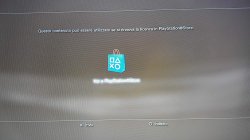
after I installed han and I also got it off, in the han menu I download a game... han unpacked it for me... when I go there to click on with the X of the joy I get out this screen:
what passage did I forget to do?
 

Attachments

  • 20180922_131724.jpg
    20180922_131724.jpg
    1.8 MB · Views: 639
As far as we know, an exploited kernel is needed to enable QA toggling.
We would definitely have used QA otherwise because if it were possible to toggle it without exploiting the kernel, we would already have resigned homebrews running.
Have u checked this exploit named as "kakaroto/ps3xport"
 
hi everybody! this is my first post! :)
((i'm italian sorry 4 my bad english :( ))

i have a question please:
after I installed han and I also got it off, in the han menu I download a game... han unpacked it for me... when I go there to click on with the X of the joy I get out this screen:
what passage did I forget to do?
You need to inject the rif file for the game backup you installed by finding the games rap file,using the resighner tool to convert the rap file into a rif,then using the act/rif copier in v3 han tools to inject your modified act.dat and rif file for your game to work with han enabled.
 
In past utility is working for some Console so with help of rop chain we can develop them to work on han consoles it is possible ?
I never considered it so I cannot say for sure but in theory you could make a ps3 backup manipulation utility like ps3xport using ps3xploit.
Currently, that wouldn't just require help from some rop chain though, it would require implementing every needed feature in ROP & using multiple chains.
 
I never considered it so I cannot say for sure but in theory you could make a ps3 backup manipulation utility like ps3xport using ps3xploit.
Currently, that wouldn't just require help from some rop chain though, it would require implementing every needed feature in ROP & using multiple chains.
I there any way to run Linux on ps3 han
 
I there any way to run Linux on ps3 han
Not as far as we know.
Currently we don't know any way to get Linux running without first exploiting the kernel.

Anyone curious enough can have a look at the Rebug Toolbox source code for instance to get an idea of how QA gets enabled or how Linux gets setup to start. It doesn't matter if you don't understand all the ins & outs of the code, the important thing you will notice is that for all those features the Toolbox needs to peek/poke lv2 and lv1 in some cases. That means the homebrew features need to make changes to the kernel memory (patches if you prefer) during their execution.
ROP can reproduce any homebrew code but as long as the kernel is not exploited, lv1/lv2 peek/poke are unavailable & the kernel memory address space is unaccessible.

Of course there might also be other avenues to research & other hacks to be found. In theory a kexploit is not the only possible solution to this problem, look at cfw for instance. But I think it is the most likely & most promising at this stage.
 
Last edited:
Can someone tell me the state of PS3 OFW because it didn't move for about 4 months. Did everybody just leave it?
 
I have to login my psn account to dump act.dat and idps files, but system says I have to update firmware to login. How can I proceed?
 
Back
Top