
Now Supports 4.84 HFW!
PS3Xploit Team has unveiled the latest progression in the form of an experimental Tool (Debug Settings Installer + Debug/XMB Swappers) for PS3Xploit v3 HAN user's (tools compatible with CFW also), with the release of REBUG REX that means a 4.82 DEX Firmware is out in the wild and that means with 4.82 DEX files, PS3 HAN user's will not have some added features and was one of the reasons why developer HABIB was suggesting user's stay on 4.81 for use of these DEX features as the status was unknown if a public 4.82 DEX would emerge, but with REBUG REX CFW release, the various files for swapping can be done, but devs will lend more details about that throughout this thread.
PS3Xploit Team has unveiled the latest progression in the form of an experimental Tool (Debug Settings Installer + Debug/XMB Swappers) for PS3Xploit v3 HAN user's (tools compatible with CFW also), with the release of REBUG REX that means a 4.82 DEX Firmware is out in the wild and that means with 4.82 DEX files, PS3 HAN user's will not have some added features and was one of the reasons why developer HABIB was suggesting user's stay on 4.81 for use of these DEX features as the status was unknown if a public 4.82 DEX would emerge, but with REBUG REX CFW release, the various files for swapping can be done, but devs will lend more details about that throughout this thread.
-STLcardsWS
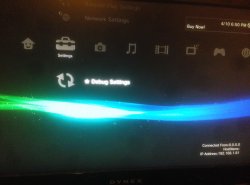
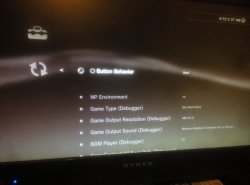
-
PS3Xploit v3 Debug Settings Installer + Debug/XMB Swappers
This tool is released for experimentation purposes only, it is not meant to be installed by every HAN user!
DO NOT TRY SIGNING INTO PSN WHILE DEX ENABLED, YOU CAN/WILL GET BANNED!
CHANGE YOUR NP ENVIRONMENT (thanks @Joonie) to invalid or anything else and reboot to block PSN access.
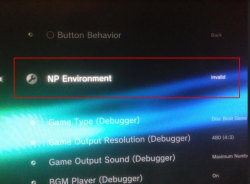
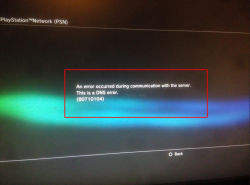
This is a set of 3 tools for installing and swapping Debug Settings Files in flash
DEX XML Files Have Support For PS3Xploit/HAN Toolbox XML Menus
NOTE: Once Installed, You Have A DEX Hybrid and Must Choose DEX Checkbox To Use Exploits or Will Freeze! Restoring Is Simple, Just Replace Files With CEX For Your FW Version!
WARNING!
This has the potential to corrupt your system and require you to install OFW (Original Firmware) if not used correctly!How To Access Recovery said:Power Down PS3 With The Power Button
Insert USB Stick Into PS3 w/OFW PUP in Correct Folder (/PS3/UPDATE/PS3UPDAT.PUP)
Push and HOLD Power Button (one beep) Until PS3 Shuts Itself Off (1 single beep + another single beep)
LET GO OF THE POWER BUTTON
From Power Off State, Push Power Button (one beep) and HOLD until you hear a single beep, then a double beep
LET GO OF THE POWER BUTTON
Plug in PS3 Controller and Select System Update
Exploit Page(s):
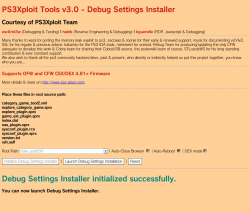
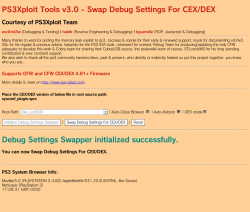
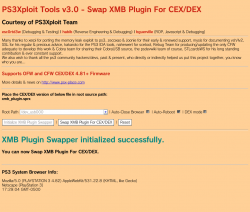
SUPPORTS OFW, HFW, and CFW
HAN "DOES NOT" Need Enabled For This!
UPDATE (2019-03-23): ALL HAN TOOLS HAVE BEEN UPDATED TO SUPPORT 4.84 CEX/DEX!
UPDATE (2018-04-11): ALL HAN TOOLS HAVE BEEN UPDATED TO SUPPORT 4.82 DEX!
UPDATE (2018-04-18): DEX Menu Links Have Been Added To DEX XML (category_game_tool2.xml) thanks @DeViL303 >> GitHub Changes Here <<
USE AT YOUR OWN RISK -
How To Use:
- 4.82 OFW: Download Debug Settings Installer ZIP archive
4.84 HFW: Download Debug Settings Installer ZIP archive - Extract the files
to install DEX files + VSH: use files from INSTALL folder and run debug_settings_installer.html
to install CEX files + VSH: use files from RESTORE folder and run debug_settings_installer.html
Main Installation:
- Place all files matching your FW version and desired target [CEX/DEX] on USB flash drive or select one of the internal HDD options**
- 4.82 OFW: Navigate to this link or use local files above and a webserver
- 4.84 HFW: Navigate to this link or use local files above and a webserver
Change Debug Settings Menu To CEX/DEX:
-
DEX is used as default settings and ONLY use this to swap between CEX/DEX versions of menu
- Place sysconf_plugin.sprx matching your FW version and desired target [CEX/DEX] on USB flash drive or select one of the internal HDD options**
- 4.82 OFW: Navigate to this link or use local files above and a webserver
- 4.84 HFW: Navigate to this link or use local files above and a webserver
Change XMB Plugin To CEX/DEX (Hide/Show Host Info):
- Place xmb_plugin.sprx matching your FW version and desired target [CEX/DEX] on USB flash drive or select one of the internal HDD options**
- 4.82 OFW: Navigate to this link or use local files above and a webserver
- 4.84 HFW: Navigate to this link or use local files above and a webserver
Run the exploit from page and allow console to reboot fully
Done! New Debug Settings/XMB Menu will take effect after reboot
** You can also create a package that holds resources or files to copy using Extra Tools and use this instead of USB as source. Default directories are /dev_hdd0/game/PS3XPLOIT/extras/ and /dev_hdd0/game/HANTOOLBX/files/
- 4.82 OFW: Download Debug Settings Installer ZIP archive
Hosted on official site: **ps3xploit.com >Domain no Longer owned by team** (ps3xploit.me =new)
(v3 HAN Tools -> Extra Tools -> Debug Settings Installer)
Source Code @: github.com/PS3Xploit/.....
Forum @: psx-place.com
(v3 HAN Tools -> Extra Tools -> Debug Settings Installer)
Source Code @: github.com/PS3Xploit/.....
Forum @: psx-place.com
Last edited:







