PS3 HAN PS3Xploit v3 Debug Settings Installer + Debug/XMB Swappers

Now Supports 4.84 HFW!

PS3Xploit Team has unveiled the latest progression in the form of an experimental Tool (Debug Settings Installer + Debug/XMB Swappers) for PS3Xploit v3 HAN user's (tools compatible with CFW also), with the release of REBUG REX that means a 4.82 DEX Firmware is out in the wild and that means with 4.82 DEX files, PS3 HAN user's will not have some added features and was one of the reasons why developer HABIB was suggesting user's stay on 4.81 for use of these DEX features as the status was unknown if a public 4.82 DEX would emerge, but with REBUG REX CFW release, the various files for swapping can be done, but devs will lend more details about that throughout this thread.
-STLcardsWS​

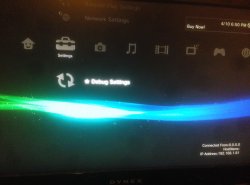
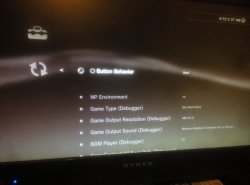
3333333333.jpg 44444444.jpg

  • PS3Xploit v3 Debug Settings Installer + Debug/XMB Swappers

    This tool is released for experimentation purposes only, it is not meant to be installed by every HAN user!

    DO NOT TRY SIGNING INTO PSN WHILE DEX ENABLED, YOU CAN/WILL GET BANNED!

    CHANGE YOUR NP ENVIRONMENT (thanks @Joonie) to invalid or anything else and reboot to block PSN access.
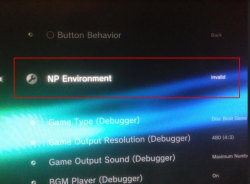
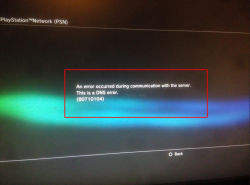
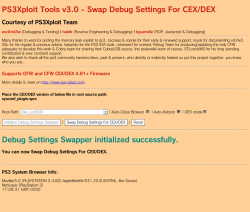
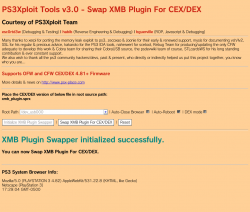
    11111111.png22222.png

    This is a set of 3 tools for installing and swapping Debug Settings Files in flash

    DEX XML Files Have Support For PS3Xploit/HAN Toolbox XML Menus

    NOTE: Once Installed, You Have A DEX Hybrid and Must Choose DEX Checkbox To Use Exploits or Will Freeze! Restoring Is Simple, Just Replace Files With CEX For Your FW Version!


    WARNING!
    This has the potential to corrupt your system and require you to install OFW (Original Firmware) if not used correctly!
    How To Access Recovery said:
    Power Down PS3 With The Power Button
    Insert USB Stick Into PS3 w/OFW PUP in Correct Folder (/PS3/UPDATE/PS3UPDAT.PUP)
    Push and HOLD Power Button (one beep) Until PS3 Shuts Itself Off (1 single beep + another single beep)
    LET GO OF THE POWER BUTTON
    From Power Off State, Push Power Button (one beep) and HOLD until you hear a single beep, then a double beep
    LET GO OF THE POWER BUTTON
    Plug in PS3 Controller and Select System Update

    Exploit Page(s):
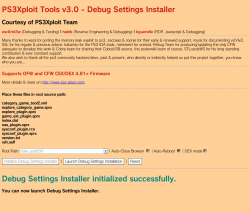
    555.png 666666666.png 777777.png

    SUPPORTS OFW, HFW, and CFW

    HAN "DOES NOT" Need Enabled For This!

    UPDATE (2019-03-23): ALL HAN TOOLS HAVE BEEN UPDATED TO SUPPORT 4.84 CEX/DEX!
    UPDATE (2018-04-11): ALL HAN TOOLS HAVE BEEN UPDATED TO SUPPORT 4.82 DEX!
    UPDATE (2018-04-18): DEX Menu Links Have Been Added To DEX XML (category_game_tool2.xml) thanks @DeViL303 >> GitHub Changes Here <<

    USE AT YOUR OWN RISK

  • How To Use:
    1. 4.82 OFW: Download Debug Settings Installer ZIP archive
      4.84 HFW: Download Debug Settings Installer ZIP archive
    2. Extract the files

    to install DEX files + VSH: use files from INSTALL folder and run debug_settings_installer.html

    to install CEX files + VSH: use files from RESTORE folder and run debug_settings_installer.html

    Main Installation:
    • Place all files matching your FW version and desired target [CEX/DEX] on USB flash drive or select one of the internal HDD options**
    • 4.82 OFW: Navigate to this link or use local files above and a webserver
    • 4.84 HFW: Navigate to this link or use local files above and a webserver

    Change Debug Settings Menu To CEX/DEX:
    • DEX is used as default settings and ONLY use this to swap between CEX/DEX versions of menu
    • Place sysconf_plugin.sprx matching your FW version and desired target [CEX/DEX] on USB flash drive or select one of the internal HDD options**
    • 4.82 OFW: Navigate to this link or use local files above and a webserver
    • 4.84 HFW: Navigate to this link or use local files above and a webserver

    Change XMB Plugin To CEX/DEX (Hide/Show Host Info):
    • Place xmb_plugin.sprx matching your FW version and desired target [CEX/DEX] on USB flash drive or select one of the internal HDD options**
    • 4.82 OFW: Navigate to this link or use local files above and a webserver
    • 4.84 HFW: Navigate to this link or use local files above and a webserver

    Run the exploit from page and allow console to reboot fully
    Done! New Debug Settings/XMB Menu will take effect after reboot :D

    ** You can also create a package that holds resources or files to copy using Extra Tools and use this instead of USB as source. Default directories are /dev_hdd0/game/PS3XPLOIT/extras/ and /dev_hdd0/game/HANTOOLBX/files/


Hosted on official site: **ps3xploit.com >Domain no Longer owned by team** (ps3xploit.me =new)
(v3 HAN Tools -> Extra Tools -> Debug Settings Installer)

Source Code @:
github.com/PS3Xploit/.....
Forum @: psx-place.com
 
Last edited:
Independent of the OFW minimum?? For example the 3.66 OFW? I'm afraid to brick my PS3.
Currently only the Flash Writer 2.0 should NOT be used on post 3.56 consoles.
All 3.0 tools are fully compatible with all ps3 models as I already said.
 
Hi, I share my experience with the Debug Settings, it is true that there is no useful function for an average user like me, that we are not developers, but it is also true that it works correctly and if you follow the steps, nothing bad should happen to your console, However, to uninstall it, the experience in my case was very bad, I had to spend more than an hour trying to run the Xploit as it failed again and again, until finally it worked, also as important annotation and that I did not know, I hope that be useful for someone, is that by putting the console in DEX loses the function of playing movies in DVD and BluRay format, well, that's all, I just wanted to share my experience with these tools, greetings.
 
I installed debug, after that my ps3 superslim not working it is showing just no signal in the TV. I tried in safe mode by long pressing the power button. No use signals are not coming to tv..pl.help
 
I installed debug, after that my ps3 superslim not working it is showing just no signal in the TV. I tried in safe mode by long pressing the power button. No use signals are not coming to tv..pl.help
seriously? u install debug at superslim?

Sent from my HUAWEI NXT-L29 using Tapatalk
 
I installed debug, after that my ps3 superslim not working it is showing just no signal in the TV. I tried in safe mode by long pressing the power button. No use signals are not coming to tv..pl.help
Sounds like rsod, maybe due to vsh/index.dat mismatch..
The recovery mode should still work though & you should be able to reinstall the fw.
If ever you don't get any video output, just use the recovery system update feature without the screen. Click on the right buttons & check activity on hdd led, not exactly very practical but fairly easy to do tbh.
 
Sounds like rsod, maybe due to vsh/index.dat mismatch..
The recovery mode should still work though & you should be able to reinstall the fw.
If ever you don't get any video output, just use the recovery system update feature without the screen. Click on the right buttons & check activity on hdd led, not exactly very practical but fairly easy to do tbh.
Thanks for the suggestion.. But in safe mode I tried all the ways to recover.. Even i tried to reinstall the firmware it is showing serious error contact Sony.....any idea how to solve.. Is it completely bricked..
 
:salve: prima di tutto vorrei sapere a cosa serve ripiazzare questi file sulla ps3?
Poi cambia pure il menu principale della ps3?
Infine che rischi si corrono?
 
@oVxzi yes, HAN Toolbox 0.3 supports DEX.

@DeViL303 is working on 0.5 to support both again AFAIK

going online as retail with DEX is frowned upon by the Sony Overlords and therefore will never be supported most likely

CFW like Rebug can do it because it can load DEX kernel and properly spoof
I got one question, with the change font replacer, do one of those fonts from the drop down part of the webpage change the font when you're in game? Like if I'm on bo2 and I go to type a message and when the keyboard for the message comes up it is the same font as when I start my ps3 on the XMB? Sorry if that's confusing...
 
I got one question, with the change font replacer, do one of those fonts from the drop down part of the webpage change the font when you're in game? Like if I'm on bo2 and I go to type a message and when the keyboard for the message comes up it is the same font as when I start my ps3 on the XMB? Sorry if that's confusing...

tbh, I don't recall, but I'm thinking that they don't change.
 

you could always try it to be sure. if the text isn't just the right size, chances are it will branch from its space into other characters. if the file size (60-75KBs iirc) is too small or too large, the characters will usually be too small or too large. it won't soft brick. it will just look messed up, so fonts need special attention. ;)
 
you could always try it to be sure. if the text isn't just the right size, chances are it will branch from its space into other characters. if the file size (60-75KBs iirc) is too small or too large, the characters will usually be too small or too large. it won't soft brick. it will just look messed up, so fonts need special attention. ;)
There are so many lol. That's why I was hoping maybe one you guys knew.
 
There are so many lol. That's why I was hoping maybe one you guys knew.

unfortunately, I don't recall ever trying this. I was mostly seeing what you could do on the xmb. the recovery menu uses its own font style, so I'm thinking that this does as well. in my font tutorial, I explain how to change the rounded and pop fonts, but I believe there's a third one in the font folder. it's the default font, so maybe try changing that one? it's a latin/roman font, so it's obvious which one you need to change. :)
 
unfortunately, I don't recall ever trying this. I was mostly seeing what you could do on the xmb. the recovery menu uses its own font style, so I'm thinking that this does as well. in my font tutorial, I explain how to change the rounded and pop fonts, but I believe there's a third one in the font folder. it's the default font, so maybe try changing that one? it's a latin/roman font, so it's obvious which one you need to change. :)
I changed the PS3-SR-R-LATIN.TTF and the PS3-SR-R-LATIN2.TTF and it only changed the xmb font. Not the in-game xmb font.
 
The PS3s XMB only shows a stripped down version when in game, differences include no theme, lots of disabled items, lower res icons, and basic font.
 

Featured content

Trending content

Latest posts

Back
Top