
- Forums
- PlayStation 3 (PS3)
- PS3 Jailbreak CFW and PS3HEN
- Ps3Xploit [Official Forum's] PS3HEN & PS3 Toolset
- Ps3Xploit Tools & Utilities
You are using an out of date browser. It may not display this or other websites correctly.
You should upgrade or use an alternative browser.
You should upgrade or use an alternative browser.
PS3 HAN PS3Xploit v3 (HAN/HFW) XML Replacer
master_adi_OP
Forum Noob
Now i have brick. I will flash new soft with recovery menu and try again xddid you do this: After that's done, scroll to XMenu - menus: "0xa." Now, change that to reflect how many tiers you want. "0xa" = 10; "0x5" = 5. It's that simple.


I don't think you can, just buy a HDCP stripper for about 10 , these work good https://www.amazon.co.uk/gp/product/B01I4LR1D0/i want option to remove hdcp protection on PS3 slim 3xxx series with Han Enabler make a tutorial for this im noob on this!

pinky
Retired
no idea how to do that. the only hdcp things I have are my dvr and the pstv . I have splitter boxes for each of them since they're plugged into hdmi splitters. however, I don't recall having this issue with my ps3 despite running it through a splitter. if there is a way to bypass it, it's unlikely to be in an xml. there are video files that probably take care of that. I believe @habib bypassed bluray protection with 2 or 3 video files, so I assume the same is true here.
edit: it might be in the vsh.self or one of the modules too, but I think it's most likely in a video file(s) or the vsh.self.
edit: it might be in the vsh.self or one of the modules too, but I think it's most likely in a video file(s) or the vsh.self.
Last edited:
pinky
Retired
I need some brave soul to test this:
http://www.mediafire.com/file/a8u52czbwqtr6qb/PS2~dev_blind~vsh~resource.rar
I decrypted 4.82 ofw, and I found that the explore_plugin_full.rco was different from the 4.81 rex one. the registory.xml was the same. this is to alphabetize psn games. dlc requires you to edit the category_game.xml which is radically different now with han, so you'll have to do that on your own. I have a tutorial on modding all of this stuff though. it's in my sig.
http://www.mediafire.com/file/a8u52czbwqtr6qb/PS2~dev_blind~vsh~resource.rar
I decrypted 4.82 ofw, and I found that the explore_plugin_full.rco was different from the 4.81 rex one. the registory.xml was the same. this is to alphabetize psn games. dlc requires you to edit the category_game.xml which is radically different now with han, so you'll have to do that on your own. I have a tutorial on modding all of this stuff though. it's in my sig.

andoryuu3
Forum Noob
I need some brave soul to test this:
http://www.mediafire.com/file/a8u52czbwqtr6qb/PS2~dev_blind~vsh~resource.rar
I decrypted 4.82 ofw, and I found that the explore_plugin_full.rco was different from the 4.81 rex one. the registory.xml was the same. this is to alphabetize psn games. dlc requires you to edit the category_game.xml which is radically different now with han, so you'll have to do that on your own. I have a tutorial on modding all of this stuff though. it's in my sig.
Brick... In the name of science I guess? Lol

System freezes after the health warning dialog just after when the "Press PS Button" popup appears (and I assume just before XMB is loaded). Thankfully I planned ahead and made my PS3Xploit flash drive my 4.82 Update flash drive as well, so I'm reinstalling firmware now.

pinky
Retired
Brick... In the name of science I guess? Lol
System freezes after the health warning dialog just after when the "Press PS Button" popup appears (and I assume just before XMB is loaded). Thankfully I planned ahead and made my PS3Xploit flash drive my 4.82 Update flash drive as well, so I'm reinstalling firmware now.
maybe try just the registory.xml . I'll see if I can figure out what the problem is - whether it's the explore_plugin_full.rco or the registory.xml . I'm thinking it's the former since the latter is identical to rebug's, and I know that it works.
andoryuu3
Forum Noob
Oh I can tell you with almost 100% certainty it's the .RCO file-- I made a noob mistake and forgot to restore the original one from the HAN Installer archive after restoring my firmware, so I'm at brick number two... Restoring again, hahamaybe try just the registory.xml . I'll see if I can figure out what the problem is - whether it's the explore_plugin_full.rco or the registory.xml . I'm thinking it's the former since the latter is identical to rebug's, and I know that it works.

EDIT: Funnily enough, when I was copying your modified .RCO file to my flash drive, I got prompted to overwrite the HAN Installer one... Took me a moment to backtrack and realize where that file I replaced came from. Laughing at myself because I did end up realizing what the file was for, and then somehow spaced out when it came time to reinstall HAN.
Best not to use rcos from Rebug on HAN/OFW, even if they work, HAN FW has a slightly different package manager and it will give them half red icons too.maybe try just the registory.xml . I'll see if I can figure out what the problem is - whether it's the explore_plugin_full.rco or the registory.xml . I'm thinking it's the former since the latter is identical to rebug's, and I know that it works.
pinky
Retired
try this one. I took the files directly from 4.82:
http://www.mediafire.com/file/tx7makw4mmwtvpc/PS3~dev_blind~vsh~resource.zip
http://www.mediafire.com/file/tx7makw4mmwtvpc/PS3~dev_blind~vsh~resource.zip
andoryuu3
Forum Noob
try this one. I took the files directly from 4.82:
http://www.mediafire.com/file/tx7makw4mmwtvpc/PS3~dev_blind~vsh~resource.zip

Looks like we have a winner!

Thanks pinky-- this solves a major annoyance for me. I've always hated how Sony neglected to add the option to alphabetize on PS3 lol
EDIT: Also, Ratchet & Clank is the last item in my list... But by default the way you had it configured (or the way it loaded? dunno) was with it set to sort in descending alphabetical order (Z to A) instead of ascending alphabetical order (A to Z). Because of this, I wasn't sure if it worked initially... But still not nearly as annoying as not having the option to sort by letter though!
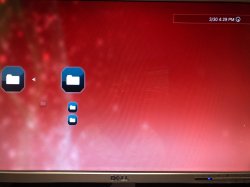
EDIT2: Looks like we've got a problem actually... I'm uploading pictures now, but in brief, while the PS3Xploit v3.0 Package Installer menu appears, the text is totally missing for the Package Installer folder and most of its subfolders. Photos coming as soon as I can get them up.
EDIT3:
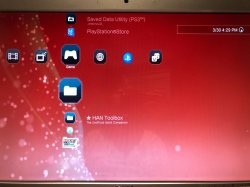
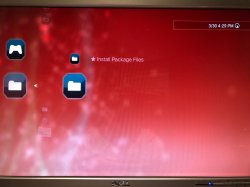
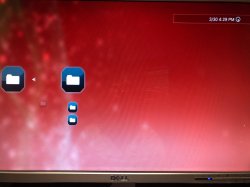
As of current I can only install .pkg files from my flash drive-- when I go into the subdirectory for installing from my PSN downloads, the list does not populate so I cannot install anything. If you're able to fix this, I'm still willing to test for you.
Attachments
Last edited:
pinky
Retired
View attachment 11475
Looks like we have a winner!
Thanks pinky-- this solves a major annoyance for me. I've always hated how Sony neglected to add the option to alphabetize on PS3 lol
EDIT: Also, Ratchet & Clank is the last item in my list... But by default the way you had it configured (or the way it loaded? dunno) was with it set to sort in descending alphabetical order (Z to A) instead of ascending alphabetical order (A to Z). Because of this, I wasn't sure if it worked initially... But still not nearly as annoying as not having the option to sort by letter though!
EDIT2: Looks like we've got a problem actually... I'm uploading pictures now, but in brief, while the PS3Xploit v3.0 Package Installer menu appears, the text is totally missing for the Package Installer folder and most of its subfolders. Photos coming as soon as I can get them up.
EDIT3:
View attachment 11476 View attachment 11478 View attachment 11479
As of current I can only install .pkg files from my flash drive-- when I go into the subdirectory for installing from my PSN downloads, the list does not populate so I cannot install anything. If you're able to fix this, I'm still willing to test for you.
my guess is that it's the rco. I think the registory.xml has a different ascending/descending thing in each of the versions that I uploaded, so tell me which one descends first and which one ascends first, because the official one is actually backwards like a lot of other things with the system. lol try that without the rco. I'm assuming that the rco is changed with han, because pkg files is in there.

andoryuu3
Forum Noob
Yep, it was definitely the RCO. And you're correct, the two registory.xml files are configured differently!my guess is that it's the rco. I think the registory.xml has a different ascending/descending thing in each of the versions that I uploaded, so tell me which one descends first and which one ascends first, because the official one is actually backwards like a lot of other things with the system. lol try that without the rco. I'm assuming that the rco is changed with han, because pkg files is in there.
1st registory.xml = ascending alphabetical order
2nd registory.xml = descending alphabetical order
Now that I'm back to using the first one (and not experiencing an accompanying brick), I can tell it works perfectly. Now "Catherine", the first game in my list, shows up as the preview image when I have my games grouped by game console... Absolutely fantastic!
I also did restore my old RCO file from the PS3Xploit support files and have access to the package manager again, with all text showing up as it used to. As expected, when I go to sort ascending/descending, it says by "creation date" now. So it seems that if you use the PS3Xploit support file's explore_plugin_full.rco as your base file for modifications, you'd probably create the perfect explore_plugin_full.rco for alphabetization.
pinky
Retired
Yep, it was definitely the RCO. And you're correct, the two registory.xml files are configured differently!
1st registory.xml = ascending alphabetical order
2nd registory.xml = descending alphabetical order
Now that I'm back to using the first one (and not experiencing an accompanying brick), I can tell it works perfectly. Now "Catherine", the first game in my list, shows up as the preview image when I have my games grouped by game console... Absolutely fantastic!
I also did restore my old RCO file from the PS3Xploit support files and have access to the package manager again, with all text showing up as it used to. As expected, when I go to sort ascending/descending, it says by "creation date" now. So it seems that if you use the PS3Xploit support file's explore_plugin_full.rco as your base file for modifications, you'd probably create the perfect explore_plugin_full.rco for alphabetization.
apparently, it's (han) using the dex version of that file. it's not encrypted, just compressed via zlib, so you should be able to modify it. there's only one occurrence of ascending and descending in the rco, so it's easy to find. just find that and change its name. I think the names are in the reverse order as the xml, so you may have to do it a couple times to get it right. personally, I like my games to descend first, then the second option, ascend. btw, game names are capitalized first, then lower case, so a lower case name will come after Z, but both will be alphabetized iirc. it can be annoying, but something you just have to live with. its probably a sprx limitation. I think another sony console does the same thing. :-/

LeanIssue
Forum Noob
Samei siinstalled game xml and i lost han toolbox install package files just like is there but doesnt do nothing< what should i do just run han installer again and do all the steps all over again?
pinky
Retired
my apologies. both explore_plugin_full.rco and category_game.xml are used with han, so it has a weird effect if you use mine, which are from ofw 4.82. category_game.xml is for dlc etc. (registory.xml is for psn games) alphabetizing. the explore_plugin_full.rco replaces creation date with alphabetical both forwards and backwards you should be fine with the registory.xml, since I don't believe it's used with han. I have tutorials on how to do this all yourselves. it's very easy. alternatively, you could alphabetize psn content with the explore_view.txt which, iirc, is in the etc folder of the profile folder. it will revert back if you change the sorting method though,which is why I suggest the registory.xml. the explore_view.txt file is on the hdd though.

Olvido
Member
Just put the normal one bacj and it should be back to the way it was . ( the one you downloaded from psx place )Same
Similar threads
-
 PS3Xploit Flash Writer (4.93 HFW Req)
- Started by Evilnat
- Replies: 10
-
 PS3 PS3 Firmware 4.93 - Update is Live! (CFW and HFW Released)
- Started by LuanTeles
- Replies: 38
-
 PS3 [HAN] etHANol v3.1.0 Updated for 4.93
- Started by esc0rtd3w
- Replies: 4
-
PS3 [Tutorial] Update Frankenstein PS3 Firmware That is Too Low to Initialize RSX (< 3.41) (NAND Models)
- Started by byt3swap
- Replies: 0