Resource icon

PS4 PS4 HDD Decryption Helper 2025-10-29

Yes unfortunately. I'm looking for a way to get the eap without extracting it from sflash. I only know of orbisman for now but that doesn't support 7.02. Also I read about kernel dumps and I was wondering if I can get the key from it and how.
 
Yes unfortunately. I'm looking for a way to get the eap without extracting it from sflash. I only know of orbisman for now but that doesn't support 7.02. Also I read about kernel dumps and I was wondering if I can get the key from it and how.
From my understanding, you can load an ftp payload and get it from the sflash0 directory (partition) or using ps4 explorer homebrew. I have a pro on 11.00 that I also need to recover hard drive files, so I have been looking into this.
 
From my understanding, you can load an ftp payload and get it from the sflash0 directory (partition) or using ps4 explorer homebrew. I have a pro on 11.00 that I also need to recover hard drive files, so I have been looking into this.
I tried ps4 xplorer but you can't copy files in the dev folder, the guy who made the app told me permissions are locked. What payloads are you talking about?

@Berion I will try with psxitarch
 
Last edited:
In "/dev" there are devices. Linux or OrbisOS (FreeBSD/NetBSD based) is not Windows. ;) In Windows both device and mount point is mixed and exposed to user as abstract called drive letter. Such thing looks different in all else OSes.

To copy key to USB, you must insert it and look for it in "/mnt/usb".
 
@Berion Hey man if you could if you got any insight on this and if you can dm me on here. I have 2 hdd that have old memories like recordings and clips, how would i be able to decrypt the files off of the ps4 hdd, i dont have the original ps4 at all, its long gone
 
@Rvrs If You don't have exploited consoles from which this HDDs came from, or dumped EAP HDD Keys, or dumped SFLASH0s, then you cannot decrypt them to retrieve recordings and clips.
 
20240727 DLC1:
+ added to keygen extraction meta key and calculation of PS4 External Storage hdd key (es_seed.bin is mandatory, you must find it on your own)
+ added to mounter decryption of PS4 External Storage but no option to mounting due to non-standard UFS (?) used

I don't making full update because of no mounting possibility for now.
Special thanks for Anonymous for method, seed and hmac revealing, also to Zecoxao for help

ps4hdh_ps4es_seed.png


ps4hdh_ps4es_dec.png


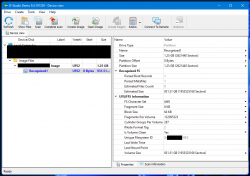
ps4hdd_es_ufs_1.png ps4hdd_es_ufs_2.png ps4hdd_es_ufs_3.png ps4hdd_es_ufs_4.png

//attachment removed, it is now part of official release
 
Last edited:
al azif would probably tell you to use the custom protocol/command MTRW in filezilla. that should grant you full privileges even if the ftp app doesn't have it.
 
I was talking about the ftp payload, but if you have something like goldhen, then it has an ftp server
I got the sflash0 file thanks to goldhen ftp and filezilla but now the problem is that I can't extract the eap key from it because I have a southbridge model that is not yet supported so I'm trying to get the eap directly from the console. Don't know how tho, linux psxitarch maybe?
 
Continuing about PS4ES:

It is not custom UFS2 as I thought earlier but cascade encryption, yet unknown (lifted one layer for now, which script from post no.28 covering up). Even if we know how to decrypt it, automating mounting it on Linux by using only existing tools is not possible. That's because UFS2 fs tables are encrypted in one way, and fs data in another - you cannot assemble one mapper from two different (i.e fs table started at 0x10000 but after it end, it is data blob encrypted differently). So at the end, it still needs dedicated, let's say fuse, application to deal with that. That was clever way to leverage difficulty for data managing on them outside PS4 and PS5!

Code:
LBA: 0       meta key
LBA: 32      encrypted twice?
LBA: 64      encrypted twice?
LBA: 144-255 not used (0x12000 - 0x20000)

"PS4 External Storage Metadata" header:

0x6000 (LBA: 48)
hexdump -s 24576 -C es_enc.img | head -6

0x5000 (LBA: 40)
hexdump -s 20480 -C es_dec.img | head -6

0xD000 (LBA: 104)
hexdump -s 53248 -C es_dec.img | head -6

"UFS" fs tables:

0x10000 (LBA: 128)
hexdump -s 65536 -C es_dec.img | head -32

0x20000 (LBA: 256)
hexdump -s 131072 -C es_dec.img | head -32
 
Berion updated PS4 HDD Decryption Helper with a new update entry:

PS4 HDD Decryption Helper (2025-10-27)

  • Added to PS4 HDD Keygen dumping EAP HDD Key from various of Orbis Kernel versions.
  • Added to PS4 HDD Keygen dumping EAP HDD Key from SFlash dump using Python 3 (thanks to Zecoxao's updated script).
  • Added to PS4 HDD Backuper copying data by using cp, not only rsync.
  • Since this version, toolkit can be placed anywhere as long as keep user and executable privileges.
  • Various of cosmetic changes.

Read the rest of this update entry...
 
I got the sflash0 file thanks to goldhen ftp and filezilla but now the problem is that I can't extract the eap key from it because I have a southbridge model that is not yet supported so I'm trying to get the eap directly from the console. Don't know how tho, linux psxitarch maybe?
You can now extract EAP HDD Key from kernel dump on all firmwares on all models except 6.xx (because I don't have dumps samples from that). Just FYI.
 
You can now extract EAP HDD Key from kernel dump on all firmwares on all models except 6.xx (because I don't have dumps samples from that). Just FYI.
Sorry for very late reply I just saw your message. So you're saying kernel dump works if i'm on 9.00fw and sb model is Belize2? (I got the sb model info from a web exploit that's specifically made to detect your sb model). Also, by 6.xx do you mean the firmware 6.xx? And finally, can you suggest an exploit for kernel dump on 9.00? Thanks
 
@Lorenzo Jabber
Yes, SBs doesn't matter (probably). Few people reported that script didn't got proper keys for them, and I confirm it is possible that key will be on different address (but it is still there anyway, just user need extract it from different address range than script doing; in all cases it was very near). It is fine to assume that all decompressed Orbis kernel dumps contains EAP HDD Key, on all models, up to and include fw v13.00.

6.xx means all v6 firmwares.

On consolemods there are links for payloads. Grab one for 9.00 called kernel dumper. Full dump should have around 42MiB.

 
Last edited:
@Lorenzo Jabber
Yes, SBs doesn't matter (probably). Few people reported that script didn't got proper keys for them, and I confirm it is possible that key will be on different address (but it is still there anyway, just user need extract it from different address range than script doing; in all cases it was very near). It is fine to assume that all decompressed Orbis kernel dumps contains EAP HDD Key, on all models, up to and include fw v13.00.

6.xx means all v6 firmwares.

On consolemods there are links for payloads. Grab one for 9.00 called kernel dumper. Full dump should have around 42MiB.
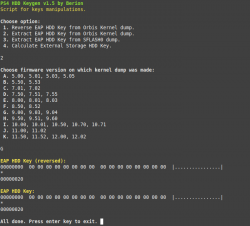
Ok i dumped the kernel and it is around 42mb but how do i extract the eap key from it? I can't find any info about this.
 
  1. Place kernel dump in "<toolkit dir>/storage/ram/kernel.bin".
  2. Start "PS4 HDD Keygen.sh" and choose option 2.
  3. Choose option G.
  4. Then check if key decrypt disk by using "PS4 HDD Mounter.sh". If not, let me know and I will extract for you proper one.
BTW: Option "K" can be used also with 13.00 dump. Addressees are the same as for 12.xx.
 
  1. Place kernel dump in "<toolkit dir>/storage/ram/kernel.bin".
  2. Start "PS4 HDD Keygen.sh" and choose option 2.
  3. Choose option G.
  4. Then check if key decrypt disk by using "PS4 HDD Mounter.sh". If not, let me know and I will extract for you proper one.
BTW: Option "K" can be used also with 13.00 dump. Addressees are the same as for 12.xx.
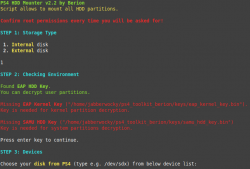
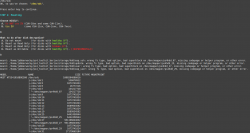
I think kernel wasn't dumped correctly.
 

Attachments

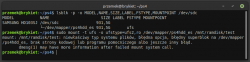
  • keygen.png
    keygen.png
    49 KB · Views: 15
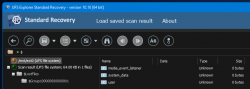
  • mounter1.png
    mounter1.png
    46.1 KB · Views: 13
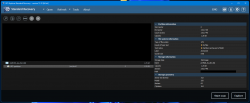
  • mounter2.png
    mounter2.png
    127.3 KB · Views: 14

Similar threads

Back
Top