
You are using an out of date browser. It may not display this or other websites correctly.
You should upgrade or use an alternative browser.
You should upgrade or use an alternative browser.
PS4 ps4 jailbreak on 7.02?
- Thread starter froggy8
- Start date

thanksThere is no 7.02 exploit out at this time. Please do not update. peace
i did nearly update to 8.00 the other week only to download some ps4 demos as i have never used a ps4 before with me being impatient.

pinky
Retired
thanks
i did nearly update to 8.00 the other week only to download some ps4 demos as i have never used a ps4 before with me being impatient.
just turn off internet in network settings to prevent any accidents. my friend, atreyu, didn't a while back and his system not only downloaded the latest update, but it also installed it. I know downloading is a real possibility, but you don't want that getting installed without your knowledge. maybe look out for blackhat in December. I'm not sure exactly what they have planned, but it's the day 0 exploit that will be revealed. if it's nothing, you might want to find a system on 5.05 over 6.72, but you may pay an arm and a leg for it. I almost never get a kp with 5.05.
pinky
Retired
Some questions
1. When Automatic downloads are turned off, how can PS4 still download & install updates?
2. If we use Al Azif host DNS, is there still a risk of automatic update?
3. If we don't sign into PSN, are we safe from Sony Ban?
1. I don't know about installing an update, but the ps4 will still download them even if it's turned off. I think there might be a misunderstanding about that option. that's what I've heard, but atreyu has a usa model and I have a Japanese model. it does the same thing on both. I've never had it install an update, but atreyu told me that his did. with one of 4.xx updates I believe, you can now delete the update from the notifications' area. before that, the only way I know of to get rid of the update was to format or possibly delete it using ftp (don't know if that will work). it's in a folder called update.
2. afaik, no. you should be safe. there are also a couple payloads update blocker and update blocker extreme. update blocker should be enough. though, I've chosen to go offline completely with the sandisk connect. I don't have to turn off the internet or use a payload. and, I can use ftp by connecting my computer to the dongle.
3. that I don't know. my friend said that most telemetry to sony is blocked if you use dns. it may still be a possibility. he said that there are a few urls to block on top of that, then you should be 100% safe.


Berion
Developer
1. When Automatic downloads are turned off, how can PS4 still download & install updates?
Because Sony doesn't give a shit about Your choice. It ignoring this option since I remember. The best solution is blacklisted update servers on router side.
pinky
Retired
On jailbroken PS4 I'm sure that You could also delete update dir (or replace pup by dummy) in one of the partitions and remove it from database.
that's actually how the update blocker works. it creates two or three dummy files in the update folder.

Sulfvr
Member
hi guys
got a new ps4 on firmware 7.02. so far all i can see on the internet is the kernel xploit is out but not the webkit.
was wondering if anyone have any update on this yet?
thanks in advance
pinky
Retired
there's also update blocker extreme, which is supposed to block all possible update points. I enabled it once to see what would happen. it added files to my usb stick. I then disabled in case there was ever an emergency. I asked a friend about it, and he said that it shouldn't block the emergency locations like safemode, but I'm wondering why it even installed something to the usb drive. it's not like I need it anyway, because I'm using a wifi stick, so I'm completely offline.
@snkplkn , just saw your post as I was writing the above.
1. I'm not sure if it's safe to delete the update folder. the update blocker puts dummy files in it instead of deleting it. you can also disable the internet. you only need the exploit to work once, then cache it, and disable the internet. if you use ftp a lot, block updates with al azif dns or use a wifi stick.
2. I'm not really sure which url are not blocked. I have a tutorial on every url I could find, which is probably overkill. it will error if you try to update, if you block them from what I remember.
3. you can delete the update in the notifications' area. this used to be impossible until one of the 4.xx firmwares. it's part of official firmware while before, the only way to get rid of an update was to format.
@snkplkn , just saw your post as I was writing the above.
1. I'm not sure if it's safe to delete the update folder. the update blocker puts dummy files in it instead of deleting it. you can also disable the internet. you only need the exploit to work once, then cache it, and disable the internet. if you use ftp a lot, block updates with al azif dns or use a wifi stick.
2. I'm not really sure which url are not blocked. I have a tutorial on every url I could find, which is probably overkill. it will error if you try to update, if you block them from what I remember.
3. you can delete the update in the notifications' area. this used to be impossible until one of the 4.xx firmwares. it's part of official firmware while before, the only way to get rid of an update was to format.
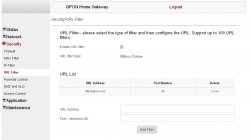
I found this list. Is it complete? Also my router needs to input port to block sites which by default is 80. What port does PS4 use to access servers? And what should i put in front of these addresses - http?
fuk01.ps4.update.playstation.net
post.net.playstation.net
get.net.playstation.net
fus01.ps4.update.playstation.net
feu01.ps4.update.playstation.net
deu01.ps4.update.playstation.net
ps4updptl.eu.np.community.playstation.net
tmdb.np.dl.playstation.net
themis.dl.playstation.net
sf.api.np.km.playstation.net
asm.np.community.playstation.net
artcdnsecure.ribob01.net
api-p014.ribob01.net
apicdn-p014.ribob01.net
t-prof.np.community.playstation.net
ps4updptl.eu.np.community.playstation.net
ps4.updptl.sp-int.community.playstation.net
ps4updptl.jp.sp-int.community.playstation.net
ps4-eb.ww.np.dl.playstation.net
ps4-eb.ww.np.dl.playstation.net
fuk01.ps4.update.playstation.net
post.net.playstation.net
get.net.playstation.net
fus01.ps4.update.playstation.net
feu01.ps4.update.playstation.net
deu01.ps4.update.playstation.net
ps4updptl.eu.np.community.playstation.net
tmdb.np.dl.playstation.net
themis.dl.playstation.net
sf.api.np.km.playstation.net
asm.np.community.playstation.net
artcdnsecure.ribob01.net
api-p014.ribob01.net
apicdn-p014.ribob01.net
t-prof.np.community.playstation.net
ps4updptl.eu.np.community.playstation.net
ps4.updptl.sp-int.community.playstation.net
ps4updptl.jp.sp-int.community.playstation.net
ps4-eb.ww.np.dl.playstation.net
ps4-eb.ww.np.dl.playstation.net
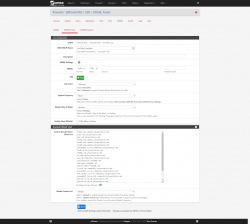
this is my DNS list to blocked on DNS request.
im using pfsense so I entered this on my DNSBL Feed
I also make sure that DNS redirection on my firewall is enabled so any devices connected on Local network is forced to use pfsense DNS, so even if the DNS sertting on each machine is configured to something DNS server, it will automatically redirect to pfsense's DNS no matter what, even the DoT and DoH are blocked so devices is forced to use the regular DNS servers.
im using pfsense so I entered this on my DNSBL Feed
Code:
fuk01.ps4.update.playstation.net
post.net.playstation.net
get.net.playstation.net
fus01.ps4.update.playstation.net
feu01.ps4.update.playstation.net
deu01.ps4.update.playstation.net
fsa01.ps4.update.playstation.net
dsa01.ps4.update.playstation.net
ps4updptl.eu.np.community.playstation.net
tmdb.np.dl.playstation.net
themis.dl.playstation.net
sf.api.np.km.playstation.net
asm.np.community.playstation.net
artcdnsecure.ribob01.net
api-p014.ribob01.net
apicdn-p014.ribob01.net
t-prof.np.community.playstation.net
ps4updptl.eu.np.community.playstation.net
ps4.updptl.sp-int.community.playstation.net
ps4updptl.jp.sp-int.community.playstation.net
ps4-eb.ww.np.dl.playstation.net
ps4-eb.ww.np.dl.playstation.net
ps4-system.sec.np.dl.playstation.net
ps4updptl.sa.np.community.playstation.net
I also make sure that DNS redirection on my firewall is enabled so any devices connected on Local network is forced to use pfsense DNS, so even if the DNS sertting on each machine is configured to something DNS server, it will automatically redirect to pfsense's DNS no matter what, even the DoT and DoH are blocked so devices is forced to use the regular DNS servers.
Attachments

a month and a half and still no webkit? *sigh*
If you're not happy with the development speed, you are more than welcome to start writing your own webkit exploit...
Similar threads
-
-
-
MPS4 PlayStation 4 (PS4) Jailbreak Advice from Modded Warefare up to 12.50 firmware
- Started by MODDED WARFARE
- Replies: 0
-
