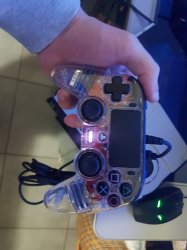
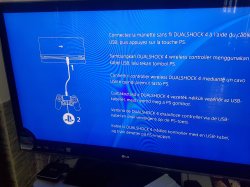
So I bought this broken PS4 for fun that gave the error during the update (SU-41283-8) due to broken WiFi chip. I changed it, updated the PS4 but when it's time to press PS button it won't do anything. But if I press option or try to take a screenshot it says that I cannot take a screenshot or go to the settings. Obviously when in safe mode I can do anything without any problems. Is it a soldering problem is it a problem linked to the controller that is a Nacon? Right now I can't test any other gamepad or ps4 because I'm in quarantene so any other advice is very welcomed, otherwise I'll wait until this quarantene is over.

You are using an out of date browser. It may not display this or other websites correctly.
You should upgrade or use an alternative browser.
You should upgrade or use an alternative browser.
PS4 PS4 recognize option and screenshot button but no PS button after WiFi Chip change
- Thread starter sautzer
- Start date
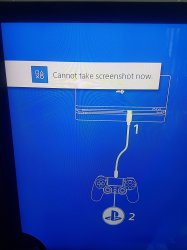
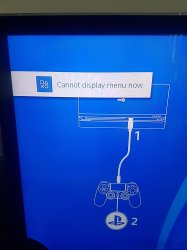

ElGris
Senior Member
Hey hi, seeing you succeeded in replacing the module, nice. I've edit the comment 'cause I didn't see those pics. Maybe you can't use the home button because is a third party joystick. And you can't use the BT function just there, Am I right?
You'll need an OG DS4 :/
If you could update after the module fix, then those are good news, 'cause that means that module is working. Did you use solder balls?
You'll need an OG DS4 :/
If you could update after the module fix, then those are good news, 'cause that means that module is working. Did you use solder balls?
Last edited:
I have bought a Nacon that is licensed by Sony and didn't buy a DS4 because being in quarantine is a pain in the ass to return the item to amazon, the Nacon one is way cheaper and it should work just like the original. And that's is what I thought, before I couldn't because the module was faulty and in recovery all works just fine. The controller works flawless on the PC and the only thing I noticed is that when I connect it to the PS4 it give a white led while on PC a blue led.
EDIT:
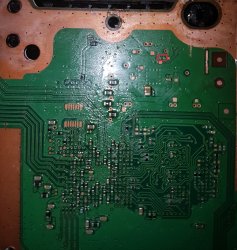
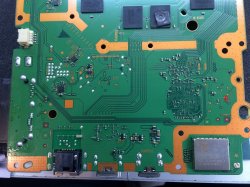
The module arrived with the solder ball, I cleaned the surface on the PS4 and used the heat gun. The only thing is that when tried to remove it the first time, 3 pad got away but in a very non elegant way I managed to "restore" it. In one of the I restore the pad using a very little wire that seems to be just placed but I can assure you that is soldered to the motherboard. I forgot to mention that and that's why I think the soldering process is the problem also if when in recovery, the PS4 allowed me to install the firmware (actually twice, I tried two HDDs)
EDIT:
The module arrived with the solder ball, I cleaned the surface on the PS4 and used the heat gun. The only thing is that when tried to remove it the first time, 3 pad got away but in a very non elegant way I managed to "restore" it. In one of the I restore the pad using a very little wire that seems to be just placed but I can assure you that is soldered to the motherboard. I forgot to mention that and that's why I think the soldering process is the problem also if when in recovery, the PS4 allowed me to install the firmware (actually twice, I tried two HDDs)
Attachments
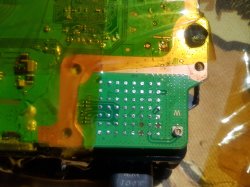
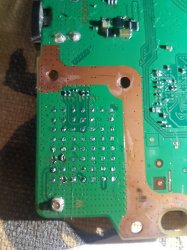
Last edited:
ElGris
Senior Member
The only crucial contact that was damaged was this:

As the other two are GND. Seeing your fix on that I think is enough for getting a connection between the module and the mobo. Is that a "hair" of a thin wire?
About the controller, like I said, on that part of the setup, you can't be sure if the BT is working 'cause the console implies you to connect a controller via wire, so it's not paired yet, at least it is like that on PS3. And if the controller is working via wire on the recovery, seems just a incompatibility in my eyes. Then again, that module is fully working for me if you can now be able to set up the controller.
P/S: https://www.reddit.com/r/NRPC/comments/7smv9m/turn_on_ps4_with_nacon/
As the other two are GND. Seeing your fix on that I think is enough for getting a connection between the module and the mobo. Is that a "hair" of a thin wire?
About the controller, like I said, on that part of the setup, you can't be sure if the BT is working 'cause the console implies you to connect a controller via wire, so it's not paired yet, at least it is like that on PS3. And if the controller is working via wire on the recovery, seems just a incompatibility in my eyes. Then again, that module is fully working for me if you can now be able to set up the controller.
P/S: https://www.reddit.com/r/NRPC/comments/7smv9m/turn_on_ps4_with_nacon/
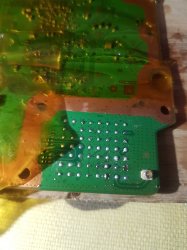
Well yes it's a wire actually and yes, that was my method to try to restore the pad. I've now dissoldered again to try to restore better that pad and I think I succeed. Now I'll try to resolder again and hope for the best. But this will be last time that I dissolder it, then I'll just wait for the quarantine to be over
Attachments
ElGris
Senior Member
That's the fix I'd have recommended you haha, the most obvious too. But now it will be a little more complicated than before since you don't have the pre-soldered solder balls. If you have any problems in getting the module working after this, remove all the tin from both pcbs and add new with the soldering iron and flux, make sure you get them all almost at the same level. There's no need to add a lot like in a solder ball.
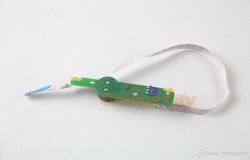
Ok finished all and still the same thing! I really hope it's just a controller issue, also I broke the power button by accindent and now I can only turn the PS4 by inserting a disc. I did this, I just made the PS4 pads as flat as possible and put the solder ball only on the WiFi module
Actualy I made fell off the button cover, the little bronze circle and strangely also the led seems to be broken, eject button and bip works insteadIt shouldn't be so bad if you only damaged the flex. Use a scissors and cut the flex, then with something sharp make new contacts.
Attachments
ElGris
Senior Member
Better look on the floor using your lantern. If you can't find it, you can get something similar from a cheap cellphone that uses a flex button, per example:
https://ae01.alicdn.com/kf/HTB1EPDKaynrK1RjSsziq6xptpXa5.jpg
https://ae01.alicdn.com/kf/HTB1EPDKaynrK1RjSsziq6xptpXa5.jpg
ElGris
Senior Member
There might be something going on apart of the module issue imo. It has the last update version?Tried also an original controller but nothing, the soldering was bad at this point. Now I'm curious because it seems that to install the bluetooth module you only just need few pin, or to be precise, to avoid the error su 41283-8
Problably yes, to be honest I think I made a bad solder. But now I don't know if soldering and desoldering it multiple times, I managed to broken it. I just don't know because you can't update it (I think)There might be something going on apart of the module issue imo. It has the last update version?
ElGris
Senior Member
Do this, leave the module alone for a while a revisit this video, watch until the end:Problably yes, to be honest I think I made a bad solder. But now I don't know if soldering and desoldering it multiple times, I managed to broken it. I just don't know because you can't update it (I think)
Now, first of all, make sure the module is well soldered again by re-updating the console. Then check the NOR thing.
Actually something came up to my mind. I had a J20H091 chip while they gave me a AW-CB262 one, but reading online they seems to be interchangeable. I shoul definitely redesolder the NOR and check it maybe
EDIT:
Dumped the NOR again but the bluetooth part is just perfect, it matches the original c0020001.bin files and in the BwE WiFi/Bt Patcher it gives no error
EDIT:
Dumped the NOR again but the bluetooth part is just perfect, it matches the original c0020001.bin files and in the BwE WiFi/Bt Patcher it gives no error
Last edited:
ElGris
Senior Member
Yeah, I don't think you're having issues with the module at all. PS3s slims and SS share the same module also, different from PS4 though. I don't think it's the module 'cause you actually managed to update the console, that was an issue that you fixed. When using the controller on that first part of the setup, you don't use the module at all, and the console also doesn't need the module to check you're pressing the home button, and since you have it connected to the console via wire, keeping the module idea is useless imho.Actually something came up to my mind. I had a J20H091 chip while they gave me a AW-CB262 one, but reading online they seems to be interchangeable. I shoul definitely redesolder the NOR and check it maybe
EDIT:
Dumped the NOR again but the bluetooth part is just perfect, it matches the original c0020001.bin files and in the BwE WiFi/Bt Patcher it gives no error
The problem should be somewhere else, maybe on the .bin of that NOR. That patcher is the only app you could get? There's no another source of dumps you can use to try to get a different result?
Keep shearching for people that managed to solve this particular problem.
Yes also because this patcher has all the c0020001.bin until now, so it just compare your NOR with all this file and look for the right one for you. Also following that video, at the part where I need to compare those file, mine looks identical. I have used this that should do it all by itself. Also BwE said that my dump was fine and still know the c0020001.bin looks identicalYeah, I don't think you're having issues with the module at all. PS3s slims and SS share the same module also, different from PS4 though. I don't think it's the module 'cause you actually managed to update the console, that was an issue that you fixed. When using the controller on that first part of the setup, you don't use the module at all, and the console also doesn't need the module to check you're pressing the home button, and since you have it connected to the console via wire, keeping the module idea is useless imho.
The problem should be somewhere else, maybe on the .bin of that NOR. That patcher is the only app you could get? There's no another source of dumps you can use to try to get a different result?
Keep shearching for people that managed to solve this particular problem.
Similar threads
-
 PS3 Super Slim wifi/bt module repair help needed
- Started by FundyBG
- Replies: 1
-
PS3 [Tutorial] Update Frankenstein PS3 Firmware That is Too Low to Initialize RSX (< 3.41) (NAND Models)
- Started by byt3swap
- Replies: 0
-
PS3 [Tutorial] Update Frankenstein PS3 Firmware That is Too Low to Initialize RSX (< 3.41) (NAND Models)
- Started by byt3swap
- Replies: 0
-
