PSBBN Definitive Project

PS2 PSBBN Definitive Project 4.2

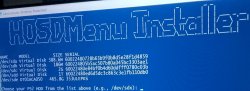
Is it supposed to make the mounted real hdd go offline if you already put the PS2BBN or PSBBN folder on that hdd?

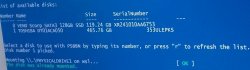
I only got it to make the HOSDMenu/OPL hdd via a 40GB virtual VHD disk because it kept making the real hdd go offline & I couldn't select the PSBBN folder in either C or D, the script keeps asking me if I want to put it on drive C as the default, i'm using Windows 11.

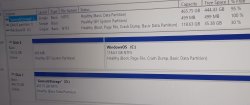
I also don't understand how it's reporting a 2GB & 1TB hdd when my biggest real hdd is below 500gb & the smallest partition is 500MB for recovery.
 

Attachments

  • IMG_20260107_141739_HDR~2.jpg
    IMG_20260107_141739_HDR~2.jpg
    120.8 KB · Views: 19
  • IMG_20260107_141528_HDR~2.jpg
    IMG_20260107_141528_HDR~2.jpg
    199.3 KB · Views: 20
  • IMG_20260107_142600_PORTRAIT~2.jpg
    IMG_20260107_142600_PORTRAIT~2.jpg
    266.9 KB · Views: 23
Is it supposed to make the mounted real hdd go offline if you already put the PS2BBN or PSBBN folder on that hdd?

Yes, as the readme states:
NOTE:
It is normal for the drive to disconnect in Windows while running the script. Always exit the PSBBN Definitive Project Main Menu by pressing q. This ensures the drive is unmounted from WSL and safely returned to Windows. For USB drives, remember to also eject them from the Windows system tray before unplugging them.

I couldn't select the PSBBN folder in either C or D, the script keeps asking me if I want to put it on drive C as the default, i'm using Windows 11.

The drive you select and the folder you are asked to selected are two totally different things. You need to select a folder that is on a Windows drive, for example drive C:. Your games are then copied from that folder to your PS2's drive.
 
  • Like
Reactions: TnA
January 8th, 2026 - PSBBN Definitive Project: New Name and Multilingual Support

The PSBBN Definitive English Patch started life in 2023 as an English language patch for PSBBN, this work has steadily expanded well beyond its original scope. Going forward, it will now collectively be called the PSBBN Definitive Project.


PSBBN is now available in English, German and the original Japanese, with French and Italian translations coming soon. You will be given a choice of languages when installing PSBBN. The language can also be changed later in the Extras Menu.

When the language is set to Japanese, titles of Japanese-region games are displayed in Japanese and sorted in "gojūon" (五十音) order in both the PSBBN Game Collection and the HOSDMenu Browser. In addition, the original Japanese online channels are also accessible from the Game Channel.

Full release notes

  • NEW! PSBBN German translation by Argo707
  • Improved English translation
  • Original Japanse online channels restored

PSBBN Installer:
  • Added an option to select a language when installing PSBBN
  • Selecting Japanese will also install the original Japanese online game channels

Update PSBBN Software:
  • Now updates the PSBBN System Software and language pack to the latest version
  • When the language is set to Japanese, the online channels are also updated

Optional Extras:
  • Added the option to change the language of PSBBN in the Optional Extras menu
Game Installer:
  • When the language is set to Japanese, titles of Japanese-region games will be displayed in Japanese and sorted in "gojūon" (五十音) order
  • The POPS IGR message is installed for the selected language
  • PS1 game manuals are installed for the selected language
TitlesDB_PS1.csv and TitlesDB_PS2.csv:
  • Added Japanese game titles for all Japanese-region games
list-builder.py:
  • Updated to handle Japanese game titles
PSBBN Definitive Patch updated to v4.1.0:
  • Updated the link to the new Konami Channel for non-Japanese installations
  • Modified fstab to mount channels partition
The PSBBN Definitive Project can be found on GitHub.
 
Yes, as the readme states:
NOTE:
It is normal for the drive to disconnect in Windows while running the script. Always exit the PSBBN Definitive Project Main Menu by pressing q. This ensures the drive is unmounted from WSL and safely returned to Windows. For USB drives, remember to also eject them from the Windows system tray before unplugging them.


The drive you select and the folder you are asked to selected are two totally different things. You need to select a folder that is on a Windows drive, for example drive C:. Your games are then copied from that folder to your PS2's drive.

Is OPL the only app that can see unofficial drives?
it's not recognized in uLE because it's not the HDLoader format? and the browser doesn't boot the OSD, i'm trying to transplant the made VHD to a usable DEV9HDD.raw image for pcsx2.
 
Is OPL the only app that can see unofficial drives?
it's not recognized in uLE because it's not the HDLoader format? and the browser doesn't boot the OSD, i'm trying to transplant the made VHD to a usable DEV9HDD.raw image for pcsx2.

I have no idea what you are talking about, but if you are trying to get PSBBN running on pcsx2 then you're out of luck. It is not compatible.
 
The pcsx2 blog covers the reasons. It might be possible in the future but not currently https://pcsx2.net/blog/2025/pcsx2-2.4_2.2

Oh ok, I guess that explains the random TLB misses I get on certain games & apps even though it's not reading or writing anything to the actual hdd, DEV9 covers more.

Thanks for pointing me towards the SAS ps2 homebrew site, the RDRAM checker will come in handy for my bios mods, i'm currently migrating from Windows 7 to 11 so your PSBBN script was the first thing I tried out :encouragement:

uLE > osdmenu psu > psbbn-forwarder psu
will run the osdboot.elf
from hdd0:/__system/p2lboot/
this shows that even though the hdd fails the magicgate check in pcsx2, you can still launch elfs off the memory card & hdd using the browser with this method.

osdboot.elf briefly flashes the ps2 disc logo then crashes in pcsx2.

If you mount a .vhd you can save it as a usable pcsx2 .dsk / .raw hdd image with isobuster.
 
V4 of psbbn doesnt use a kelf. No signing. Pcm720 helped me with the forwarder which is osdmenu launcher( without the patcher) while osdmenu launcher supports kelfs, again thats a magicgate thing, so w v4 that requirement is gone

Basically its a forwarder. A way to launch something when user may not have drivers pre loaded. Ie say your a 70k user, hdd drivers are not in rom. If your a fmcb or ps2bbl user you dont need to add the drivers...if you want ps2bbl but not as your exploit like fhdb...etc
 
Last edited:
V4 of psbbn doesnt use a kelf. No signing. Pcm720 helped me with the osbbn forwarder which is osdmenu launcher( without the patcher) while osdmenu launcher supports kelfs, again thats a magicgate thing, so w v4 that requirement is gone

Basically its a forwarder. A way to launch something when user may not have drivers pre loaded. Ie say your a 70k user, hdd drivers are not in rom. If your a fmcb or ps2bbl user you dont need to add the drivers...if you want ps2bbl but not as your exploit like fhdb...etc

Ok but which is the elf on the hdd still protected by magicgate used by ps2bbn?
boot.kelf & password.bin, mbr or osd, or the all FNTIMAGE type modules & .pak files, can't I transplant / overwrite them from the cracked hosdsys using a hexeditor?
IMG_20260118_150340~2.jpg


HDD Magicgate comparison,
PSBBN vs the cracked hosdys.
IMG_20260120_011653~3.jpg
 

Thanks, I prefered the older method in winxp/7,
in the time it takes to select the capture area your program may of crashed or the screen output may of changed that you wanted to grab.
Atm i'm using my phone to take pictures of the TV instead then cropping an rotating sideways so it displays in landscape on my mobile, sorry.
IMG_20260120_193149~2.jpg


I took a look at the atadpatcher 0.4 values of hdfill.elf & fsck.elf in a hexeditor an their different.
 
You didn't watch the short video, did ya?
Never mind. It was off topic.
Have a good day.

Sorry i'm still getting used to it, so that applies to all apps including unsigned or just Office, Edge & windows app store verified?
If I where to compile my own app, would I need to set some enable flag so the keys don't conflict?

I'm guessing if Linux ever does get working in pcsx2 you'll need two keyboards, because hid mouse & keyboard removes windows functions, until you escape.
I did try typing into the console but it just throws up symbols instead of characters like uLE.
 
@CosmicScale :
As-tu besoin d'une traduction en Français ? Si OUI, alors fais-moi parvenir le fichier à traduire au format TEXTE en Anglais et je te le fournirai traduit dans ce forum, pas ailleurs.

Do you need a French translation? If YES, then send me the file to be translated in English TEXT format and I will provide it to you translated in this forum.

Algol "le papy".
 
@CosmicScale :
As-tu besoin d'une traduction en Français ? Si OUI, alors fais-moi parvenir le fichier à traduire au format TEXTE en Anglais et je te le fournirai traduit dans ce forum, pas ailleurs.

Do you need a French translation? If YES, then send me the file to be translated in English TEXT format and I will provide it to you translated in this forum.

Algol "le papy".
A French version will be coming soon! It's almost completely translated and just needs some polish.
 

Similar threads

Back
Top