
You are using an out of date browser. It may not display this or other websites correctly.
You should upgrade or use an alternative browser.
You should upgrade or use an alternative browser.

PS2 PSBBN Definitive Project 4.2
- Thread starter CosmicScale
- Start date

Kevstah2004
Member
It still needs to be on a pfs partition as far as i'm aware.

CosmicScale
Developer
Can i install the new HOSDMenu without to format my HDD ?
If you already have an older version of PSBBN DP installed that doesn't have HOSDMenu, just select the option from the menu to "Update PSBBN software", this will also install HOSDMenu and keep all your data intact.
If you want a HOSDMenu-only install using my script, it will mean formatting your HDD. Alternatively, you can install HOSDMenu manually by visiting its GitHub page. However, if you install manually, you'll have no exFAT partition and you won't be able to use the game installer.
Bonjour @CosmicScale :
Puis-je espérer un installateur sous un Windows 7 en 32 bits s'il te plait car je ne possède pas mieux chez moi. Je suis à la retraite depuis 12 ans déjà et je ne peux pas me payer une machine plus récente que mon vieux Mac de 2009 (Mac Mini sous OS X.11.6 "El Capitan"). Un grand MERCI par avance.
Could I please have an installer for a 32-bit version of Windows 7, as I don't have anything better at home? I've been retired for 12 years now and I can't afford a machine newer than my old 2009 Mac (Mac Mini running OS X 11.6 "El Capitan"). Thank you very much in advance.
Algol "le papy".
Puis-je espérer un installateur sous un Windows 7 en 32 bits s'il te plait car je ne possède pas mieux chez moi. Je suis à la retraite depuis 12 ans déjà et je ne peux pas me payer une machine plus récente que mon vieux Mac de 2009 (Mac Mini sous OS X.11.6 "El Capitan"). Un grand MERCI par avance.
Could I please have an installer for a 32-bit version of Windows 7, as I don't have anything better at home? I've been retired for 12 years now and I can't afford a machine newer than my old 2009 Mac (Mac Mini running OS X 11.6 "El Capitan"). Thank you very much in advance.
Algol "le papy".
CosmicScale
Developer
Bonjour @CosmicScale :
Puis-je espérer un installateur sous un Windows 7 en 32 bits s'il te plait car je ne possède pas mieux chez moi. Je suis à la retraite depuis 12 ans déjà et je ne peux pas me payer une machine plus récente que mon vieux Mac de 2009 (Mac Mini sous OS X.11.6 "El Capitan"). Un grand MERCI par avance.
Could I please have an installer for a 32-bit version of Windows 7, as I don't have anything better at home? I've been retired for 12 years now and I can't afford a machine newer than my old 2009 Mac (Mac Mini running OS X 11.6 "El Capitan"). Thank you very much in advance.
Algol "le papy".
Unfortunately, that's not possible. The script require Linux and older versions of Windows do not have the Windows Subsystem for Linux (WSL).
What you can do is install Linux Mint on one of your old PCs, you will then be able to run the script. You don't even need to actually install it to your HDD, Linux can be run and booted from a USB drive. The other alternative would be to buy a cheap Raspberry Pi such as the Raspberry Pi 3 Model B+ and use that.
Oui, mais je suis un profane en Linux, je n'y connais absolument rien. Je vais voir pour le Linux-Mint pour MacOS-X-11.6 ou pour le X.5.8 (Leopard) car je n'ai pas mieux mis à part le Windows-7 (32 bits).
Yes, but I'm a complete novice when it comes to Linux; I know absolutely nothing about it. I'll look into Linux Mint for macOS X 11.6 or X 5.8 (Leopard) because I don't have anything better besides Windows 7 (32-bit) booting on my Mac Mini.
Je n'y parviendrai pas, trop compliqué et trop de ressources à utiliser !!!
I won't be able to do it, it's too complicated and requires too many resources!
Yes, but I'm a complete novice when it comes to Linux; I know absolutely nothing about it. I'll look into Linux Mint for macOS X 11.6 or X 5.8 (Leopard) because I don't have anything better besides Windows 7 (32-bit) booting on my Mac Mini.
Je n'y parviendrai pas, trop compliqué et trop de ressources à utiliser !!!
I won't be able to do it, it's too complicated and requires too many resources!
Last edited by a moderator:
CosmicScale
Developer
Je n'y parviendrai pas, trop compliqué et trop de ressources à utiliser !!!
I won't be able to do it, it's too complicated and requires too many resources!
The only resource required is a USB memory stick!
It's pretty simple really:
1. Download Linux Mint from here
2. Follow the instruction here until you get to the section titled "The live session"
3. The PSBBN Definitive Project can be run in the live session, just follow the instructions for "Installing on Linux" here
Kevstah2004
Member
I've patched the boot.kelf ELF header an now it boots in pcsx2 bypassing MagicGate, but fmcb goes into a constant bootloop of trying to load the RECOVERY.ELF from usb, the new BDM driver is being loaded with the FAT/exFAT support, I also removed all memory cards & usb devices in pcsx2 but the bootloop remains.
It's opening
pfs:/osdmenu/hosdmenu.elf which then loads
pfs0:/osdmenu/OSDMENU.CNF an then it gets stuck loading another MagicGate ELF off the hdd.
OSDSYS_A.XLF needs the ELF header patched as well?
It's opening
pfs:/osdmenu/hosdmenu.elf which then loads
pfs0:/osdmenu/OSDMENU.CNF an then it gets stuck loading another MagicGate ELF off the hdd.
OSDSYS_A.XLF needs the ELF header patched as well?
Last edited:
CosmicScale
Developer
I've patched the boot.kelf ELF header an now it boots in pcsx2 bypassing MagicGate, but fmcb goes into a constant bootloop of trying to load the RECOVERY.ELF from usb, the new BDM driver is being loaded with the FAT/exFAT support, I also removed all memory cards & usb devices in pcsx2 but the bootloop remains.
It's opening
pfs:/osdmenu/hosdmenu.elf which then loads
pfs0:/osdmenu/OSDMENU.CNF an then it gets stuck loading another MagicGate ELF off the hdd.
OSDSYS_A.XLF needs the ELF header patched as well?
This isn't the best place to ask these questions. I am not the developer of HOSDMenu or pcsx2. You can find the HOSDMenu GitHub here: https://github.com/pcm720/OSDMenu
Kevstah2004
Member
This isn't the best place to ask these questions. I am not the developer of HOSDMenu or pcsx2. You can find the HOSDMenu GitHub here: https://github.com/pcm720/OSDMenu
Ok, I patched OSDSYS_A.XLF also, now it's gets stuck with a fmcb splashscreen with a purple / pinkish line underneath instead of RECOVERY.ELF.
Je ne peux charger aucun fichier "torrent", je n'y accède plus depuis très très longtemps. Si vous pouvez me donner un autre lien vers un site connu de DL, je suis preneur. Merci.The only resource required is a USB memory stick!
It's pretty simple really:
1. Download Linux Mint from here
2. Follow the instruction here until you get to the section titled "The live session"
3. The PSBBN Definitive Project can be run in the live session, just follow the instructions for "Installing on Linux" here
I can't download any torrent files; I haven't been able to access them for a very long time. If you can give me another link to a well-known download site, I'd appreciate it. Thanks.
CosmicScale
Developer
Je ne peux charger aucun fichier "torrent", je n'y accède plus depuis très très longtemps. Si vous pouvez me donner un autre lien vers un site connu de DL, je suis preneur. Merci.
I can't download any torrent files; I haven't been able to access them for a very long time. If you can give me another link to a well-known download site, I'd appreciate it. Thanks.
The page I linked to is the official Linux Mint website and has direct downloads. You do not have to torrent anything.
Kevstah2004
Member
So OSDMenu falls back to the RECOVERY.ELF on USB if it can't find the payload.
What exactly is the payload?
I thought it was the boot.kelf in the mbr? it always has kelftool in the header, if you used the mbr installer instead of the cracked NTSC-U SCUD v1.10 HDD Utility installer file.
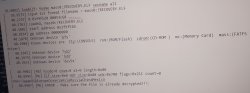
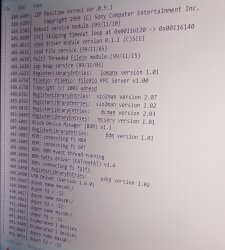
I've put uLE as RECOVERY.ELF an it boots into uLE but the pcsx2 log is saying the dev9 hdd driver isn't loaded, hence the reason it can't find the payload, which makes no sense to me since it's loading OSDMENU.CNF off the HDD with
hosdmenu.elf
There's still a magicgate error left but I can't tell what file it's supposed to be, unless osdmenu loads it's own additional encrypted irx driver module for pfs / hdd access.
What exactly is the payload?
I thought it was the boot.kelf in the mbr? it always has kelftool in the header, if you used the mbr installer instead of the cracked NTSC-U SCUD v1.10 HDD Utility installer file.
I've put uLE as RECOVERY.ELF an it boots into uLE but the pcsx2 log is saying the dev9 hdd driver isn't loaded, hence the reason it can't find the payload, which makes no sense to me since it's loading OSDMENU.CNF off the HDD with
hosdmenu.elf
There's still a magicgate error left but I can't tell what file it's supposed to be, unless osdmenu loads it's own additional encrypted irx driver module for pfs / hdd access.
Attachments
CosmicScale
Developer
So OSDMenu falls back to the RECOVERY.ELF on USB if it can't find the payload.
What exactly is the payload?
I don't know why you're asking this here. The OSDMenu thread is over here: https://www.psx-place.com/threads/osdmenu.48213/
Kevstah2004
Member
I don't know why you're asking this here. The OSDMenu thread is over here: https://www.psx-place.com/threads/osdmenu.48213/
So your only knowledge is of Linux development?
your not a console developer per se?
CosmicScale
Developer
So your only knowledge is of Linux development?
your not a console developer per se?
I'm a bit of both. However, I am not the developer of OSDMenu. Like I said, the OSDMenu thread is over here: https://www.psx-place.com/threads/osdmenu.48213/
Kevstah2004
Member
I have the HDDOSD working in pcsx2 now,
you just need to patch boot.kelf & OSDSYS_A.XLF
with the headers from the cracked HDDOSD
https://archive.org/details/pcsx2hddosd
I used IsoBuster to extract the boot.kelf & WinImage to extract the OSDSYS_A.XLF off the virtual usb4G.img that I copied to mass / usb from the HDD in uLE, searched the .dsk I made from the .VHD I made with IsoBuster & patched them in hxD.
Depending on which bios you use, it won't work unless you also enable Ethernet to display the MAC Address under System Configuration, the PS3 softemu & netemu bios only require you to enable the virtual HDD,
but oddly the bioses that don't work without Ethernet turned on, already show their MAC Address with just the virtual HDD enabled for instance:
ps2-190j-20030822-152237.bin
ps2-220j-20060905-125923.bin
ps2-220dj-20060905-125924.bin
I can't confirm it but I think once you've enabled Ethernet it saves the MAC Address in nvm? so if you disable Ethernet it'll still load up next time after you restart on these bios.
you just need to patch boot.kelf & OSDSYS_A.XLF
with the headers from the cracked HDDOSD
https://archive.org/details/pcsx2hddosd
I used IsoBuster to extract the boot.kelf & WinImage to extract the OSDSYS_A.XLF off the virtual usb4G.img that I copied to mass / usb from the HDD in uLE, searched the .dsk I made from the .VHD I made with IsoBuster & patched them in hxD.
Depending on which bios you use, it won't work unless you also enable Ethernet to display the MAC Address under System Configuration, the PS3 softemu & netemu bios only require you to enable the virtual HDD,
but oddly the bioses that don't work without Ethernet turned on, already show their MAC Address with just the virtual HDD enabled for instance:
ps2-190j-20030822-152237.bin
ps2-220j-20060905-125923.bin
ps2-220dj-20060905-125924.bin
I can't confirm it but I think once you've enabled Ethernet it saves the MAC Address in nvm? so if you disable Ethernet it'll still load up next time after you restart on these bios.
CosmicScale
Developer
I have the HDDOSD working in pcsx2 now,
Great! I'm sure people in the OSDMenu thread will be interested in this: https://www.psx-place.com/threads/osdmenu.48213/
Kevstah2004
Member
How does the save folder work? can you use it with one of the backup launchers as internal storage instead of memory card 1 or 2 or is it just for temp storage to freeup space? I've launched some SAS apps from the folder, can I copy the dvdplayer software to the hdd?
Is it left out because the backup launchers already support some type of vmc like .psu?
Is it left out because the backup launchers already support some type of vmc like .psu?
Last edited:
CosmicScale
Developer
How does the save folder work? can you use it with one of the backup launchers as internal storage instead of memory card 1 or 2 or is it just for temp storage to freeup space? I've launched some SAS apps from the folder, can I copy the dvdplayer software to the hdd?
Is it left out because the backup launchers already support some type of vmc like .psu?
The "Your Saves" folder on the internal drive is mainly used to backup save files from your memory cards. There are a few games that support saving and loading games directly from that folder, but if you're not using an official Sony HDD, you'll need to jump through a number of hoops to get that working. If you want PS2 games to save to the internal drive, your only real option is to use OPL and its VMCs.
Again, you can backup the DVD Player software to the internal drive, but it needs to be on a memory card to be used.
Similar threads
-

-
PS2 PSBBN Definitive English Patch v2.11 - Can't Boot/Help
- Started by Blizzrdball
- Replies: 8
-
