
You are using an out of date browser. It may not display this or other websites correctly.
You should upgrade or use an alternative browser.
You should upgrade or use an alternative browser.


Vika23
Senior Member
sure but i still hate sony that they not give features to remove black bars))Really interesting. It would be cool to see some more of the PSX classics on the PS4. Besides the official ports of course...;-)

Stayhye
Senior Member
Has any of the new commands for the latest emu been discovered yet? As in LUA? I want to try some widescreen codes...
Yes, extremely higher! High res, save states, etc
You can go full screen with new emu with in-game options. (press option button)

So is the compatibility higher with this emu?
Yes, extremely higher! High res, save states, etc
sure but i still hate sony that they not give features to remove black bars))
You can go full screen with new emu with in-game options. (press option button)
Last edited:
Vika23
Senior Member
ok i not hate sony anymore!Has any of the new commands for the latest emu been discovered yet? As in LUA? I want to try some widescreen codes...
You can go full screen with new emu with in-game options. (press option button)
View attachment 38029
also some Syphon Filter emu commands u can see here link
Stayhye
Senior Member
ok i not hate sony anymore!
also some Syphon Filter emu commands u can see here link
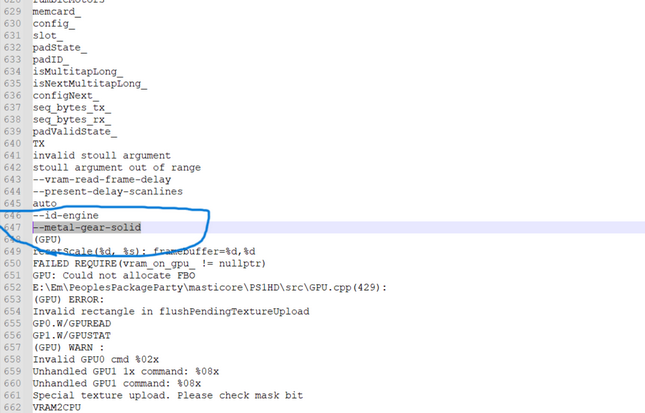
I also pulled some commands out just a second ago
Code:
--mcd1=
--bios=
--bios-dir=
--bios-hide-sce-osd=0
--pace-gpu-dma=true
--defer-linked-dma-irq=true
--cdrom-max-seek=
--cdrom-cmd-time=
--guncon=
--multitap=
--vram-read-frame-delay=
--present-delay-scanlines=
--gpu-scanout-fps-override=ntsc #[ntsc/pal]
--gpu-scanout-fps-override=#[AAMode::NoAA.AAMode::FXAA.AAMode::CMAA.AAMode::SSAA_4x]
--xobuttonmode=oenter  #[oenter.ocancel]
Anyone know what is the naming scheme of new emu for lua? Format should be the same as PS2(mostly) I had widescreen patching working on older emu, but emu was stuck in 4:3
Vika23
Senior Member
Stayhye
Senior Member
Config for Tenchu Stealth Assassins NTSC
config-title.txt
package-ps4.conf
SCUS00706.lua
Widescreen works great!! Tenchu never looked so good!
config-title.txt
Code:
# Tenchu Stealth Assassins

--sim-analog-pad=0x2020

# following settings are machine-generated
--region-dir=SIEA
--ps4-trophies=0
--ps5-uds=0
--trophies=0
Code:
# CONFIG FOR PS4 PACKAGE ENVIRONMENT

--gpu-scanout-fps-override=SSAA_4x #[AAMode::NoAA.AAMode::FXAA.AAMode::CMAA.AAMode::SSAA_4x]
#--title-id
#--opt-cache-isolation
--ps1-title-id=SCUS00706
--pace-gpu-dma=true
#--defer-linked-dma-irq
#--libcrypt
--cdrom-max-seek=true
#--region= SCEA,SCEE,SCEI
#--deterministic
#--guncon
#--multitap
#--vram-read-frame-delay
#--present-delay-scanlines= auto
#--id-engine
#--metal-gear-solid
#--snapshot-vram
#--image= data/Syphon Filter (USA) (v1.1).bin"
#--snapshot-entrypoint
#--snap-entrypoint-filename= %TITLE_ID%_entrypoint.bin
#--snapshot-autokill
#--ps1-title-id
#--bios=SCPH5500.bin,SCPH5501.bin,SCPH5502.bin
#--bios-dir== Usage Notes:  Specify custom path to ALL assets with #--assets-dir=/path/to/assets, Specify custom path to BIOS assets with #--bios-dir=/path/to/bios_dir ,Explicitly specify BIOS file with #--bios-dir=/path/to/bios.bin
--bios-hide-sce-osd=0
#--state-restore
#--snapshot-restore
#--trace-snap-compare= defer
#--wait
#--autokill
#--mcd0
#--mcd1
#--agerestrict
#--remap
#--load-scripts
#--boot-script= app_boot.lua
#--snapshot-dir
#--savestate-dir
#--locale=enUS
#--xobuttonmode=oenter,ocancel
#--host-audio
#--texreplace
#--git-rev-gamedata
#--region-dir
#--app-dir
#--app-artifacts-dir
#--title-artifacts-dir
#--run-hook-msg
#--cwd-dir
#--vault-dir
#--gamedata-dir
#--title-dir
#--config-local-dir
#--clamp-line-thickness-max
#--clamp-line-thickness-min
#--ctlanalog
#--sim-analog-pad=0x2020
#--scale
#--gamma
--brightness=2
#--contrast
#--hue
#--saturation
#--screenshot-dir
#--assets-dir
#--savedata-mode
#--ps4-trophies=1
#--trophies=1
#--ps5-uds=1
Code:
-- Tenchu Stealth Assassins
-- Widescreen
-- emu used=syphonfilter v2

local patcher = function()
--16:9
R3K_WriteMem16(0x800C4108,0x0C00)

end

EM_AddVsyncHook(patcher)
Widescreen works great!! Tenchu never looked so good!
Last edited:
Stayhye
Senior Member
Widecreen Config for Tenchu 2 Birth of the Stealth Assassins NTSC
package-ps4.conf
config-title.txt
SLUS00939.lua
package-ps4.conf
Code:
# CONFIG FOR PS4 PACKAGE ENVIRONMENT

--gpu-scanout-fps-override=SSAA_4x #[AAMode::NoAA.AAMode::FXAA.AAMode::CMAA.AAMode::SSAA_4x]
#--title-id
#--opt-cache-isolation
--ps1-title-id=SLUS00939
--pace-gpu-dma=true
#--defer-linked-dma-irq
#--libcrypt
--cdrom-max-seek=true
#--region= SCEA,SCEE,SCEI
#--deterministic
#--guncon
#--multitap
#--vram-read-frame-delay
#--present-delay-scanlines= auto
#--id-engine
#--metal-gear-solid
#--snapshot-vram
#--image= data/Syphon Filter (USA) (v1.1).bin"
#--snapshot-entrypoint
#--snap-entrypoint-filename= %TITLE_ID%_entrypoint.bin
#--snapshot-autokill
#--ps1-title-id
#--bios=SCPH5500.bin,SCPH5501.bin,SCPH5502.bin
#--bios-dir== Usage Notes:  Specify custom path to ALL assets with #--assets-dir=/path/to/assets, Specify custom path to BIOS assets with #--bios-dir=/path/to/bios_dir ,Explicitly specify BIOS file with #--bios-dir=/path/to/bios.bin
--bios-hide-sce-osd=0
#--state-restore
#--snapshot-restore
#--trace-snap-compare= defer
#--wait
#--autokill
#--mcd0
#--mcd1
#--agerestrict
#--remap
#--load-scripts
#--boot-script= app_boot.lua
#--snapshot-dir
#--savestate-dir
#--locale=enUS
#--xobuttonmode=oenter,ocancel
#--host-audio
#--texreplace
#--git-rev-gamedata
#--region-dir
#--app-dir
#--app-artifacts-dir
#--title-artifacts-dir
#--run-hook-msg
#--cwd-dir
#--vault-dir
#--gamedata-dir
#--title-dir
#--config-local-dir
#--clamp-line-thickness-max
#--clamp-line-thickness-min
#--ctlanalog
#--sim-analog-pad=0x2020
#--scale
#--gamma
--brightness=2
#--contrast
#--hue
#--saturation
#--screenshot-dir
#--assets-dir
#--savedata-mode
#--ps4-trophies=1
#--trophies=1
#--ps5-uds=1
Code:
# Tenchu 2

--sim-analog-pad=0x2020

# following settings are machine-generated
--region-dir=SIEA
--ps4-trophies=0
--ps5-uds=0
--trophies=0
Code:
-- Tenchu 2 Birth of the Stealth Assassins
-- Widescreen
-- emu used=syphonfilter v2

local patcher = function()
--16:9
R3K_WriteMem16(0x800CD358,0x0C00)

end

EM_AddVsyncHook(patcher)
Last edited:

Stayhye
Senior Member
Config for Bushido Blade 2 (SLUS-00663)
SLUS00663.lua
SLUS00663.lua
Code:
-- Bushido Blade 2 [NTSC-U] (SLUS-00663)
-- Widescreen hack by VIRGIN KLM


local patcher = function()
--Widescreen 16:9
R3K_WriteMem16(0x800FF650,0x0C00)
--Dither off code (with conditional code to work with widescreen)
local code_check1 = R3K_ReadMem16(0x07C788)
if code_check1 == 0x0200 then
R3K_WriteMem16(0x8007C788,0x0000)
end

end

EM_AddVsyncHook(patcher)
Last edited:

SeanRanklin
Member
This has completely changed the meaning of PS1 on PS4 for me. The display settings and save state/rewind feature are absolutely AMAZING.
Need to get my hands on this emu so i can test some other titles out as generally PS1 compatibility has been low.
Need to get my hands on this emu so i can test some other titles out as generally PS1 compatibility has been low.
Stayhye
Senior Member
Simple setting for multi-disc games:
config-region.txt
If more than one disc is present, a swap disc option will show up in in-game menu(option button)
config-region.txt
Code:
--image0="data/Parasite Eve (USA) (Disc 1).bin"
--image1="data/Parasite Eve (USA) (Disc 2).bin"
#--image2, etc, etc
If more than one disc is present, a swap disc option will show up in in-game menu(option button)
Vika23
Senior Member
Good, or also use some merged image like GT2, it also seem work good! (arcade and simulation in one disc).Simple setting for multi-disc games:
config-region.txt
Code:--image0="data/Parasite Eve (USA) (Disc 1).bin" --image1="data/Parasite Eve (USA) (Disc 2).bin" #--image2, etc, etc
If more than one disc is present, a swap disc option will show up in in-game menu(option button)
VIDEO

Manu Mx
Member
I think this link could help with a GT2 "Ultimate Widescreen PS4" edition.
https://github.com/CookiePLMonster/Console-Cheat-Codes/tree/master/PS1
Back in the day I had to play this using Bleemcast! But it was fun though running this on Sega hardware.
https://github.com/CookiePLMonster/Console-Cheat-Codes/tree/master/PS1
Back in the day I had to play this using Bleemcast! But it was fun though running this on Sega hardware.
Vika23
Senior Member
Yes some guys tell about these cheats today! But for me game looks ok without it!I think this link could help with a GT2 "Ultimate Widescreen PS4" edition.
https://github.com/CookiePLMonster/Console-Cheat-Codes/tree/master/PS1
Back in the day I had to play this using Bleemcast! But it was fun though running this on Sega hardware.
Manu Mx
Member
Had no time to test it. At least the 60fps should be noticeable. There really is a lot to do when I look at this nice list for the PSX
https://www.metacritic.com/browse/games/score/userscore/all/ps/filtered?page=0
https://www.metacritic.com/browse/games/score/userscore/all/ps/filtered?page=0


Vika23
Senior Member
Soul Reaver has cracle sound? looks like same as with old emu! I noticed that some games still have bugs as on old one emu!Legend of Legaia and Legend of the Dragoon don't work with new emu(yet). Soul Reaver has audio issues but plays great.
Similar threads
-
PS4 How to play multiplayer (3-4 players) using PSX-FPKG?
- Started by PSXP_Kira
- Replies: 2
-
 PS3 New PS1/PS2 Emulation Features for PS3 CFW user's + Evilnat's 4.91.2-BETA 12
- Started by STLcardsWS
- Replies: 14
-
 PS5 Modified PS2 ISO on PS5! Kingdom Hearts 2 FM Roxas Mod (Help!)
- Started by itskeyexe
- Replies: 2
-
 PS3 [Release] PS1 and PS2 Emulator Mods
- Started by mrjaredbeta
- Replies: 205