PSX-FPKG

PS4 PSX-FPKG (by Jabu) - A Tool to convert PS1 (PSX) games for use on PS4 v0.3

Bushido Blade - (SCUS94180)
Emu used = The Legend of Dragoon

config-title.txt
Code:
# Bushido Blade (all regions)

--ctlanalog=true
--sim-analog-pad=0x2020

--gpu-scanout-fps-override=ntsc

--bios-hide-sce-osd=1
--has-shown-start-select-help=1

# Use the new shared image directory
--image-dir=data

# following settings are machine-generated
--ps4-trophies=0
--ps5-uds=0
--trophies=0

--globalgamedata-dir=global

--force-frame-blend=false

# Allow the user to change between PAL and NTSC
--userui-region-selector=false

# Emu used = The Legend of Dragoon

app_boot.lua
Code:
require "disc-selection"

local ntsc_disc_map = {
    en = { "Bushido_Blade_SCUS94180_EN.bin" }
}

RegisterDiscs(ntsc_disc_map)

Widescreen.lua
Code:
-- Title: Bushido Blade [NTSC-U] (SCUS-94180)
-- ported to PS4 lua by JSimesen
-- Widescreen hack by VIRGIN KLM
-- emu used= Legend of Dragoon

local patcher = function()
local pad_bits = EM_PadRead()

local UP = pad_bits & 0x0010
local DOWN = pad_bits & 0x0040
local LEFT = pad_bits & 0x0080
local RIGHT = pad_bits & 0x0020
local Triangle = pad_bits & 0x1000
local Cross = pad_bits & 0x4000
local Square = pad_bits & 0x8000
local Circle = pad_bits & 0x2000
local L1 = pad_bits & 0x0400
local L2 = pad_bits & 0x0100
local L3 = pad_bits & 0x0002
local R1 = pad_bits & 0x0800
local R2 = pad_bits & 0x0200
local R3 = pad_bits & 0x0004
local Select = pad_bits & 0x0001
local Start = pad_bits & 0x0008

if (R3 ~= 0 and L3 ~= 0) then --arbitrarily assigned keys

-- Widescreen 16:9
R3K_WriteMem16(0x8013C87C,0x0C00)
end
end
EM_AddVsyncHook(patcher)

-- The End Widescreen.
 

Attachments

Parasite Eve II (SLUS01042) (Combined Disc)
Code:
-- Parasite Eve II (NTSC) (Combined Disc)
-- emu used=syphonfilter v2

config-title.txt
Code:
--gpu-scanout-fps-override=ntsc
--scale=6
--gamma=5
--brightness=9
--contrast=8

Parasite Eve II. Short GamePlay!
VIDEO


I also attach save file with with all modes and gunblade unlocked. You can find saves to view true ending(se room 8), normal ending (se room 7), and sad ending(se room 3).

nice. just like the "chrono cross single disc" i downloaded long time ago. how? psp tools?

btw chrono cross single disc also works on ps4.
 
nice. just like the "chrono cross single disc" i downloaded long time ago. how? psp tools?

btw chrono cross single disc also works on ps4.
its not psp tools, other tools but not all games work these method! For example Driver 2 works as 2 cd, but if you merge discs emu give u black screen after bios logo!
 
Codename Tenka (SCUS94409)

config-title.txt
Code:
--gpu-scanout-fps-override=ntsc
--scale=6
--gamma=5
--brightness=9
--contrast=8
--sim-analog-pad=0x2020

# Use the new shared image directory
--image-dir=data

--force-pad-connect=0b1

# Enable LopnorSPU to fix some audio issues
--use-lopnor-spu=1

# following settings are machine-generated
--region-dir=SIEA
--ps4-trophies=1
--ps5-uds=1
--trophies=1

--globalgamedata-dir=global

LUA.
Code:
-- Codename Tenka [NTSC-U] (SCUS-94409)
-- emu used=syphonfilter 3

local patcher = function()
local pad_bits = EM_PadRead()

local UP = pad_bits & 0x0010
local DOWN = pad_bits & 0x0040
local LEFT = pad_bits & 0x0080
local RIGHT = pad_bits & 0x0020
local Triangle = pad_bits & 0x1000
local Cross = pad_bits & 0x4000
local Square = pad_bits & 0x8000
local Circle = pad_bits & 0x2000
local L1 = pad_bits & 0x0400
local L2 = pad_bits & 0x0100
local L3 = pad_bits & 0x0002
local R1 = pad_bits & 0x0800
local R2 = pad_bits & 0x0200
local R3 = pad_bits & 0x0004
local Select = pad_bits & 0x0001
local Start = pad_bits & 0x0008

if (UP ~= 0 and R1 ~= 0) then --arbitrarily assigned keys

-- Infinite Ammo
R3K_WriteMem16(0x80059A6C,0x0063)
R3K_WriteMem16(0x80059A78,0x0063)
end
if (L3 ~= 0) then

-- Infinite Armor
R3K_WriteMem16(0x80019DDA,0x00C8)
end
if (R3 ~= 0) then

-- Infinite Energy
R3K_WriteMem16(0x80019DD8,0x0064)
end
end
EM_AddVsyncHook(patcher)

Codename Tenka. Short GamePlay! (NEW)
VIDEO
 
Men In Black The Series Crashdown (SLUS01387)

Black Screen & Right Analog FiX added!

config-title.txt

Code:
# Men in Black: The Series - Crashdown (NTSC)

--gpu-scanout-fps-override=ntsc
--scale=6
--gamma=5
--brightness=9
--contrast=8
--cdrom-cmd-time=100
--cdrom-max-seek=true
--libcrypt=26B6

# Use the new shared image directory
--image-dir=data

--force-pad-connect=0b1

# Enable LopnorSPU to fix some audio issues
--use-lopnor-spu=1

# following settings are machine-generated
--region-dir=SIEA
--ps4-trophies=1
--ps5-uds=1
--trophies=1

--globalgamedata-dir=global

LUA.
Code:
-- Men In Black - The Series - Crashdown [NTSC-U] (SLUS-01387)
-- emu used=syphonfilter 3

local patcher = function()
local pad_bits = EM_PadRead()

local UP = pad_bits & 0x0010
local DOWN = pad_bits & 0x0040
local LEFT = pad_bits & 0x0080
local RIGHT = pad_bits & 0x0020
local Triangle = pad_bits & 0x1000
local Cross = pad_bits & 0x4000
local Square = pad_bits & 0x8000
local Circle = pad_bits & 0x2000
local L1 = pad_bits & 0x0400
local L2 = pad_bits & 0x0100
local L3 = pad_bits & 0x0002
local R1 = pad_bits & 0x0800
local R2 = pad_bits & 0x0200
local R3 = pad_bits & 0x0004
local Select = pad_bits & 0x0001
local Start = pad_bits & 0x0008

if (UP ~= 0 and R1 ~= 0) then --arbitrarily assigned keys

-- Have All Levels
R3K_WriteMem16(0x800955EC,0xFFFF)
R3K_WriteMem16(0x800955EE,0xFFFF)
end
if (L3 ~= 0) then

-- Infinite Ammo
R3K_WriteMem16(0x80044886,0x2400)
end
if (R3 ~= 0) then

-- Infinite Health
R3K_WriteMem16(0x800EFF5C,0x0064)
end
end
EM_AddVsyncHook(patcher)

Men In Black The Series Crashdown. Short GamePlay! (NEW)
VIDEO
 
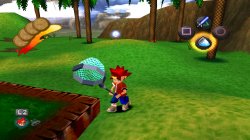
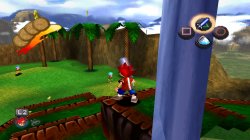
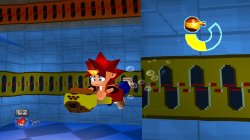
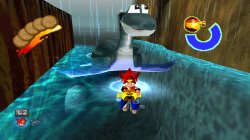
Ape Escape (SCUS94423)

Right Analog FiX added!

config-title.txt

Code:
# Ape Escape (NTSC)

--gpu-scanout-fps-override=ntsc
--scale=6
--gamma=5
--brightness=9
--contrast=8
--cdrom-max-seek=true
--pace-gpu-dma=true
--libcrypt=26B6

# Use the new shared image directory
--image-dir=data

--force-pad-connect=0b1

# Enable LopnorSPU to fix some audio issues
--use-lopnor-spu=1

# following settings are machine-generated
--region-dir=SIEA
--ps4-trophies=1
--ps5-uds=1
--trophies=1

--globalgamedata-dir=global

LUA.
Code:
-- Ape Escape [NTSC-U] (SCUS-94423)
-- emu used=syphonfilter 3

local patcher = function()
local pad_bits = EM_PadRead()

local UP = pad_bits & 0x0010
local DOWN = pad_bits & 0x0040
local LEFT = pad_bits & 0x0080
local RIGHT = pad_bits & 0x0020
local Triangle = pad_bits & 0x1000
local Cross = pad_bits & 0x4000
local Square = pad_bits & 0x8000
local Circle = pad_bits & 0x2000
local L1 = pad_bits & 0x0400
local L2 = pad_bits & 0x0100
local L3 = pad_bits & 0x0002
local R1 = pad_bits & 0x0800
local R2 = pad_bits & 0x0200
local R3 = pad_bits & 0x0004
local Select = pad_bits & 0x0001
local Start = pad_bits & 0x0008

if (UP ~= 0 and R1 ~= 0) then --arbitrarily assigned keys

-- Widescreen 16:9
R3K_WriteMem16(0x800AF0A0,0x0C00)
end
if (DOWN ~= 0 and R1 ~= 0) then

-- Infinite Lives
R3K_WriteMem16(0x800F448C,0x0064)
end
if (DOWN ~= 0 and R3 ~= 0) then

-- Infinite Air
R3K_WriteMem16(0x800F4DC8,0x0258)
end
if (DOWN ~= 0 and L3 ~= 0) then

-- Infinite Health
R3K_WriteMem16(0x800EC2C8,0x0005)
end
end
EM_AddVsyncHook(patcher)

Game had required analog sticks to play, and now its fully playble!

Ape Escape. Short GamePlay!
VIDEO
 

Attachments

  • 01.jpg
    01.jpg
    1.1 MB · Views: 49
  • 02.jpg
    02.jpg
    982 KB · Views: 51
  • 03.jpg
    03.jpg
    568.3 KB · Views: 47
  • 04.jpg
    04.jpg
    829.9 KB · Views: 46
Populous The Beginning (SLES01760)

Right Analog FiX added!

config-title.txt

Code:
# Populous The Beginning

--gpu-scanout-fps-override=ntsc
--scale=6
--gamma=5
--brightness=9
--contrast=8
--libcrypt="0x26B6"
--enable-change-disc-ui=true

# Use the new shared image directory
--image-dir=data

--force-pad-connect=0b1

# Enable LopnorSPU to fix some audio issues
--use-lopnor-spu=1

# following settings are machine-generated
--region-dir=SIEA
--ps4-trophies=1
--ps5-uds=1
--trophies=1

--globalgamedata-dir=global

LUA.
Code:
-- Populous The Beginning [PAL-E] (SLES-01760)
-- emu used=syphonfilter 3

local patcher = function()
local pad_bits = EM_PadRead()

local UP = pad_bits & 0x0010
local DOWN = pad_bits & 0x0040
local LEFT = pad_bits & 0x0080
local RIGHT = pad_bits & 0x0020
local Triangle = pad_bits & 0x1000
local Cross = pad_bits & 0x4000
local Square = pad_bits & 0x8000
local Circle = pad_bits & 0x2000
local L1 = pad_bits & 0x0400
local L2 = pad_bits & 0x0100
local L3 = pad_bits & 0x0002
local R1 = pad_bits & 0x0800
local R2 = pad_bits & 0x0200
local R3 = pad_bits & 0x0004
local Select = pad_bits & 0x0001
local Start = pad_bits & 0x0008

if (UP ~= 0 and R1 ~= 0) then --arbitrarily assigned keys

-- All Spells
R3K_WriteMem16(0x301DC2E3,0x0004)
R3K_WriteMem16(0x801DC2E4,0x0403)
R3K_WriteMem16(0x801DC2E6,0x0304)
R3K_WriteMem16(0x301DC2E8,0x0002)
R3K_WriteMem16(0x801DC2EA,0x0302)
R3K_WriteMem16(0x801DC2EC,0x0174)
R3K_WriteMem16(0x801DC2EE,0x0301)
R3K_WriteMem16(0x801DC2F0,0x0401)
R3K_WriteMem16(0x801DC2F2,0x0404)
R3K_WriteMem16(0x301DC2F4,0x0044)
end
if (DOWN ~= 0 and R1 ~= 0) then

-- Have All Build Options
R3K_WriteMem16(0x801DC2D0,0xFFFF)
end
if (R3 ~= 0) then

-- Infinite time
R3K_WriteMem16(0x801E5F90,0xFFFF)
end
if (L3 ~= 0) then

-- All Levels Selectable
R3K_WriteMem16(0x800D850C,0x0019)
end
end
EM_AddVsyncHook(patcher)

Don't forget turn on Dualshock in game options!

Populous The Beginning. Short GamePlay!
VIDEO
 
Ape Escape (SCUS94423)

Right Analog FiX added!

config-title.txt

Code:
# Ape Escape (NTSC)

--gpu-scanout-fps-override=ntsc
--scale=6
--gamma=5
--brightness=9
--contrast=8
--cdrom-max-seek=true
--pace-gpu-dma=true
--libcrypt=26B6

# Use the new shared image directory
--image-dir=data

--force-pad-connect=0b1

# Enable LopnorSPU to fix some audio issues
--use-lopnor-spu=1

# following settings are machine-generated
--region-dir=SIEA
--ps4-trophies=1
--ps5-uds=1
--trophies=1

--globalgamedata-dir=global

LUA.
Code:
-- Ape Escape [NTSC-U] (SCUS-94423)
-- emu used=syphonfilter 3

local patcher = function()
local pad_bits = EM_PadRead()

local UP = pad_bits & 0x0010
local DOWN = pad_bits & 0x0040
local LEFT = pad_bits & 0x0080
local RIGHT = pad_bits & 0x0020
local Triangle = pad_bits & 0x1000
local Cross = pad_bits & 0x4000
local Square = pad_bits & 0x8000
local Circle = pad_bits & 0x2000
local L1 = pad_bits & 0x0400
local L2 = pad_bits & 0x0100
local L3 = pad_bits & 0x0002
local R1 = pad_bits & 0x0800
local R2 = pad_bits & 0x0200
local R3 = pad_bits & 0x0004
local Select = pad_bits & 0x0001
local Start = pad_bits & 0x0008

if (UP ~= 0 and R1 ~= 0) then --arbitrarily assigned keys

-- Widescreen 16:9
R3K_WriteMem16(0x800AF0A0,0x0C00)
end
if (DOWN ~= 0 and R1 ~= 0) then

-- Infinite Lives
R3K_WriteMem16(0x800F448C,0x0064)
end
if (DOWN ~= 0 and R3 ~= 0) then

-- Infinite Air
R3K_WriteMem16(0x800F4DC8,0x0258)
end
if (DOWN ~= 0 and L3 ~= 0) then

-- Infinite Health
R3K_WriteMem16(0x800EC2C8,0x0005)
end
end
EM_AddVsyncHook(patcher)

Game had required analog sticks to play, and now its fully playble!

Ape Escape. Short GamePlay!
VIDEO

LibCrypt magic Word Works fine... =)

Use "--libcrypt=(your LibCrypt Protected here)"

libcrypt here:
https://www.psdevwiki.com/ps3/PS1_Custom_Patches

Ape Escape PAL Only

config-title.txt
Code:
--libcrypt=CEC1
--libcrypt=9AD4
--libcrypt=26B6
--libcrypt=23D9
--libcrypt=34C6
 
I have been having some audio issues with the Japanese version of Silent Hill (SLPM-86192) --- the game runs and looks fine, but various sound effects (such as footsteps, weapons, etc) will just disappear at times and won't load again until later. The game never becomes completely mute as the ambient noise is still intact, and voice acting is still fine too. Some sound effects (like selecting something in the main menu) will emit a high pitched noise briefly.

This happens to be the case with every emulator I've tried. Any potential commands worth trying?
 
I have been having some audio issues with the Japanese version of Silent Hill (SLPM-86192) --- the game runs and looks fine, but various sound effects (such as footsteps, weapons, etc) will just disappear at times and won't load again until later. The game never becomes completely mute as the ambient noise is still intact, and voice acting is still fine too. Some sound effects (like selecting something in the main menu) will emit a high pitched noise briefly.

This happens to be the case with every emulator I've tried. Any potential commands worth trying?

Try this: --use-lopnor-spu=1
The game also has a problem with the blood particle textures, they're supposed to be fully red but are white and red instead. Maybe this potentially new MGS emu could fix that.
 
Try this: --use-lopnor-spu=1
The game also has a problem with the blood particle textures, they're supposed to be fully red but are white and red instead. Maybe this potentially new MGS emu could fix that.

EDIT: resolved the issue, turns out it was something unrelated to the emu config. But I will keep that lopnor command in line for future reference, thanks!
 
Last edited:
Can you tell us so that in the future, if other games have similar issues we can try that solution?
The Japanese version of Silent Hill, along with a lot of other import games released around that time had a modchip lockout. Any FPKG I made, regardless of the emulator, would always crash at the point where that lockout would be triggered on a real console. Luckily, there were Gameshark / hex codes from back then that allowed you to bypass the lockout and these can be conveniently referenced in a LUA script.

There were multiple codes listed for Silent Hill, and the code I was initially using worked in terms of bypassing the lockout crash, but unbeknownst to me was also causing the weird audio issue I posted about. I tried many emulators and emu configs but nothing made a difference, which baffled me because I know the US version runs absolutely fine. In the end just for the hell of it I tried one of the other Gameshark codes listed and wow so far everything is A-OK, audio sounds great. I got as far as the house with the dog house out front with no issues. I plan to do a full playthrough of the whole game later but I imagine I won't have any further problems.

While we're on this subject, the whole lockout thing has been interesting mainly because I didn't think it would still be an issue with today's emulators. I have made FPKGs for other games that have it (like Ore no Ryouri) and played them fine, but other games, such as the Japanese version of Ape Escape, would always crash at the same point, prompting my initial search for a solution on that front.

Assuming there are no Gameshark codes to work with for the game you want to play, there is another workaround. In case you are not familiar with it, there is a handy tool called APRip that can search a PS1 image for all the common lockout features and patch them out. I mainly use it for Japanese titles but it should work with all the PAL games that were known to have their own lockouts implemented.
 
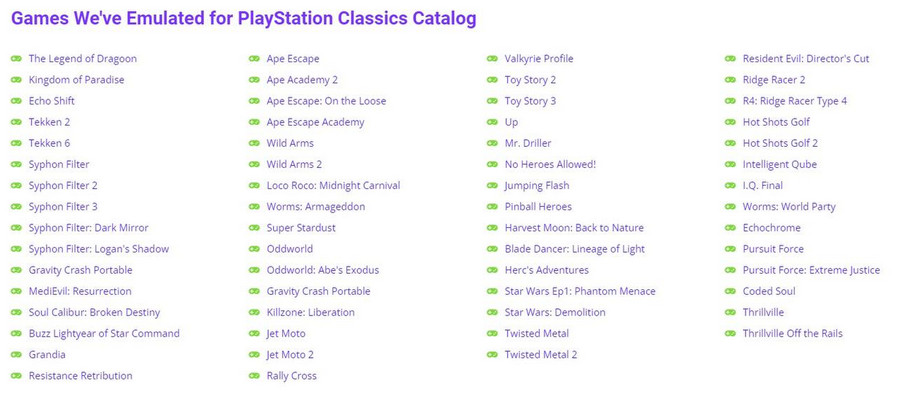
Just want show actual list of all PSX/PSP emus in PS Plus store catalog!
More bigger pic is attached!
PSXPSP-Emus-Catalog.jpg
 

Attachments

  • PSXPSP Emus Catalog.jpg
    PSXPSP Emus Catalog.jpg
    62.2 KB · Views: 66
Casper (SLUS00162)

config-title.txt
Code:
# Casper (all regions)

--gpu-scanout-fps-override=ntsc
--ps1-left-stick-action=1
--sim-analog-pad=0x2020
--enable-change-disc-ui=true
--has-shown-start-select-help=0
--bios-hide-sce-osd=1

--ps5-uds=0

# Use the new shared image directory
--image-dir=data

# Enable LopnorSPU to fix some audio issues
--use-lopnor-spu=1


# following settings are machine-generated
--region-dir=SIEA
--ps4-trophies=0
--ps5-uds=1

--globalgamedata-dir=global

LUA.
Code:
-- Casper [NTSC-U] (SLUS-00162)
-- emu used=Oddworld Abe's Oddysee v2

local patcher = function()
local pad_bits = EM_PadRead()

local UP = pad_bits & 0x0010
local DOWN = pad_bits & 0x0040
local LEFT = pad_bits & 0x0080
local RIGHT = pad_bits & 0x0020
local Triangle = pad_bits & 0x1000
local Cross = pad_bits & 0x4000
local Square = pad_bits & 0x8000
local Circle = pad_bits & 0x2000
local L1 = pad_bits & 0x0400
local L2 = pad_bits & 0x0100
local L3 = pad_bits & 0x0002
local R1 = pad_bits & 0x0800
local R2 = pad_bits & 0x0200
local R3 = pad_bits & 0x0004
local Select = pad_bits & 0x0001
local Start = pad_bits & 0x0008

if (UP ~= 0 and R1 ~= 0) then --arbitrarily assigned keys

-- Infinite Health
R3K_WriteMem16(0x8007F01C,0x0064)
R3K_WriteMem16(0x8007F02C,0x0064)
R3K_WriteMem16(0x800FBD80,0x0064)
end
if (L3 ~= 0) then

-- Brass Key
R3K_WriteMem16(0x8007EA28,0x0001)
end
if (R3 ~= 0) then

-- Iron Key
R3K_WriteMem16(0x8007EA2C,0x0001)
end
end
EM_AddVsyncHook(patcher)

Graphical bug (annoyd colored strip at right side of screen) - FiXed with picked right emu!

Casper. Short GamePlay! [PSXtoPS5]
VIDEO
 
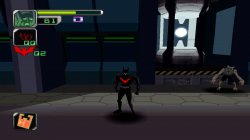
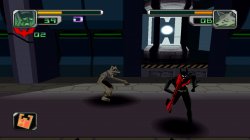
Batman Beyond Return of the Joker (SLUS01207)

config-title.txt
Code:
# Batman Beyond Return of the Joker (US)

--gpu-scanout-fps-override=ntsc
--ps1-left-stick-action=1
--sim-analog-pad=0x2020
--enable-change-disc-ui=true
--has-shown-start-select-help=0
--bios-hide-sce-osd=1

--ps5-uds=0

# Use the new shared image directory
--image-dir=data

# Enable LopnorSPU to fix some audio issues
--use-lopnor-spu=1


# following settings are machine-generated
--region-dir=SIEA
--ps4-trophies=0
--ps5-uds=1

--globalgamedata-dir=global

LUA.
Code:
-- Batman Beyond - Return of the Joker [NTSC-U] (SLUS-01207)
-- emu used=Oddworld Abe's Oddysee v2

local patcher = function()
local pad_bits = EM_PadRead()

local UP = pad_bits & 0x0010
local DOWN = pad_bits & 0x0040
local LEFT = pad_bits & 0x0080
local RIGHT = pad_bits & 0x0020
local Triangle = pad_bits & 0x1000
local Cross = pad_bits & 0x4000
local Square = pad_bits & 0x8000
local Circle = pad_bits & 0x2000
local L1 = pad_bits & 0x0400
local L2 = pad_bits & 0x0100
local L3 = pad_bits & 0x0002
local R1 = pad_bits & 0x0800
local R2 = pad_bits & 0x0200
local R3 = pad_bits & 0x0004
local Select = pad_bits & 0x0001
local Start = pad_bits & 0x0008

if (R3 ~= 0) then

-- Infinite health
R3K_WriteMem16(0x8001A276,0x2400)
end
if (L3 ~= 0) then

-- Stop Timer
R3K_WriteMem16(0x8006CF1C,0x0000)
end
end
EM_AddVsyncHook(patcher)

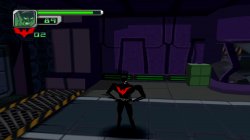
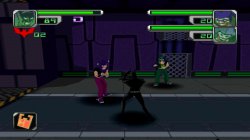
Freeze issue on loading screen (picked right emu) and CDDA music bug - FiXed!

Batman Beyond Return of the Joker. Short GamePlay!
VIDEO
 

Attachments

  • 01.jpg
    01.jpg
    494.8 KB · Views: 40
  • 02.jpg
    02.jpg
    604.7 KB · Views: 44
  • 03.jpg
    03.jpg
    403.8 KB · Views: 35
  • 04.jpg
    04.jpg
    439.9 KB · Views: 36
  • BatmanBeyond TOC.rar
    BatmanBeyond TOC.rar
    259 bytes · Views: 26
Back
Top