
You are using an out of date browser. It may not display this or other websites correctly.
You should upgrade or use an alternative browser.
You should upgrade or use an alternative browser.

where exactly can i get the emulator folder you use when you manually compile games?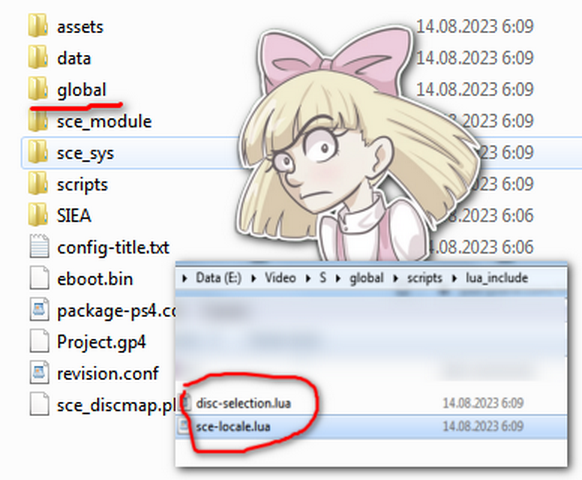
This is structure of new emu, with some new folder!
Inside global folder we see few lua. files!
disc-selection.lua gives hope that it will help with multi-disc games like MGS...with right disc swap!
Charles_n_town
Senior Member
If you mean what I think, you have to dump the game. If it's an fpkg, you can extract the pkg with orbis-pub-check (think that's the name), which is part of the PS4 sdk or you can try liborbispkg. The passcode for fpkg is usually 32x0's.where exactly can i get the emulator folder you use when you manually compile games?

Benyoda
Member
I am working on MTV Snowboarding, also called "MTV Sports Pure Ride" but it gives me a black screen when the first FMV (a short MTV Interactive animated logo) is supposed to load. The game works flawless on ePSXe (1.9.0) but I am sure the EMU got some broader compatibility than PSX-FPKG 0.3.
Is there any potential lua script that could skip FMVs or some other workaround? I am guessing I am not the first here with this type of FMV-problem.
Is there any potential lua script that could skip FMVs or some other workaround? I am guessing I am not the first here with this type of FMV-problem.

Vika23
Senior Member
Santa Claus Saves the Earth (SLES04023)
config-title.txt
LUA.
Santa Claus Saves the Earth.Short GamePlay!
VIDEO
config-title.txt
Code:
# Santa Claus Saves the Earth

--gpu-scanout-fps-override=ntsc
--ps1-left-stick-action=1
--sim-analog-pad=0x2020
--has-shown-start-select-help=0
--bios-hide-sce-osd=1
--enable-user-color-adjustment=1

--ps5-uds=0

# Use the new shared image directory
--image-dir=data

# Enable LopnorSPU to fix some audio issues
--use-lopnor-spu=1


# following settings are machine-generated
--region-dir=SIEA
--ps4-trophies=0
--ps5-uds=1

--globalgamedata-dir=global
LUA.
Code:
-- Santa Claus Saves the Earth [PAL] (SLES-04023)
-- emu used=Oddworld Abe's Oddysee v2

local patcher = function()
local pad_bits = EM_PadRead()

local UP = pad_bits & 0x0010
local DOWN = pad_bits & 0x0040
local LEFT = pad_bits & 0x0080
local RIGHT = pad_bits & 0x0020
local Triangle = pad_bits & 0x1000
local Cross = pad_bits & 0x4000
local Square = pad_bits & 0x8000
local Circle = pad_bits & 0x2000
local L1 = pad_bits & 0x0400
local L2 = pad_bits & 0x0100
local L3 = pad_bits & 0x0002
local R1 = pad_bits & 0x0800
local R2 = pad_bits & 0x0200
local R3 = pad_bits & 0x0004
local Select = pad_bits & 0x0001
local Start = pad_bits & 0x0008

if (UP ~= 0 and R1 ~= 0) then --arbitrarily assigned keys

-- Infinite energy
R3K_WriteMem16(0x800560E4,0x0004)
end
if (LEFT ~= 0 and R1 ~= 0) then

-- Infinite tomotoes
R3K_WriteMem16(0x800560FE,0x0063)
end
if (L3 ~= 0) then

-- Infinite lives
R3K_WriteMem16(0x80055FF4,0x0063)
end
if (R3 ~= 0) then

-- Infinite Snow balls
R3K_WriteMem16(0x800560FA,0x0063)
end
end
EM_AddVsyncHook(patcher)
Santa Claus Saves the Earth.Short GamePlay!
VIDEO
Attachments
Vika23
Senior Member
Sled Storm (SLUS00955)
config-title.txt
LUA.
Sled Storm. Short GamePlay!
VIDEO
config-title.txt
Code:
# Sled Storm (US)

--gpu-scanout-fps-override=ntsc
--ps1-left-stick-action=1
--sim-analog-pad=0x2020
--enable-change-disc-ui=true
--has-shown-start-select-help=0
--bios-hide-sce-osd=1
--enable-user-color-adjustment=1

--ps5-uds=0

# Use the new shared image directory
--image-dir=data

# Enable LopnorSPU to fix some audio issues
--use-lopnor-spu=1


# following settings are machine-generated
--region-dir=SIEA
--ps4-trophies=0
--ps5-uds=1

--globalgamedata-dir=global
LUA.
Code:
-- Sled Storm [NTSC-U] (SLUS-00955)
-- emu used=Oddworld Abe's Oddysee v2

local patcher = function()
local pad_bits = EM_PadRead()

local UP = pad_bits & 0x0010
local DOWN = pad_bits & 0x0040
local LEFT = pad_bits & 0x0080
local RIGHT = pad_bits & 0x0020
local Triangle = pad_bits & 0x1000
local Cross = pad_bits & 0x4000
local Square = pad_bits & 0x8000
local Circle = pad_bits & 0x2000
local L1 = pad_bits & 0x0400
local L2 = pad_bits & 0x0100
local L3 = pad_bits & 0x0002
local R1 = pad_bits & 0x0800
local R2 = pad_bits & 0x0200
local R3 = pad_bits & 0x0004
local Select = pad_bits & 0x0001
local Start = pad_bits & 0x0008

if (L3 ~= 0) then

-- Infinite money
R3K_WriteMem16(0x800BFFA0,0xFFFF)
end
if (R3 ~= 0) then

-- Stop Timer
R3K_WriteMem16(0x800D8AD0,0x0000)
end
-- Widescreen
R3K_WriteMem16(0x800E0128,0x1333)
end
EM_AddVsyncHook(patcher)
Sled Storm. Short GamePlay!
VIDEO
Attachments
Vika23
Senior Member
The Adventure of Little Ralph (SLPS01853)
config-title.txt
LUA.
The Adventure of Little Ralph. Short GamePlay!
VIDEO
config-title.txt
Code:
# Chippoke Ralph no Daibouken - The Adventure of Little Ralph
--gpu-scanout-fps-override=ntsc
--ps1-left-stick-action=1
--sim-analog-pad=0x2020
--has-shown-start-select-help=0
--bios-hide-sce-osd=1
--enable-user-color-adjustment=1

--ps5-uds=0

# Use the new shared image directory
--image-dir=data

# Enable LopnorSPU to fix some audio issues
--use-lopnor-spu=1


# following settings are machine-generated
--region-dir=SIEA
--ps4-trophies=0
--ps5-uds=1

--globalgamedata-dir=global
LUA.
Code:
-- Chippoke Ralph no Daibouken - The Adventure of Little Ralph [NTSC-J] [English Patched] (SLPS-01853)
-- emu used=Oddworld Abe's Oddysee v2

local patcher = function()
local pad_bits = EM_PadRead()

local UP = pad_bits & 0x0010
local DOWN = pad_bits & 0x0040
local LEFT = pad_bits & 0x0080
local RIGHT = pad_bits & 0x0020
local Triangle = pad_bits & 0x1000
local Cross = pad_bits & 0x4000
local Square = pad_bits & 0x8000
local Circle = pad_bits & 0x2000
local L1 = pad_bits & 0x0400
local L2 = pad_bits & 0x0100
local L3 = pad_bits & 0x0002
local R1 = pad_bits & 0x0800
local R2 = pad_bits & 0x0200
local R3 = pad_bits & 0x0004
local Select = pad_bits & 0x0001
local Start = pad_bits & 0x0008

if (UP ~= 0 and R1 ~= 0) then --arbitrarily assigned keys

-- Walk Through Enemies
R3K_WriteMem16(0x8018874E,0xFFFF)
end
if (LEFT ~= 0 and R1 ~= 0) then

-- 1-Hit Death
R3K_WriteMem16(0x8018874E,0x0001)
end
if (L3 ~= 0) then

-- Infinite Time
R3K_WriteMem16(0x800B9BF8,0x9999)
end
if (R3 ~= 0) then

-- Infinite energy
R3K_WriteMem16(0x800B9C18,0x0009)
end
end
EM_AddVsyncHook(patcher)
The Adventure of Little Ralph. Short GamePlay!
VIDEO
Hi, did you manage to solve it? Because I'm also interested and researching.Hi. Can anyone please help with Crash bash ? i want to play it using 4 controllers and it only lets me use 2. even after adding the mtap to config file nothing happens or the game crashes, can anyone help with that please ? thanks in advance.
Does anyone know if there is a LUA command that is the equivalent of pressing the analog button on the controller, that works mid-game?
There is a CLI command in some of the new emulators - --pad-analog-button=1 - but applying that while the game is running doesn't seem to work.
Edit:-
I found a workaround, using --legacy-force-analog and --legacy-force-analog-value. Basically you can set these (via EM_SetSettingCli) and then create/load a save state to "reset" the emulator. Doing this seems to force the emulator to re-evaluate those settings, so effectively allowing you to toggle the analog button.
I also came across a code example in Jet Moto 2, which was for toggling the analog mode on older save states. This does it as it would have been done on original hardware, and this led me to documentation on this:
https://problemkaputt.de/psxspx-controller-and-memory-card-i-o-ports.htm
https://problemkaputt.de/psxspx-controllers-configuration-commands.htm
https://www.chibialiens.com/mips/platform.php (Lesson 2 - Reading the joystick Directly!)
But I can't seem to get this to work.
Reading those pages seems like it may be an incomplete implementation, but adding in what would appear to be the missing commands doesn't work.
There is a CLI command in some of the new emulators - --pad-analog-button=1 - but applying that while the game is running doesn't seem to work.
Edit:-
I found a workaround, using --legacy-force-analog and --legacy-force-analog-value. Basically you can set these (via EM_SetSettingCli) and then create/load a save state to "reset" the emulator. Doing this seems to force the emulator to re-evaluate those settings, so effectively allowing you to toggle the analog button.
Code:
-- Turn on Analog button
EM_SetSettingCli("--legacy-force-analog=true")
EM_SetSettingCli("--legacy-force-analog-value=true")
Code:
-- Turn off Analog button
EM_SetSettingCli("--legacy-force-analog=true")
EM_SetSettingCli("--legacy-force-analog-value=false")
I also came across a code example in Jet Moto 2, which was for toggling the analog mode on older save states. This does it as it would have been done on original hardware, and this led me to documentation on this:
https://problemkaputt.de/psxspx-controller-and-memory-card-i-o-ports.htm
https://problemkaputt.de/psxspx-controllers-configuration-commands.htm
https://www.chibialiens.com/mips/platform.php (Lesson 2 - Reading the joystick Directly!)
But I can't seem to get this to work.
Code:
-- Jet Moto 2 v1.03

-- Called when reading input.
function ForceAnalog()
    -- Used to force analog mode to on, for compatibility with old snapshots, if it's off.
    -- Basically we just need to switch analog_button to true, but to do this, we have to
    -- use the actual way this is done in real hardware.


    if R3K_GetGpr(gpr.v0) == 0x41 then

        print("Written")

        --local stat = R3K_ReadMem8(0x1F80104A)

        --print("Ctrl: ", string.format("%X", stat))

        --stat = stat | 0x40
        --R3K_WriteMem16(0x1F80104A, stat)
        --stat = R3K_ReadMem16(0x1F80104A)
        --print("Post stat: ", string.format("%X", stat))

        --R3K_WriteMem16(0x1F80104A, 3)

        R3K_WriteMem16(0x1F80104A, 3)


        R3K_WriteMem8(0x1F801040, 1)


        R3K_WriteMem8(0x1F801040, 0x44)


        R3K_WriteMem8(0x1F801040, 0)
        R3K_WriteMem8(0x1F801040, 1)
        R3K_WriteMem8(0x1F801040, 2)

        R3K_WriteMem8(0x1F801040, 0)
        R3K_WriteMem8(0x1F801040, 0)
        R3K_WriteMem8(0x1F801040, 0)
        R3K_WriteMem8(0x1F801040, 0)


    end

end
--R3K_AddHook(0x004680, 0x00021600, ForceAnalog)
Reading those pages seems like it may be an incomplete implementation, but adding in what would appear to be the missing commands doesn't work.
Last edited:
Here's something to keep an eye on in the future (once relevant emulator versions have been dumped).
Updates for Armored Core Master of Arena and Armored Core Project Phantasma released last week included new menu options in the emulators menu:

I did some digging and it turns out this is a new fully featured scriptable menu system. You can essentially create anything you want, including nested menus. No more having to rely on button combinations to trigger LUA code in future:

I've shared the code for doing this (once emulators are dumped) here. It should also apply to PSPHD and PS2HD once newer versions of those are released too:
https://ps1hd.pages.dev/ui-scripted-menu
Updates for Armored Core Master of Arena and Armored Core Project Phantasma released last week included new menu options in the emulators menu:
I did some digging and it turns out this is a new fully featured scriptable menu system. You can essentially create anything you want, including nested menus. No more having to rely on button combinations to trigger LUA code in future:
I've shared the code for doing this (once emulators are dumped) here. It should also apply to PSPHD and PS2HD once newer versions of those are released too:
https://ps1hd.pages.dev/ui-scripted-menu
Metro City
Member
Hi, do you know how to create cheats or where to find .jsons for some PSX games? Thank you
I recently found that someone had created door skip cheats for the Resident Evil games:- https://gamehacking.org/game/89745?hacker=nolberto82
I had a go at implementing it for the Claire disc in RE2 Dual Shock edition. What's interesting here is that because you can hook into the code, you can tell the emulator to go as fast as possible during the door sequences - so not only does this skip the door, it's able to do so even faster than normal.
I had a go at implementing it for the Claire disc in RE2 Dual Shock edition. What's interesting here is that because you can hook into the code, you can tell the emulator to go as fast as possible during the door sequences - so not only does this skip the door, it's able to do so even faster than normal.
Code:
DOOR_START_PC = 0x80013bc4
DOOR_START_OP = 0x27BDFFE8
DOOR_END_PC = 0x80026ed0
DOOR_END_OP = 0x03E00008
DOOR_SKIP_ADDR_1 = 0x8009A774
DOOR_SKIP_ADDR_2 = 0x80049E96

R3K_AddHook(DOOR_START_PC, DOOR_START_OP, function()
    print("!!! Starting Door Sequence !!! ")
    EM_ThrottleMax()
    R3K_WriteMem16(DOOR_SKIP_ADDR_1, 0x417C)
    R3K_WriteMem16(DOOR_SKIP_ADDR_2, 0x2400)
end
)

R3K_AddHook(DOOR_END_PC, DOOR_END_OP, function()
    print("!!! Ending Door Sequence !!! ")
    EM_ThrottleNormal()
end
)Similar threads
-
PS4 How to play multiplayer (3-4 players) using PSX-FPKG?
- Started by PSXP_Kira
- Replies: 2
-
 PS3 New PS1/PS2 Emulation Features for PS3 CFW user's + Evilnat's 4.91.2-BETA 12
- Started by STLcardsWS
- Replies: 14
-
 PS5 Modified PS2 ISO on PS5! Kingdom Hearts 2 FM Roxas Mod (Help!)
- Started by itskeyexe
- Replies: 2
-
 PS3 [Release] PS1 and PS2 Emulator Mods
- Started by mrjaredbeta
- Replies: 205