PS3 [Q?] How to dump Syscon firmware? + Issue downgrading 65mm Sony Frankie FW possibly?

daft

Member
How to dump Syscon firmware? (not the error logs)
.
I recently picked up a C04 backwards compatible PS3 that has F29 Syscon firmware. And I noticed on the PS3 dev wiki the F29 firmware is not currently dumped: https://www.psdevwiki.com/ps3/Syscon_Firmware#Syscon_firmwares

I would like to help the community by dumping it.

I have done some searching before making this thread, one of the ideas is to use PS3 Linux. Which I have not used before (I have used PS4 Linux though if that helps)

I have a UART reader, and I can possibly explore installing Linux on the PS3 if need be.

Is there any easy way with software (i.e. CFW)? Or is it more involved process?
 

Attachments
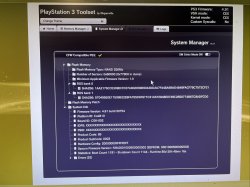
  • runtime.jpg
    runtime.jpg
    278.4 KB · Views: 85
Last edited by a moderator:
Hi,
you need to be able to install CFW, need to have an UART adapter and a display with a HDMI port.
First a special CFW is installed, which installs a special patch on Syscon.
Now as long as no HDMI display is connected, and the PS3 is powered on, Syscon will dump it's firmware over UART.
After that's successful, a display needs to be connected and any firmware can be installed to make the system behave normal again.

I'll create the special fw and then I'll step you through the process. I'm currently very busy so it might take some time.
 
Hi,
you need to be able to install CFW, need to have an UART adapter and a display with a HDMI port.
First a special CFW is installed, which installs a special patch on Syscon.
Now as long as no HDMI display is connected, and the PS3 is powered on, Syscon will dump it's firmware over UART.
After that's successful, a display needs to be connected and any firmware can be installed to make the system behave normal again.

I'll create the special fw and then I'll step you through the process. I'm currently very busy so it might take some time.

Thanks for the reply, that sounds good and something I should be able to do. No worries about being busy right now, I'll be keeping hold of this console so can do it whenever :)
 
Thanks for the reply, that sounds good and something I should be able to do. No worries about being busy right now, I'll be keeping hold of this console so can do it whenever :)
Hi,
you can find the necessary files (and explanation) here: https://workupload.com/file/HMwHeRDXtQ8
It differs a bit from the method I described because this one is fail safe.
Please familiarize yourself with the readme and report back any ambiguities or questions before starting.
You might need to repeat the main part (obtaining the syscon dump) to verify that the dump is correct.
 
Hi,
you can find the necessary files (and explanation) here: https://workupload.com/file/HMwHeRDXtQ8
It differs a bit from the method I described because this one is fail safe.
Please familiarize yourself with the readme and report back any ambiguities or questions before starting.
You might need to repeat the main part (obtaining the syscon dump) to verify that the dump is correct.

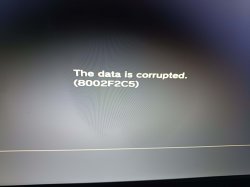
Hi so I've started the process of installing the special CFW. But it seems I get an error about corrupt data.

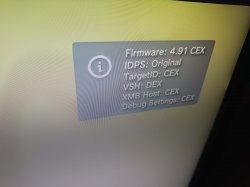
I am currently on Evilnat 4.91 PEX. I have enabled QA flags.

I've tried different USB ports, and redownloaded the PUP several times. The USB shows in the XMB and I have used it many times before with no issue.

If it helps in XMB it says no applicable data found, and when I go into safe mode to install, that's when I get the corrupt data error.

Any idea?
 

Attachments

  • cechc F29 error.jpg
    cechc F29 error.jpg
    772.2 KB · Views: 59
  • cechc info.jpg
    cechc info.jpg
    952.1 KB · Views: 60
Thanks I will try this. Do I need new instructions after install this particular CFW?
If this installs successfully, try the original PUP file and then continue.
If the original PUP stills fails to install there's something wrong on my side and I need to check it.
 
If this installs successfully, try the original PUP file and then continue.
If the original PUP stills fails to install there's something wrong on my side and I need to check it.
Hello, sorry for the delay I was busy with something else.

I've tried both PUPs (renamed to PS3UPDAT.PUP) and I'm getting the data corrupt error for both of them. I'm not sure what to do. I know for a fact I am on CEX kernel as it has a regular CFW Evilnat 4.91 install, and I haven't installed DEX on this console.
 
Hello, sorry for the delay I was busy with something else.

I've tried both PUPs (renamed to PS3UPDAT.PUP) and I'm getting the data corrupt error for both of them. I'm not sure what to do. I know for a fact I am on CEX kernel as it has a regular CFW Evilnat 4.91 install, and I haven't installed DEX on this console.
Hmm that's weird. Can you try downgrading to 3.55 OFW and then try to install it via recovery mode?
The last resort would be the manufacturing updater, but this wasn't required in the past (for @lcferrum)
 
Okay so I've been doing lots of things to try find a solution. I went back to OFW 4.91, re-patched the flash, got the latest Evilnat CFW 4.91.2 build, same problem.

I've seen reports this error can be from corrupt USB sticks, bad HDDs, or not having a CFW install or patched flash while > 3.55 OFW. I've tried different USB sticks, and I've changed the internal storage drive. Nothing changed.

I think the issue is with downgrading on my console period - because vanilla 3.55 OFW does not work either, same problem. In fact, I can't downgrade at all to any OFW or CFW.

However - I realised how QA Flags is listed with SYSCON tag in CFW settings. What if my F29 Syscon firmware is not fully supported by the Evilnat CFW and it's a bug that needs to be fixed? After all, the amount of 65nm Sony Frankies will be low amount.

I don't know how to prove this theory though.

Someone somewhere else suggested looking at FSM install update logs, but I have no idea how to do that. I've been in FSM before though.

I have an idea, I will ask in a different thread if people using F29 Syscon can downgrade their system. If they cannot, then I will know it is not just me and I will get into contact with Evilnat to see if it is a potential bug.

Thanks for the help so far :smile new:

Edit: My other post got deleted as violating rules. So as a result I will give up trying to dump the F29 Syscon. I will not post further about this. Someone else will have to provide the F29 dump, apologies as you have helped a lot but I do not wish to continue now.
 
Last edited by a moderator:
psx-place is as much a dictatorship as the wiki? no way :)

@daft contact me via dm in telegram or discord. i'm zecoxao on discord and zecoxao1 on telegram
 
Last edited by a moderator:
psx-place is as much a dictatorship as the wiki? no way :)

What is that a potato in the shape of a male part that floats?
I don't think much is ever done without reason or input from other's

Edit: My other post got deleted as violating rules. So as a result I will give up trying to dump the F29 Syscon. I will not post further about this. Someone else will have to provide the F29 dump, apologies as you have helped a lot but I do not wish to continue now.

45544545.jpg


A bit dramatic, considering that it seems to be a valid reason since it was really just a duplicate thread that already had details and info presented,

You could of edited the title as you did so with the {Closed} brackets you added.

Edit: i went ahead and edited title.
 
Last edited:
Back
Top