@Peppe90 You can use a batch file to get around adding 1 game at a time to the Jobs List.
This can be really useful, thanks!

@Peppe90 You can use a batch file to get around adding 1 game at a time to the Jobs List.


Just to round some info (regarding the apps) up:
- HDL Dump/Dumb is obsolete IMO.
- WinHIIP is nice but has some issues like the game-limit, some fragmentation-stuff and might try to patch an image!
- HDL Dump Helper GUI is a great tool and except for the missing batch-install really good!
- HDL Game Installer is great as well and allows games to be installed via various ways.
Btw.: @Peppe90 It is not mbps, but M(i)Bps! That's 8x as fast...
...and... AFAIR he uses his own protocol and not FTP!

I've even heard of people getting better results when they tighten the screws on the network adapter to push the metal plates back more & then screw it tightly to the console.

@Peppe90 I was wonder why he said old maybe he never heard about that one
HDL Dump GUI also exists and is veeery old!
Please post the exact names in future! There is only one HDL Dump Helper GUI, tho'.
Yes, it is Megabytes (or more specifically Mebibytes) per second.... What did you write? 'mbps'! Keeping the prefix small does NOT refer to Megabyte, but Megabit (which is only 1/8th of a Megabyte)!

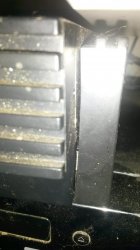
I am kean to say... (Sorry, but...) Those people who have a gap between the adapter and a PS2 are just too freakin' stupid to correctly attach the thing!!!
View attachment 19948
You see...?!? I don't have this freakin' big 5mm-gap at the bottom!


Yea fast HDD access can cause problems have you tried mode 2 or mode 1 both together use to fix most skipping problems by fast accessHere's mines... The gap looks alot bigger in the picture than it does in real life, but that's as tight as I can get it, without putting insane pressure on the screws. I like to leave it a tiny bit of play on the screws, once I feel it securely in.
What are the kind of issues one could face if they're not in correctly? I mean apart from the HDD not being picked up, what would the benefits be of having it loose, compared to having it tight?
I heard on one forum, a guy was having game crashes, and the answer was to tighten the screws, & if I remember correctly, he said it fixed the issue... I would have expected, if all of the pins aren't touching correctly, the HDD would just fail to initialise in the first place...
Also off topic, since I switched to my 1TB drive, alot of the games that worked perfectly on my 160GB drive, now need compatibility modes & UDMA changes to run (I've found UDMA 3 to fix so many of them it's insane) could this be due to the NA connection, or is my new HDD too new, & possibly spinning a little too fast, so UDMA 3 is feeding the data a little slower & in-turn fixing the issue?Sent from my C6603 using Tapatalk
