PS3 [Question] Does a Game Manager for PSN (.pkg) installed games exist?

auracle2g

Forum Noob
Hello guys,

I have 83 games, titles installed in .PKG form and it is a pain in the butt to look through the games in the default XMB way, scrolling down vertically.

Is there any homebrew that already exists that can act as a launcher, game manager for .PKG installed titles? or am I absolutely stuck having to select something through that menu, using that method?

Thanks
 
? just add those games to wmm, then all games will be sorted together. it will still be on the xmb though, but adding a launcher is a waste of time to the process.
 
? just add those games to wmm, then all games will be sorted together. it will still be on the xmb though, but adding a launcher is a waste of time to the process.

Ok, Thanks. How do I do that though? Get webman mod to recognize .pkg installed games. I'm fairly proficient with computers, so even a brief explanation or just the method used would be great.
 
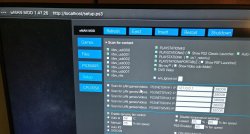
click this:
20201108_142431_HDR.jpg
 
Oh wow, thank you! I cannot believe that I missed that menu section, I thought it was already expanded, haha! Appreciate it.
 
I think it's off by default, because it uses a different icon either icon0.png or box art like it does with normal wmm. I turned mine off, because some of the artwork was deformed.
 
it may not be available on the sman gui. turning "sman gui" off. you may have to reboot but i dont think so.
Nope, that didn't work. If Webman Mod had the ability to include the games listed on the XMB under PS3 games, had a cover flow like managunz and a gui file manager like MM, it would be perfect. It would be nice to click on a link to your PS3 games and a cover flow launcher would show, or the same for the ps2 and ps1 links separately. Wouldn't want all the games jumbled together. one coverflow launcher for each system. The FTP works great.
 
After some messing around, I got it to work thank you very much for the xml. it disabled hen toolbox though and whenever I renabled hen toolbox, it deleted ★ app_home/PS3_GAME, so I ended up removing hen toolbox. I also noticed that it's not finding the installed psx games when scanning. it found all the ps3 titles and at first it listed them as their game id. then after a few reboots, it shows them in order by name with their game pic.
 
After some messing around, I got it to work thank you very much for the xml. it disabled hen toolbox though and whenever I renabled hen toolbox, it deleted ★ app_home/PS3_GAME, so I ended up removing hen toolbox. I also noticed that it's not finding the installed psx games when scanning. it found all the ps3 titles and at first it listed them as their game id. then after a few reboots, it shows them in order by name with their game pic.

The option only list the games which title id start with NP.

The app_home is removed because HEN Toolbox is swap the XML with a version that doesn't have it.
 
The option only list the games which title id start with NP.

The app_home is removed because HEN Toolbox is swap the XML with a version that doesn't have it.

gotcha, so if I rename those psx games starting with NP they should be scanned? and it's not a big deal about hen tools, I never really used them. you are a genius by the way, thank you for all your hard work.
Edit: I just checked and I only have 7 PSX titles installed and they all start with NP
 
Last edited:
gotcha, so if I rename those psx games starting with NP they should be scanned? and it's not a big deal about hen tools, I never really used them. you are a genius by the way, thank you for all your hard work.
Edit: I just checked and I only have 7 PSX titles installed and they all start with NP

The NP folder must have an EBOOT.BIN. The reason of this check is that these games are mounted through /app_home/PS3_GAME
Also this check prevents the listing of folders containing only DLC data or non-bootable content

TIP: An easy way to access your NP games is listing them grouped by format (PS1, PS2, PSP, etc.).
Use SQUARE button on the Game column of XMB to change the group method. Also use the XMB Folders to group them by custom categories like genre, favorites, etc. For this hit TRIANGLE on each NP game > Go to Information > Name the Album. After that hit SQUARE on the XMB and it will show your folders.
 
The NP folder must have an EBOOT.BIN. The reason of this check is that these games are mounted through /app_home/PS3_GAME
Also this check prevents the listing of folders containing only DLC data or non-bootable content

TIP: An easy way to access your NP games is listing them grouped by format (PS1, PS2, PSP, etc.).
Use SQUARE button on the Game column of XMB to change the group method. Also use the XMB Folders to group them by custom categories like genre, favorites, etc. For this hit TRIANGLE on each NP game > Go to Information > Name the Album. After that hit SQUARE on the XMB and it will show your folders.

So basically there's no way to show your PSX games in WebMan Mod?

Edit: So I just installed Irisman and it's exactly what I was looking for, it even recognizes .bin.enc PS2 isos. I have 2 questions though, is it possible to show your XMB games in the coverflow like you can in WM? And where are the covers stored for PS2 isos? Is there a way to pin Irisman to the XMB, so as soon as Hen is loaded, I can just load it right away instead of having to dig through folders to find it?

Edit2: I just discovered that when loading a PS2 game through Irisman, you lose wireless controller support. It works fine on WM though.
 
Last edited:
I'm not exactly sure what happened, but the XMB games are being counted and added to the PS3 iso games under Webman Games, but the games themselves are not showing up in the list. I copied over the .xml you posted several times and refreshed the xml and rebooted the system, but the games aren't showing up in the list.
 
I'm not exactly sure what happened, but the XMB games are being counted and added to the PS3 iso games under Webman Games, but the games themselves are not showing up in the list. I copied over the .xml you posted several times and refreshed the xml and rebooted the system, but the games aren't showing up in the list.

Try changing the memory allocation in /setup.ps3 to MAX or MC-4 bg. Maybe the number of games is too high and breaking the XML.
 
I'm still not having any luck getting the PSN titles on the XMB back. They won't even show on IrisMan even though they are being counted. It worked a week ago just fine, I don't know what happened.
 
I'm still not having any luck getting the PSN titles on the XMB back. They won't even show on IrisMan even though they are being counted. It worked a week ago just fine, I don't know what happened.

IRISMAN has a homebrew mode (inherited from Iris Manager project) that I never have tried.

webMAN MOD mounts PSN games through "★ app_home/PS3_GAME".
If you have that icon on XMB, these games will not be mounted.
 
Back
Top