
The long wait is finally over as Team REBUG has officially released REBUG 4.65.2 REX/D-REX COBRA Editions. This highly touted CFW comes to us with a bang and with some impressive features from the REBUG developers. Also the team has brought an additional developer to the team in Abkarino to make this elite team of developer's even stronger. In this version of the CFW the developers have managed to fix the controller sync issues on PS2 Games that has plagued user's since Sony's release of v4.50 firmware. All bugs from 4.65.1 [break]ss[/break] have been corrected and various other issues Like the PS1 Video issues that affects a small amount of user's was fixed, Full PS2 ISO Support on BC/Semi BC Consoles. TMAPI issues were resolved and various other fixes and additions were made to the CFW.. No need to listen to me explain this CFW as the developer's always come with plenty of information and there is a huge amount of information for this release found below.
Download & Source: www.rebug.me
As with any CFW installation USE at your OWN RISK
Checkout Additional REBUG RELEASES via this link
 D-REX Cobra 7.03 EDITION - INSTALL ON DEX PS3 SYSTEM REBUG 4.65.2 D-REX EDITION - JAN. 13TH 2015 REX Cobra 7.03 EDITION - INSTALL ON CEX PS3 SYSTEM REBUG 4.65.2 REX EDITION - JAN. 13TH 2015 ----> Donate to Rebug <---- | ||||||||||||||||||||||||||||||||||||||||||||||||||
| FEATURES FOR REBUG REX/D-REX EDITION | ||||||||||||||||||||||||||||||||||||||||||||||||||
DOWNLOAD @: www.rebug.me REX MD5: c18eecd7e91320e759432f21d07b1f4c D-REX MD5: 46e531ff271e02d137cc960100a1006e Rebug Team: Evilsperm, Cyberskunk Joonie, Habib, Abkarino
| ||||||||||||||||||||||||||||||||||||||||||||||||||
| REBUG PACKAGE MANAGER | ||||||||||||||||||||||||||||||||||||||||||||||||||
 Package Manager is a replacement for the standard Install Package Files option under Game in the XMB. It allows for the install and deletion of .pkg files from dev_hdd0/packages, dev_usb/packages and the standard Install Package Files locations. In addition to this, your downloaded PSN content 'bubbles' will appear under this option instead of cluttering your Game menu with uninstalled content. USAGE Navigate to Game in your XMB and click on Package Manager (It will be where Install Package Files usually is). You will find three options | ||||||||||||||||||||||||||||||||||||||||||||||||||
PlayStation® Network Content
| ||||||||||||||||||||||||||||||||||||||||||||||||||
Install Package Files
PS3 Hard Disk (dev_hdd0/packages) Package Folder (dev_usb/packages) Standard Package Location (Standard Install Package Files locations) NOTE: The Install All Packages is only available by pressing the TRIANGLE button when the Standard Package Location option is highlighted because the PS3 will only install ALL packages from the root of a storage device as of the moment. | ||||||||||||||||||||||||||||||||||||||||||||||||||
Delete Package Files
PS3 Hard Disk (dev_hdd0/packages) Package Folder (dev_usb/packages) Standard Package Location (Standard Install Package Files locations) DELETING FILES: 1: Highlight the file you would like to delete and press TRIANGLE. The sidebar should appear. 2: Press CROSS on either Unlink or Unlink(Folder) (Both do the same thing for now). | ||||||||||||||||||||||||||||||||||||||||||||||||||
| REBUG TOOLBOX | ||||||||||||||||||||||||||||||||||||||||||||||||||
 Rebug Toolbox is application designed to complete the full function of REBUG REX EDITION firmwares. Besides from performing the CEX/DEX EID0 and LV2 Kernel Swapping it is also an FTP server and is packed with a bunch of other useful tools. INSTALL: 1: On the PS3 XMB go to Game Column 2: Select Package Manager 3: Select Install Package Files 4: Select PS3 Hard Disk 5: Select REBUG-TOOLBOX-02.02.02.pkg VIDEO [video=youtube;GQYH4PfvMJs]htt://www.youtube.com/watch?v=GQYH4PfvMJs[/video] | ||||||||||||||||||||||||||||||||||||||||||||||||||
| COBRA 7.03 | ||||||||||||||||||||||||||||||||||||||||||||||||||
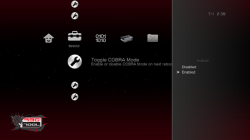 (Toogle COBRA Displayed in Image) Cobra 6.0 and lower was CobraUSB and needed a USB dongle to use it's unique features,. This was the first product by the Cobra Team who is now behind the CobraODE. After the Cobra Team launched the first ODE device, Community News Writer STLcardsWS inquired about the future of the CobraUSB device as it seemed to be shevled (unofficially at the time). STLcardsWS according to the Cobra Team Representiave Magneto asked if the device could be made open source for the community since the team has all but moved onto ODE products. That is when Team Cobra gave in and threw a bone to the PS3 Homebrew Community. Shortly after that time is when we seen the first official source code release of CobraUSB (link on this story). While this proved to be a huge advancement in the PS3 develolment community it however was a rough release as it contained all the USB security source code also. While developer's iike u$er was able to use parts and makes sense of some of the functions (which helped create PRX Loader, the first plugin system for the PS3)., however most developer struggled with the source as it had alot of unneccsary parts included such as the security for the USB device when the Cobra Devs wanted to keep this system closed sourced. . So about a month later the Lead CobraUSB developer (who was not aware of the first release when it happened) released the first Dongle-Less Cobra CFW using Rogero's 4.46 CFW as a base. The developer also updated Cobra 6.0 to Cobra 7.0 with new features and cleaned the source removing all the security garbage (link to this story). Thus making it a complete release with full instructions and the details for scene developers. Since that time we have seen its evolve and added to many CFW. Below you can view some of the features that are built into Cobra with some additional explanations. | ||||||||||||||||||||||||||||||||||||||||||||||||||
How to Enable Cobra Features:
INSTALL Rebug Toolbox (to enabled Cobra CFW): 1: On the XMB select Package Manager 2: Select Install Package Files 3: Select PS3 System Storage 4: Select REBUG-TOOLBOX-02.02.02.pkg 5: Access Rebug Toolbox from XMB 6: Scroll to 2nd column Selector, and select 3rd option Toggle Cobra Mode 7: Select Enable, and system will reboot with Cobra now enabled on the CFW. | ||||||||||||||||||||||||||||||||||||||||||||||||||
Overview of Cobra CFW Features
| ||||||||||||||||||||||||||||||||||||||||||||||||||
PLUGINS
| ||||||||||||||||||||||||||||||||||||||||||||||||||
 Cobra 7.03 PS2 Features (4.65 Cobra) With Cobra core, You can play PS2 ISO rips on NON-Backward compatible PS3, however, there has been an annoying wireless sync issue while playing ps2 games, so we designed this work around to fix the issue with wireless pad sync by following method. Couple things are required - multiMAN for PS2 ISO to Classic conversion, not needed if you use PC method - RAP activation for PS2 Launcher - PS2 Launcher or PS2 Classic Place holder [they both do the same function] [video=youtube;xc55LPgdnpY]https://www.youtube.com/watch?v=xc55LPgdnpY&feature=player_embedded[/video] 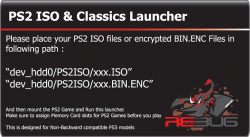 1 .Install placeholder and activate the rap file for classic via reactPSN 2. Go to multiman normal mode and click on iso 3. Convert ISO to Classic [ISO.BIN.ENC] 4. Use multiMAN filemanager [mmOS] , look for this path "/dev_hdd0/PS2ISO/<gamename>/" 5. Copy or Move ISO.BIN.ENC to "/dev_hdd0/game/PS2U1000/USRDIR/" 6. With webMAN "MOD", Toggle press SELECT+L2+/\ 7. Run the game from npdrm legit/placeholder(depending on the option you chose) and maintain one stable sync, this is important to write proper sync data in registry. 8. You can safely close the game, and start mounting PS2 ISO via webMAN (*Back up registry via TOOLBOX is recommended in case of potential sync issue problem occurs, if the sync issue happens in the future, you can restore your sync data via registry restoration) General Cobra PS2 INFO Software (SW) Emulation:Support for PS2 ISOs in non BC consoles was removed in Cobra 4.30 (usb), due to ps2_soft emu missing. It has been re-enabled now by hacking of ps2_netemu. You can use it in the same way as before, just load an ISO and launch from disc icon (sync issues see note 2), Cobra core takes care of rest. No need for encrypted isos, isos patched with limg sectors, etc (ala PS2 Classic). Just your normal PS2 isos dumped from discs. However, there is no support for optical discs in ps2_netemu . Note 1: Don't forget to set the memory cards in XMB, in the old memmory card utility for PS/PS2, as ps2_netemu won't let you assign them in game. Note 2: Please use PS2 ISO / Classic Launcher method to fix the issue with wireless pad sync issue. RAP activation via ReActPSN is required PlayStation 2 on BC ConsolesHardware (HW) Emulation: PS3 Models: CECHC, CECHE, CECHA and CECHB Backwards Compatible (BC) Consoles will still use their respetive emulators (ps2_emu, ps2_gxemu), which have much better compatibility and also support optical discs, original or backups. [video=youtube;q6reFRX8LPw]https://www.youtube.com/watch?v=q6reFRX8LPw&feature=player_embedded[/video] | ||||||||||||||||||||||||||||||||||||||||||||||||||
| IMPORTANT INFORMATION | ||||||||||||||||||||||||||||||||||||||||||||||||||
COBRA MODE COBRA mode / webMAN currently disabled by default, if you want to use Cobra 7.03 features, please enable Cobra mode via REBUG TOOLBOX 2.02.02. Previous Cobra CFW users may experience issues with some games due to improved cobra payload that has updated permission patch, in this case. ***Remove old game data and re-install the game, possibly save game data as well if you run into weird issues. Previous Cobra payload still had its old patches that were used for USB Dongle and mmCM, but not anymore, and this fixes the issue with all non-working games with Cobra. non-Cobra users will not have this problem since their data were not corrupted by old cobra payload. | ||||||||||||||||||||||||||||||||||||||||||||||||||
PS2 ISO / Classic Launcher (non-BC only for wireless sync issue) With Cobra core, You can play PS2 ISO rips on NON-Backward compatible PS3, however, there has been an annoying wireless sync issue while playing ps2 games, so we designed this work around to fix the issue with wireless pad sync by following method. Couple things are required
1.Install placeholder and activate the rap file for classic via reactPSN 2. Go to multiman normal mode and click on iso 3. Convert ISO to Classic [ISO.BIN.ENC] 4. Use mm filemanager [mmOS] , look for this path "/dev_hdd0/PS2ISO/<gamename>/" 5. Copy or Move ISO.BIN.ENC to "/dev_hdd0/game/PS2U1000/USRDIR/" 6. Create a flag file named "classic_ps2″ via mmOS [file manager from multiMAN] or, go to XMB and use webMAN "MOD"'s toggle; press SELECT+L2+/\ 7. Run the game from npdrm legit/placeholder(depending on the option you chose) and maintain one stable sync, this is important to write proper sync data in registry. 8. You can safely close the game, and start mounting PS2 ISO via webMAN (*Back up registry via TOOLBOX is recommended in case of potential sync issue problem occurs, if the sync issue happens in the future, you can restore your sync data via registry restoration) | ||||||||||||||||||||||||||||||||||||||||||||||||||
QA SUPPORT
| ||||||||||||||||||||||||||||||||||||||||||||||||||
OTHEROS++ SUPPORT
1: Use a 3.55 firmware that already has emer_init.self patched to the size you want. 2: Patch REBUG 3.55.x REX EDITION in PS3MFW Builder If you choose option 2 we highly recommend that you ONLY patch emer_init.self. Also the resulting PUP will only be able to be installed on 3.55 firmware as the spkg_hdr will be mismatched. | ||||||||||||||||||||||||||||||||||||||||||||||||||
REBUG 4.21.x AND HIGHER
| ||||||||||||||||||||||||||||||||||||||||||||||||||
Known Bug(s)
| ||||||||||||||||||||||||||||||||||||||||||||||||||
| Credits and Thanks | ||||||||||||||||||||||||||||||||||||||||||||||||||
| Codename: REBUG Team. Codename: REBUG New Team Members: ** Joonie ** ** Habib ** ** Abkarino **- Without them this version of Rebug would never exist. These are some very talented developers so please show them the same respect you have shown us over the years. | ||||||||||||||||||||||||||||||||||||||||||||||||||
| Codename: REBUG would like to thank: graf_chokolo (as always) and The Three Musketeers for the work they have done in the past and (hopefully) future. | ||||||||||||||||||||||||||||||||||||||||||||||||||
| Big thanks to: naehrwert - For scetool (its elf compression played a big part in 4.21.1) deank - Helping us get the Rebug Toolbox up and running, and Webman aldostools m@tsumot0, haxxxen - Webman MOD 1.41.33 KW - Cobra payload coding, EvilNAT- help with LV1/LV2 reversing | ||||||||||||||||||||||||||||||||||||||||||||||||||
Our BIGGEST thanks: flatz - Helping with the OtherOS testing and well... You know what you did..  | ||||||||||||||||||||||||||||||||||||||||||||||||||
| Rebug Scorpion Artwork: by blastleaf - [email protected] | ||||||||||||||||||||||||||||||||||||||||||||||||||
| Rebug Customised Font: by @GDcooya | ||||||||||||||||||||||||||||||||||||||||||||||||||
| UPDATE | ||||||||||||||||||||||||||||||||||||||||||||||||||
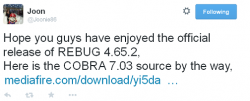 DOWNLOAD Cobra 7.03 Source Code |
[*=1|left]REBUG 4.65.2 D-REX: 46e531ff271e02d137cc960100a1006e
[*=1|left]REBUG 4.65.2 REX: c18eecd7e91320e759432f21d07b1f4c
[*=1|left]REBUG TOOLBOX 02.02.02: 1576ec41fda37c9d44a05ae0c29a319d
[*=1|left]REBUG TOOLBOX 02.02.02_PS2: b75a17cb29ecbc38a6c873f05da8e9ff
[*=1|left]Ps2 Launcher Rebug Edition (nonBC): b46c5bd7e7f5cf58c069a318d3159056
[*=1|left]PS2: 0ca07f0aca7d76bf75c60f82d328372a
Download & Source: www.rebug.me
As with any CFW installation USE at your OWN RISK
Checkout Additional REBUG RELEASES via this link
Last edited by a moderator:


 I trying 4 diffrent controlers (1sixaxis, 1 ds3, 2x no-name) and i cant go wireless even on classics. Is imposible to "record" sync data to registry on standard emu and use it on cobra emu?







