
REBUG 4.81.2: PSNINJA breaking app/home

ModdingOne

Forum Noob
so I recently installed REBUG 4.81.2 and I'm slowly learning how to use it. My most recent bump in the road is PSNINJA. I want to be able to play at least semi safely online and psninja seems like the best way for me to do that, I had it working just fine on CEX Ferrox 4.82 1.01 but now when I do the top 3 options on psninja it results in a broken /app_home/PS3_GAME/

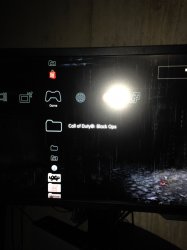
The uploaded picture shows what it looks like, no icon and pic1, and launching results in an error code. All happens after using PSNINJA
 

Attachments

  • IMG_0140.JPG
    IMG_0140.JPG
    448.9 KB · Views: 1,269
so I recently installed REBUG 4.81.2 and I'm slowly learning how to use it. My most recent bump in the road is PSNINJA. I want to be able to play at least semi safely online and psninja seems like the best way for me to do that, I had it working just fine on CEX Ferrox 4.82 1.01 but now when I do the top 3 options on psninja it results in a broken /app_home/PS3_GAME/

The uploaded picture shows what it looks like, no icon and pic1, and launching results in an error code. All happens after using PSNINJA
I did enable senenabler if that makes a difference
 
Ps ninja is outdated app. Use Sen enabler, or psnpatch (Choose one, not use two in one time).
Does sen enabler clear history? That's all I want to do, clear history replace it and make it read only. So apparently /app_home/ isn't necessary at all? I can just launch backups from the disc icon no worries?
 
Hi. I know it has been asked sometimes but I wanted to really know if nowadays it's necessary to use PSNinja or not. I'm with a DEX 4.81.2 console and everytime I go online I do this: Rebug Toolbox and in "Change Active PS3ID" I change from "No" to "Use EID5: 84 (CEX)"; then I start PSNPatch and click X (I've the plugin enabled btw); finally I start PSNinja and select the option 1, 2, 3 and 5. This is what is on GBAtemp and is from 2016. I read it when I received this PS3 (february i think) and I've been using this since so. But now it came to my mind that as PSNinja is VERY old (2011), I thought I might not be safe anymore to use it. Does anyone know if there's anything PSNinja still does that no other do or if it's not safe to use anymore? (something like what it does being detected by $ony). Thanks in advance!
 
Hi. I know it has been asked sometimes but I wanted to really know if nowadays it's necessary to use PSNinja or not. I'm with a DEX 4.81.2 console and everytime I go online I do this: Rebug Toolbox and in "Change Active PS3ID" I change from "No" to "Use EID5: 84 (CEX)"; then I start PSNPatch and click X (I've the plugin enabled btw); finally I start PSNinja and select the option 1, 2, 3 and 5. This is what is on GBAtemp and is from 2016. I read it when I received this PS3 (february i think) and I've been using this since so. But now it came to my mind that as PSNinja is VERY old (2011), I thought I might not be safe anymore to use it. Does anyone know if there's anything PSNinja still does that no other do or if it's not safe to use anymore? (something like what it does being detected by $ony). Thanks in advance!
Psninja is obsolete.
You should currently use either psnpatch or SEN Enabler. One or the other, not both at the same time.
I recommend psnpatch because it's definitely simpler & more noob friendly. SEN is more suited to advanced users imho.
I also recommend using the psnpatch plugin rather than the app for your daily needs. The plugin can be installed from the app's Cobra menu.
The plugin gets loaded automatically at boot & applies the settings you choose. When you wish to connect to PSN, you only need to trigger the plugin with a simple gamepad combo.
You can get the latest psnpatch version from our resources section or on https://store.brewology.com/ahomebrew.php?brewid=244
Read the psnpatch release notes carefully.
 
Last edited:
Right. Then I'll stop using PSNinja. I thought despite being so old, it would still be useful with some function. I don't use the combo but maybe I'll begin using it. I never read the release notes, completely... I'll spend some time to read it all then. Thanks for all the info!
 
Just to follow up what @bguerville @kozarovv has already said ..

DON'T USE PSNINJA

If you see any guide or tutorial suggesting to use the tool .
A.) ITS BAD ADVICE
b.) VERY OUTDATED

As it will be an extremely false sense of security when psnninja was created.
The community back then, did not know as much about the PS3 / PSN Connections that is known today.

I know some people will write a new guide or give some advice with PSNINJA. They are wrong to do so and CLEARLY have no understanding of the apps functions.

Does sen enabler clear history? That's all I want to do, clear history replace it and make it read only. So apparently /app_home/ isn't necessary at all? I can just launch backups from the disc icon no worries?

Yes and so does PSNpatch, in regards to deleting history, but more importantly they have a feature of ((webMAN MOD has this also):

Disabling CFW Syscalls -
Is believed to be one of the most effective way to avoid a ban. (everything with Bans is speculative though, only Sony knows for 100%) Things like deleting History are good (any current app that has CFW Syscall disabling will also delete history). PSNninja will delete history but does not have any CFW syscall disabling ability that was not a thing back when that early utility was created. Thus is why its a completely obsolete .
 
can someone please help me. i tryed everything and none of this works. i activated sen enabler and psn patch and it still sayed i need a system update to go online. when i used psn ninja it broke my ps3 and now psn patch always gets an error and crashes and won,t open at all. is their a way to undo whatever psn ninja dose to your ps3. if theirs not im gonna have to factory reset my entire ps3 and restart everything wich i really do not want to have to do.
 
can someone please help me. i tryed everything and none of this works. i activated sen enabler and psn patch and it still sayed i need a system update to go online. when i used psn ninja it broke my ps3 and now psn patch always gets an error and crashes and won,t open at all. is their a way to undo whatever psn ninja dose to your ps3. if theirs not im gonna have to factory reset my entire ps3 and restart everything wich i really do not want to have to do.
do not use psninja. it is out of date and newer tools are better. reinstall your cfw might help.
 
do not use psninja. it is out of date and newer tools are better. reinstall your cfw might help.
yeah that fixed that and i deleted psninja but i still can,t get online. i have psn patch 2017 and a version of sen enabler that spoofs 4.87 and enabled sen/psn access and did the reboot with psn patch and it still says either a system update is required to sign in or error a problem was detected you have been signed out or something along those lines and it litteraly will not let me sign in. how do i go online. is it even possible anyore. why dosen,t this work.
 
yeah that fixed that and i deleted psninja but i still can,t get online. i have psn patch 2017 and a version of sen enabler that spoofs 4.87 and enabled sen/psn access and did the reboot with psn patch and it still says either a system update is required to sign in or error a problem was detected you have been signed out or something along those lines and it litteraly will not let me sign in. how do i go online. is it even possible anyore. why dosen,t this work.

For CFW you have to wait for Evilnat 4.88 (or any other CFW 4.88). It is unsafe to log onto PSN/SEN with a 4.88 spoofer due recent changes to the login process.

It's still advised to clear the history and disable the CFW syscalls before go online. webMAN MOD has these options.
PSN patch mainly adds an additional security layer disabling the access to the PSN servers until the CFW syscalls are disabled.
 
Back
Top